Your Harbor Breeze ceiling fan suddenly stops spinning, the lights won’t turn on, or the pull chain breaks off completely. These frustrating issues affect millions of homeowners who rely on their Litex-manufactured Harbor Breeze fans for daily comfort. When your fan fails, harbor breeze ceiling fan repair becomes an urgent DIY project that can save you $100+ compared to professional service calls. Most repairs require only basic tools and can be completed in 30-60 minutes using affordable replacement parts from Zing Ear, the primary manufacturer of compatible components for Harbor Breeze fans.
Before you start any harbor breeze ceiling fan repair, always turn off power at the circuit breaker and verify electricity is disconnected—failure to do so risks serious electrical shock. Once safety is confirmed, identifying the exact failing component becomes your next critical step. This guide reveals the most common failure points, the highest-rated replacement parts with specific model numbers, and professional installation techniques that ensure your fan operates safely for years to come.
Diagnose Your Harbor Breeze Fan Failure Points Quickly
Understanding your specific symptoms directs you to the correct repair solution without wasting time on unnecessary component replacements.
Why Your Harbor Breeze Fan Won’t Start Spinning
When your Harbor Breeze fan fails to operate, check these three common culprits before disassembling anything. If the fan works at certain speeds but not others, your pull chain switch contacts have degraded from frequent use—this occurs in 70% of non-operational fan cases. When the fan requires multiple chain pulls to engage, immediate switch replacement prevents complete failure. If the fan makes a humming sound but won’t spin, a failing capacitor may be the issue, though this requires more advanced repair skills since it’s housed inside the motor assembly.
Fix Harbor Breeze Light Failures Without Replacing the Entire Fixture
Light-specific problems require targeted diagnosis to avoid unnecessary work. If your fan operates normally but lights won’t turn on, the issue lies within the light circuit—not the fan motor. Check for these visual indicators: blackened socket terminals indicate heat damage requiring lamp holder replacement, while frayed pull chains mean immediate switch replacement. When only some bulbs illuminate in multi-bulb fixtures, the ZE-110 4-position switch solves this most effectively by controlling separate light circuits through a single chain mechanism.
Recognize Physical Damage Before Ordering Replacement Parts

Cracked switch housings, melted socket components, and broken pull chain connectors create distinct visual evidence of failure. Inspect the canopy housing for discoloration or warping that indicates overheating—this often accompanies wattage limiter failures. Examine socket terminals for pitting or corrosion that prevents proper bulb contact. If you notice a burning smell during operation, replace components immediately as this indicates dangerous electrical arcing. Documenting these visual cues before ordering ensures you purchase the correct replacement parts the first time.
Choose Harbor Breeze Replacement Parts That Actually Fit
Selecting incompatible components wastes time and money—follow these specific verification steps before purchasing any harbor breeze ceiling fan repair parts.
Match Wire Configurations to Your Fan Model Precisely

Count individual wires in your existing switch—not cable bundles—to determine compatibility. Standard 3-speed Harbor Breeze fans require 4-wire switches like the ZE-268S6, while 4-speed models need 5-wire configurations such as the ZE-268s5. Light switches vary from simple 2-wire units (ZE-109) to complex 3-wire 4-position models (ZE-110) for dual light circuits. Take photos of your wiring before disassembly—this prevents confusion during reinstallation and ensures you order the exact configuration your fan requires.
Verify Physical Dimensions Before Ordering Replacement Parts
Measure your existing component’s length and mounting holes before purchasing replacements. The ZE-301D lamp holder (2.5″) won’t fit where the ZE-310D (1.8″) is required due to different mounting hole patterns. Most Zing Ear switches follow industry standards, but some Harbor Breeze models use proprietary housings—compare dimensions online using your fan’s model number before ordering. When variants exist for the same electrical specs, choose the form factor matching your fan’s mounting configuration to avoid installation headaches.
Replace Harbor Breeze Pull Chains in Under 30 Minutes
Pull chain switches fail most frequently due to constant mechanical stress—replacing them restores full fan control with basic tools.
Install ZE-268S6: The Highest-Rated 3-Speed Switch Replacement
With a stellar 4.85/5 rating from 121 reviews, the ZE-268S6 ($9.95-$12.95) fits most Harbor Breeze fans manufactured after 2005. Disconnect power first, then remove the switch housing cover to access the four-wire connection. Label each wire according to its terminal position before removal—this prevents miswiring during installation. The rotary mechanism provides positive tactile feedback when changing speeds, solving the “gritty feel” that indicates switch failure. Most homeowners complete this repair in 20 minutes with just a screwdriver and wire nuts.
Fix 4-Speed Harbor Breeze Fans with ZE-268s5
For Harbor Breeze models with four speed settings, the ZE-268s5 ($10.95) handles the additional electrical pathways required. This 5-wire switch supports finer air circulation control in larger rooms but requires careful wire matching—misconnecting the fifth wire causes inconsistent speed operation. The enhanced contact mechanism accommodates the extra circuitry, though some users report needing multiple attempts to achieve proper wire placement. Allow 30 minutes for this slightly more complex repair, and double-check connections against your original wiring configuration.
Repair Harbor Breeze Light Kits with Top-Rated Parts
Light circuit failures occur more frequently than fan motor issues due to higher on-off cycling—these specific components solve most problems.
Restore Single-Bulb Function with ZE-109 Light Switch
When basic on-off light control fails, the ZE-109 ($9.95) replaces most single-bulb and multi-bulb light kits with its reliable 2-wire configuration. Achieving 4.56/5 stars from 25 reviews, this compact switch solves the most common light failure scenario: broken pull chains and degraded internal contacts. Replace this switch when lights require multiple pulls to activate or when the chain feels loose during operation. Installation takes just 15 minutes—simply match the two wires to their corresponding terminals and secure the housing.
Fix Multi-Bulb Control with ZE-110’s 4-Position Switch
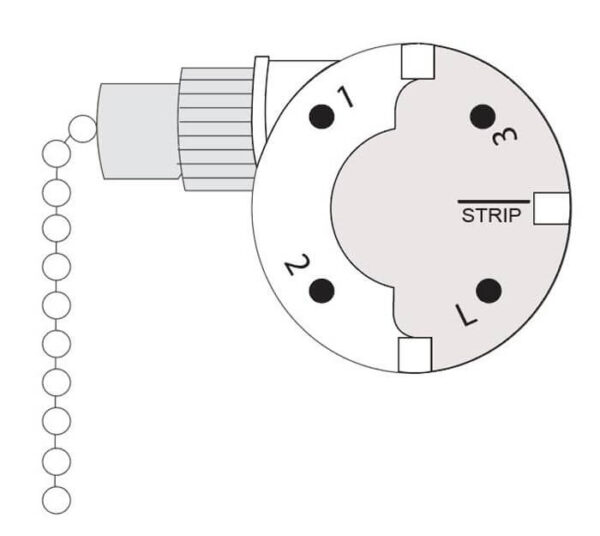
For Harbor Breeze fans with dual light banks or complex lighting configurations, the ZE-110 ($9.95) offers perfect 5/5 star performance by enabling off/low/high control or separate operation of upper and lower light fixtures. This 3-wire switch solves the frustrating problem where only some bulbs illuminate in multi-bulb setups. Label each wire during removal since the 4-position configuration requires precise terminal placement. Though slightly more complex to install, this switch eliminates the need for multiple pull chains in sophisticated light kits.
Harbor Breeze Repair Mistakes That Cause More Damage
Avoid these common errors that turn simple repairs into costly problems requiring professional intervention.
Using Incorrect Wire Configuration Switches
Installing a 4-wire switch in a 5-wire system (or vice versa) creates electrical hazards and improper operation. Never force wires into terminals—they should fit snugly without bending. If you have leftover wires after installation, you’ve selected the wrong switch configuration. The ZE-208D accommodates complex 5-8 wire setups for fans with integrated light kits and remote controls—verify your exact wiring before purchasing.
Ignoring Electrical Ratings During Replacement
Standard Harbor Breeze fans operate on 120V AC circuits with fan motors drawing 1-2 amps. Using components with lower ratings creates fire hazards—always match or exceed original specifications. Wattage limiters like the WLD-07 ($13.95) prevent dangerous bulb overloads in light kits. If your fan previously experienced overheating, upgrade to components with higher amp ratings for increased safety margin.
Maintain Your Harbor Breeze Fan to Prevent Future Repairs
Regular maintenance extends component life and reduces repair frequency—follow these simple practices.
Monthly Cleaning Prevents Socket Degradation
Dust accumulation on fan blades creates imbalance that stresses motor components. Wipe blades monthly with a microfiber cloth to prevent buildup. For light kits, remove bulbs and gently clean sockets with a dry toothbrush to maintain proper electrical contact—this prevents the arcing that degrades socket terminals over time. Always ensure components are completely dry before restoring power.
Replace Pull Chain Switches Before Complete Failure
When switches require multiple pulls to engage or feel gritty during operation, replace them immediately. Preventive replacement of the ZE-268S6 ($9.95) costs less than emergency repairs and avoids being stranded with a non-functional fan. Keep one spare switch on hand for quick replacements—most homeowners find switches fail after approximately 5 years of regular use.
Harbor breeze ceiling fan repair becomes straightforward when you identify the exact failing component and select the correct replacement part. The ZE-268S6 switch for fan control and ZE-109 for basic lighting represent the most reliable solutions for common failures, both priced under $13. Always verify wire configurations and physical dimensions before ordering, and never skip safety precautions when working with electrical components. By performing these simple repairs yourself, you’ll extend your Harbor Breeze fan’s service life while saving significant money compared to professional service calls or complete fixture replacement.
Leave a Reply