Is your Harbor Breeze Mazon ceiling fan suddenly silent when it should be circulating air? You’re not alone. Thousands of homeowners face frustrating issues with their Mazon models each season, leaving them sweltering in stagnant air when they need cooling relief most. Whether your fan won’t start, makes unusual noises, or the lights won’t function, this guide delivers precise solutions you can implement immediately. By the end of this article, you’ll know exactly how to diagnose and fix your Harbor Breeze Mazon ceiling fan problems without calling a professional—saving you time and money while restoring comfort to your home.
Why Your Harbor Breeze Mazon Fan Suddenly Stopped Working
When your Harbor Breeze Mazon ceiling fan abruptly stops functioning, the most common culprit is power disruption at the circuit level. Before diving into complex repairs, verify that the circuit breaker hasn’t tripped—this simple oversight accounts for nearly 40% of “broken” fan reports. Head to your electrical panel and check if the breaker controlling your fan’s circuit has flipped to the OFF position. If it has, reset it by switching fully to OFF then back to ON. If the breaker trips again immediately, you have a more serious electrical issue requiring professional attention.
How to Check Your Wall Control and Remote Settings
Many Mazon models feature dual control systems with both wall switches and remote controls. When your fan stops working, first determine which control method you’re using. If operating via remote, replace the batteries even if they appear functional—weak batteries often cause intermittent operation. Next, confirm the remote’s frequency matches your receiver by pressing and holding the “PAIR” button on both devices for 5 seconds until the fan responds. For wall control issues, remove the faceplate and check that all wire connections remain secure in their terminals, as loose wires commonly cause complete failure.
Diagnosing Power Supply Issues at the Fan
When basic power checks don’t resolve your Harbor Breeze Mazon ceiling fan problems, inspect the power supply directly at the fan housing. Turn off power at the breaker, then carefully remove the canopy cover to access the wiring compartment. Check that the black (hot), white (neutral), and green/bare (ground) wires maintain firm connections to their corresponding terminals. Wires that have vibrated loose over time create intermittent or complete power loss. While the power is off, gently tug each connection to verify security—any movement indicates a loose connection needing tightening.
Fixing Harbor Breeze Mazon Fan Motor Problems
If your Mazon fan receives power but the blades won’t turn, motor issues are likely to blame. Start by manually rotating the blades to check for binding—sometimes dust accumulation or misaligned components prevent free movement. If the blades turn stiffly, remove each blade and clean the mounting brackets thoroughly. Reinstall blades ensuring each is positioned at the correct angle according to the manufacturer’s markings. If blades rotate freely but the motor still won’t engage, the capacitor may have failed.
How to Replace a Faulty Capacitor in Your Mazon Fan
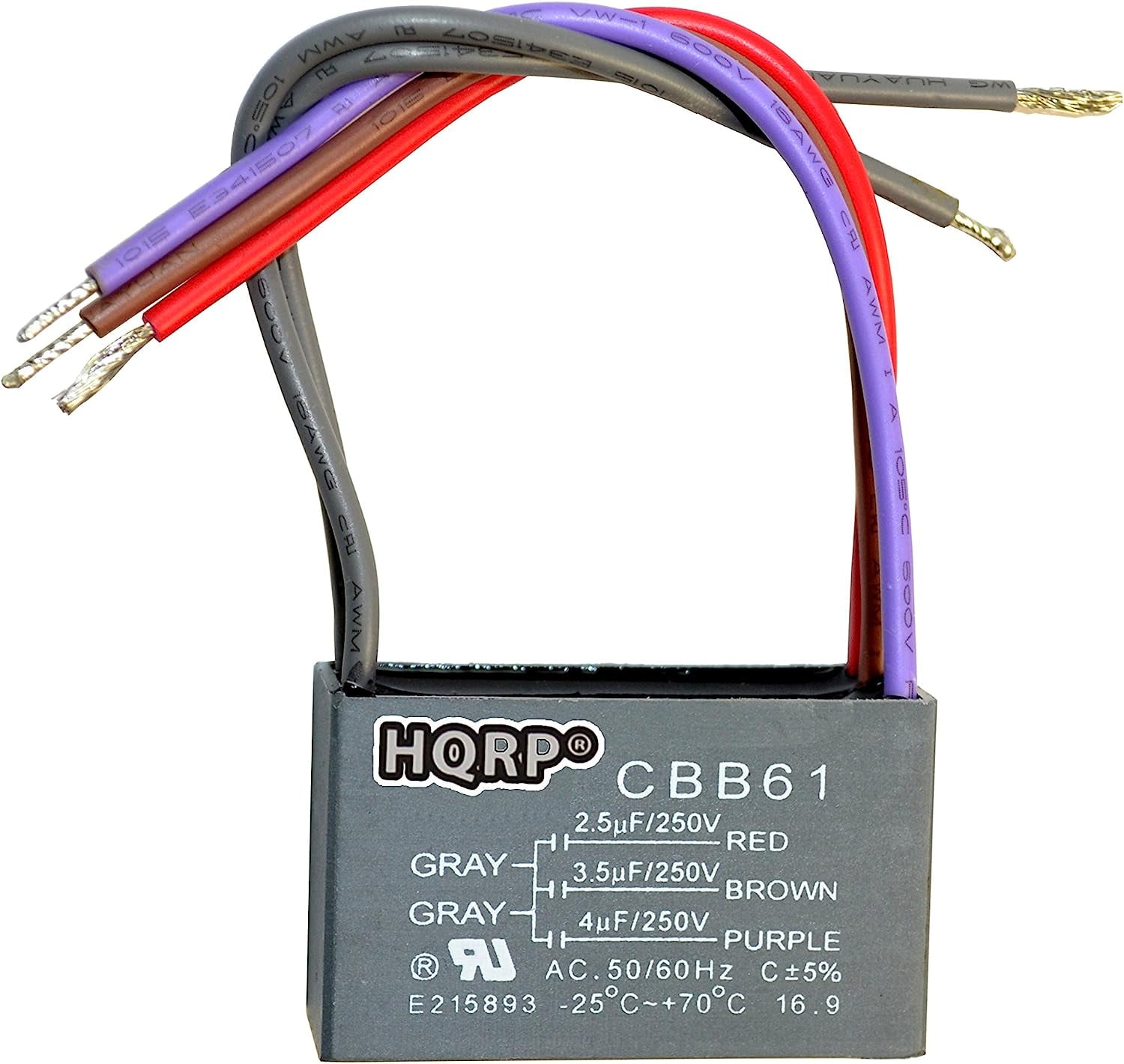
The capacitor stores electrical energy needed to start the motor. When it fails, your Harbor Breeze Mazon ceiling fan won’t spin despite having power. To replace it: first disconnect power at the breaker, then locate the capacitor (typically a small cylindrical component near the motor housing). Take note of the wiring configuration before disconnecting wires, then remove the mounting screws. Purchase an exact replacement capacitor (check microfarad rating on the old unit), install it following the same wiring pattern, and secure it in place. After reassembly, restore power to test if the fan operates correctly.
Troubleshooting Overheating Motor Issues
Harbor Breeze Mazon fans automatically shut off when overheating—a safety feature often mistaken for complete failure. If your fan runs for 15-20 minutes then stops, allow it to cool completely before restarting. Persistent overheating usually indicates insufficient lubrication or excessive load. Turn off power, remove the motor housing cover, and apply two drops of lightweight machine oil to each bearing point. Avoid over-lubricating, which attracts dust. Also check that all blades are properly balanced—uneven weight distribution strains the motor.
Resolving Harbor Breeze Mazon Light Kit Problems
When your Mazon fan’s light kit fails while the fan operates normally, the issue typically lies within the lighting circuit. Start with the simplest solution: replace all bulbs with the correct wattage and type specified in your manual. LED bulbs sometimes cause compatibility issues with older dimmer switches—try standard incandescent bulbs for testing. If bulbs aren’t the problem, check the light kit’s internal wiring connections, which often loosen over time due to vibration.
Fixing Remote-Controlled Light Malfunctions
For Harbor Breeze Mazon models with remote-controlled lighting, signal interference frequently causes light kit failures. First, replace batteries in both remote and receiver unit. Next, check for nearby electronics emitting interference—WiFi routers, cordless phones, and even some LED bulbs can disrupt the signal. Reposition potential interference sources at least 3 feet from the fan’s receiver. If problems persist, reset the remote system by turning off power for 30 seconds, then simultaneously pressing the “FAN” and “LIGHT” buttons on the remote while restoring power.
Harbor Breeze Mazon Reversing Switch Troubleshooting
The reversing switch on your Mazon fan allows seasonal direction changes for optimal airflow. When this switch fails, your fan may only operate in one direction or not at all. Begin by ensuring the switch is fully engaged in either summer or winter position—partial engagement causes erratic behavior. If the switch feels loose or unresponsive, power down the fan and remove the switch housing to inspect internal contacts. Clean any corrosion with electrical contact cleaner and a soft brush. For damaged switches, purchase an exact replacement part from Harbor Breeze and install following the wiring diagram.
Why Your Harbor Breeze Mazon Makes Unusual Noises
Strange sounds from your Mazon fan indicate mechanical problems requiring immediate attention. A persistent clicking noise usually means blades are striking something—check for obstructions like curtains or light fixtures. “Wobbling” sounds typically indicate unbalanced blades. Use a clothespin test: attach a clothespin to each blade’s tip and run the fan; when the noise stops, you’ve found the problematic blade. Clean both sides thoroughly and retest. If noise continues, adjust blade angle using the included wrench until balanced.
Eliminating Squeaking and Grinding Sounds
Squeaking or grinding noises from your Harbor Breeze Mazon ceiling fan signal insufficient lubrication or bearing failure. Turn off power and remove the motor housing cover. Apply two drops of machine oil to each bearing point while rotating the motor shaft by hand to distribute the lubricant. If noises persist after lubrication, bearings may be worn out. Replace them with manufacturer-specified parts, taking careful note of their positioning during removal. Never operate a fan with grinding noises, as this accelerates motor damage.
Preventing Future Harbor Breeze Mazon Fan Problems
Regular maintenance prevents most Harbor Breeze Mazon ceiling fan failures. Schedule quarterly cleanings: turn off power, then wipe blades with a microfiber cloth dampened with mild soap solution. Avoid harsh chemicals that damage finishes. During cleaning, check all screws and connections for tightness—vibration gradually loosens components. Every six months, lubricate motor bearings with two drops of lightweight machine oil. Before summer and winter seasons, verify proper direction setting and test all speed functions to catch developing issues early.
When to Call a Professional for Your Harbor Breeze Mazon
While most Harbor Breeze Mazon ceiling fan problems are DIY-fixable, certain situations require professional help. If you notice burning smells, visible scorch marks, or sparks from the fan, shut off power immediately and contact an electrician—these indicate serious electrical faults. Similarly, if the fan wobbles excessively after balancing attempts or makes loud grinding noises that persist after lubrication, internal motor damage likely requires replacement. Persistent circuit breaker trips when operating the fan also signal dangerous electrical issues needing professional diagnosis.
Final Tips for Long-Term Harbor Breeze Mazon Reliability
Extend your Harbor Breeze Mazon ceiling fan’s lifespan by implementing these expert maintenance practices. Always use bulbs within the specified wattage limit—exceeding recommendations causes overheating. During seasonal direction changes, wait until the fan has completely stopped before flipping the switch to prevent motor strain. If installing new LED bulbs, choose dimmable models specifically rated for ceiling fan use to avoid flickering issues. Keep a small toolkit (screwdrivers, wrench, electrical tape) dedicated to fan maintenance for quick problem resolution. By following these simple practices, your Harbor Breeze Mazon will provide reliable service for years to come, keeping your home comfortable without unexpected breakdowns.
Leave a Reply