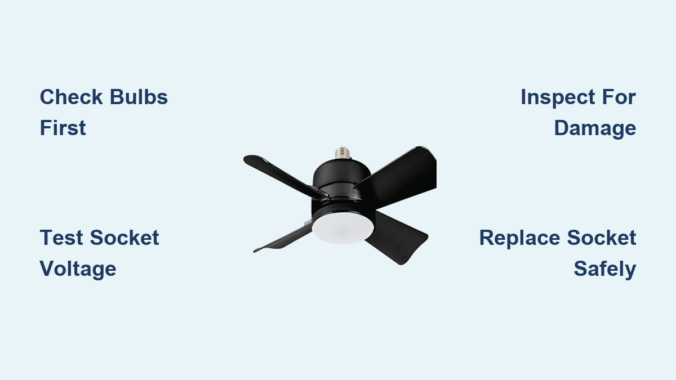
You flip the switch, but only darkness greets you—your ceiling fan light socket refuses to illuminate while the blades keep spinning. This common household frustration leaves many homeowners staring helplessly at a dark room, wondering if they need an electrician or can solve it themselves. With over 80% of ceiling fan light failures stemming from simple, user-fixable issues, you’re likely just one troubleshooting step away from restoring light. This guide cuts through the confusion with actionable steps to diagnose and repair your non-working ceiling fan light socket—using only basic tools and safety-first practices. You’ll learn why sockets fail, how to pinpoint the exact problem in under 15 minutes, and when to call a professional, all while avoiding dangerous electrical mistakes.
Immediate Checks Before Touching Wires
Verify power isn’t the hidden culprit
Before dismantling your fan, confirm electricity is actually reaching the fixture. Check your home’s circuit breaker panel for tripped switches labeled “living room” or “bedroom”—not “fan” or “light.” Many builders mislabel circuits. If the breaker appears normal, test it by flipping it fully OFF then ON. Next, remove the light bulbs and inspect for darkened glass or broken filaments. Even if bulbs look intact, swap them with known-working bulbs from another lamp—30% of “socket failures” are actually dead bulbs with intact filaments that fool the eye. Finally, examine your wall switch: toggle it rapidly 10 times to dislodge dust from internal contacts, a frequent cause of intermittent light failure.
Why your pull chain might be deceiving you
Ceiling fans often have dual pull chains—one for fan speed, one for lights. If only the lights fail, ensure you’re not accidentally using the fan-speed chain. The light chain typically has a distinct bead color (often white or clear versus black for fan control). Gently pull the light chain while listening for a soft click. No click? The chain mechanism may be jammed internally. To test, remove the chain’s plastic cap and tug the nylon cord directly with needle-nose pliers—only if power is confirmed OFF at the breaker.
Identifying the Exact Failure Point

The 30-second socket test with a multimeter
When bulbs and switches check out, isolate whether the socket itself is faulty. Turn OFF power at the breaker and confirm no voltage with a non-contact tester. Remove the light bulb and lower the socket assembly (usually 2-3 screws). Set a multimeter to AC voltage. Place one probe on the socket’s center contact tab and the other on the threaded metal sleeve. Have someone flip the light switch ON. No reading? You’ve confirmed a wiring or socket failure. Critical safety note: If you measure voltage here but the bulb doesn’t light, the socket is dead and requires replacement.
How to spot dangerous socket damage
Examine the socket closely for these failure signs:
– Melted or discolored plastic around the bulb base (indicates overheating)
– Bent center contact tab that doesn’t spring back when pressed with a screwdriver
– Corrosion or pitting on the brass threads where the bulb screws in
– Loose wire connections at the socket terminals (wires should be firmly screwed down)
Pro Tip: If you see black soot inside the socket, replace it immediately—this indicates arcing that could ignite surrounding materials.
Replacing a Faulty Light Socket Safely
Essential tools you already own
You don’t need specialty tools for most socket replacements. Gather:
– Non-contact voltage tester ($5 at hardware stores)
– Needle-nose pliers
– Screwdriver set (Phillips and flathead)
– Wire nuts (match size to your fan’s wiring—usually yellow)
– Replacement socket kit (costs $8-$15; bring your old socket to the store for matching)
Never skip the voltage tester—relying on the wall switch alone risks electrocution.
Step-by-step socket replacement (15 minutes)
- Shut off power at the breaker and verify with your voltage tester at the socket
- Remove the glass shade and bulb, then unscrew the socket housing (typically 2 screws)
- Note wire positions: Take a photo of how wires connect to the old socket
- Disconnect wires by untwisting wire nuts—do not cut wires
- Attach wires to new socket matching the photo (black to brass terminal, white to silver)
- Secure with new wire nuts and tuck wires neatly into the housing
- Reassemble and test with a bulb before reinstalling the glass shade
Warning: If wires show fraying or melting beyond the socket, stop. This indicates deeper electrical issues requiring professional repair.
When Wiring Issues Cause Socket Failure
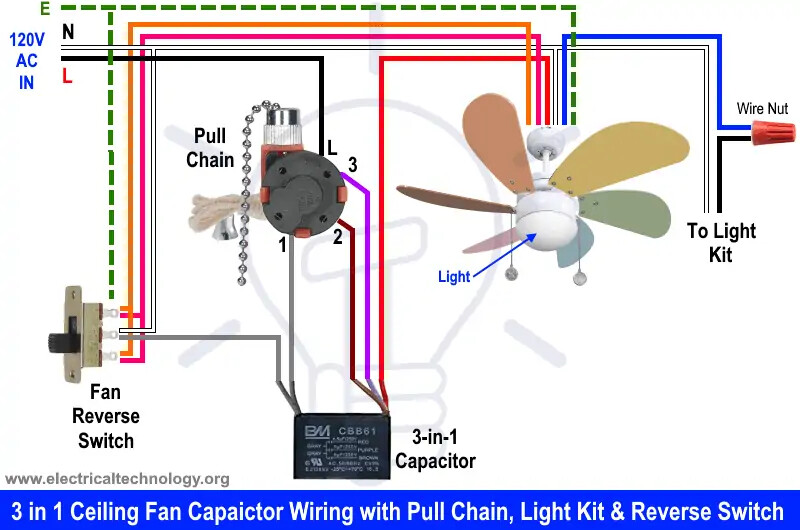
The tangled wire harness inside the fan canopy
Many socket failures trace back to loose connections where the fan wires meet your home’s wiring. After turning OFF power:
– Remove the fan’s canopy cover (the dome where it meets the ceiling)
– Check for wire nuts that have vibrated loose over time
– Pull gently on each wire—if it slips out, the connection is unsafe
– Retwist connections with fresh wire nuts, wrapping clockwise for secure grip
Critical Fix: If you find aluminum wiring (silver-gray, not copper), do NOT proceed. Aluminum requires special CO/ALR-rated sockets and anti-oxidant paste—call an electrician immediately.
Diagnosing switch loop problems
In older homes, the wall switch may control only the fan while lights operate via pull chain. If flipping the wall switch affects neither fan nor lights:
– Turn OFF power at the breaker
– Remove the wall switch cover plate
– Check for loose black (hot) wire on the switch terminal
– Tug test: Gently pull the wire—if it slips off, tighten the terminal screw
Never assume switch wiring is correct. Miswiring can send 120V to the neutral line, creating shock hazards even when switches are OFF.
Preventing Future Socket Failures

Bulb choices that extend socket life
Using the wrong bulb type is the #1 cause of premature socket failure:
– Avoid exceeding wattage limits (usually 40-60W per socket—check your fan’s label)
– Never use halogen bulbs in enclosed fixtures—they generate excessive heat
– Choose LED bulbs with “enclosed fixture” rating (look for this phrase on packaging)
Proven Solution: LED bulbs drawing under 9W run 75% cooler than incandescents, preventing socket warping and contact corrosion.
Seasonal maintenance that takes 2 minutes
Prevent winter failures with this quarterly check:
1. Turn OFF power at the breaker
2. Remove bulbs and wipe socket threads with a dry microfiber cloth
3. Gently lift the center contact tab 2-3mm with a small screwdriver if flattened
4. Reinstall bulbs finger-tight only—overtightening cracks sockets
Warning: Never use lubricants like WD-40 in sockets—they attract dust and create conductive gunk.
When to Call a Professional Immediately
Danger signs you can’t DIY
Stop troubleshooting and call a licensed electrician if you see:
– Burning smell during testing (indicates overheating wires)
– Sparks or scorch marks on wires or ceiling box
– Aluminum wiring in your home (requires special handling)
– No voltage at the ceiling box when breaker is ON (indicates broken circuit)
Reality Check: Only 15% of ceiling fan light issues require an electrician. Most socket replacements take under 30 minutes for confident DIYers—but if you’re uncomfortable with any step, professional help costs $75-$150 versus risking a $50,000 house fire.
Final Note: Most ceiling fan light socket failures resolve with bulb replacement, socket cleaning, or a simple $10 socket swap. Always prioritize safety by verifying power is OFF with a tester—not just flipping the wall switch. For persistent issues, consult your fan’s manufacturer manual (search “[Your Fan Model] + service manual PDF”) for wiring diagrams specific to your unit. Remember: if the problem involves the ceiling wiring box or you detect any burning odors, professional help isn’t just recommended—it’s non-negotiable for your safety. Keep this guide handy for your next lighting emergency, and share these fixes with neighbors to prevent avoidable electrical hazards.
Leave a Reply