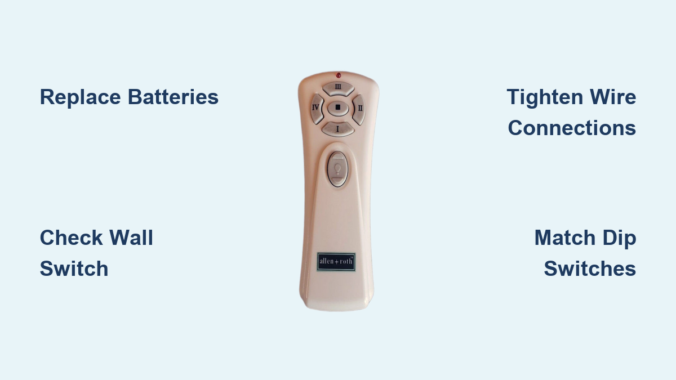
You’re reaching for your Allen + Roth ceiling fan remote control only to discover it won’t respond—no lights, no fan movement, no light adjustments. This frustrating situation affects thousands of homeowners who suddenly lose convenient wireless control of their ceiling fans. The good news is that most Allen + Roth ceiling fan remote failures stem from just a handful of common issues you can diagnose and fix yourself in under 30 minutes. Whether your remote has stopped working entirely, responds only intermittently, or seems to have lost connection to your fan, systematic troubleshooting will identify the problem and get your wireless control back. This comprehensive guide covers every potential cause, from simple battery replacements to receiver module failures, helping you restore functionality without unnecessary parts purchases or expensive service calls.
Before replacing any components, work through these troubleshooting steps in order. Most remote control problems resolve within the first few checks, saving you time, money, and the frustration of unnecessary component replacement. By following this methodical approach, you’ll eliminate guesswork and pinpoint the exact issue affecting your specific Allen + Roth ceiling fan system.
Replace Remote Batteries Immediately
Dead or improperly installed batteries account for more than 60% of all Allen + Roth ceiling fan remote failures. Before diving into complex electrical diagnostics, start with this simplest solution that takes less than two minutes.
Open the battery compartment on your remote and examine the batteries closely. If your remote has an indicator light that fails to illuminate when buttons are pressed, this strongly suggests battery-related issues. Remove the existing batteries and check their voltage with a tester, or simply replace them with a fresh set as a diagnostic step. When installing new batteries, ensure they match the correct polarity orientation indicated inside the compartment—positive and negative ends must align precisely with the corresponding markings. Batteries can gradually work loose from their compartment due to vibration and normal household movement, so pressing them firmly into place after installation ensures secure contact.
If the remote still shows no signs of life after battery replacement, try a second fresh set of batteries. Occasionally, new batteries from a package may be defective or partially depleted. Testing with a known-good set eliminates battery quality as the variable. Once you’ve confirmed the remote powers on—indicated by a light or display—test all buttons to ensure consistent operation across different functions.
Confirm Wall Switch Is On
Ceiling fan remotes require consistent electrical power to both the receiver module and the fan itself. The wall switch controlling your Allen + Roth fan must remain turned on for remote operation to function, as this switch provides primary power to the receiver unit hidden in the ceiling canopy.
Locate the wall switch that controls your ceiling fan and verify it is in the “on” position. Many homeowners accidentally flip this switch off during routine lighting adjustments, completely cutting power to the remote receiver without realizing it. If the switch has been turned off, simply flip it back on and test your remote immediately. Some Allen + Roth fan installations include a separate pull chain switch on the fan itself—ensure this hasn’t been accidentally engaged in a way that bypasses remote control.
If the wall switch appears functional but power seems uncertain, check your home’s circuit breaker panel. A tripped breaker serving the bedroom or room containing the fan would prevent all electrical operation. Reset any tripped breakers and wait several minutes before testing the remote again.
Tighten Ceiling Canopy Wire Connections

The ceiling canopy—the decorative cover where your Allen + Roth fan mounts to the ceiling—houses critical electrical connections that frequently cause remote control failures when they degrade or loosen over time. These connections link your home’s electrical wiring to the fan’s receiver module, and any interruption here affects remote operation.
Turn off power at the circuit breaker before accessing any ceiling connections. Remove the canopy cover by loosening the mounting screws, typically located on the sides of the canopy where it meets the ceiling. With the cover lowered, you’ll see the receiver module and wire connections secured with wire nuts. Gently tug on each wire connection under its wire nut to check for looseness—if a connection pulls free with gentle tension, you’ve found your problem. Even connections that seem secure should be disconnected and reconnected to ensure optimal contact, as corrosion and oxidation can develop on connection points over time.
Examine the receiver module itself for visible signs of damage, burning, or component failure. The module should feel solid and securely mounted—not loose or rattling inside the canopy. Look for discoloration, melting, or a burning smell that indicates electrical damage.
Match Dip Switch Positions Exactly
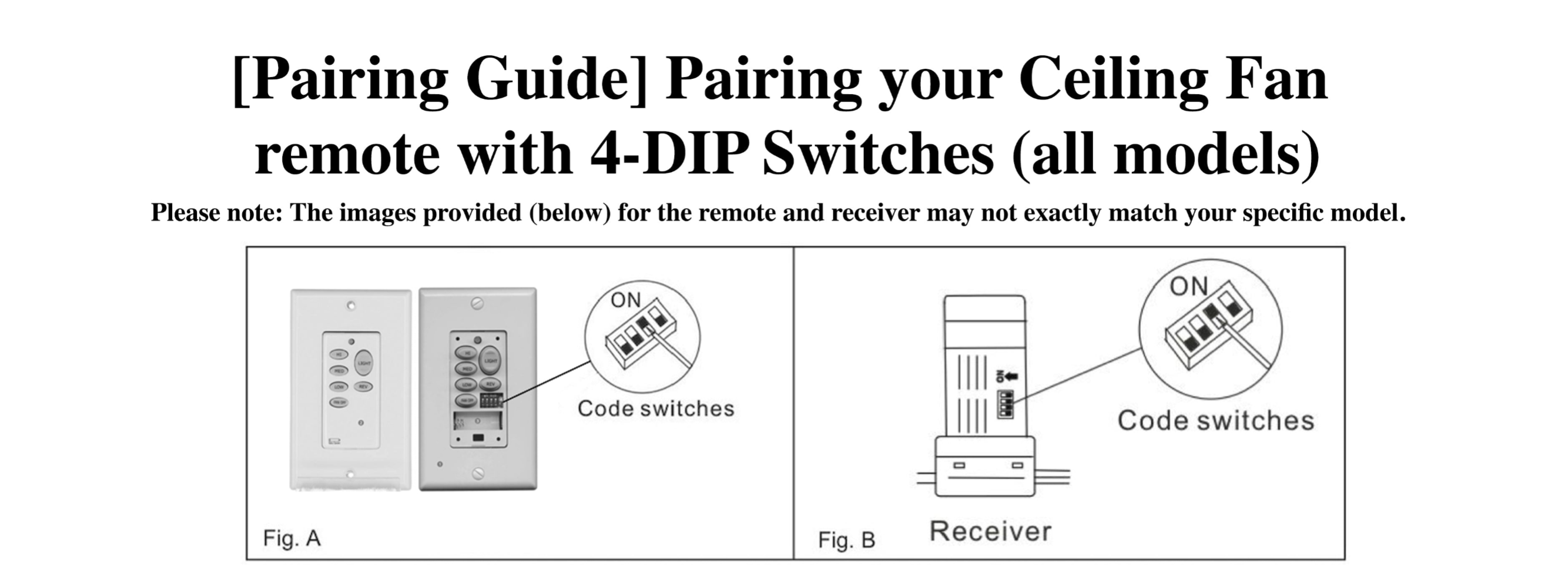
Allen + Roth ceiling fan remotes and their corresponding receivers communicate using dip switches—small toggle switches that establish a unique frequency code. If these switches don’t match exactly between the two components, the remote cannot send commands that the receiver understands.
Locate the dip switches inside your remote control’s battery compartment. They’re typically arranged in a row of four to eight tiny switches that can be slid up or down. Next, access the receiver module in your ceiling canopy to find its dip switches—location varies by model but they’re usually visible on the receiver circuit board. Compare the position of every single switch between the remote and receiver. Every switch must be in the identical position on both units for communication to occur.
If you find any mismatched switches, adjust them on either the remote or the receiver to create an exact match. This resynchronizes the communication between components and often resolves remote failures that developed without any other apparent cause. Dip switch codes sometimes change accidentally during battery replacement when the remote is handled, or when the receiver is disturbed during maintenance.
Perform Complete Remote Reset Procedure
When dip switches match but communication still fails, the receiver’s memory may need clearing through a complete reset procedure. This power cycle forces the receiver to clear its electronic state and re-establish communication with the remote.
Begin by turning off power to the ceiling fan at the wall switch. Alternatively, switch off the circuit breaker serving the fan for a more complete power cut. Leave the power off for at least 30 seconds to allow the receiver’s capacitors to fully discharge and clear any temporary electronic states. This waiting period is essential—rushing the reset by turning power back on immediately often results in incomplete reset and persistent issues.
After the waiting period, restore power and immediately attempt to operate the fan using the remote control. If basic power cycling doesn’t restore functionality, perform a more deliberate pairing procedure. Turn off power at the circuit breaker and wait a full minute before restoring power. Once power returns, locate the pair, sync, or reset button on your remote (often inside the battery compartment or on the remote face). Press and hold this button for several seconds until you receive confirmation of successful pairing. Confirmation indicators vary by model but may include a visible light on the remote, an audible beep, or movement in the fan blades themselves.
Eliminate Signal Interference Sources
Remote control signals can be disrupted by other electronic devices operating on similar radio frequencies. If your Allen + Roth remote works only when you’re standing directly beneath the fan but fails from across the room, interference or range limitations are the likely culprits.
Common interference sources include:
– Wireless routers
– Baby monitors
– Cordless phones
– Neighboring garage door openers
– Other remote controls
Walk through your home with the remote and a phone, noting whether interference patterns correlate with specific devices or locations. Temporarily disable potential interference sources to test whether remote function improves. Verify you’re operating the remote within its effective range—typically 25-30 feet for most Allen + Roth models.
Inspect the fan’s signal receiver sensor for obstruction or contamination. The infrared or radio frequency sensor inside the fan assembly can accumulate dust, debris, and cobwebs that impede signal reception. Gently clean the sensor area with a soft, dry cloth, ensuring no decorative elements, fan blades, or other components physically block the sensor’s line of sight.
Replace Failed Receiver Module

After exhausting all troubleshooting steps, component failure becomes the most likely explanation. Two components typically fail: the receiver module or the remote control itself.
Receiver module failure occurs when there is absolutely no response from the fan or light when using the remote, despite verified power, proper connections, confirmed dip switch matching, and successful pairing procedures. The receiver module translates radio frequency signals from the remote into electrical commands for your fan and light. When this module fails, it no longer responds to any remote commands regardless of the remote’s condition. Replacement receivers can be purchased from the manufacturer or compatible third-party suppliers. Installation requires electrical work and should only be performed by those comfortable with electrical safety practices or by a licensed electrician.
When to Contact Allen + Roth Support
Some situations require professional assessment rather than continued DIY troubleshooting. If you complete all troubleshooting steps without success, or if you feel uncomfortable working with electrical connections, a licensed electrician can provide expert diagnosis and repair.
Before pursuing professional repair, contact Allen + Roth customer support for guidance specific to your fan model and warranty coverage information. Your fan may still be under warranty, which could cover parts or service costs. Additionally, if you notice any signs of electrical damage beyond simple component failure—such as scorched wiring, burning smells, sparking, or frequent breaker tripping—immediately turn off power at the breaker and contact a professional.
Prevent Future Remote Failures
Regular maintenance prevents unexpected remote failures and extends the life of your ceiling fan control system. Implementing a simple inspection schedule catches developing issues before they cause complete failure.
Periodically inspect your ceiling fan’s electrical connections, particularly if the remote has malfunctioned before or if the fan has operated for an extended period without maintenance. Check that all wire connections in the ceiling canopy remain tight and free from corrosion. Verify the receiver module stays securely mounted and shows no signs of damage or overheating. Replace remote control batteries proactively every twelve months as preventive maintenance rather than waiting for complete failure. Keep a spare set of quality batteries in a drawer specifically for your ceiling fan remote to avoid interruptions when batteries die.
By following this systematic troubleshooting approach, you address the most common causes of Allen + Roth ceiling fan remote control failures while minimizing unnecessary parts replacement and professional service calls. Start with the simplest solutions—battery replacement and power verification—before progressing to more complex diagnostics. Most remote control issues resolve within the first few troubleshooting steps, restoring your fan’s convenient wireless operation quickly and efficiently.
Leave a Reply