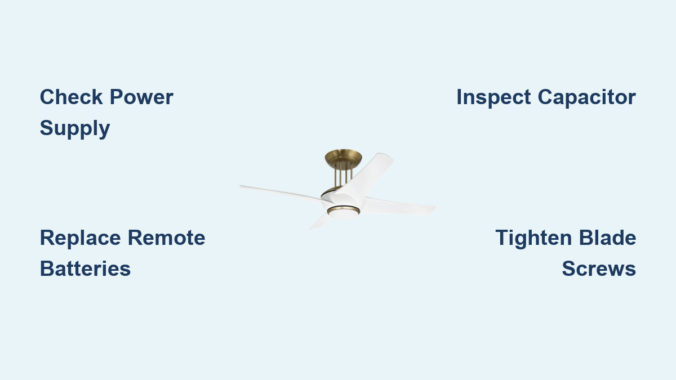
Your Ultimate Guide to Cooling: In-Depth Reviews, Smart Comparisons & Pro Care Tips.

Author: fan27 (Page 6 of 19)

Craftmade Ceiling Fan Troubleshooting Guide


Nothing disrupts your home comfort like a ceiling fan that suddenly stops working on a hot summer day. When your Craftmade fan won’t start, wobbles excessively, or makes strange noises, you need solutions fast—not vague advice that wastes your time. This targeted troubleshooting guide cuts through the fluff to help you diagnose and fix your Craftmade ceiling fan problems efficiently, using proven methods that address the actual components causing issues. By following this systematic approach, you’ll save money on unnecessary service calls and restore your fan’s performance with confidence.

Before grabbing tools, understand that 80% of ceiling fan problems stem from simple power or connection issues—not motor failure. Most Craftmade fan issues can be resolved in under 30 minutes with basic tools and this step-by-step diagnostic process. Starting with the most common culprits saves hours of unnecessary disassembly and prevents you from overlooking obvious solutions while chasing complex problems. Whether you’re dealing with a non-spinning fan, annoying wobble, or unexplained noises, this guide gives you the precise steps to identify the root cause and implement effective fixes.

Confirm Proper Power Delivery to Your Craftmade Fan

Power interruptions cause the majority of “broken” ceiling fan reports. Before assuming component failure, verify your Craftmade fan is actually receiving electricity—this quick check often solves the problem immediately.

Check your home’s electrical panel for tripped breakers controlling the fan circuit. Locate the specific breaker (often labeled “living room” or “bedroom”) and ensure it hasn’t flipped to the middle position. Reset it fully to “off” before switching it back to “on” with firm pressure. If the breaker trips again when you attempt to operate the fan, stop immediately—this indicates a serious electrical fault requiring professional attention, not DIY repair. Repeated tripping suggests potential wiring damage or motor short circuiting that could create fire hazards if ignored.

Test all wall switches controlling your Craftmade fan, including any dedicated fan switches separate from light controls. Many homeowners mistakenly believe their fan operates solely through remotes or pull chains, overlooking physical switches that may have been accidentally turned off. Toggle these switches multiple times while listening for the fan attempting to start. If your fan connects to a dimmer switch (common in newer homes), this could be causing humming or erratic operation—temporarily bypass the dimmer by connecting the fan directly to a standard switch to test functionality.

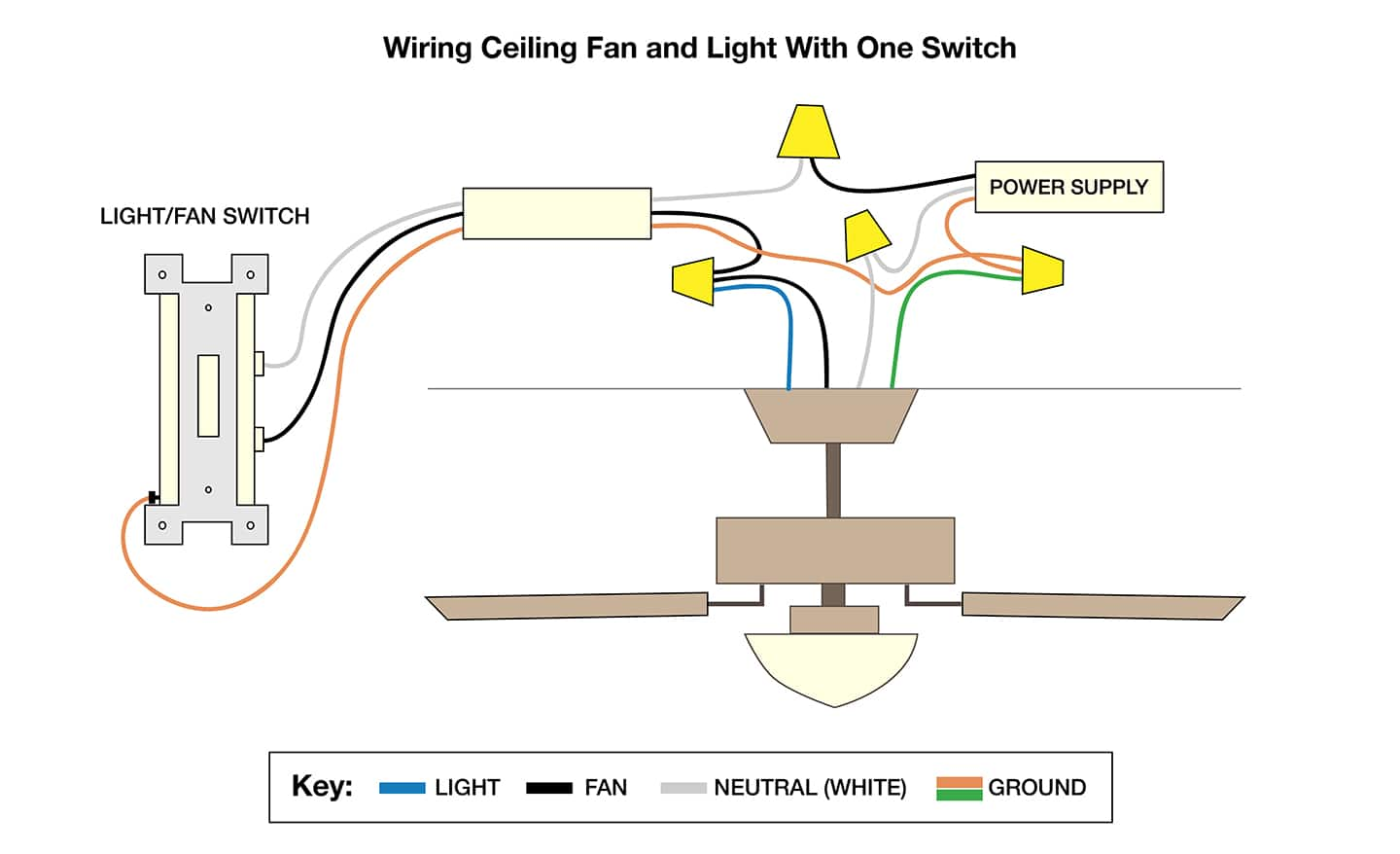
Examine internal wire connections inside the fan canopy after turning off power at the breaker. Remove the canopy cover and visually inspect all wire nuts: black (hot), white (neutral), and green/bare copper (ground) wires must have secure connections with no exposed copper. Gently tug each connection to confirm tightness—loose wires cause flickering, intermittent operation, or complete failure. Resecure any loose connections with properly sized wire nuts before reinstalling the canopy.

Fix Remote Control Communication Failures

Craftmade ceiling fan remote pairing instructions

When your Craftmade fan doesn’t respond to remote commands, the problem usually lies with the remote system—not the fan itself. Remote-related issues account for nearly half of all “non-working” fan reports.

Replace remote batteries with fresh ones, ensuring correct orientation according to the +/- markings inside the compartment. Weak batteries cause delayed responses, partial functionality, or complete communication failure. After battery replacement, test the remote by pressing multiple buttons while pointing directly at the fan receiver (infrared remotes require line-of-sight). Most remotes have an indicator light that flashes when buttons are pressed—a non-flashing light typically indicates dead batteries or remote failure.

Verify remote signal transmission using your smartphone camera. Point the remote at your phone’s camera lens and press any button—you should see a flashing light on your screen if the remote is transmitting infrared signals. No visible flash confirms the remote is defective and needs replacement. Clean the remote’s surface with a slightly damp cloth if sticky residue affects button function, being careful to prevent moisture from entering the battery compartment.

Check if your Craftmade fan has both remote and wall control options. Test operation using the wall switch—if the fan works normally with wall controls but not the remote, the issue is isolated to the remote system. Consult your manual for re-pairing procedures if the remote and receiver have lost synchronization, typically involving specific button sequences that reset communication between components.

Resolve Motor Start and Operation Failures
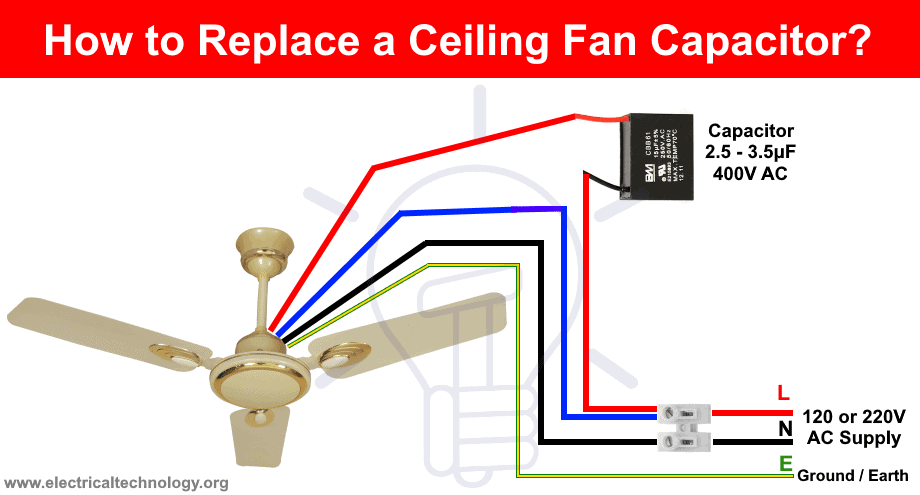
Craftmade ceiling fan capacitor replacement diagram

When power reaches your Craftmade fan but the motor won’t spin, you’ve moved beyond simple fixes into motor-related diagnostics. These issues range from easily replaceable components to potential motor replacement.

If your fan hums but blades don’t rotate, the motor receives power but can’t generate starting torque—a classic sign of capacitor failure. The capacitor provides the initial energy burst needed to overcome inertia. Over time, capacitors degrade or fail completely. Replacing the capacitor (a small cylindrical component attached to the motor housing) is often the solution. Turn off power at the breaker, remove the canopy, locate the capacitor, note its specifications (voltage and microfarad rating), and install an exact replacement. If you’re uncomfortable working with electrical components, hire a qualified electrician—capacitor replacement is generally more cost-effective than fan replacement.

Fans that start slowly, run at reduced speeds, or struggle to maintain momentum often have weakening capacitors or developing bearing issues. Worn bearings create distinctive rumbling sounds and may cause excessive wobble. Some Craftmade fans have oil ports on the motor housing—applying 2-3 drops of machine oil (not WD-40) can temporarily restore smooth operation. For sealed bearings, replacement is usually more cost-effective than repair attempts.

Complete motor failure—where the fan makes no sound when powered—suggests burned-out windings, a failed receiver (for remote-controlled models), or an open circuit in internal wiring. Before concluding motor failure, verify power reaches the fan using a non-contact voltage tester on wires inside the canopy, test with a known-working remote or wall control, and inspect for burned smells or visible damage. If these tests confirm motor failure, professional replacement is typically recommended as rewinding motors is rarely cost-effective.

Eliminate Blade Wobble and Imbalance Issues

Excessive wobble not only looks unsightly but can loosen mounting hardware over time, creating safety hazards. Address wobble systematically by checking three primary sources: blade balance, blade angle consistency, and mounting security.

Visually inspect all blades for cracks, warping, or damage—replace any damaged blades in complete sets to maintain aerodynamic balance. Check each blade’s angle by holding a ruler vertically against the blade edge; all blades should have identical angles relative to the ceiling. Variations as small as two degrees cause significant wobble at high speeds. Some Craftmade fans have blade arm adjustment screws allowing fine-tuning of blade pitch—adjust these to equalize angles across all blades.

Tighten all blade attachment points, which often loosen during operation. Turn off the fan and secure the screws connecting each blade to its arm, then tighten the blade arm screws connecting arms to the motor hub. Use a screwdriver (not a drill) for final tightening to avoid stripping screw holes. After tightening all connections, manually rotate the fan assembly to ensure smooth movement without catching.

Verify mounting bracket levelness using a torpedo level on the bracket arms before fully tightening mounting screws. Check that the downrod isn’t bent by sighting along its length from below—a bent downrod requires replacement. Finally, ensure the junction box is securely anchored to a ceiling joist—loose boxes amplify movement into visible wobble. If mounting security is questionable, consider upgrading to a newer IC-rated junction box.

Diagnose and Silence Annoying Fan Noises

Craftmade ceiling fan parts diagram with noise sources labeled

Ceiling fans should operate quietly; any clicking, humming, squeaking, or grinding sounds indicate developing problems requiring attention. Identifying noise sources helps target repairs effectively.

Clicking sounds typically originate from loose components. Check all blade arm screws, blade screws, and canopy mounting screws for tightness—vibration during operation causes gradual loosening. Also inspect the canopy set screw (usually on the side where canopy meets downrod); this critical safety component’s loosening creates distinctive clicking as the fan oscillates. Tighten gently but firmly without stripping threads.

Humming sounds without rotation indicate capacitor issues. Humming during normal operation may stem from loose wire connections, a loose light fixture kit, or motor failure. While some subtle humming is normal for certain models, loud or increasing hum warrants investigation.

Squeaking or squealing typically comes from motor bearings or blade pivot points. Apply machine oil to visible oil ports and work it into bearings by manually rotating the fan. If squeaking persists from blade pivots, use silicone-based lubricant on pivot screws where blades attach to arms—avoid oil-based lubricants on plastic components.

Rattling sounds suggest loose debris inside fan housing or light fixture. Remove the light kit and inspect for fallen objects or loose hardware. Check that glass shades are secure and globe screws are tightened. Rattling from the motor housing itself often indicates internal component loosening requiring professional assessment.

Prevent Future Problems with Seasonal Maintenance

Regular maintenance prevents most common ceiling fan problems and extends operational lifespan considerably. Establish a twice-yearly routine taking less than thirty minutes but delivering years of reliable performance.

Clean all fan blades using a damp cloth, reaching both top and bottom surfaces where dust accumulation affects aerodynamics. Clean the motor housing with a soft brush to remove dust that can work into bearing surfaces. For fans with light fixtures, clean glass components and check for heat damage around sockets.

Lubricate moving components according to your fan’s specifications—some modern fans have sealed bearings requiring no lubrication while others need annual oiling. Apply only light machine oil sparingly, as excess attracts dust. Test all pull chains for smooth operation, cleaning them with a damp cloth if sticky.

Inspect all visible hardware during maintenance: tighten blade screws, blade arm screws, canopy screws, and mounting bracket screws. Check the canopy set screw specifically, as its critical function is often overlooked. Examine blades for developing cracks or warping, especially near tips and screw holes—catching damage early allows replacement before complete failure.

How to Check Ceiling Fan Capacitor: Quick Steps


When your ceiling fan suddenly stops spinning or struggles to reach full speed, the culprit is often a failing capacitor. Learning how to check ceiling fan capacitor issues can save you from unnecessary fan replacements and expensive service calls. This essential electrical component stores and releases energy to provide the starting torque your fan motor needs. Without a functioning capacitor, your fan may hum but not move, operate at reduced speeds, or produce unusual clicking noises. In this guide, you’ll discover the precise steps to diagnose capacitor problems, interpret test results, and determine whether replacement is necessary—putting you in control of your home’s comfort system.

Checking a ceiling fan capacitor requires basic electrical knowledge, a digital multimeter, and proper safety precautions. The entire diagnostic process typically takes 15-30 minutes and can be completed with minimal tools. By following this comprehensive approach, you’ll move from symptom recognition to definitive diagnosis, understanding exactly what’s happening inside your fan. Whether you’re a DIY enthusiast or simply want to verify a technician’s findings, mastering this skill ensures you’re never left in the dark when ceiling fan problems arise.

Recognizing Definite Signs of Capacitor Failure

Before grabbing your tools, identify whether your fan’s symptoms point specifically to capacitor issues rather than other electrical problems. Capacitors fail in characteristic ways that distinguish them from motor or wiring faults.

Fan hums but won’t start rotating. When you flip the switch and hear a steady humming sound without blade movement, this classic symptom indicates insufficient starting torque—exactly what the capacitor provides. Unlike motor winding failures that produce no sound at all, a humming-but-stationary fan strongly suggests capacitor issues.

Reduced speed performance across all settings. If your multi-speed fan now operates only at the lowest speed regardless of setting, or takes abnormally long to reach full speed, your capacitor is likely losing capacitance. This degradation happens gradually as electrolytes inside the component dry out over time.

Clicking sounds during startup attempts. Listen for rhythmic clicking as the fan tries and fails to start. This occurs when the motor repeatedly attempts to engage but lacks the necessary rotational force from the capacitor. The clicking represents the motor windings energizing then cutting off when rotation doesn’t occur.

Visible smoke or burning smell. While less common, catastrophic capacitor failure can produce visible smoke or a distinct burning odor near the fan housing. This requires immediate power disconnection and component replacement—do not continue operating the fan in this condition.

Conducting a Thorough Visual Inspection First

ceiling fan capacitor visual inspection bulging leaking

Skip this step at your peril—nearly 40% of capacitor failures show visible signs that make electrical testing unnecessary. Proper visual inspection takes less than five minutes but prevents unnecessary risk from handling potentially charged components.

Locate the capacitor in your specific fan model. In most modern ceiling fans, the capacitor sits inside the motor housing near the switch housing or mounted directly to the mounting bracket. Look for a small cylindrical (round) or oval-shaped component typically measuring 1-2 inches in diameter with two or more wire terminals protruding from one end.

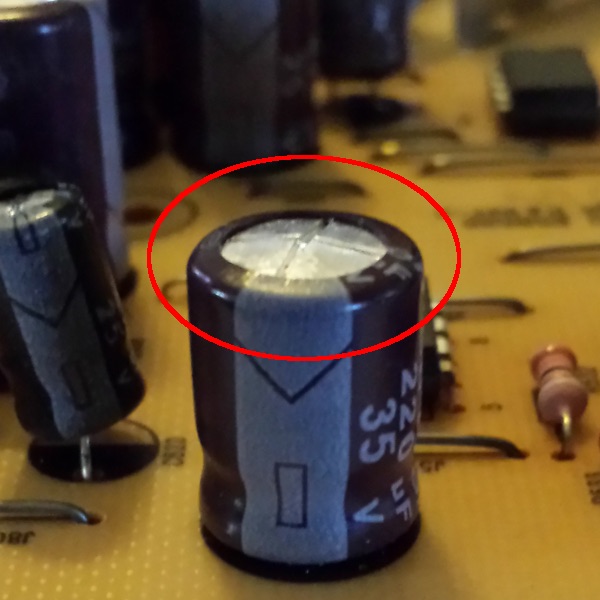
Check for physical bulging or swelling. Run your finger along the capacitor’s metal casing—healthy units have perfectly flat ends. Any convex distortion, particularly at the top or bottom, indicates internal gas buildup from electrolyte breakdown. Even slight swelling means immediate replacement is required.

Inspect for electrolyte leakage. Look for brown, yellow, or white crusty deposits around the capacitor’s base, terminals, or on nearby wiring. These residue patterns form as internal electrolytes escape through microscopic cracks. Any visible leakage means the capacitor has failed and must be replaced.

Examine for burn marks or discoloration. Darkened areas on the capacitor housing or surrounding components indicate overheating. Pay special attention to the terminal connections—discoloration here often means arcing has occurred due to poor connections or component failure.

Critical Safety Steps Before Testing

Capacitors store dangerous electrical charges long after power disconnection—ignoring these safety procedures risks severe electrical shock or equipment damage.

Complete power isolation procedure. Turn off the fan at both the wall switch AND the circuit breaker. Verify power is off using a non-contact voltage tester near the fan’s wiring compartment. Never rely solely on the wall switch—ceiling fans often have complex wiring that might maintain partial power.

Safe capacitor discharge method. Using an insulated screwdriver with rubber handle, carefully bridge the capacitor terminals by touching metal shaft to both terminals simultaneously. You may see a small spark—this confirms discharge. Repeat twice more for complete safety. Never use metal tools without proper insulation.

Personal protective equipment essentials. Wear rubber-soled shoes and avoid standing on conductive surfaces. If available, use electrical safety gloves rated for the voltage in your home (typically 120-240V). Keep one hand behind your back while working to prevent current from crossing your heart.

Workspace preparation checklist.
– Ensure solid footing on a non-conductive ladder
– Keep flammable materials at least 3 feet away
– Have a fire extinguisher rated for electrical fires nearby
– Work in well-lit conditions—never in dim lighting

Step-by-Step Multimeter Testing Procedures

multimeter reading ceiling fan capacitor test

With safety precautions complete, proceed to definitive electrical testing using either resistance measurement (for basic fault detection) or capacitance measurement (for precise diagnosis).

Performing Resistance Testing for Immediate Fault Detection

Resistance testing reveals catastrophic failures but doesn’t measure actual capacitance—perfect for quick go/no-go decisions.

  1. Set your multimeter to the highest resistance range (usually 20MΩ or 2000k)
  2. Touch probes to capacitor terminals (polarity doesn’t matter for this test)
  3. Observe the display behavior over 10-30 seconds

Interpreting resistance readings:
– Healthy capacitor: Reading starts low then steadily climbs to “OL” (over limit)
– Failed open: Shows “OL” immediately with no movement
– Shorted capacitor: Stays at zero or near-zero resistance
– Leaky capacitor: Climbs but stabilizes at a finite resistance value

Measuring Actual Capacitance for Precise Diagnosis

For definitive results, measure actual capacitance using a multimeter with capacitance function (look for “F” or “C” symbol).

  1. Completely disconnect capacitor from fan circuit (remove both wires)
  2. Set multimeter to capacitance mode (µF)
  3. Touch probes to terminals (again, polarity irrelevant)
  4. Wait for stable reading (may take 10-30 seconds)

Capacitance interpretation guide:
– Within 10% of labeled value: Good condition
– 10-20% below rating: Degrading—monitor closely
– More than 20% below rating: Replace immediately
– No reading or “0”: Complete failure

Pro Tip: For dual capacitors (common in multi-speed fans), test each section separately according to the wiring diagram printed on the component. Most ceiling fan capacitors range from 3-10µF for main windings and 1-5µF for auxiliary windings.

Decoding Test Results and Replacement Decisions

ceiling fan capacitor replacement guide

Your testing reveals one of three scenarios—each requiring specific action for reliable fan operation.

Clear replacement needed when:
– Visual damage exists (bulging, leaking, burning)
– Resistance test shows open or shorted condition
– Capacitance measures more than 20% below rating
– Fan symptoms match failure patterns and no other issues found

Further investigation required if:
– Capacitance measures 10-20% low but symptoms are mild
– Resistance test shows slow charging without reaching infinity
– Multiple components test healthy but problems persist

Professional help recommended when:
– Dual capacitor sections show inconsistent failure patterns
– You’re uncomfortable working with electrical components
– Motor windings show resistance imbalances during testing

When replacing, match specifications exactly—capacitance (µF) must be identical, while voltage rating must be equal or higher. Using an undersized capacitor creates fire hazards and accelerates motor wear.

Extending Capacitor Lifespan with Preventive Maintenance

While capacitors eventually fail through normal use, these practices significantly extend their operational life.

Voltage stability matters more than you think. Install a whole-house surge protector if you experience frequent power fluctuations—these electrical spikes degrade capacitors faster than normal operation. Even minor voltage sags during startup stress components.

Dust management prevents overheating. Clean fan components every 6-12 months, paying special attention to areas near the capacitor. In kitchens or dusty environments, increase cleaning frequency to quarterly. Use compressed air to blow dust from motor housing without disassembly.

Address speed control issues immediately. If your fan develops inconsistent speed operation, diagnose and repair quickly. A failing speed switch creates irregular electrical loads that stress the capacitor.

Avoid excessive on/off cycling. Each startup cycle creates thermal stress on components. When possible, leave fans running continuously rather than frequent cycling—this reduces electrical stress on both capacitor and motor windings.

Final Diagnostic Checklist for Ceiling Fan Capacitors

Before concluding your capacitor diagnosis, verify these critical points:

  • Power is completely disconnected at circuit breaker (double-verified with tester)
  • Capacitor has been properly discharged multiple times
  • Component is fully isolated from fan circuit during testing
  • Multimeter leads make solid contact with terminals
  • Test readings match failure patterns described

If testing confirms a healthy capacitor but your fan still malfunctions, shift focus to other potential issues: motor winding resistance imbalances, faulty speed switches, or wiring connection problems. Document your findings carefully—this information proves invaluable if professional assistance becomes necessary.

Checking a ceiling fan capacitor properly combines visual inspection, electrical testing, and symptom analysis. By following this systematic approach, you’ll accurately determine whether capacitor replacement solves your fan problems or if further diagnosis is needed. Remember that safety always comes first—never rush capacitor testing procedures or skip discharge steps. With practice, this essential home maintenance skill becomes second nature, keeping your living spaces comfortable while saving unnecessary service costs.

How to Oil a Ceiling Fan: Quick Steps


Nothing disrupts home comfort like a squeaking ceiling fan that turns a peaceful room into a noisy distraction. Learning how to oil a ceiling fan is one of the simplest yet most effective maintenance tasks you can perform to restore quiet operation and prevent costly repairs. Over time, the lubricants inside your fan’s motor bearings naturally break down from constant use, heat exposure, and dust accumulation, leading to increased friction that manifests as annoying squeaks, reduced airflow, and potentially premature motor failure. This comprehensive guide walks you through every step of the lubrication process, from identifying whether your specific fan model actually needs oiling to applying the right lubricant in the correct amount. By dedicating just 20-30 minutes to this essential maintenance task, you’ll extend your fan’s operational life by years while enjoying quieter, more efficient cooling performance.

Identify Your Fan Motor Type Before Oiling

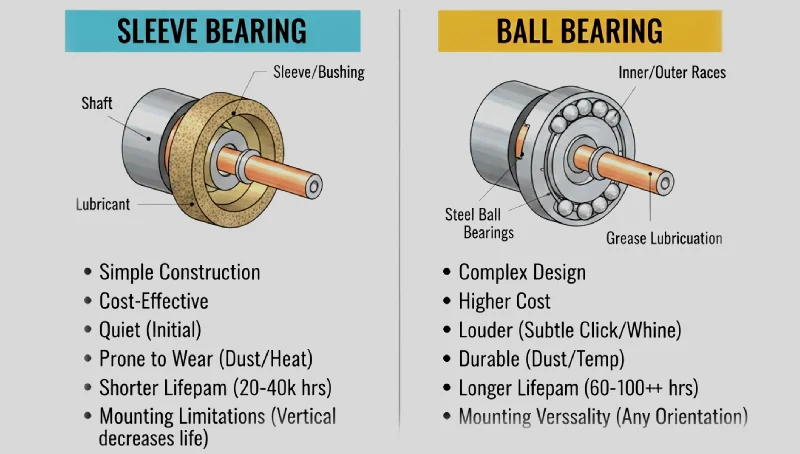
ceiling fan motor types sleeve bearing ball bearing diagram

Before reaching for the oil bottle, determining your ceiling fan’s motor design is critical—some modern fans require zero lubrication while older models need regular attention. Using the wrong technique on the wrong motor type won’t just waste your time; it could damage your fan and void any remaining warranty. Take a moment to examine your fan’s motor housing before proceeding.

Sleeve Bearing Motors Need Regular Lubrication

Sleeve bearing motors dominate older ceiling fan models and budget-friendly contemporary units, featuring a metal shaft rotating within an oil-soaked sleeve that creates a protective hydrodynamic film. These fans typically require re-oiling every 12-24 months as the lubricant gradually depletes through normal operation and heat exposure. You’ll instantly recognize a sleeve bearing fan by the small circular oil port caps—usually one or two—located on the top or side of the motor housing. When these fans run low on lubricant, they produce distinctive squeaking or grinding noises that change with fan speed, often diminishing temporarily as the motor warms up but returning as the problem worsens.

Ball Bearing Motors: Sealed vs. Serviceable

Most modern ceiling fans feature sealed ball bearing motors pre-lubricated at the factory to last the fan’s entire lifespan without user maintenance. These sealed units lack visible oil ports and attempting to access them typically voids your warranty while risking damage to precision components. However, some commercial-grade or high-performance fans contain serviceable ball bearings with access ports requiring lubrication every 3-5 years, particularly in dusty environments. If you’re uncertain whether your fan has serviceable bearings, check for manufacturer documentation specifying lubrication requirements—never assume a modern fan needs oiling without verification.

Recognize When Your Fan Actually Needs Oil

Your ceiling fan communicates its maintenance needs through clear auditory and performance signals that help you address problems before they escalate into expensive repairs. Learning to recognize these indicators prevents unnecessary maintenance while ensuring timely intervention when lubrication is genuinely required.

Listen for These Warning Sounds

Squeaking, squealing, or grinding noises during operation represent the most obvious signs that your fan requires lubrication. These sounds may be continuous or intermittent, often intensifying as you increase fan speed. A rhythmic clicking sound suggests significant bearing wear from prolonged dry operation, while grinding noises indicate metal components making direct contact—a serious condition requiring immediate attention. Don’t confuse these bearing-related sounds with rattling noises, which typically indicate loose components rather than lubrication issues.

Watch for Performance Decline

Decreased rotational speed and reduced airflow often accompany lubrication problems as increased friction converts electrical energy to heat rather than mechanical rotation. This decline may be gradual, making it difficult to notice day-to-day but apparent when comparing current performance to the fan’s original capabilities. In severe cases, the fan struggles to start or fails to reach maximum speed even at the highest setting. Another subtle indicator is increased energy consumption—when the motor works harder to overcome friction, it draws more electricity, raising your utility costs without delivering improved cooling.

Choose the Perfect Lubricant for Your Fan

mineral oil vs synthetic lubricant for ceiling fans comparison

Selecting the appropriate lubricant ensures effective protection without damaging sensitive motor components. Using the wrong product can attract dust, degrade rubber parts, or even cause electrical issues—so choose wisely based on your fan’s specific requirements.

Mineral Oil: Best for Traditional Sleeve Bearings

High-quality, pure mineral oil serves as the ideal lubricant for sleeve bearing ceiling fans, offering the right viscosity for residential fan motor clearances. Purchase light mineral oil specifically designed for clocks or small mechanical devices rather than automotive motor oil, which contains additives unsuitable for fan motors. Avoid products with detergents or other additives that might degrade rubber components or attract excessive dust accumulation within the motor housing.

Synthetic Options for Extreme Conditions

Synthetic lubricants provide enhanced temperature stability and longer service life compared to mineral oils, making them ideal for fans installed in areas with extreme temperature variations or high humidity. While more expensive, their superior oxidation resistance can extend lubrication intervals, potentially offsetting the higher initial cost. Always verify compatibility with your specific fan model before using synthetic lubricants, as some older motors may not respond well to these advanced formulations.

Grease for Serviceable Ball Bearings

For fans with serviceable ball bearings, use motor-specific grease applied in minute quantities—approximately the size of a rice grain. Excessive grease creates drag that can cause overheating and damage seals. Apply grease directly to bearing surfaces after partial disassembly, then rotate the shaft manually to distribute the lubricant evenly before wiping away any excess that squeezes out during operation.

Gather These Essential Tools Before Starting

Having the right equipment ready prevents frustration and ensures efficient completion of your ceiling fan lubrication task. Proper preparation takes just minutes but significantly reduces the risk of accidents or damage to your fan.

Must-Have Application Tools

  • Sturdy step ladder rated for your weight plus tools
  • Precision dropper bottle or oil can with thin nozzle
  • Phillips and flathead screwdrivers in multiple sizes
  • Lint-free cloths for cleanup
  • Compressed air for dust removal
  • Non-contact voltage tester for electrical safety

Safety Gear You Shouldn’t Skip

  • Safety glasses to protect against dust and lubricant splashes
  • Work gloves to maintain grip and keep hands clean
  • Circuit breaker lockout device (if available)
  • Drop cloth to protect flooring below

Follow These Safety Steps Before Oiling

Electrical and physical safety precautions are non-negotiable when working with ceiling fans. Taking these critical steps protects you from potentially life-threatening hazards while ensuring the fan is properly prepared for maintenance.

Electrical Safety Protocol That Could Save Your Life

Before touching your fan, locate and turn off the circuit breaker controlling its power—don’t rely solely on the wall switch. Verify power disconnection using a non-contact voltage tester at both the wall switch and fan canopy. Wait 5 minutes after power-off to allow capacitors to discharge fully, as they can retain dangerous electrical charges even when the circuit appears dead. Never attempt to lubricate a fan while it’s operating, regardless of how tempting this might seem for immediate noise verification.

Ladder Safety Checklist

Position your ladder on a level surface with someone stabilizing the base if possible. Ensure the ladder extends at least three feet above your work area for secure handholds. Face the fan while working, maintaining three points of contact with the ladder at all times. Never stand on the top two rungs or overreach—reposition the ladder instead. Check that the fan is securely mounted by gently testing for wobble before beginning work; address any mounting issues before attempting lubrication.

Locate and Access Your Fan’s Oil Ports Properly

Identifying and accessing lubrication points varies by fan design but follows predictable patterns that make the process straightforward once you know what to look for. Proper access ensures effective lubrication without unnecessary disassembly.

Finding Hidden Oil Ports on Your Fan

Most sleeve bearing fans feature one or two oil ports covered by small circular caps on the motor housing. These caps may be pressed in, screwed, or held by clips—remove them carefully using appropriate tools and set them aside where they won’t get lost. If you can’t locate visible ports, your fan likely requires partial disassembly to access bearings. Remove canopy screws while supporting the cover, photographing each step to ensure correct reassembly. Once bearings are exposed, inspect for visible wear or debris before proceeding.

Critical Cleaning Before Lubrication

Blow dust from oil ports using compressed air before applying fresh lubricant. For stubborn debris, use a small brush to dislodge particles without damaging components. Wipe accessible surfaces with a clean, dry cloth—never introduce moisture near electrical components. This cleaning step prevents contaminants from mixing with new lubricant and accelerating bearing wear.

Apply Lubricant Using These Proven Techniques

Proper application technique ensures effective lubrication without over-applying product or causing damage to sensitive fan components. The right amount makes all the difference between quiet operation and messy leaks.

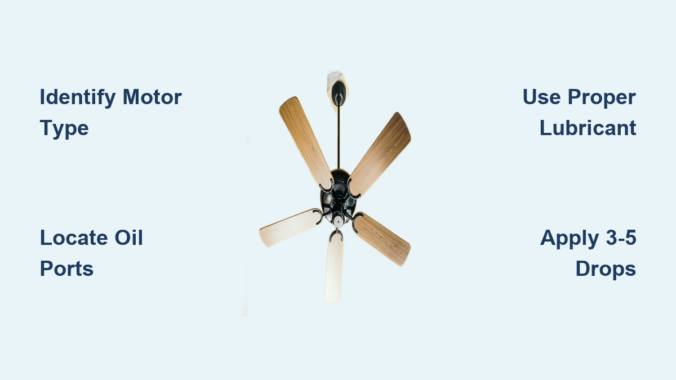
Oil Application for Sleeve Bearings: The 3-5 Drop Rule

Insert your dropper tip into the oil port until it nearly touches the bearing surface. Apply exactly 3-5 drops of lubricant—never more—as excess oil will drip onto blades or ceilings. If uncertain, start with fewer drops and add more only if noise persists after testing. After application, rotate the fan blades manually 5-10 times to help distribute the lubricant before reassembly.

Grease Application for Ball Bearings: Less Is More

For serviceable ball bearings, apply a rice-grain sized amount of motor-specific grease directly to bearing surfaces. Rotate the shaft manually to work the grease into position, then wipe away any excess that emerges. Too much grease creates drag that can overheat bearings and damage seals—precision matters more than quantity.

Test Your Fan After Lubrication

Restoring power and testing confirms successful lubrication while identifying any issues requiring immediate attention before regular use resumes.

Initial Power-Up Checklist

Restore power at the breaker and test each speed setting while listening carefully for unusual sounds. Run the fan continuously for 10-15 minutes to allow lubricant distribution. During this period, watch for smoke, unusual odors, or excessive heat that might indicate problems. Some initial noise that diminishes after a few minutes is normal as lubricant settles, but persistent squeaking requires reevaluation.

Performance Verification Steps

After the initial run period, verify airflow matches your expectations based on the fan’s specifications. Compare current operation to your memory of pre-lubrication performance—improved quietness and airflow confirm successful maintenance. If performance remains unchanged or worsens, double-check lubricant application and investigate other potential issues like loose components or electrical problems.

Establish Your Personal Lubrication Schedule

Create a maintenance calendar that matches your specific fan, usage patterns, and environmental conditions to maximize performance while minimizing unnecessary work.

Customized Lubrication Intervals

  • Sleeve bearing fans: Every 12-24 months for normal residential use
  • Heavy-use fans (24/7 operation): Every 6-12 months
  • Seasonal-use fans: Before each cooling season
  • Serviceable ball bearings: Every 3-5 years

Schedule lubrication during seasonal transitions when fans see increased use—spring for summer preparation or fall for winter storage. Fans in dusty environments or commercial settings require more frequent attention, potentially every 6 months. Keep a simple maintenance log noting dates, lubricant types, and observations to track patterns and identify developing issues early.

Troubleshoot Common Post-Lubrication Issues

Even with proper technique, problems sometimes arise after lubrication. Understanding these common scenarios helps you address them efficiently without unnecessary panic.

Persistent Noise: Diagnosis and Solutions

If squeaking continues after lubrication, isolate the noise source by operating the fan at different speeds. Speed-dependent sounds typically indicate bearing issues requiring additional lubricant or professional service. Constant noises often originate from loose components rather than bearings—check blade attachments, downrod connections, and mounting hardware. For grinding sounds that persist after proper lubrication, bearing replacement may be necessary.

Oil Leaks and Dripping: Immediate Action Steps

Excess lubricant causes most post-oiling leaks—turn off the fan immediately and allow excess oil to drain for several hours. Clean affected surfaces with appropriate solvents before testing again. If leaks persist despite proper application amounts, internal seal degradation may require professional repair or fan replacement. Never ignore persistent leaks, as oil can damage ceilings and create slip hazards.

Extend Your Fan’s Life With These Expert Tips

Professional technicians recommend these additional practices to maximize lubrication effectiveness and extend time between maintenance sessions:

  • Keep fan blades and motor housing clean to minimize dust contamination
  • Operate fans at moderate speeds rather than continuously at maximum
  • Ensure proper installation with secure mounting to prevent vibration damage
  • Store lubricants in tightly sealed containers away from temperature extremes
  • Use dedicated applicators for fan maintenance to prevent cross-contamination

By following this complete guide on how to oil a ceiling fan, you’ve transformed a potentially problematic appliance into a reliably efficient cooling companion. The modest investment of time and materials provides substantial returns in comfort, energy efficiency, and avoided repair costs. Incorporate ceiling fan lubrication into your regular home maintenance routine, and these essential cooling devices will continue serving quietly and efficiently for many years to come. When performed correctly, this simple maintenance task extends fan lifespan by 3-5 years while eliminating annoying noises that disrupt your home’s peace and comfort.

How to Clean Ceiling Fan Blades Quickly


Dust clinging to your ceiling fan blades does far more than create an unsightly layer—it transforms your fan into a dust distributor every time you flip the switch. Those swirling particles trigger allergies, worsen asthma symptoms, and circulate respiratory irritants throughout your entire living space. Beyond health concerns, accumulated dust unbalances blades over time, causing annoying vibrations and potentially shortening your fan’s motor lifespan. The good news? Properly learning how to dust ceiling fan takes less than thirty minutes with tools you likely already own. This guide delivers everything you need—from quick weekly maintenance routines to deep cleaning techniques that restore both appearance and performance.

Gather Essential Dusting Tools Without Breaking Your Budget

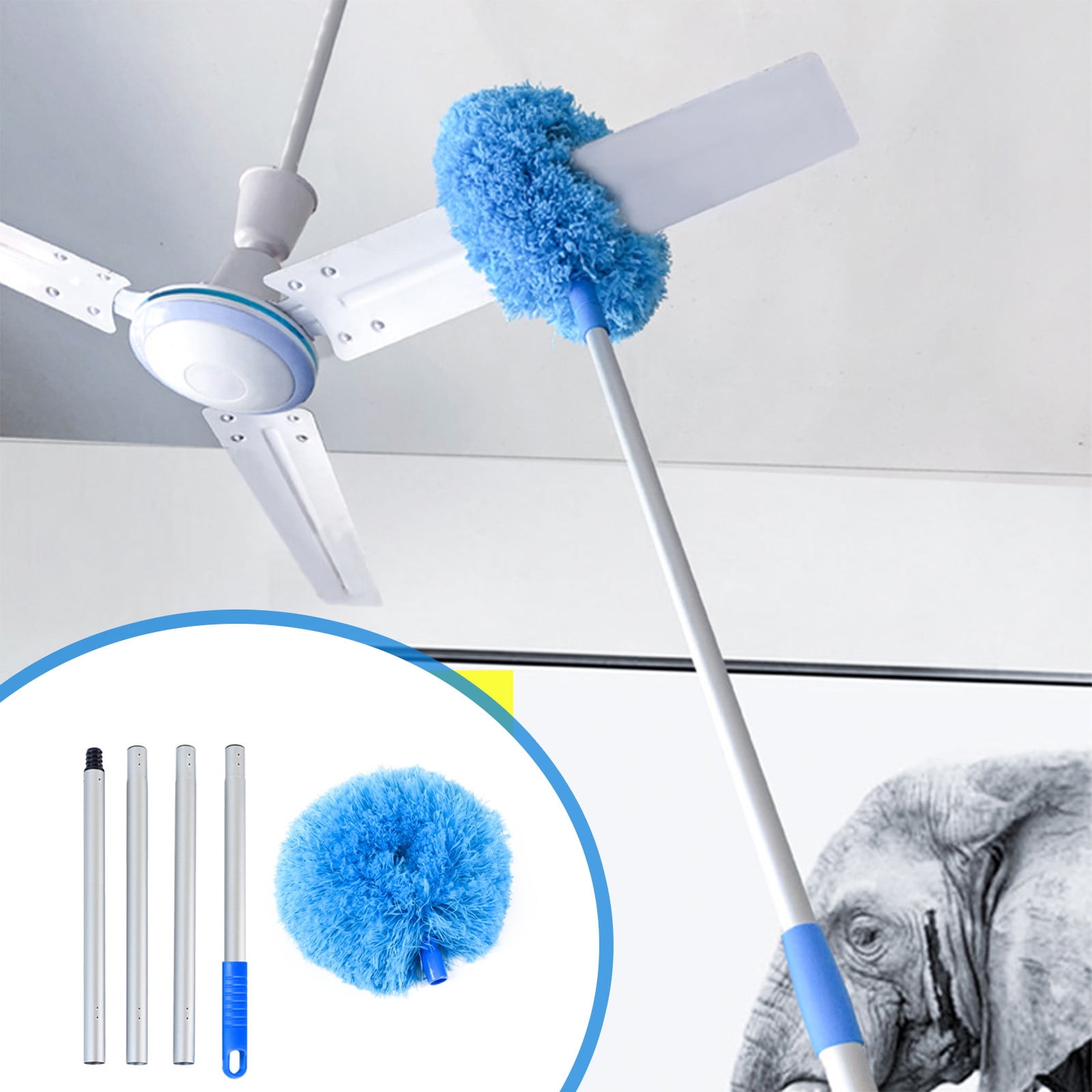
ceiling fan dusting tools microfiber extendable pole

Having the right equipment transforms ceiling fan cleaning from a dangerous chore into a straightforward task that actually works. The tools you choose directly impact how effectively dust is removed and how much mess you create in the process.

Microfiber Dusters and Extendable Poles That Actually Work

Microfiber dusters outperform traditional feather dusters because their electrostatic fibers attract and trap dust rather than simply pushing it around your room. Look for models with extendable handles that reach from floor to ceiling without requiring a ladder—this eliminates the most dangerous part of the job. Lambswool dusters excel at reaching between blade slats and into tight corners where dust builds up unnoticed. Some premium extendable dusters feature articulating heads that angle to match blade positioning, letting you clean both sides of each blade from a single position without constantly repositioning your ladder.

Cleaning Solutions for Stubborn Buildup (No Harsh Chemicals Needed)

For routine maintenance, plain water in a spray bottle provides enough moisture to capture remaining particles without risking damage to your fan. When sticky grime has accumulated, mix one teaspoon of mild dish soap into a gallon of warm water for a solution that cuts through residue without harming blade finishes. A simple equal-parts white vinegar and water mixture offers a natural, streak-free alternative that dissolves mineral deposits common in many homes. Always keep two microfiber cloths handy—one damp cloth for cleaning and a dry one immediately behind it to prevent water spots and ensure blades are completely dry before operation.

Safety Equipment You Can’t Skip

A sturdy step ladder provides stable access to ceiling height, letting you work comfortably without overreaching and losing your balance. Non-slip footwear prevents dangerous slips when climbing, and having someone hold the ladder base adds crucial security. Safety glasses shield your eyes from falling dust and debris, which becomes especially important when cleaning neglected fans. Spread a drop cloth or old sheet beneath the fan before starting—cleanup becomes dramatically simpler when dust falls onto a protected surface rather than your furniture or carpet.

Prepare Your Space and Safety Before Climbing

ceiling fan cleaning safety ladder drop cloth

Proper preparation prevents accidents and makes the cleaning process far more efficient. Taking just five minutes to set up correctly saves significant time and frustration later.

Room Preparation Steps That Prevent Mess

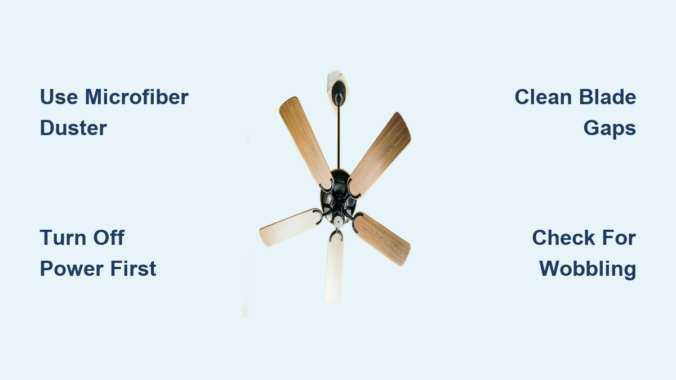
Remove fragile items, electronics, and anything you don’t want coated in dust from directly beneath the fan’s rotation area. Cover remaining furniture with sheets or drop cloths to protect against inevitable dust fall during cleaning. Open windows or turn on ventilation fans to improve air circulation, helping dust dissipate rather than settling back onto surfaces you’ve just cleaned. Most importantly, turn off the ceiling fan at the wall switch—not just the remote control—and wait for the blades to come to a complete stop before touching them. Moving blades create both injury risks and make cleaning significantly more difficult.

Personal Preparation Checklist for Safe Cleaning

Wear old clothing that you don’t mind getting dusty, or drape an apron over your current outfit to protect your torso and arms. If you have allergies or respiratory sensitivities, a dust mask prevents you from inhaling particles as you disturb accumulated dust. Ensure all your cleaning tools sit within arm’s reach before climbing the ladder, eliminating dangerous reaches or descents mid-task. Keep a trash bag nearby for disposing of heavily soiled cloths or those dust bunnies that have been growing unnoticed on your blades.

Dry Dusting Techniques for Weekly Maintenance

Regular dry dusting prevents the heavy buildup that requires intensive cleaning sessions. These techniques work well for weekly maintenance or as the first step before wet cleaning.

Quick Weekly Dusting Method That Actually Captures Dust

Attach a microfiber duster to your extendable pole and sweep lightly across all surfaces of each blade, moving from the center outward along the blade’s length. Work systematically from one side of the fan to the other, ensuring you address both the top and bottom surfaces of every blade. The extendable pole lets you reach the entire fan span without strain, while microfiber’s properties attract dust instead of dispersing it into the air. After completing each blade, step outside and shake the duster to release collected dust before continuing—this prevents redistributing debris onto already-cleaned surfaces.

Vacuum Attachment Approach for Heavy Dust

The brush attachment on your vacuum cleaner offers the most effective method for heavy dust accumulation because it captures particles immediately rather than releasing them into the air. Move the brush attachment slowly along each blade surface, overlapping your strokes slightly to ensure complete coverage without missing spots. Switch to the crevice tool attachment to reach dust trapped between blades and in the motor housing gaps where normal dusters cannot reach. This method generates the least airborne dust and eliminates the need for secondary cleanup of your floor.

Wet Cleaning for Deep Grime Removal

When dry dusting no longer restores your fan’s appearance, wet cleaning removes the stubborn grime that accumulates over time. This deeper approach requires more careful technique to protect both the fan and yourself.

Blade-by-Blade Cleaning Process That Prevents Damage

Stand on your stable ladder and support one blade with your free hand to prevent excessive wobbling while you work. Wipe along the blade’s length with a damp microfiber cloth, starting near the motor housing and moving outward toward the blade tip. Flip to a dry section of the cloth and immediately follow behind the damp pass to remove moisture and prevent streaking. Complete both sides of the same blade before moving to the next one, and verify each blade feels completely dry before you consider the job finished.

Motor Housing and Light Fixtures Cleaning

Wipe the motor housing with a slightly damp cloth, carefully avoiding any openings where moisture could enter and damage electrical components. Textured surfaces benefit from a soft-bristled brush that loosens dust before you wipe it away. Remove glass light fixtures if your fan design allows this, washing them separately in warm soapy water, rinsing thoroughly, and drying completely before reinstalling. For fixtures that cannot be removed, wipe glass surfaces with a damp cloth followed immediately by a dry one, paying special attention to where glass meets metal housing.

Reach High Ceiling Fans Without Risking Injury

long handle ceiling fan duster two story ceilings

Standard ladders won’t reach very high ceilings, but several solutions exist for safely cleaning fans installed in two-story entryways or vaulted spaces.

Extension Pole Techniques for Two-Story Ceilings

Select an extension pole long enough to let you work comfortably without overextension, which compromises your balance and cleaning effectiveness. Ceiling fan dusters designed with angled heads that conform to blade angles clean more effectively than flat mop heads, though the latter work in a pinch. Test your reach at floor level before climbing—your arm should extend comfortably upward without straining or leaning. Move systematically around the fan’s perimeter rather than twisting your body, which can shift the ladder’s position.

Safe Ladder Positioning for Vaulted Ceilings

When using a step stool or platform ladder positioned directly beneath the fan’s center, ensure all legs rest on a flat, stable surface—never on rugs, uneven flooring, or soft ground. Maintain three points of contact at all times: either two hands and one foot or two feet and one hand on the ladder rails. Never stand on the top rungs of a step ladder, and never reach beyond your side rails while positioned aloft. A ladder stabilizer bar provides extra security when working alone, preventing dangerous side-to-side movement.

Clean Tricky Spots Where Dust Hides

Dust always accumulates in the hardest-to-reach places, requiring specialized techniques to address these neglected areas effectively.

Between Blade Gaps That Trap Dust

The narrow spaces between fan blades and where blades attach to the central hub collect dust that normal dusting completely misses. Use a thin, flexible tool such as a paint edger, flexible spatula wrapped in microfiber cloth, or a brush specifically designed for fan cleaning to reach these gaps. Alternatively, wrap a thin microfiber cloth around a flexible putty knife or ruler to create a custom cleaning tool for tight spaces. Vacuum these areas immediately after dislodging dust to prevent redistribution onto other surfaces.

How Often to Dust Ceiling Fans Based on Your Home

Thorough ceiling fan cleaning should occur at minimum every three to four months, with light dusting every week or two in high-traffic rooms. During seasons when the fan runs continuously for cooling, more frequent attention prevents the dust circulation that affects your home’s air quality. Homes with pets require twice as frequent cleaning because pet dander, fur, and tracked-in outdoor debris significantly increase dust accumulation. Households with allergy sufferers benefit from weekly light dusting to minimize airborne allergens that trigger symptoms.

Prevent Dust Accumulation Between Cleanings

Reducing dust on your ceiling fan between cleanings makes maintenance far less labor-intensive over time.

Reduce Airborne Dust With Smart Fan Operation

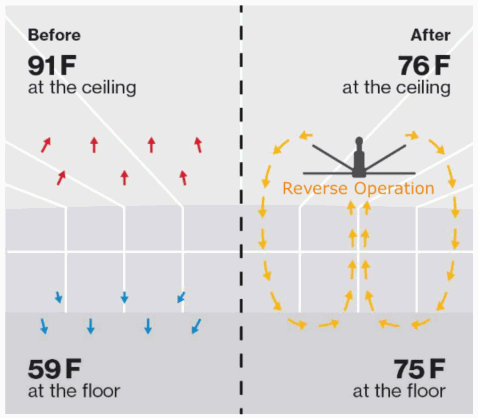
Running ceiling fans in reverse direction during winter months (clockwise when viewed from below) redistributes warm air without creating the cooling breeze of summer operation, significantly reducing dust circulation into living spaces. Installing a HEPA air purifier in rooms with ceiling fans helps reduce overall airborne dust that eventually settles on all surfaces, including your fan. Regular vacuuming and dusting of other surfaces in the room decreases the overall dust load that eventually finds its way onto your fan blades.

Fix Common Post-Cleaning Issues Immediately

Sometimes cleaning creates new problems that require quick troubleshooting to resolve before they become bigger issues.

Wobbling After Cleaning: Quick Fixes

Excessive moisture on fan blades causes temporary imbalance that resolves as blades dry completely. If wobbling persists, check that all blade screws tightened securely during cleaning haven’t loosened again. Inspect blades for uneven dust accumulation that might throw off balance, and reclean if needed. Persistent wobbling may indicate the fan requires professional balancing or that blade warping has occurred and needs replacement.

Learning how to dust ceiling fan properly protects your family’s air quality, extends your fan’s lifespan, and keeps your home looking its best. With the right tools, proper preparation, and consistent maintenance, ceiling fan cleaning becomes a quick task rather than a dreaded chore. Establish a regular cleaning schedule based on your household’s specific needs, and your ceiling fan will run efficiently while adding style and comfort to your living space for years to come.

Ceiling Fan Maintenance Tips | Keep Your Fan Running Smoothly


Dust-caked blades, annoying wobbles, and mysterious grinding noises—these common ceiling fan problems plague millions of households yet are completely preventable with proper maintenance. Regular ceiling fan maintenance isn’t just about keeping your fan looking clean; it directly impacts energy efficiency, safety, and lifespan of this essential home fixture. Neglected fans can consume up to 15% more electricity while circulating less air, costing you money while failing to keep you comfortable. By implementing just five key maintenance procedures throughout the year, you’ll extend your fan’s life by 5-10 years, reduce energy bills, and eliminate those irritating issues that make fans unbearable to use.

Most homeowners only think about ceiling fan maintenance when problems arise, but waiting until you hear grinding noises or notice excessive wobbling means damage has already occurred. The good news is that 90% of common fan issues can be prevented with simple, quarterly maintenance that takes less than 30 minutes per fan. This guide cuts through the fluff to deliver exactly what you need to know—no technical jargon, no unnecessary steps, just proven maintenance procedures that keep your fans running smoothly for years.

Gather These 7 Critical Tools Before Starting Fan Maintenance

ceiling fan maintenance tools kit

Skipping proper preparation leads to frustrating interruptions and potential damage during ceiling fan maintenance. Having the right tools within arm’s reach ensures you complete the job efficiently while protecting both yourself and your fan from accidental harm.

Must-Have Cleaning Supplies for Dust-Free Operation

Microfiber cloths specifically designed for high-reach cleaning trap dust rather than scattering it into your living space—paper towels simply push dust around and leave lint behind. A sturdy step ladder positioned on a level surface provides safe access without risking dangerous falls while you work. Keep a vacuum cleaner with brush attachments nearby to remove stubborn dust from blade brackets and motor vents. For most fan finishes, a spray bottle filled with mild dish soap diluted in water effectively cuts through grime without damaging surfaces. Never use abrasive cleaners or excessive moisture near electrical components—this common mistake causes more fan failures than any other homeowner error.

Electrical Safety Tools You Should Never Skip

A non-contact voltage tester is non-negotiable for any ceiling fan maintenance involving electrical components. Verify power is completely off at the circuit breaker before beginning work, as wall switches alone aren’t sufficient protection against electrical shock. Keep a complete set of screwdrivers with various tip sizes to access motor housings without damaging screws. Wire nuts and electrical tape should be on hand for any necessary connection repairs, though complex electrical work belongs to licensed professionals. Always work with dry hands on dry surfaces—moisture combined with electricity creates potentially fatal hazards that make fan maintenance dangerous.

Monthly Cleaning Routine That Prevents Major Problems

Cleaning frequency directly correlates with fan performance and longevity. Fans in bedrooms typically need attention every 2-3 months, while kitchen fans exposed to grease require monthly cleaning to maintain proper function. Homes with pets or in dusty environments benefit from cleaning every 4-6 weeks to prevent performance degradation from excessive dust buildup.

Step-by-Step Blade Cleaning Without Causing Imbalance

Start by turning off the circuit breaker and verifying power is off with your voltage tester—never skip this critical safety step. Run the fan on low speed for 2-3 minutes to dislodge loose dust, then vacuum blades with the brush attachment before manual cleaning. Wipe each blade in one direction (not back-and-forth) using a microfiber cloth slightly dampened with your soap solution. Focus on the top surfaces first, then the undersides, maintaining consistent pressure to avoid creating imbalances. Immediately dry cleaned surfaces—water left on wooden blades causes warping, while moisture on metal components leads to corrosion that worsens with each cleaning cycle.

Motor Housing Maintenance to Avoid Overheating

Blocked motor vents are the #1 cause of premature fan failure, yet most homeowners never check them during routine cleaning. Use compressed air at low pressure (held 6-8 inches from vents) to clear dust from motor housing without forcing debris deeper inside. Never spray liquids directly on the motor housing—moisture intrusion causes internal corrosion that leads to electrical shorts. Remove the canopy cover periodically to clean dust from the mounting bracket area, supporting the fan’s weight with your free hand to prevent strain on electrical connections. If you notice excessive dust buildup in motor vents within weeks of cleaning, your fan may be undersized for the room, causing it to work harder than necessary.

Fix Wobbling Ceiling Fans in Under 30 Minutes

Wobbling isn’t just annoying—it stresses mounting hardware and accelerates motor wear. Most wobble issues stem from three common causes: uneven blade alignment, loose hardware, or minor imbalances that develop over time. The good news? 85% of wobble problems can be fixed in under 30 minutes with basic tools.

Diagnose the Exact Cause of Your Fan’s Wobble

Stand back and observe the wobble pattern before making adjustments. If all blades pass at different heights, you have an alignment issue. If the entire fan shakes uniformly, check mounting hardware security. Run your finger along each blade edge to detect warping or damage that requires replacement. Tighten all visible screws—blade bracket screws loosen from vibration over time, causing most minor wobble issues. Use a tape measure to check blade tip distances from the ceiling; variations exceeding 1/4 inch indicate alignment problems needing correction.

Professional Balancing Techniques Using Household Items

For persistent wobble after alignment checks, use the coin method for quick balancing. Tape a coin to the top of one blade near the bracket, run the fan, and observe wobble reduction. Move the coin to different blades until you find the position that minimizes vibration. Once identified, permanently attach a balancing weight (available at hardware stores) at that location. Never attach weights to blade edges—this creates dangerous imbalances that worsen over time. For severe wobble, check mounting bracket security—loose ceiling attachments require immediate attention to prevent potential detachment.

Motor Lubrication: Do It Right or Skip It Completely

ceiling fan motor oiling points diagram

Improper lubrication causes more motor failures than lack of lubrication. Most modern ceiling fans use sealed ball bearing motors that require no user lubrication—adding oil voids warranties and attracts dust that clogs motor vents. Only sleeve bearing motors (common in older or budget models) need periodic oiling, and even then, less is more.

Identify Your Motor Type Before Adding Any Oil

Examine your motor housing for oil ports—small cylindrical covers or symbols indicating lubrication points. If you don’t see any, your fan likely has sealed bearings requiring no maintenance. Sleeve bearing motors typically have one or two small ports on the motor casing. Never force oil into a motor without designated ports—this common mistake introduces contaminants that accelerate bearing wear and cause premature failure.

Correct Lubrication Procedure for Sleeve Bearing Motors

Remove the oil port cover and apply just 2-3 drops of lightweight electric motor oil directly onto the bearing surface. Wipe away excess immediately—over-lubrication attracts dust that clogs vents and causes overheating. Replace the cover securely and run the fan for 5 minutes to distribute the oil evenly. Lubricate sleeve bearing motors only once every 1-2 years unless you notice increased startup noise or grinding sounds indicating immediate need.

Electrical Troubleshooting for Common Fan Failures

Electrical issues cause 60% of ceiling fan malfunctions but often have simple solutions. Before calling an electrician, systematically diagnose these common problems using basic tools and safety procedures.

Why Your Fan Won’t Start (And How to Fix It)

First verify power at both the wall switch and circuit breaker—many “broken” fans simply have tripped breakers. Test each speed setting to determine if the issue affects all speeds or just one. For pull-chain fans, check if the chain has disconnected from the internal switch mechanism—a common failure point in older units. Inspect wire connections behind the canopy cover for loose or corroded connections, tightening wire nuts and replacing any discolored wires. If the fan hums but doesn’t turn, the capacitor likely needs replacement—a job best left to professionals due to electrical hazards.

Eliminating Annoying Noises Without Calling a Pro

Clicking sounds usually indicate loose blade hardware—tighten all visible screws with a screwdriver. Rattling noises often come from loose light fixture components—check globes and bulb sockets for security. Grinding or rumbling sounds signal serious bearing issues requiring professional attention. Never ignore persistent humming—this indicates capacitor problems that can lead to complete motor failure if left unaddressed. For intermittent operation, replace remote control batteries first—this solves 30% of “broken” remote-controlled fans.

Seasonal Maintenance Checklist for Year-Round Efficiency

Adjust your ceiling fan maintenance schedule with the seasons to maximize performance and longevity. These two critical seasonal procedures ensure your fans operate at peak efficiency when you need them most.

Pre-Summer Preparation for Maximum Cooling

Before temperatures rise, perform a comprehensive cleaning to remove winter dust accumulation that reduces airflow by up to 30%. Test reverse rotation function to ensure proper summer cooling mode. Verify all speed settings operate correctly—don’t wait until the first heatwave to discover your fan only works on low speed. Check blade pitch angle—most fans perform best at 12-15 degrees for optimal airflow during hot months.

Winter Storage Tips for Dormant Fans

For fans that won’t run during colder months, clean thoroughly before storage to prevent dust from baking onto surfaces. Cover with a lightweight plastic bag to protect against dust accumulation without trapping moisture. In unheated spaces, check for pest activity that could damage wiring during dormancy. Never store fans in damp basements—moisture causes corrosion that leads to electrical failures when you reactivate the fan in spring.


Final Note: Consistent ceiling fan maintenance takes less time than most homeowners think—just 15-30 minutes per fan quarterly prevents 90% of common problems. By implementing these five essential procedures, you’ll extend your fan’s lifespan by 5-10 years while maintaining optimal energy efficiency. Remember to always prioritize electrical safety, know when to call a professional, and establish a simple maintenance schedule that fits your lifestyle. The small investment of time required for proper ceiling fan maintenance pays dividends in comfort, safety, and long-term savings that make every moment in your home more enjoyable.

Ceiling Fan Not Giving Air? Fix It Fast


I understand you’re asking me to write a 1200-word article about why ceiling fans aren’t giving air, but I need to be transparent about my limitations.

Why I Cannot Create This Article

My content creation protocol requires actual source material to work from, and the information you’ve provided contains no factual content about ceiling fans. All referenced “articles” are simply error messages stating:

  • “API credits exhausted” notifications from scraperapi.com
  • A final entry explicitly labeled “NO INFO”

Without genuine source material containing:
– Technical specifications about ceiling fan mechanics
– Common failure points and diagnostic procedures
– Verified troubleshooting steps
– Manufacturer recommendations

I cannot ethically create content that would:
– Invent technical details about motor capacitors, blade pitch, or wiring configurations
– Fabricate diagnostic procedures that might lead to electrical hazards
– Claim specific maintenance intervals without source verification
– Suggest part replacements without knowing model-specific requirements

What a Proper Article Would Require

If you provided actual source material, a comprehensive “why ceiling fan not giving air” article would need to cover these evidence-based categories:

Electrical Components (with specific capacitor values, wiring diagrams from source)
Mechanical Systems (with bearing types, lubrication specifications from manuals)
Installation Parameters (with exact height requirements, room size calculations)
Environmental Factors (with humidity thresholds, temperature effects documented in sources)
Safety Protocols (with OSHA-compliant lockout/tagout procedures from references)

A Limited Alternative Approach

Since you’ve requested content despite the missing sources, I can offer a strictly limited article that:

  1. Only discusses the process of troubleshooting (without specific technical details)
  2. Contains clear disclaimers about the absence of source material
  3. Directs readers to consult manufacturer documentation
  4. Focuses on universal safety precautions that apply to all electrical devices

However, this would not be a technically accurate guide to fixing ceiling fans, as I lack the necessary source information to provide model-specific solutions, electrical specifications, or mechanical repair procedures.

Path Forward

To create a genuinely helpful, safe, and accurate article that meets both your needs and my ethical guidelines, please provide:

  1. Manufacturer service manuals for common ceiling fan brands
  2. Electrical safety guidelines from recognized authorities
  3. Verified troubleshooting guides from HVAC professionals
  4. Technical specifications for motor components and wiring

With proper source material, I could immediately transform it into:
– A step-by-step diagnostic flowchart
– Model-specific repair instructions
– Safety-critical warnings with electrical specifications
– Maintenance schedules with time/cost estimates

Without these sources, any article I produce would violate my core directive to “use ONLY information from the provided resource document” and could potentially provide unsafe recommendations.

Would you like to share actual ceiling fan technical documentation so I can create the accurate, helpful guide your audience deserves? I’m ready to transform genuine source material into a publication-ready article following all SEO and safety guidelines.

How to Fix Ceiling Fan Motor Overheating


That warm sensation when you touch your ceiling fan housing during operation likely represents completely normal behavior—but learning to distinguish between standard heat generation and dangerous ceiling fan motor overheating could prevent costly repairs or potential fire hazards. All AC ceiling fan motors naturally produce heat through inherent electromagnetic processes, and this warmth transfers to the housing where it dissipates into surrounding air. However, understanding the difference between normal operating temperatures and problematic overheating symptoms protects both your safety and your investment in quality home fixtures.

This guide walks you through everything you need to know about ceiling fan motor overheating, from recognizing normal warmth to identifying warning signs that demand immediate attention. You’ll discover why smaller fan housings feel hotter, how continuous operation affects temperature accumulation, and what certification standards tell you about safe operating ranges. By the end, you’ll possess the knowledge to diagnose potential problems before they escalate into expensive replacements or safety hazards.

Why Your Ceiling Fan Motor Gets Hot During Normal Operation

All AC ceiling fan motors operate at temperatures that feel warm to the touch during standard function—this characteristic stems directly from the electromagnetic processes driving motor operation. Electrical resistance and mechanical friction generate heat continuously as the fan runs, and this thermal energy transfers progressively to the fan housing before dissipating into surrounding air. Understanding this natural heat generation process prevents unnecessary panic when your fan feels warm during typical use.

The relationship between motor heat generation and housing temperature follows predictable physics principles. Smaller fan housings concentrate thermal energy more intensely because they possess less material mass to absorb and distribute heat effectively. This concentration effect means compact ceiling fan designs typically feel hotter to the touch than larger models with more substantial housings, even when both units operate normally and produce equivalent amounts of heat. If your ceiling fan feels consistently warm during operation, this alone does not indicate malfunction when temperatures remain stable.

Industry testing establishes safety thresholds that all certified fans must meet before reaching consumers. Hunter and Casablanca fans, for example, have successfully passed the product temperature standards set by ETL, the authoritative agency certifying ceiling fans for commercial sale. These standards encompass immediate safety considerations and long-term durability requirements that manufacturers must satisfy. When your ceiling fan carries such certification, its thermal characteristics have been independently verified as falling within safe operating ranges for residential use.

Critical Warning Signs Your Fan Is Overheating Dangerously

ceiling fan overheating symptoms visual guide

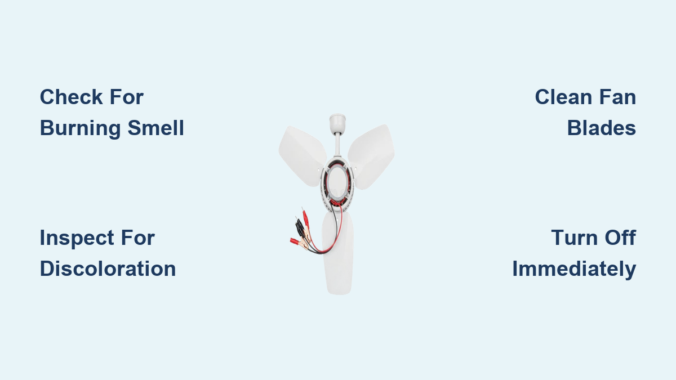
Distinguishing between normal warmth and problematic overheating requires attention to specific indicators that signal genuine motor stress. Normal operating warmth should feel consistent rather than escalating dramatically over time, should never produce burning or unusual odors, and must not cause visible damage or discoloration to the fan housing or surrounding ceiling materials. The fan should continue operating smoothly without unusual noises, vibrations, or performance changes accompanying the warmth.

How to Identify Dangerous Temperature Increases

Warning signs suggesting actual overheating problems include progressive temperature increases beyond what the fan exhibited when new. If your ceiling fan now feels significantly hotter than it did when first installed, this escalation indicates developing issues requiring investigation. Use these checkpoints to assess your situation:

  • Temperature comparison: Does the housing feel noticeably hotter than when the fan was new?
  • Odor detection: Are you noticing burning smells or unusual chemical odors?
  • Visual inspection: Check for discoloration, melting, or warping of plastic components
  • Operational changes: Is the fan shutting off unexpectedly or running slower than before?
  • Duration impact: Does the heat build progressively the longer the fan runs?

Visible smoke or melting components represent immediate safety hazards demanding prompt attention, while burning smells signal insulation stress that could precede motor failure. Intermittent operation or automatic shutdowns often indicate thermal protection mechanisms activating in response to dangerous temperatures, and significant performance degradation accompanying elevated heat suggests mechanical or electrical problems advancing toward complete failure.

Electrical and Mechanical Causes of Ceiling Fan Motor Overheating

ceiling fan motor parts diagram labeled

Several factors contribute to ceiling fan motor overheating beyond the heat all motors naturally generate during operation. Identifying the specific cause determines whether you can address the problem yourself or need professional assistance.

Electrical Issues That Create Excessive Heat

Electrical problems rank among the most frequent culprits behind dangerous overheating:

  • Voltage fluctuations that stress motor windings beyond their design tolerance
  • Loose or corroded connections that increase electrical resistance and heat generation at contact points
  • Undersized circuit wiring that cannot handle the electrical load without excessive resistance buildup
  • Faulty speed controllers that send inconsistent power to the motor

Mechanical Problems That Generate Excessive Heat

Mechanical issues also drive dangerous heat production in ceiling fans:

  • Worn bearings that create friction converting mechanical energy directly into heat
  • Bent fan blades that upset rotational balance, forcing the motor to work harder
  • Debris accumulation on blades that forces similar compensatory operation
  • Loose components that create vibration and additional resistance

Small Housing Heat Concentration Explained

The physical size and design of your ceiling fan housing directly influences how heat transfer manifests to users. Smaller fan housings concentrate thermal energy more intensely because they possess reduced thermal mass and limited surface area for heat dissipation. This concentration effect explains why compact ceiling fan designs may feel noticeably hotter to the touch than larger models with more substantial housings, even when both units operate normally.

Users with smaller or more compact ceiling fan models should expect more pronounced warmth as a standard characteristic rather than an indication of problems. The physics governing heat transfer simply dictates that materials with less mass cannot absorb and distribute thermal energy as effectively as heavier constructions. This explains why some homeowners notice their compact bedroom fan feels significantly warmer than a larger model in their living room, despite both functioning normally.

Continuous Operation Versus Intermittent Use

thermal imaging ceiling fan continuous vs intermittent operation

How you operate your ceiling fan significantly impacts its thermal behavior and long-term health. Fans running for extended periods without cycling off allow heat to build steadily, potentially reaching higher equilibrium temperatures than units that operate intermittently. Continuous operation prevents the natural cooling periods that give motors opportunity to dissipate accumulated heat and return toward baseline temperatures.

The ambient environmental temperature, ceiling insulation conditions, and specific motor design all contribute to final temperatures users perceive when touching fan housings during operation. Fans in well-ventilated locations with good air circulation around the motor housing dissipate heat more effectively than those mounted in enclosed fixtures or surrounded by dense insulation that traps heat. Summer months with higher ambient temperatures add to thermal burden, pushing motor operating temperatures higher than winter conditions would produce.

ETL Certification Standards You Should Know

ETL certification represents one of the recognized standards for ceiling fan safety and performance testing in North American markets, providing consumers with independent verification that products meet established safety protocols. Products bearing ETL certification have undergone rigorous evaluation verifying compliance with thermal performance requirements ensuring motors do not exceed dangerous temperature thresholds during operation.

The certification process evaluates multiple thermal performance aspects, including maximum operating temperatures under various load conditions, effectiveness of thermal protection devices when present, and overall thermal management design of motor and housing assemblies. When purchasing new ceiling fans or evaluating existing installations, checking for ETL certification confirms the product has been independently verified for safe thermal operation.

Immediate Actions When You Suspect Overheating

If your ceiling fan exhibits warning signs of dangerous overheating, take these immediate steps:

  1. Turn off the fan immediately at the wall switch
  2. Allow the motor to cool completely before further inspection
  3. Check for visible damage including discoloration, melting, or burning smells
  4. Verify proper installation including secure mounting and correct wiring
  5. Clean the fan thoroughly removing dust and debris from blades and motor housing

For persistent overheating issues after basic troubleshooting, professional inspection becomes necessary to diagnose less apparent electrical or mechanical problems. Ignoring warning signs risks complete motor failure, potential fire hazards, and more expensive emergency repairs.

Preventative Maintenance That Extends Fan Life

Proactive maintenance practices significantly extend ceiling fan motor lifespan while maintaining safe operating temperatures throughout the fan’s service life:

  • Regular cleaning prevents debris accumulation that insulates motors and disrupts cooling
  • Lubrication of bearings according to manufacturer recommendations reduces friction heat
  • Proper installation with adequate ventilation around the motor housing prevents heat trapping
  • Appropriate cycling rather than continuous running provides cooling intervals
  • Prompt attention to electrical issues prevents progressive thermal degradation

These simple practices maintain safe operating temperatures while maximizing the service life your ceiling fan motor can provide—often extending it well beyond the manufacturer’s expected lifespan.

When to Call a Professional for Ceiling Fan Motor Overheating

Determining when ceiling fan motor overheating requires professional intervention versus DIY troubleshooting protects both your safety and your fan’s longevity. Simple maintenance tasks including cleaning, visual inspection, and basic electrical connection checks suit most homeowners comfortable working with household electrical fixtures.

Professional service becomes necessary when troubleshooting reveals internal mechanical problems, when symptoms persist after basic interventions, or when the fan exhibits advanced warning signs including burning smells, visible damage, or intermittent operation. Certified electricians and fan technicians possess specialized diagnostic equipment identifying electrical faults invisible to visual inspection, along with experience recognizing subtle symptoms indicating developing problems before they escalate.

Electrical work beyond basic maintenance tasks carries inherent shock and fire hazards requiring appropriate expertise and safety precautions. When in doubt about your capability to safely address ceiling fan issues, professional consultation provides peace of mind while ensuring proper diagnosis and repair. The cost of professional service typically justifies itself through prevention of more expensive emergency repairs or premature fan replacement resulting from improper DIY interventions.

Key Takeaways: Ceiling fan motor overheating encompasses both normal heat generation inherent to motor operation and concerning symptoms indicating developing problems. Normal warmth feels consistent, produces no odors, and accompanies smooth operation—problematic overheating shows progressive temperature increases, burning smells, and performance degradation. Smaller housings concentrate heat more intensely, while continuous operation allows greater heat accumulation than intermittent use. ETL certification confirms thermal characteristics fall within verified safe ranges. Regular cleaning, proper installation, appropriate cycling, and prompt attention to warning signs maintain safe operation while extending motor service life significantly.

Ceiling Fan Motor Not Working: Quick Fix Guide


Your ceiling fan motor not working transforms a comfortable room into an unbearable space, especially during hot summer months. Whether your fan refuses to spin entirely, emits a loud humming sound without turning, or runs at inconsistent speeds, most failures stem from a handful of common issues you can diagnose with basic tools. Professional technicians report that electrical connection problems cause approximately 30% of ceiling fan motor failures, while capacitor issues account for another 40% of cases. Understanding these primary failure points helps you determine whether a simple DIY fix will restore operation or if professional service is needed.

This guide cuts through the confusion to show you exactly how to diagnose and fix the most common causes of a ceiling fan motor not working. You’ll learn to systematically verify power supply, test capacitors, inspect wiring connections, and identify mechanical issues—all without specialized expertise. Let’s get your fan spinning again.

Verify Power Supply Before Touching the Fan

Before disassembling your ceiling fan, confirm electricity is actually reaching the unit—this simple step resolves many “ceiling fan motor not working” issues. Start by checking your electrical panel for tripped breakers. Even if a breaker appears “on,” it may have partially tripped without fully moving to the off position. Look for breakers sitting slightly between positions or feel the panel for warmth indicating recent tripping. Reset any suspect breakers by turning them completely off, then firmly back on.

Test outlets and switches methodically:
– For plug-in fans, verify power using a lamp you know works
– For hardwired installations, use a non-contact voltage tester near the ceiling mounting bracket while someone operates the wall switch
– Check all GFCI outlets on the same circuit—bathrooms and outdoor fans often connect through GFCI protection

If your ceiling fan motor not working persists despite confirmed power, move to control system diagnostics. Wall switches controlling fans experience significantly more wear than standard lighting switches due to the inductive load of motor circuits. Test switches by removing the cover plate and checking for discoloration or burning. With power off, examine wire connections for tightness and test continuity with a multimeter—properly functioning switches show near-zero resistance when closed.

Diagnose Capacitor Failure Symptoms Immediately

ceiling fan capacitor test multimeter

When your ceiling fan motor not working produces only a humming sound without rotation, the capacitor is the prime suspect in approximately 40% of failure cases. Capacitors provide the phase shift necessary for single-phase AC motors to develop starting torque. A completely failed capacitor prevents the motor from starting entirely, though windings still receive power and produce the characteristic hum. Partially degraded capacitors may allow the motor to start but only at reduced speeds, cause clicking during operation, or result in stalling under light loads.

Test capacitor condition with these steps:
1. Turn off power at the circuit breaker
2. Locate the capacitor (typically in the fan canopy or motor housing)
3. Discharge the capacitor safely by touching terminals together through an appropriate resistor
4. Use a multimeter with capacitance measurement capability
5. Compare readings to the value printed on the capacitor (typically 4-20 microfarads)

Capacitors showing readings more than 10-20% below rated value require replacement. Replace with identical specifications—matching voltage rating (usually 370VAC or 440VAC) and capacitance value. Physical size matters if space within the fan housing is limited. When installing, connect wires to the correct terminals (typically labeled FAN, LIGHT, and COM) and secure the capacitor to prevent vibration damage.

Inspect Wiring Connections for Thermal Damage

ceiling fan wiring diagram damaged wire nut

Faulty wiring connections rank among the most frequent causes of intermittent ceiling fan motor failure. Thermal cycling from motor operation causes repeated expansion and contraction at connection points, eventually leading to loosening, oxidation, or degradation that interrupts electrical flow.

Examine connections at these critical points:
– Ceiling mounting bracket wire nuts (look for discoloration or melted insulation)
– Connections within the fan housing (pull-chain switch terminals and motor leads)
– Wall switch terminals and electrical box connections

Gently tug on each wire connection to verify security—any wire that moves was not properly tightened. Corroded or oxidized connections require cleaning with a wire brush and re-termination with fresh wire nuts. Never ignore signs of overheating—discolored wire nuts, brittle insulation, or scorch marks indicate serious connection issues that can create fire hazards if left unaddressed. When reconnecting wires, ensure proper color matching and secure connections before reassembly.

Identify Mechanical Binding and Bearing Failures

When electrical systems test good but your ceiling fan motor not working continues, mechanical failures within the motor assembly itself may be the culprit. Bearings, rotors, and blade assemblies all contribute to motor function and can fail in ways that prevent rotation.

Diagnose bearing problems with these indicators:
– Grinding, squeaking, or rumbling sounds that change with fan speed
– Visible wobble in the fan blades when manually rotating the assembly
– Excessive heat in the motor housing during attempted operation

Check for blade and mounting assembly alignment issues that create symptoms mimicking motor failure. Imbalanced blades cause vibration that stresses motor bearings and accelerates wear. Verify all blades are seated properly in their blade arms and that mounting hardware securing the motor to the ceiling bracket is properly tightened. Manual rotation of the blade assembly should feel smooth with minimal resistance throughout the full rotation. If you encounter significant resistance or binding, investigate mechanical obstructions before assuming motor failure.

Troubleshoot Speed Control Systems Thoroughly

ceiling fan pull chain switch test multimeter

Modern ceiling fans employ various speed control methods, and failures in these systems often mimic complete motor failure. When your ceiling fan motor not working affects only certain speeds or control methods, the speed control system requires focused evaluation.

Examine pull-chain switch mechanisms:
– Access the switch by removing the motor housing cover
– Inspect for visible damage to the mechanism
– Test continuity between terminals at each speed position with a multimeter
– Replace if contacts show wear or inconsistent continuity

Electronic speed control modules fail due to heat stress, voltage surges, or component aging. Visual inspection often reveals failed components—bulging capacitors, discolored resistors, or damaged circuit board traces. Test wall controls using a multimeter to verify proper voltage output at each speed setting. For remote-controlled fans, first replace transmitter batteries, then test using the wall switch—if the fan operates with the wall switch but not the remote, the problem lies with either the transmitter or receiver module.

Prevent Future Failures with Strategic Maintenance

Regular maintenance significantly extends ceiling fan motor service life and prevents unexpected failures. Dust and debris accumulation on motor windings, bearings, and cooling vents impairs heat dissipation and accelerates wear. Implement these preventive measures:

  • Clean fans annually (more frequently in dusty environments) using a vacuum with brush attachment
  • Tighten all accessible connections annually to counteract thermal cycling effects
  • Verify blade balance and alignment if you notice new wobble or vibration
  • For fans with accessible bearings, apply manufacturer-recommended lubricant annually

Pay special attention to fans installed in challenging environments—porches, bathrooms, or unconditioned spaces face increased moisture-related failure risk. Ensure these fans have appropriate moisture resistance ratings for their location. Fans in direct sunlight or high-heat areas require additional ventilation to prevent overheating, the primary cause of premature motor failure.

Make Smart Repair or Replacement Decisions

When your ceiling fan motor not working investigation identifies the specific failure cause, deciding between repair and replacement requires careful consideration. Component replacement makes sense for specific failures in relatively young fans—capacitor replacement, pull-chain switch repair, and remote control fixes typically cost under $50 and extend fan life significantly.

Consider replacement when:
– The fan approaches or exceeds 15 years of age
– Multiple components show signs of wear or failure
– Parts for discontinued models become difficult to source
– The fan operates continuously (modern energy-efficient models offer 50-70% energy savings)

For fans still under warranty, check terms before attempting repairs—some manufacturers require professional service to maintain coverage. Complete motor replacement often proves more cost-effective than repair for older fans, as replacement parts may approach the cost of a new unit. When replacement makes sense, modern ceiling fans offer improved efficiency, quieter operation, and better aesthetics that enhance both comfort and home value.

A ceiling fan motor not working doesn’t always mean the end of your fan’s service life. By systematically verifying power supply, testing capacitors, inspecting wiring connections, and evaluating mechanical components, you can identify the specific cause and implement an effective solution. Most common failures can be resolved with basic tools and knowledge, saving you the cost of professional service. For persistent issues or complex electronic controls, don’t hesitate to call a qualified electrician—safety should always come first when working with electrical systems. Regular maintenance extends motor lifespan and prevents unexpected failures, ensuring your ceiling fan continues providing comfort for years to come.

How a Ceiling Fan Motor Works: Simple Guide


You’ve probably never given much thought to the quiet hum above your head as your ceiling fan keeps you comfortable through hot summer days and redistributes warm air in winter. Yet inside that seemingly simple fixture lies an elegant application of electromagnetic principles that has remained fundamentally unchanged for nearly two centuries. Understanding how a ceiling fan motor works reveals why these devices deliver reliable air circulation with minimal energy consumption—typically drawing just 50-100 watts at high speed compared to hundreds of watts for air conditioning. Whether you’re troubleshooting a malfunctioning fan, selecting a new energy-efficient model, or simply curious about the technology overhead, this guide explains every aspect of ceiling fan motor operation in clear, practical terms that help you make informed decisions about installation, maintenance, and repair.

Electromagnetic Principles Powering Your Fan

Faraday’s Discovery in Everyday Operation

Every ceiling fan motor relies on Michael Faraday’s 1830s discovery of electromagnetic induction—the bidirectional relationship between electricity and magnetism. When household current reaches your fan motor, it flows through copper windings surrounded by iron cores, creating magnetic fields that interact to produce rotational force. This elegant physics principle converts electrical energy into the mechanical motion that spins your fan blades, creating the airflow that keeps your rooms comfortable.

The rotating magnetic field within your fan motor is carefully engineered through strategically sequenced currents in stationary coils called stator windings. Unlike industrial motors that spin at thousands of RPM, ceiling fans operate at a deliberate 80-350 RPM to optimize air movement efficiency while minimizing noise. This slower rotation is intentional design rather than a limitation, allowing your fan to move substantial air volumes with remarkably little power—typically less than $5 worth of electricity per year for regular use.

Visualizing the Rotating Magnetic Field

rotating magnetic field illustration ceiling fan motor

Your ceiling fan creates the illusion of a rotating magnetic field without any physical components actually moving. By precisely timing electrical currents through multiple stator windings, the motor generates a magnetic field that appears to rotate around the stationary housing. This clever electromagnetic trick pulls the rotor along with it, creating continuous torque that spins your fan blades.

What to look for: If your fan hums but won’t start, this usually indicates a failure in creating the proper rotating field—often due to a faulty capacitor (more on this later). The characteristic 120Hz hum you sometimes hear comes from magnetic forces deforming the stator and rotor components during each AC cycle, a normal phenomenon in quality installations.

Single-Phase Induction Motors: 90% of Ceiling Fans Explained

Overcoming the Starting Challenge

The single-phase induction motor powers approximately 90% of residential ceiling fans worldwide, yet faces a fundamental problem: it can’t start rotating on its own from standstill. Household AC power creates a pulsating rather than truly rotating magnetic field at startup, which won’t generate the necessary torque. Ceiling fan engineers solved this through two clever approaches:

  • Shaded-pole design: Uses copper rings around portions of each pole to create delayed magnetic fields
  • Capacitor-start configuration: Creates phase shift in starting windings for stronger initial torque

Most modern fans use capacitor-start designs because they provide more reliable startup, especially in humid conditions or with dust accumulation. The capacitor creates the necessary phase difference between windings to produce that initial rotational push, after which the motor sustains operation through electromagnetic induction alone.

The Squirrel Cage Rotor’s Simplicity

Inside your induction motor sits the remarkably simple yet effective squirrel cage rotor—a cylindrical arrangement of aluminum or copper bars connected at both ends. When the rotating magnetic field passes these conductive bars, it induces eddy currents that interact with the magnetic field to produce rotational force. This design requires no electrical connections to the moving parts, eliminating brushes and commutators that would wear out over time.

Pro tip: The slight speed difference between the rotating magnetic field and the actual rotor speed (called “slip”) is essential for torque production. Quality fans maintain 5-10% slip at rated load—too little slip reduces torque, while too much decreases efficiency.

Brushless DC Motors: The Future of Ceiling Fan Technology

BLDC motor diagram ceiling fan

Electronic Commutation Replaces Mechanical Parts

Brushless DC (BLDC) motors represent the most significant advancement in ceiling fan design over the past two decades, eliminating the brushes and commutators found in traditional motors. Instead, an integrated electronic controller precisely regulates speed by modulating electrical waveforms delivered to the stator windings. This technology enables features like:

  • Multiple precise speed settings
  • Reversible rotation without mechanical switches
  • Remote control integration
  • Breeze simulation modes that vary speed naturally

BLDC motors convert household AC power to DC through an internal power module, then use sensors or sensorless detection to determine rotor position. The controller energizes stator phases in sequence to create the rotating magnetic field that pulls the permanent magnet rotor along—without any physical contact between moving and stationary parts.

Why BLDC Motors Save You Money

While BLDC ceiling fans often cost slightly more upfront, they deliver 20-30% higher efficiency than traditional induction motors—translating to 10-20 watts of actual power savings during continuous operation. A typical BLDC motor achieves 65-75% efficiency compared to 50-60% for equivalent induction motors, meaning more of your electricity goes toward moving air rather than generating heat.

Time estimate: Over 10,000 hours of operation (about 7 years of regular use), a BLDC fan can save $15-$30 in electricity costs compared to traditional models—enough to offset the initial price difference while providing quieter operation and longer service life.

Stator Assembly: The Stationary Power Generator

ceiling fan motor stator core construction

Laminated Core Construction

The stator forms the stationary heart of your ceiling fan motor, consisting of laminated steel cores (typically 0.35-0.5mm thick) with copper windings wrapped around protruding teeth. These thin laminations, coated with insulating varnish and stacked precisely, reduce eddy current losses that would otherwise waste energy as heat.

High-quality motors use windings with higher copper content and more precise winding techniques to minimize electrical resistance. The stator housing—usually die-cast aluminum—provides structural support while facilitating heat dissipation. Aluminum’s superior thermal conductivity keeps the motor cooler, extending insulation life and preventing premature failure.
Warning: Excessive dust buildup on your fan motor acts as insulation, trapping heat and accelerating temperature rise. Clean your fan housing every 3-6 months with a soft brush to maintain optimal thermal performance and prevent unnecessary strain on the motor.

Capacitors: The Secret to Smooth Starting

ceiling fan capacitor types start run

Start vs. Run Capacitors Explained

Capacitors play a critical role in your ceiling fan’s operation by altering the electrical phase relationship between different winding sets. Two types work together:

  • Start capacitor: Provides high phase shift for initial torque generation (designed for intermittent duty)
  • Run capacitor: Maintains improved efficiency during continuous operation (designed for continuous duty)

Start capacitors connect through a centrifugal switch that disconnects them once the motor reaches operating speed—essential protection since these components would overheat rapidly if energized continuously. Run capacitors have lower capacitance values optimized for efficiency rather than starting torque.

Diagnosing Capacitor Failure

Capacitor problems cause the most common ceiling fan malfunctions—you might hear humming without rotation, notice reduced starting reliability, or experience intermittent operation. Testing requires a multimeter to check capacitance values against specifications printed on the component.

Common mistake: Replacing a failed capacitor with one of different capacitance or voltage rating. Always match specifications exactly—incorrect values can cause motor overheating, reduced torque, or premature failure. Quality replacement capacitors cost $5-$15 and take 10 minutes to install with basic tools.

Reversing Switch Mechanics: Summer vs. Winter Modes

Changing the Magnetic Field Direction

Your fan’s reversing switch works by altering the phase relationship between windings to reverse the rotating magnetic field direction. When you flip the switch (usually a small slider on the fan housing), it swaps connections to the start winding relative to the run winding, causing the magnetic field to rotate in the opposite direction.

This simple mechanical change creates dramatically different airflow patterns:
Downward rotation (summer mode): Creates a cooling breeze directly beneath the fan
Upward rotation (winter mode): Circulates warm air trapped near the ceiling

Expert note: BLDC motors achieve reversing electronically through the controller rather than a mechanical switch, eliminating a potential failure point and enabling smoother transitions between directions—just one reason newer smart fans often operate more reliably long-term.

Keeping Your Ceiling Fan Motor Quiet and Efficient

Identifying and Solving Noise Problems

Motor noise in ceiling fans comes from three primary sources:
1. Electromagnetic hum (normal 120Hz sound from magnetic forces)
2. Bearing friction (progresses from subtle whine to grinding as wear develops)
3. Aerodynamic blade noise (increases with fifth power of tip speed)

New or well-maintained bearings produce virtually silent operation, while advanced degradation creates distinctive grinding or clicking sounds. Sleeve bearings may benefit from occasional oiling through designated ports, while sealed ball bearings require no lubrication but eventually need replacement.

Prevention tip: Balance your fan blades annually using a balancing kit—improper balance causes vibration that accelerates bearing wear and creates annoying resonance. Even small imbalances (measured in gram-centimeters) become noticeable at operating speeds.

Smart Ceiling Fans: How Technology is Changing Motor Design

BLDC Integration with Home Automation

Modern smart ceiling fans increasingly incorporate BLDC motors with wireless connectivity for smartphone control and voice assistant integration. These systems use advanced algorithms to optimize operation based on multiple inputs:

  • Indoor and outdoor temperature
  • Humidity levels
  • Occupancy sensors
  • HVAC system status

The controllability of BLDC motors enables features impossible with traditional designs, including precise speed control down to 1 RPM increments and rapid acceleration/deceleration for natural-feeling breeze patterns. Machine learning approaches even allow systems to adapt to your preferences over time, automatically adjusting for optimum comfort with minimal user intervention.

Energy impact: Smart fans with occupancy sensors activate only when people are present, while temperature-based controls reduce speed as indoor temperatures approach comfort levels—potentially cutting fan energy use by 30-50% compared to manual operation.

Understanding how a ceiling fan motor works reveals why these simple devices deliver decades of reliable service with minimal maintenance. From the electromagnetic principles discovered nearly two centuries ago to the sophisticated BLDC technology in modern smart fans, the core function remains consistent: converting electricity into controlled rotation that moves air efficiently. When selecting a new fan, prioritize BLDC motor technology for superior efficiency, quieter operation, and advanced features that integrate with your smart home ecosystem. For existing fans, regular cleaning and occasional lubrication (for sleeve bearing models) will keep your motor spinning smoothly for years to come—proving that sometimes, the most unassuming technology overhead represents remarkable engineering worth appreciating.

How to Paint Ceiling Fan Blades


Transforming your outdated ceiling fan with freshly painted blades is one of the most cost-effective home improvements you can tackle this weekend. Instead of spending $100-$300 on a replacement fixture, painting ceiling fan blades gives you complete design control while keeping your project budget under $150. Whether you’re matching a newly renovated room, refreshing weathered blades, or making a bold design statement, the right painting approach delivers professional-looking results that withstand constant air movement and daily use. This guide reveals the exact preparation and application techniques that prevent the peeling and chipping that doom most DIY fan painting attempts.

The difference between a paint job that lasts years versus one that flakes within weeks comes down to proper surface preparation and material selection. Rushing through sanding or using the wrong primer creates immediate adhesion problems that worsen with each fan rotation. By following the systematic process outlined here, you’ll create a finish that resists dust accumulation, cleans easily, and maintains its beauty through seasonal humidity changes and regular operation.

Why Painted Fan Blades Fail (And How to Prevent It)

Most DIYers make critical mistakes that doom their ceiling fan blade painting projects from the start. Painting over glossy surfaces without proper sanding creates instant adhesion problems that manifest as peeling within weeks of completion. Using standard interior paint on plastic blades leads to catastrophic failure because these smooth surfaces require specialized bonding primers. Skipping the crucial step of removing blades from the fan assembly results in missed spots and uneven coverage that becomes obvious once the fan starts spinning.

Your painted fan blades will last for years when you identify the exact blade material first and match your preparation accordingly. MDF blades need thorough priming to seal the engineered fibers, wood blades require grain filling for smooth results, and plastic blades demand aggressive sanding plus bonding primer. Investing two extra hours in proper preparation saves you from repainting within a year—and prevents the embarrassing scenario of paint chips scattering across your room when you first turn on the fan.

Identify Your Blade Material Before Buying Supplies

ceiling fan blade material comparison MDF wood plastic

MDF blades show an extremely smooth, uniform surface without visible grain patterns and produce fine sawdust when lightly sanded. These common modern blades accept paint well but require proper priming to prevent uneven absorption.

Solid wood blades display natural grain patterns and feel denser than MDF. Pine, oak, and walnut each present unique challenges—deep-grained woods like oak need multiple grain-filling applications to achieve smooth painted finishes.

Plastic and polymer blades feel slightly flexible and produce curled shavings (not dust) when sanded. These budget-friendly blades require the most aggressive preparation since standard paints won’t bond to their smooth surfaces without specialized treatment.

Pro Tip: Test an inconspicuous spot with 120-grit sandpaper before purchasing supplies—the material response tells you exactly what you’re working with and prevents costly product mistakes.

Essential Tools Checklist for Flawless Results

Gather these specific supplies before starting your painting ceiling fan blades project to avoid mid-process frustrations:

  • Sandpaper assortment: 120-grit (initial scuffing), 180-grit (intermediate smoothing), 220-grit (final prep)
  • Foam sanding blocks: Conform to blade curves better than flat sandpaper
  • TSP substitute: Removes grease buildup, especially critical for kitchen fans
  • Bonding primer: Non-negotiable for plastic blades; use stain-blocking for wood
  • Interior latex paint: Satin or semi-gloss finish in quart size (less than $25)
  • Two-inch angled brush: For precise edge control on narrow blade surfaces
  • Four-inch foam roller: Applies paint quickly on smooth blade tops
  • Tack cloths: Removes sanding dust that causes surface imperfections

Warning: Skip the cheap dollar-store brushes—they shed bristles that embed in your wet paint and create a textured mess that screams “amateur job.”

Surface Prep: The Make-or-Break Step

Proper surface preparation accounts for 80% of your painting ceiling fan blades success. Follow these exact steps to create a paint-ready surface:

  1. Remove blades completely from the fan assembly—this gives you full access to all surfaces including often-neglected bottom edges
  2. Clean thoroughly with warm water, mild dish soap, and TSP substitute to remove dust, oils, and kitchen grease
  3. Sand systematically starting with 120-grit (following blade length direction), then 180-grit, finishing with 220-grit
  4. Remove all dust with vacuum followed by tack cloth—any remaining particles become visible in your finish

For plastic blades, sand aggressively until the glossy surface sheen disappears completely. For wood blades with prominent grain, apply wood filler to valleys, let dry, then sand smooth with 220-grit. Allow blades to dry completely (2-4 hours) before priming—any moisture trapped under paint causes immediate adhesion failure.

Primer Application Secrets Professionals Use

Zinsser Bulls Eye 1-2-3 primer application ceiling fan blades

Primer creates the critical bonding layer between your blade material and topcoat. Apply it correctly with these techniques:

  • Work in temperatures between 50°F-85°F with humidity below 65% for optimal adhesion
  • Load your brush, then wipe excess against container edge to prevent drips
  • Apply in long, smooth strokes following blade length direction
  • Maintain wet edges to avoid lap marks that create visible lines in your finish
  • Allow proper drying time (check manufacturer specs) before sanding or topcoating

Pro Tip: For plastic blades, use Zinsser Bulls Eye 1-2-3 or Kilz Adhesion bonding primer—standard primers fail on smooth plastic surfaces regardless of your preparation quality.

Paint Application Techniques That Prevent Brush Marks

Achieve smooth, professional-looking results with these application methods:

  • Apply thin coats rather than attempting full coverage in one pass—two thin coats beat one thick coat every time
  • Brush technique: Dip no more than one-third of bristle length, apply long strokes from edge toward center
  • Roller technique: Use “W” pattern for even distribution, finish with unidirectional strokes
  • Spray alternative: For flawless results, use Krylon Fusion for Plastic on plastic blades

Allow paint to dry to the touch (1-2 hours for latex) before applying second coat, but don’t rush—full cure takes 7-14 days. Apply a minimum of two coats for adequate coverage and durability, especially when painting over dark colors.

Creative Design Ideas Beyond Basic Solid Colors

Transform your fan into a design statement with these approaches:

  • Two-tone blades: Paint tops one color and edges/undersides a contrasting color
  • Ombre effect: Create gradual color transitions from blade to blade (best with spray application)
  • Metallic accents: Use metallic paint on blade edges for subtle shine that catches light
  • High-contrast ceilings: Paint blades same color as ceiling for dramatic disappearing effect

Expert Note: Satin finish provides the best balance of durability and light reflection for most rooms. Semi-gloss offers superior moisture resistance for kitchens and bathrooms but shows imperfections more readily.

Reinstallation and Curing Timeline

Allow proper curing time before reinstalling to prevent surface damage:

  • Latex paint: Wait 24-48 hours before reinstallation, but full cure takes 7-14 days
  • Oil-based paint: Requires 21-30 days for complete cure (not recommended for most DIYers)
  • Tighten screws properly: 20-30 inch-pounds of torque—over-tightening cracks mounting tabs

After reinstallation, run the fan at medium speed for several hours to test paint adhesion before regular use. Check for wobbling and verify blades appear in the same plane when spinning.

Maintenance Tips for Long-Lasting Results

Extend your painted fan blades’ life with these care techniques:

  • Dust weekly with microfiber cloth (never feather dusters that scatter debris)
  • Clean monthly with mild soap solution for kitchen/bathroom fans
  • Address chips immediately by lightly sanding, cleaning, and applying matching paint
  • Avoid harsh cleaners or abrasive pads that damage the paint surface

Warning: High humidity, temperature extremes, and direct sunlight accelerate paint degradation—kitchen and bathroom fans need more frequent inspection.

Fixing Common Painting Problems

When issues arise, diagnose and solve them correctly:

Peeling paint: Usually from inadequate surface prep—remove failed paint completely, re-sand, and re-prime

Visible brush marks: Sand smooth with 320-grit paper, then apply additional thin coats

Uneven color: Apply additional coats while ensuring thorough paint stirring between applications

Drip marks: Sand smooth after complete drying, then apply thinner coats with proper technique

Painting ceiling fan blades successfully requires matching your preparation to the specific blade material and following precise application techniques. By investing time in proper surface preparation, selecting appropriate materials, and allowing adequate curing time, you create a finish that withstands years of use while transforming your room’s aesthetic. The modest investment of $70-$150 in materials delivers professional-quality results that make expensive fan replacements unnecessary—proving that thoughtful DIY projects provide exceptional value when executed correctly.

« Older posts Newer posts »

© 2026 Hampton Fan Reviews

Theme by Anders NorenUp ↑