A non-functioning Casablanca ceiling fan can disrupt comfort in your entire room, especially during extreme weather when you need reliable air circulation the most. Whether your fan refuses to start entirely, makes unusual sounds during operation, or intermittently stops working, understanding the root cause helps you determine whether a simple DIY fix resolves the issue or professional assistance becomes necessary. This guide walks through common problems, diagnostic steps, and appropriate solutions for restoring your fan’s performance.
Before diving into specific troubleshooting procedures, gather your fan’s model number and note the exact symptoms you’ve observed. Having this information ready streamlines the diagnostic process and proves invaluable if you need to contact Casablanca support at 1.888.227.2178 for personalized assistance. The manufacturer’s technical team operates Monday through Friday, 8AM to 5PM CST, and can provide guidance tailored to your specific fan model when basic troubleshooting proves insufficient.
Power Supply Issues Preventing Fan Operation
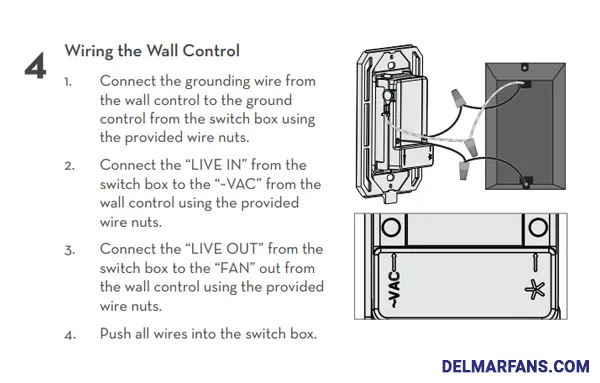
When your Casablanca ceiling fan not working situation appears suddenly, electrical supply problems should be your first investigation point. Many homeowners mistakenly assume motor failure when the problem actually stems from basic power interruptions that require minimal intervention.
Begin by checking your home’s electrical panel for tripped circuit breakers or blown fuses. Casablanca fans often share circuits with other lighting fixtures, so verify the specific breaker serving your fan location hasn’t tripped. If you find a tripped breaker, reset it fully to the “off” position before switching it back “on.” For homes with fuse boxes, replace any visibly damaged fuses with matching amperage units. After restoring power, wait 30 seconds before attempting to operate your fan to allow electrical systems to stabilize.
Next, test the wall switch controlling your fan by toggling it multiple times while listening for any audible response from the fan. If your Casablanca model includes separate controls for fan speed and light, ensure both switches are in the “on” position. Some models require the pull chain to be in the “on” position for remote operation to function properly, so verify this simple oversight hasn’t caused your casablanca ceiling fan not working dilemma.
How to Verify Electrical Connections at the Fan
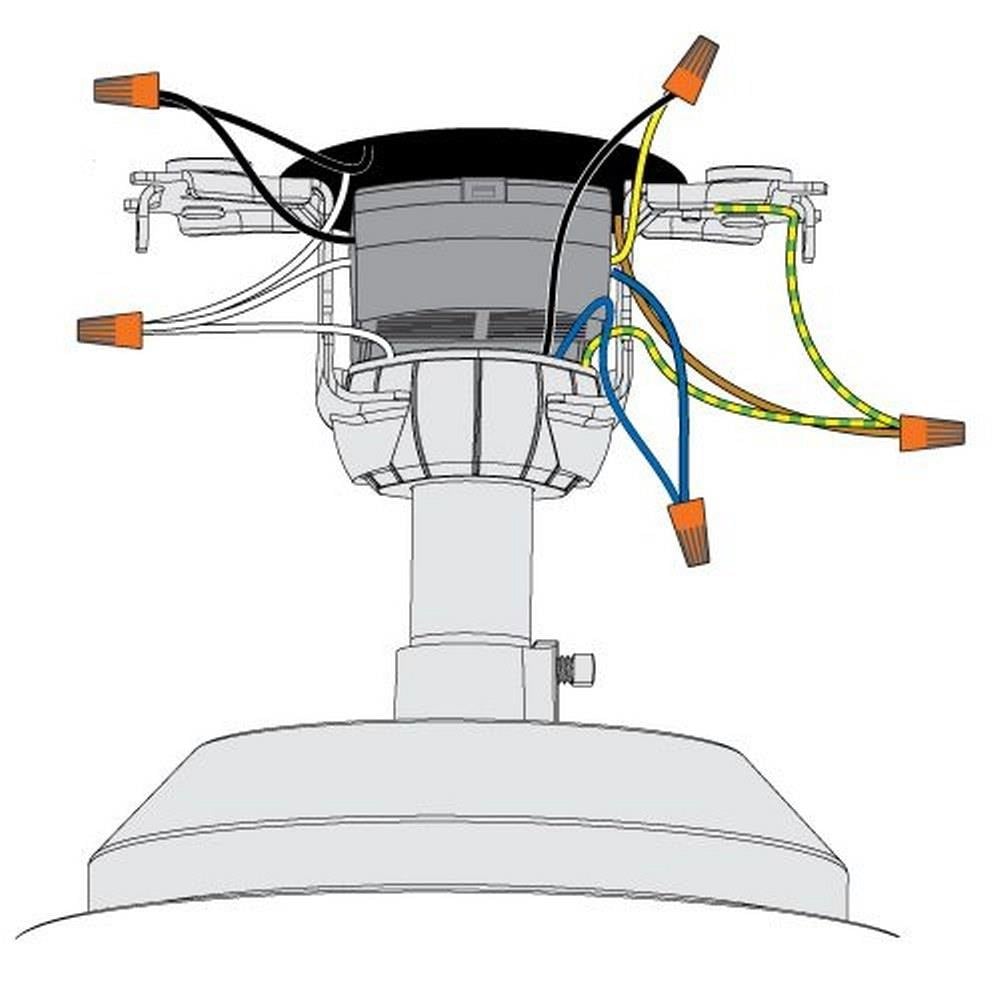
For fans that remain unresponsive after checking the circuit breaker and wall switch, examine the wiring connections at the fan itself. Turn off power at the circuit breaker before proceeding:
- Remove the fan’s canopy cover to access the electrical connections
- Check that all wire nuts are securely fastened and wires aren’t frayed
- Confirm the black (hot), white (neutral), and green/bare (ground) wires are properly connected
- Look for signs of arcing, burning, or melting on wire connections
Loose connections often develop over time due to fan vibration. Tighten any loose wire nuts while ensuring no bare copper is exposed beyond the connector. If you notice damaged wires or signs of electrical burning, contact a licensed electrician immediately rather than attempting further DIY repairs.
Remote Control Failures Causing Fan Malfunction
Remote control issues account for a significant percentage of casablanca ceiling fan not working scenarios. Before assuming motor failure, systematically diagnose your remote control system with these specific steps.
Start by replacing the remote batteries with fresh alkaline units, ensuring correct polarity during installation. Many homeowners overlook that battery contacts can become corroded over time, preventing proper electrical connection even with new batteries. Clean battery contacts with a cotton swab dipped in white vinegar, then dry thoroughly before inserting new batteries.
Testing Remote Signal Transmission
Verify your remote is transmitting signals properly by using your smartphone camera:
- Point the remote directly at your smartphone camera
- Press any button on the remote while watching the camera screen
- If the remote is functioning, you’ll see a faint purple or white light emitted from the remote’s LED through your camera screen
If no light appears, the remote itself has failed and requires replacement. Casablanca offers replacement remotes through their official channels – contact 1.888.227.2178 with your model number to ensure compatibility.
Resetting the Remote Receiver Unit
When your Casablanca ceiling fan not working affects only remote operation while wall switch control functions normally, reset the receiver unit:
- Turn off power to the fan at the circuit breaker for 30 seconds
- Restore power and immediately press and hold the “light” and “fan” buttons on the remote simultaneously for 10 seconds
- Listen for a single beep from the fan indicating successful reset
- Test all remote functions
This reset procedure clears any temporary communication errors between the remote and receiver without affecting your fan’s operational settings.
Diagnosing Motor and Capacitor Problems

When power supply and remote control issues have been eliminated, motor and capacitor problems become the likely culprits for your casablanca ceiling fan not working situation. These components require more technical diagnosis but often present characteristic symptoms.
Identifying Capacitor Failure Symptoms
The capacitor plays a critical role in starting your fan motor. When it fails, you’ll typically notice:
- A humming sound without blade movement
- Inability to reach higher speeds
- Intermittent operation that worsens over time
- Complete failure to start after periods of inactivity
Capacitors naturally degrade over time, especially in environments with high humidity or temperature fluctuations. Casablanca fans typically use oil-filled capacitors rated for 10,000-20,000 hours of operation. If your fan is more than 5-7 years old, capacitor replacement should be your first consideration for resolving casablanca ceiling fan not working issues.
Testing for Motor Winding Problems
Motor winding failures produce symptoms nearly identical to capacitor problems but require complete motor replacement rather than a simple component swap. To distinguish between these issues:
- Listen carefully to the humming sound – capacitor failures produce a steady hum while winding problems often create a buzzing or sputtering noise
- Try manually spinning the blades while the fan is powered on (use a broom handle for safety)
- If the fan starts and runs when manually spun, the capacitor is likely faulty
- If the fan still won’t run after manual spinning, motor winding failure is probable
Important: Never attempt to manually spin fan blades with your hands while the fan is powered – use a non-conductive object like a wooden broom handle to avoid serious injury.
Light Kit Troubleshooting Procedures
When your casablanca ceiling fan not working affects only the light kit while the fan motor operates normally, follow these specific diagnostic steps before replacing components.
Begin by testing with multiple known-working bulbs of the correct wattage and type. LED bulbs sometimes cause compatibility issues with older Casablanca fan models, so try a standard incandescent bulb if you’ve been using LEDs. Examine bulb sockets for darkened or corroded contacts that prevent proper electrical connection – clean with electrical contact cleaner and a small brush if necessary.
Checking Light Kit Wiring Connections
If bulb replacement doesn’t solve the issue, inspect wiring connections specific to the light kit:
- Turn off power at the circuit breaker
- Remove the light kit assembly to access wiring connections
- Check that the blue wire (light kit hot) is securely connected
- Verify connections at the pull chain switch if your model includes one
- Look for loose connections at the light kit terminal block
Many Casablanca models feature a separate switch housing for the light kit. If the pull chain feels loose or doesn’t click when operated, the internal switch mechanism has likely failed and requires replacement.
When to Contact Casablanca Support
Certain casablanca ceiling fan not working situations require professional intervention. Contact Casablanca support at 1.888.227.2178 when:
- You notice burning smells or visible damage to wiring
- The fan wobbles excessively even after blade balancing
- Motor housing becomes unusually hot during operation
- You’re uncomfortable working with electrical components
Pro Tip: Before calling, prepare these details to accelerate troubleshooting:
– Your fan’s model number (typically found on a label inside the canopy)
– Exact symptoms and when they occur
– Any error codes displayed (on newer models)
– Steps you’ve already attempted
The manufacturer’s support team can often diagnose issues more efficiently when provided with specific operational details rather than general “fan not working” descriptions.
Preventive Maintenance to Avoid Future Failures
Implement these maintenance practices to minimize future casablanca ceiling fan not working incidents:
Clean fan blades and motor housing every 3-4 months using a microfiber cloth slightly dampened with water. Dust accumulation creates imbalance that stresses motor bearings. For fans in high-dust environments, increase cleaning frequency to monthly.
Check mounting hardware tightness twice yearly. Use a ladder to gently push on the fan housing in different directions – any movement beyond 1/8 inch indicates loose mounting that requires attention. Tighten all visible screws, including those connecting blades to brackets.
Schedule professional inspections every 3-5 years, especially for fans operating continuously or in challenging environments. Professional technicians can identify developing bearing wear and capacitor degradation before they cause complete failure.
When facing a casablanca ceiling fan not working situation, systematic troubleshooting starting with the simplest potential causes often resolves the issue without professional help. Always verify power supply first, then test remote control functionality before investigating motor or capacitor problems. Remember that Casablanca support at 1.888.227.2178 provides expert guidance Monday through Friday, 8AM to 5PM CST, but having your model number and specific symptoms prepared significantly accelerates the assistance process. Implement regular maintenance to keep your fan operating smoothly for years to come, and don’t hesitate to contact a licensed electrician when electrical work exceeds your comfort level. Proper diagnosis and timely intervention transform what seems like a major malfunction into a quick, straightforward repair that restores your home’s comfort immediately.
Leave a Reply