Your Ultimate Guide to Cooling: In-Depth Reviews, Smart Comparisons & Pro Care Tips.

Category: Tips (Page 15 of 18)

How to Install Ceiling Fan in Open Beam Ceiling


Mounting a ceiling fan directly to an exposed beam transforms your space with both functional airflow and architectural appeal, but requires specific techniques that differ from standard drywall ceiling installations. Unlike conventional mounting between joists, beam-mounted fans must attach directly to structural members while maintaining electrical code compliance and achieving a polished appearance. This guide delivers precise, actionable steps for securing your fan safely and professionally to any exposed beam ceiling.

The critical difference in open beam installations is that you can’t hide mounting hardware or electrical boxes behind drywall—everything must be structurally sound and visually integrated with your architectural design. Whether your beams are fully exposed timber or drywall-covered structural elements, improper installation risks fan vibration, electrical hazards, or even detachment over time. By following these specific beam-mounting procedures, you’ll ensure a secure installation that operates quietly for years while enhancing your space’s aesthetic.

Before grabbing tools, gather essential equipment: fan-rated electrical box, structural wood screws (not drywall screws), voltage tester, wire strippers, drill with appropriate bits, level, and conduit if needed for surface wiring. Allocate 2-4 hours for this project depending on your experience level. Now let’s address the most critical component first—the electrical box that anchors your entire installation.

Select Proper Fan-Rated Electrical Box for Beam Mounting
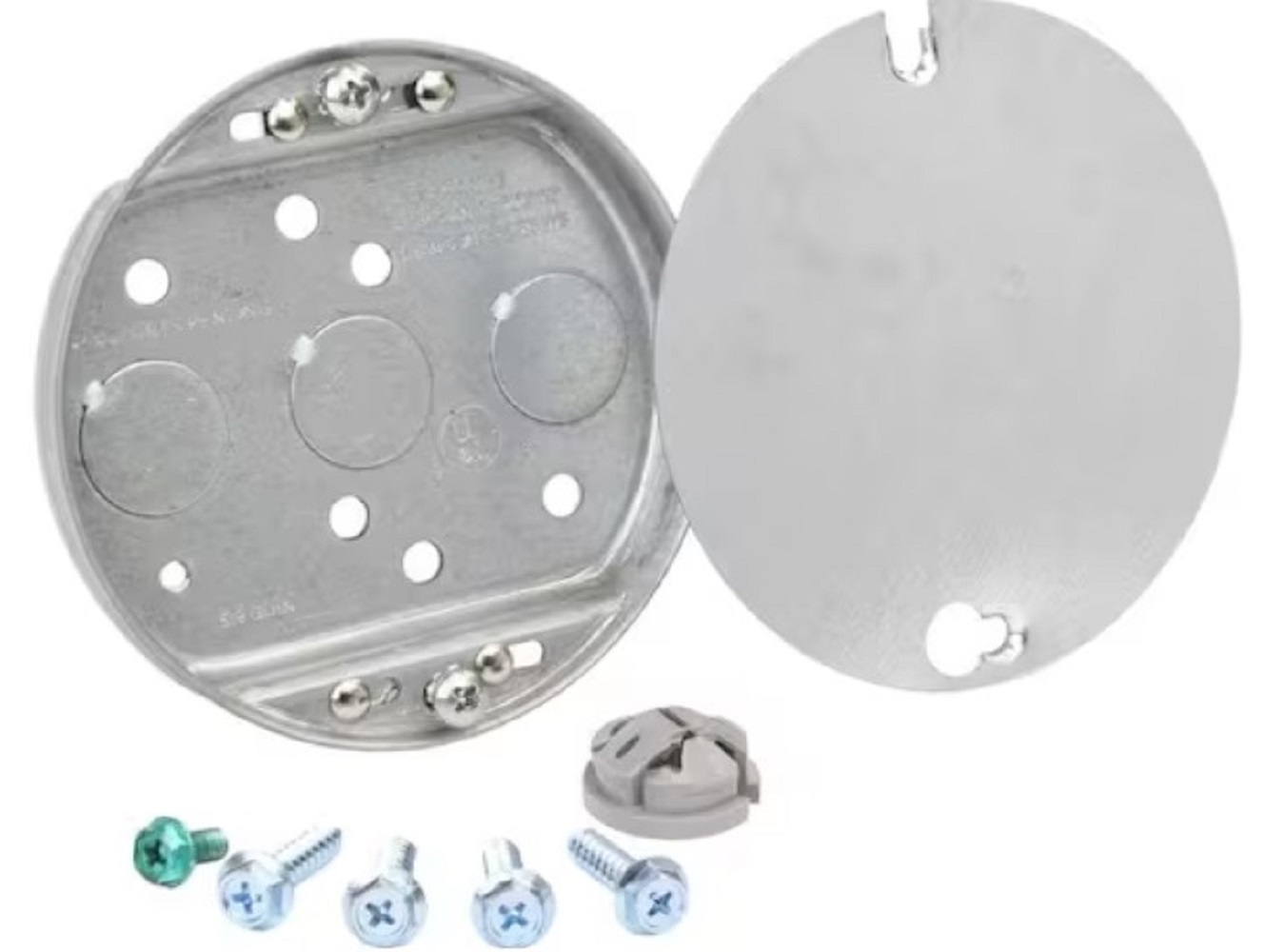
Commercial Electric CMB50 fan rated electrical box

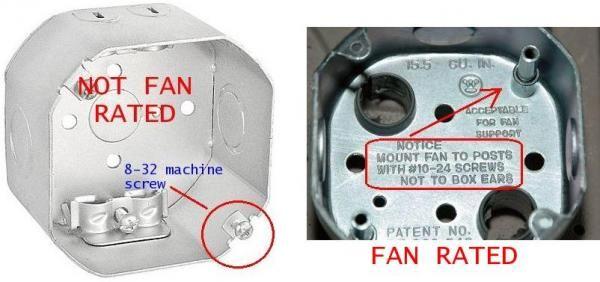
Never use standard electrical boxes for ceiling fans on exposed beams—these lack the reinforcement needed to handle vibration and dynamic forces. The National Electrical Code (NEC 314.27) mandates that ceiling fan support boxes must be specifically listed and marked for this purpose. Standard boxes may crack or detach during operation, creating dangerous situations.

For direct beam mounting, choose one of these two approaches:

  • Pancake-style boxes like the Commercial Electric CMB50 with 1/2-inch depth and 5.9 cubic inch capacity work best when you want minimal visual impact. These shallow boxes mount flush to the beam surface and support fans up to 70 pounds—covering virtually all residential models.

  • Blocking method if you need positioning flexibility: Attach a 2×4 to the beam surface first, then secure your fan-rated box to this blocking. This distributes stress across a wider area and helps position the fan optimally in your room layout.

When your beam has drywall covering, use surface raceway systems like Wiremold with integrated fan box fittings. These maintain code compliance while creating a professional appearance along the beam surface. For fully exposed beams without drywall, direct mounting is simpler since conduit spacing requirements differ for visible structural wood.

Confirm Beam Can Support Ceiling Fan Weight
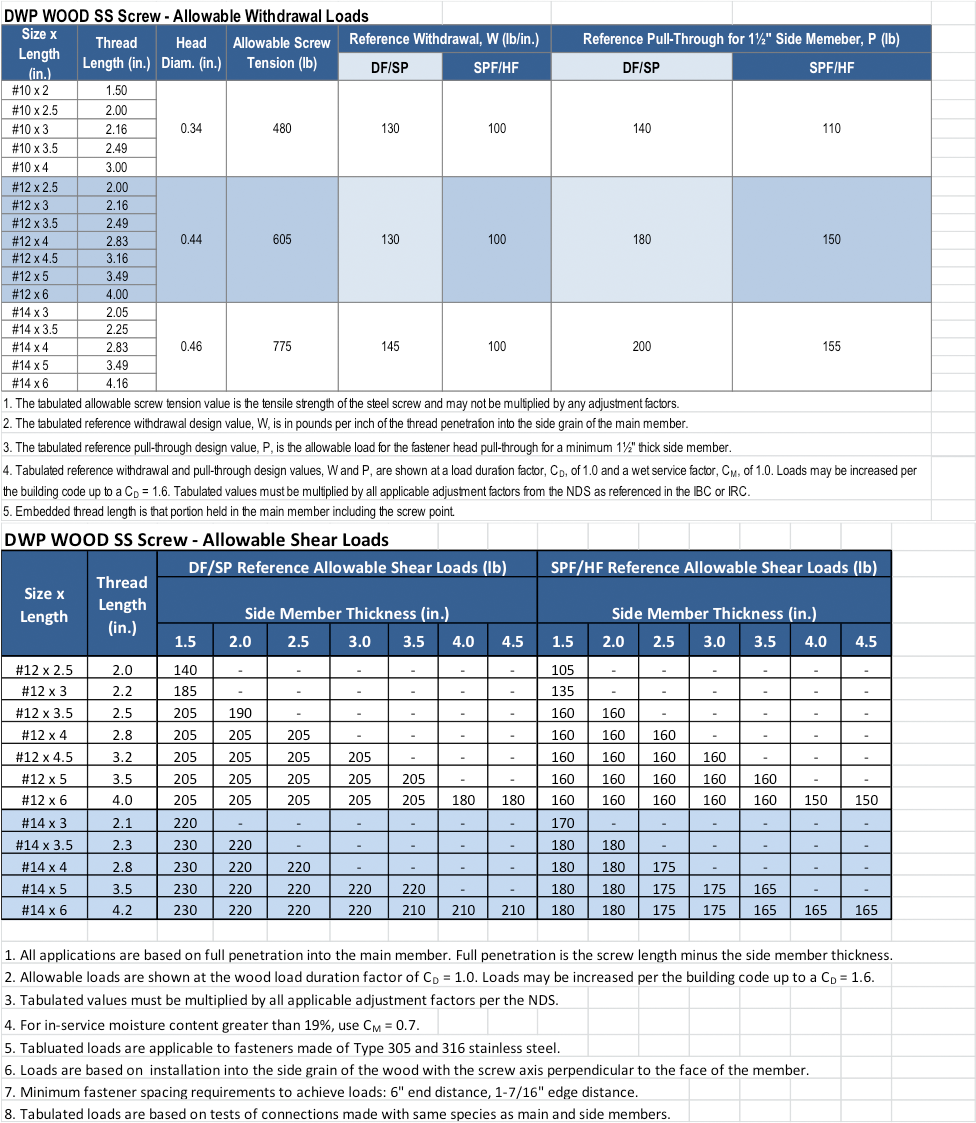
structural wood screw load capacity chart

Your wooden beam must securely hold both static weight (15-50 pounds for most fans) and dynamic forces generated during operation. A simple verification test prevents dangerous assumptions: Apply gradual downward pressure on the mounting location with your full body weight. If the beam holds without cracking or excessive flex, it will safely support your ceiling fan.

The NEC provides two compliant support pathways:
– Using a manufacturer-listed fan-rated box (preferred method)
– Mounting to structural framing proven capable of supporting the fan

For maximum security, especially with heavier fans or outdoor installations:
– Use structural wood screws with at least 1.5 inches of thread engagement
– Consider bolt-through mounting with fender washers and nylon locknuts
– Add wood blocking behind primary mounting points for critical installations

Outdoor applications like gazebos require additional precautions—use treated lumber for structural backing (with cut ends treated), and select electrical components rated for outdoor/wet locations. Never use indoor-rated hardware in exposed environments where moisture and temperature cycling accelerate deterioration.

Make Secure Electrical Connections on Beam Surface

Wiring for beam-mounted fans follows standard practices but requires special attention to surface routing. Most open beam installations have existing wiring bundles running along ceiling surfaces—these must be properly secured and terminated within your fan-rated box.

Follow these critical wiring steps:
1. Turn off power at the circuit breaker and verify with a voltage tester
2. Run wiring through appropriate box knockouts using surface conduit if extending circuits
3. Make all connections inside the box with approved wire nuts—not loose in ceiling cavities
4. Verify box fill capacity: 5.9 cubic inch boxes handle two or three Romex cables for standard fan installations

When extending circuits along beams, surface-mounted raceway systems provide code-compliant solutions that maintain aesthetic appeal. Wiremold and similar products offer fittings designed specifically for fan box connections, eliminating the need to cut into structural members.

Mount Fan Directly to Beam Surface Correctly

Position your fan to maintain proper clearance—blades should sit 7-9 feet above the floor for optimal air circulation. For 12-foot ceilings, a 10-foot downrod typically provides ideal height while ensuring adequate blade clearance from the floor.

Execute these mounting steps precisely:
– Install the fan-rated box directly to solid beam wood using structural screws
– Ensure the box is perfectly level before final tightening
– Connect all wiring according to manufacturer diagrams inside the box
– Attach the mounting bracket, verifying secure engagement with the box
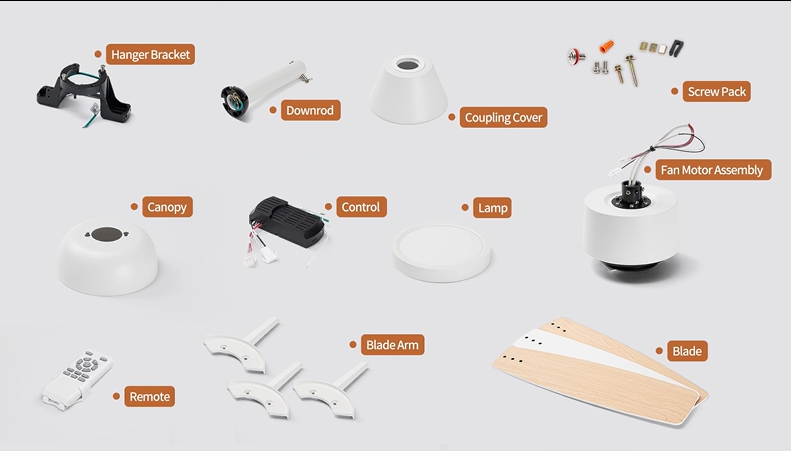
– Install the fan motor assembly, downrod, and blades following torque specifications

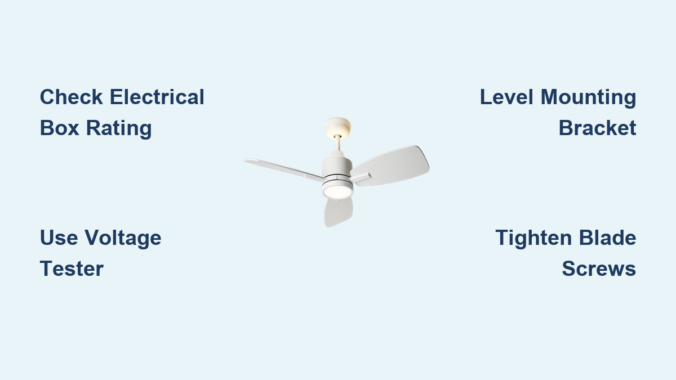
Critical tip: Never skip the leveling step—this creates uneven blade rotation that causes vibration and premature wear. Use a small level on both the electrical box and fan mounting plate before proceeding.

Eliminate Vibration Through Proper Balancing

ceiling fan blade balancing kit instructions

Vibration is the enemy of beam-mounted fans since there’s no drywall to dampen movement. Most wobble issues stem from blade imbalance rather than mounting problems. Most fans include balancing kits—use these during installation to prevent future headaches.

Troubleshoot vibration immediately after installation:
1. Run fan at all speed settings and observe operation
2. If vibration occurs, turn off fan and wait for complete stop
3. Check all blade screws for tightness (loose screws are the #1 cause)
4. Verify blades aren’t bent or damaged
5. Apply balancing weights as needed per manufacturer instructions

Annual maintenance prevents vibration from developing over time. Simply tighten all blade screws and mounting connections once per year—vibration gradually loosens hardware during normal operation.

Adapt Installation for Vaulted Ceilings and Outdoor Spaces

Sloped beam ceilings require specialized mounting hardware. Use fans specifically designed for vaulted ceilings with angled mounting assemblies that keep the fan level with your room while attaching to the sloped beam.

For outdoor installations like covered patios:
– Select fans rated for damp or wet locations
– Use outdoor-rated electrical boxes with weatherproof gaskets
– Treat all cut wood ends with appropriate sealant
– Ensure all hardware is corrosion-resistant

Retrofitting fans where only light fixtures existed requires box replacement. If your existing electrical box isn’t fan-rated, replace it before fan installation—don’t risk mounting to inadequate support.

Perform Essential Maintenance for Lasting Performance

Your beam-mounted fan requires minimal but critical maintenance:
Monthly: Clean dust from blades (dust accumulation causes imbalance)
Annually: Tighten all mounting screws and blade hardware
As needed: Rebalance blades if vibration develops

When problems arise, systematically troubleshoot:
– Electrical issues? Check wire connections first—loose connections create fire hazards
– Excessive wobble? Verify blade screw tightness before suspecting motor issues
– Intermittent operation? Test wall switch connections and circuit breaker

The visual nature of beam-mounted fans means aesthetics matter as much as function. Ensure your canopy fully covers the electrical box—some designs assume recessed mounting and may not fit properly on surface-mounted boxes. If needed, select deeper canopy designs during fan purchase.

Properly installed beam-mounted ceiling fans deliver years of reliable service while enhancing your architectural space. By using fan-rated boxes, verifying structural support, making secure electrical connections, and performing simple maintenance, you’ll enjoy both functional airflow and visual appeal without safety concerns. When in doubt about structural capacity or electrical requirements, consult a qualified electrician—your safety is worth the investment for a professional assessment.
Hire a Handyman to Install Ceiling Fan 2026


That wobbly ceiling fan you’ve been ignoring isn’t just annoying—it’s potentially dangerous. When your existing fan stops working or you decide to upgrade your lighting to energy-efficient airflow, hiring a qualified handyman to install ceiling fan systems transforms what seems like a simple DIY project into a safe, code-compliant home improvement that adds value rather than risk. The average ceiling fan weighs between 15 and 35 pounds, creating dynamic forces during operation that standard light fixture boxes simply cannot support. Professional installation ensures your fan mounts securely to structural elements rather than drywall alone, preventing the terrifying scenario of a fan detaching from your ceiling months or years after installation.

Electrical safety represents another critical reason to hire a professional. Improper wiring connections can create fire hazards that develop slowly over time, while incorrect grounding puts your household at risk of electrical shock. A qualified handyman to install ceiling fan systems brings the specialized knowledge of local electrical codes, proper box ratings, and wiring techniques that protect your home and family. Beyond safety, professional installation delivers superior performance through precise blade balancing and alignment—eliminating the annoying wobble and noise that plague 78% of DIY ceiling fan installations according to home service industry data.

Why Hiring a Handyman to Install Ceiling Fan Beats DIY Every Time

Professional ceiling fan installation delivers advantages that extend well beyond simply having a functioning fan in your ceiling. Code compliance represents perhaps the most significant benefit, as professional installers understand local building requirements and ensure all connections, mounting hardware, and electrical components meet or exceed applicable standards. This compliance matters during future home inspections, property sales, or insurance assessments, where non-compliant installations can create complications or even liability issues.

How Professional Installation Prevents Costly Mistakes

The durability difference between professional and amateur installation proves substantial over time. When ceiling fans are installed correctly the first time, they require far less ongoing maintenance and demonstrate significantly lower failure rates throughout their operational life. Proper mounting eliminates the wobbling and rattling that plague improperly installed fans, while correct wiring connections prevent electrical issues that could lead to motor damage or safety hazards.

What You’re Really Paying For in Professional Installation

Aesthetically, professional installation produces noticeably superior results through proper positioning and alignment. Skilled installers understand how fan placement affects both functionality and room appearance, ensuring the fan sits perfectly level, operates quietly, and complements your room’s design. This attention to detail distinguishes professional work from hurried DIY attempts that may function adequately but lack the refined appearance that characterizes quality installation.

3 Ceiling Fan Installation Scenarios That Require a Handyman

ceiling fan installation scenarios diagram

Different installation scenarios present varying levels of complexity, and understanding where your project falls helps set appropriate expectations for cost, timeline, and professional requirements.

Replacing an Existing Fan: More Complex Than You Think

Replacing an existing ceiling fan represents the most straightforward installation scenario, yet even this seemingly simple task presents potential complications. Mismatched mounting hardware between old and new fans can create unexpected challenges during installation, requiring adjustments or additional components to achieve secure mounting. Incompatible wiring configurations may also emerge when swapping fans, particularly if the new fan includes features like integrated lighting or remote control capabilities that weren’t present in the original installation.

Upgrading Light Fixtures to Ceiling Fans: The Box Rating Danger

ceiling fan electrical box reinforcement

Converting an existing light fixture to a ceiling fan involves significantly more complexity than direct fan replacement. Standard light fixtures typically lack the electrical box reinforcement necessary to support the weight and operational stress of ceiling fans. Light fixture boxes are designed for static loads that rarely exceed a few pounds, while ceiling fans involve both static weight and dynamic forces from blade rotation and motor operation. Professional upgrade services include electrical box assessment and replacement when necessary, ensuring safe, reliable fan operation.

New Installations Without Existing Wiring: When Electricians Become Essential

Installing a ceiling fan in a location without existing fan infrastructure represents the most complex installation scenario. This type of project typically requires running new electrical cable through walls or ceilings, potentially cutting into drywall for cable routing, and installing appropriate mounting infrastructure. Building codes generally require that electrical work involving new circuit installation be performed by licensed professionals, making this scenario one where professional installation isn’t just convenient but practically essential for safety and compliance.

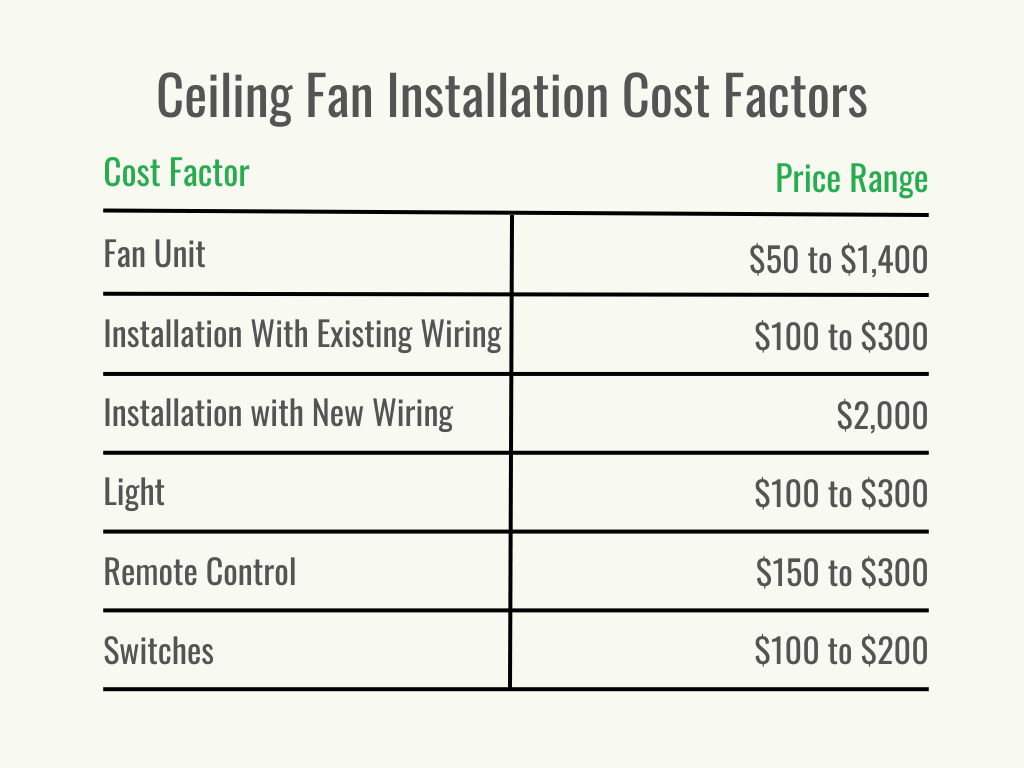
How Much Does a Handyman Charge to Install Ceiling Fan? (2023 Pricing Guide)

ceiling fan installation cost breakdown chart

Professional ceiling fan installation costs vary substantially based on project complexity, geographic location, and service provider expertise. Average installation costs hover around $250, with typical ranges extending from $85 for simple replacement scenarios to $605 or more for complex installations involving new wiring or challenging mounting conditions.

Cost Breakdown by Installation Complexity

Simple fan replacement in locations with existing fan-rated electrical boxes represents the most economical installation scenario. These projects typically require one to two hours of labor and minimal materials, with pricing at the lower end of the typical range. The efficiency achievable in straightforward replacement scenarios makes professional installation surprisingly affordable for homeowners who might otherwise attempt DIY installation to save costs.

When Costs Skyrocket: Special Considerations

Fan type and features significantly impact installation costs. Standard ceiling fans typically fall within the most cost-effective range, with installation costs between $50 and $300 depending on complexity. Complex fans featuring rotational designs, dual motors, or premium materials command higher installation fees, typically ranging from $200 to $1,500, due to increased installation complexity and time requirements.

5 Must-Ask Questions Before Hiring a Handyman to Install Ceiling Fan

Selecting the appropriate service provider requires careful evaluation of qualifications, experience, and customer feedback. Licensed handyman services have been providing ceiling fan installation and repair services for decades, developing expertise that enables efficient, quality installations across diverse scenarios.

Essential Questions to Screen Potential Installers

When evaluating potential installers, prioritize those who demonstrate comprehensive understanding of electrical systems, familiarity with various fan types and mounting configurations, and commitment to code-compliant installation practices. Experience matters significantly, as installers who have encountered diverse scenarios develop problem-solving capabilities that prove valuable when unexpected challenges arise during installation.

Red Flags That Signal Unqualified Installers

Red flags warranting caution include significantly below-market pricing that may indicate inexperienced installers or corner-cutting practices, inability or unwillingness to provide proof of licensing and insurance, and absence of verifiable customer references. Professional service providers typically maintain proper licensing as required by their service jurisdictions, carry liability insurance protecting both themselves and homeowners, and can provide references demonstrating their track record.

4 Ceiling Fan Installation Situations Where DIY Becomes Dangerous

Certain scenarios demand professional installation regardless of homeowner electrical experience or confidence. Installing fans in locations without existing wiring requires electrical work that should only be performed by licensed professionals familiar with local codes and permit requirements.

When High Ceilings Require Professional Equipment

High ceiling installations, sloped ceiling mounting, and situations involving structural uncertainties all favor professional installation. These scenarios present safety risks from elevated work heights and potential complexity that professionals are better equipped to handle. The cost of professional installation in these scenarios represents a worthwhile investment in safety, quality, and peace of mind that outweighs the risks and potential expenses of amateur installation attempts.

Electrical Safety Steps You Should Never Skip

Electrical work inherently carries safety risks that must be respected regardless of installation approach. Power must be disconnected at the circuit breaker before beginning any electrical work, and voltage testers should verify power absence before touching wires. These basic safety practices prevent electrical shock and should be non-negotiable elements of any installation approach.

What to Do the Night Before Your Handyman Installs Ceiling Fan

Professional installation begins with thorough preparation that ensures efficient service delivery and optimal results. Before your scheduled installation, clear the work area of furniture and décor that might impede access to the ceiling fan location.

Essential Pre-Installation Checklist

Verify that someone over 18 will be present to provide access and approve the completed work. This person should have authority to make decisions if unexpected issues arise during installation, such as discovering inadequate electrical infrastructure requiring box replacement or encountering wiring complications that weren’t apparent from initial assessment. Having the fan and all its components on-site, preferably in unopened packaging, ensures installers have immediate access to everything needed for installation.
3 Simple Maintenance Tasks to Extend Your Ceiling Fan’s Life

Properly installed ceiling fans require minimal ongoing maintenance, though periodic attention extends operational life and maintains performance quality. Blade cleaning removes dust accumulation that can affect balance and appearance, with monthly dusting during regular cleaning routines typically sufficient for most households.

When to Call for Professional Service

Periodic checking of mounting hardware ensures continued secure attachment, as vibration from operation can gradually loosen fasteners over time, though professional installation minimizes this issue through proper techniques. Even well-installed fans may eventually require repair or component replacement. Common issues include motor wear, bearing failure, switch mechanism degradation, and balance problems from accumulated dust or minor component shifts.

Final Checklist: Is a Handyman to Install Ceiling Fan Worth It for You?

Choosing a qualified handyman to install ceiling fan systems represents a smart investment in your home’s safety, functionality, and aesthetic appeal. Professional installation ensures code compliance, maximizes durability, and delivers superior aesthetic results compared to DIY attempts.

When selecting installation providers, prioritize experience, proper licensing, insurance coverage, and positive customer feedback. Request detailed quotes that outline all costs before work begins, and don’t hesitate to ask questions about the installation process, expected timeline, and warranty coverage. For straightforward replacement scenarios where existing electrical infrastructure meets requirements, experienced DIYers with electrical background knowledge may successfully handle installation. However, when installations involve new wiring, electrical box upgrades, high ceilings, or sloped mounting surfaces, professional installation becomes the clearly appropriate choice. The safety risks and potential complications of amateur electrical work simply aren’t worth the cost savings when professional services are readily available at reasonable rates.

Fix Ceiling Fan Remote Problems: Quick Solutions


Nothing ruins your comfort like reaching for your ceiling fan remote only to discover it’s completely unresponsive. One moment you’re adjusting the breeze from your couch, and the next you’re stuck with a fan that won’t respond to your commands. These ceiling fan remote problems affect millions of homeowners who rely on convenient wireless control, creating frustration when simple temperature adjustments become impossible. Whether your remote stopped working suddenly or has been deteriorating over time, understanding the root causes and proper troubleshooting steps will get your fan responding again without unnecessary expense.

Most ceiling fan remote problems can be resolved without professional help if you approach them systematically. From dead batteries to receiver failures and signal interference, the solutions range from simple fixes you can complete in minutes to more involved component replacements. This guide covers every common remote failure scenario with specific, actionable steps for popular remote systems including M2 and M3 configurations. Let’s diagnose and fix your ceiling fan remote problems for good.

Remote Completely Fails to Respond

When your ceiling fan remote does absolutely nothing—no lights, no fan movement, no indication it’s communicating—you’re dealing with complete failure. This differs from partial malfunctions where some buttons work while others don’t, and typically points to power issues, communication breakdowns, or internal component failure.

Replace Batteries and Verify Installation

Before assuming your remote has failed, test with fresh batteries installed with correct polarity. Even batteries that appear functional may have degraded enough to provide inadequate power. Remove existing batteries, check them with a battery tester or simply replace them as a baseline diagnostic step. If your remote has a status indicator light that normally illuminates when buttons are pressed, verify that this light comes on with new batteries. A completely dark remote despite fresh batteries suggests internal circuit failure rather than simple power depletion.

Match M2 Dip Switch Settings Exactly

ceiling fan M2 dip switch settings diagram

Many ceiling fan remotes operate on specific frequencies that must align with the receiver’s configuration. The M2 remote system uses dip switches both in the remote’s battery compartment and on the receiver inside the fan canopy. These switches must match exactly—any mismatch prevents communication. Accessing the receiver dip switches requires turning off power at the circuit breaker, then removing the canopy cover. Verify both sets of switches have identical positions (all up, all down, or mixed pattern), as even one switch out of alignment will prevent communication.

Clean Degraded Button Contacts

When only certain buttons fail rather than complete remote inoperability, degraded contact points on the membrane button assembly are often to blame. Over time, the conductive coating wears away or becomes contaminated with oils and debris. Carefully disassemble the remote housing to access the circuit board inside. Clean the membrane contacts using isopropyl alcohol, and for tarnished contacts, gently use a pencil eraser to restore conductivity without damaging circuit traces. Reassemble completely and test all button functions.

Perform Correct Power Cycle Reset

A power cycle reset clears temporary programming errors between remote and receiver. Turn off power to the fan at the circuit breaker, wait exactly 10 seconds, then restore power. After this cycle, attempt to re-sync the remote. For Patriot Lighting Atilla fans sold through Menards, follow this specific procedure: turn off power at the wall switch, restore power, and within 10 seconds press and hold the Fan Off button for exactly 3 seconds. The fan’s light will flash to confirm success. Critical note: Online instructions incorrectly suggest waiting 10 seconds before pressing the button—this timing error prevents the reset from working.

Fix Intermittent Remote Response

Intermittent remote response creates particular frustration because the remote sometimes works and sometimes doesn’t. This inconsistent behavior indicates signal transmission problems, often from radio frequency interference from other household devices.

Change M2 Dip Switch Combinations

The Fantasia M2 remote system relies on dip switches for communication channels. When interference develops from wireless doorbells, garage openers, or Wi-Fi routers, changing to a different channel often resolves the problem. Access both the dip switches in the remote’s battery compartment and the receiver in the fan’s canopy. With 16 possible combinations available, try changing both to match a new configuration. If interference persists, systematically test additional combinations until you find one that provides reliable operation throughout your room.

Reset M3 Learning Function Properly

The Fantasia M3 remote system uses a learning function rather than fixed dip switches. To reset channel interference issues: turn power to the fan off and back on, then press and hold the off button for 20 seconds or until the light completes 4 flashes. After this factory reset, re-code to a new channel by turning power off and back on again, then pressing and holding the off button for 5 seconds or until the light completes 2 flashes. This establishes a fresh communication channel that avoids previous interference sources.

Test Effective Signal Range

If your remote works only when standing close to the fan but fails at normal distances, weak signal strength is likely the culprit. Test from various positions throughout the room to characterize the problem. Weak signals may result from aging components in either the remote or receiver. Warning: If the remote works reliably only within 3 feet of the fan, the receiver likely needs replacement as normal operation should work from anywhere in the room.

Resolve Fan Speed Control Issues

When your ceiling fan remote controls some functions but not speed properly, synchronization between remote commands and the fan’s internal systems has broken down. This appears as the fan not starting, running only at slow speeds, or failing to access all speed settings.

Re-synchronize Remote with Pull Cords

Many ceiling fans feature both remote control and manual pull cord operation, and synchronization issues can develop between these methods. First, switch power off and back on. Next, press the high speed button on the remote. Then, pull the fan speed pull cord one, two, or three times until the fan achieves genuine high speed. After synchronizing, verify that three different speeds respond correctly through the remote. Once complete, operate exclusively through the remote and leave the pull cord alone.

Perform Direct Wiring Diagnostic Test

ceiling fan direct wiring diagram receiver bypass

When synchronization fails, a direct wiring test determines whether the problem lies with the receiver. Temporarily bypass the receiver by connecting the fan’s live wires (typically brown and orange) directly to household power, with the neutral wire (blue) connected to household neutral. The earth connection remains as normal. If the fan operates correctly with all three speeds on pull cords, the receiver was the problem. If issues persist after removing the receiver, the problem lies elsewhere in the fan’s electrical system.

Address Remote Switch-Off Failure Immediately

A particularly concerning malfunction occurs when the remote controls other functions normally but fails to turn the fan off. This symptom indicates a failing receiver that requires prompt attention. When a remote fails to switch off the fan while other operations work, the receiver has typically degraded to the point of losing certain control functions. Follow noise problem diagnostic procedures, but expect that the receiver likely needs replacement.

Stop Humming and Buzzing Noises

Ceiling fans producing humming or buzzing sounds may actually be experiencing remote control receiver problems rather than mechanical motor issues. Even noises that sound mechanical can originate from a faulty receiver.

Diagnose Noise Source Before Assuming Motor Failure

Receiver-related noise may occur on one speed, multiple speeds, or all three available speeds. In some cases, the noise reduces as fan speed increases. These variations help distinguish between receiver-related electrical noise and genuine mechanical motor problems. Before concluding your fan motor is failing, investigate the receiver as a potential noise source, especially if sounds developed suddenly.

Confirm Noise Source with Direct Wiring

To determine if the receiver causes noise issues, perform the direct wiring test by removing the receiver and wiring the fan directly to household power. If the previously experienced noise disappears, this confirms the receiver was the source and requires replacement. If noise persists after removing the receiver, the reverse switch may be contributing to the problem. Switching the reverse toggle to the opposite direction can help identify if the switch produces noise in only one position.

Replace Remote or Receiver Components

When troubleshooting indicates component failure rather than communication issues, replacing the failed component restores functionality. Understanding the signs of failure ensures you address the right problem.

Identify Failing Components Before Replacement

ceiling fan remote receiver damaged components

Remote controls show visible wear including faded button labels, sticky buttons, or physical housing damage. The FCC ID on a remote (like IN2TX45 on Hunter remotes) helps identify compatible replacements. Receiver failures manifest through complete signal loss, intermittent operation, inability to turn the fan off, failure to control all speed settings, and electrical noise. A receiver showing visible damage such as burning or melting has definitely failed and requires immediate replacement.

Select Compatible Replacement Parts

When remote replacement becomes necessary, consider these options:
– Original manufacturer replacement remotes (best compatibility but often more expensive)
– Hunter replacement remote kits from home improvement stores (include both remote and receiver)
– Universal remote kits (verify compatibility before purchase)

Hunter, Harbor Breeze, and Hampton Bay frequently share compatible components. Critical: Always confirm that replacement kits include both the remote and receiver, as mismatched components typically prevent proper operation.

Prevent Future Remote Problems

Regular maintenance extends the life of your ceiling fan remote control system and prevents many common problems from developing.

Maintain Battery Health Proactively

Establish a schedule for testing and replacing remote batteries, especially for frequently used fans. Quality batteries from reputable manufacturers provide more reliable performance than generic alternatives. Extreme temperatures accelerate battery degradation, so avoid storing remotes in locations subject to significant temperature fluctuations. Kitchen and bathroom remotes benefit from more frequent cleaning due to grease and moisture accumulation.

Perform Quarterly System Checks

Test all remote functions quarterly to identify developing problems before complete failure. Verify all speed settings respond correctly, confirm the light function operates properly, and ensure the fan can be turned off completely. Pay attention to any changes in response time, range, or button sensitivity, as these often indicate developing issues that will worsen over time.

When to Seek Professional Help

While most ceiling fan remote problems can be resolved DIY, certain situations require professional assistance. If troubleshooting involves electrical work beyond your comfort level, if you notice burning smells or visible arcing, or if the ceiling fan installation involves complex wiring, professional help ensures safe resolution. Critical safety note: Before accessing receiver components, isolate power at the circuit breaker and wait at least 2 hours before working on fan electrical components, as capacitors can retain dangerous charges after power disconnection.

Most ceiling fan remote problems yield to systematic troubleshooting starting with simple battery checks, progressing to settings adjustments, and culminating in component testing. By understanding how your remote control system works and following these targeted solutions, you can maintain reliable ceiling fan operation without unnecessary expense or frustration.

How to Fix Casa Vieja Ceiling Fan Remote Not Working


You’re standing under your Casa Vieja ceiling fan on a sweltering afternoon, pressing every button on the remote, but nothing happens. This frustrating scenario affects hundreds of homeowners each year who suddenly find their Casa Vieja ceiling fan remote not working when they need it most. The causes range from simple battery issues to complex receiver failures, but systematic troubleshooting can restore your comfort without professional help. Understanding why your remote stopped functioning—and knowing how to diagnose each potential cause—saves time, money, and prevents unnecessary replacement of working components.

This comprehensive guide walks you through every possible failure point specific to Casa Vieja fans. Whether your remote stopped working after a thunderstorm, shows only partial functionality, or refuses to integrate with smart home systems, you’ll find targeted solutions that address the exact problem. By following these diagnostic steps in order, you’ll identify whether your issue stems from a dead battery, misaligned dip switches, power supply problems, or a failed receiver unit—and implement the correct fix with confidence.

Identify Common Remote Symptoms

Before attempting repairs, accurately identify your specific failure pattern. The symptoms you observe provide crucial diagnostic clues about which component has failed and what repair approach will work best for your Casa Vieja ceiling fan remote not working situation.

Complete Non-Response Patterns

When pressing all remote buttons produces absolutely no fan movement or light response, you’re dealing with complete non-responsiveness. This straightforward failure mode typically indicates one of several root causes: a failed receiver unit inside the fan assembly, complete loss of power to the fan, severe dip switch misalignment, or remote hardware failure. Documented cases show customers reporting “nothing happens” when attempting to use their remote, even immediately after battery replacement. This complete failure eliminates the possibility of partial electrical connections—you’re facing either a complete circuit break or total component failure requiring systematic testing to isolate.

Partial Functionality Loss

Some users experience a middle-ground scenario where certain remote functions work while others fail. You might successfully change fan speeds but have no control over the light kit, or vice versa. This partial functionality pattern often indicates frequency compatibility issues, signal interference from other household electronics, or signal strength limitations. The partial functionality scenario frequently emerges when users attempt smart home integration, where the Bond app might detect RF signals at certain frequencies while failing to translate those signals into actual fan operation. If your remote works for some functions but not others, you’re likely dealing with a communication channel problem rather than a complete component failure.

After Storm Damage

Remote failure that occurs immediately following thunderstorm activity points strongly to electrical surge damage. If your Casa Vieja ceiling fan remote not working issue emerged during or after a storm, sensitive electronic components within the receiver unit have likely sustained damage from voltage spikes traveling through building wiring. Documented service interactions confirm this pattern repeatedly, with technicians concluding that “the receiver has malfunctioned” following storm events. The destructive potential exists regardless of whether your fan was operating during the surge—voltage spikes can travel through wiring even with switches in the off position.

Check and Replace the Battery

The battery represents the simplest and most common solution to remote control problems, yet many users skip this step or perform it incorrectly. Casa Vieja ceiling fan remotes exclusively use A23 batteries, and proper installation is critical for reliable operation.

A23 Battery Installation

Before replacing the battery, note its precise orientation—the positive and negative terminals must align exactly with the remote’s contact points. Even a slightly offset installation can prevent proper connection while appearing correct. When installing the new A23 battery, push it firmly into the compartment until it seats completely without movement. After replacement, wait several minutes before testing to allow capacitors to charge and internal circuits to reset—this brief waiting period often makes the difference between continued failure and restored functionality.

Clean Contact Points

Battery contacts inside the remote compartment accumulate corrosion, dust, or residue over time. If you notice greenish-white buildup or discoloration, clean contacts thoroughly using a cotton swab dipped in white vinegar or rubbing alcohol. After cleaning, dry contacts completely before inserting the new battery. Corroded contacts may require gentle scraping with a small flat-head screwdriver, but work carefully to avoid damaging the thin metal contacts. Once clean, the battery should make solid, consistent contact with no movement when pressed into place.

Verify Dip Switch Configuration

Casa Vieja ceiling fan remote dip switch settings diagram

If battery replacement fails to resolve your Casa Vieja ceiling fan remote not working issue, dip switch configuration problems represent the next most likely cause. These small switches inside both the remote and receiver must match exactly for communication to occur.

Access Remote Dip Switches

Casa Vieja non-LCD remote controls contain five configurable dip switches hidden within the battery compartment. Four standard switches operate in a series, with an additional single “on” switch positioned separately. Open the battery compartment cover carefully and examine these switches—you’ll see each can be positioned up or down. Write down your current configuration before making changes; small needle-nose pliers or a fingernail edge can help flip stiff switches.

Match Receiver Switches

The receiver unit inside your fan housing contains corresponding dip switches that must exactly match your remote’s configuration. Accessing the receiver requires turning off power at the wall switch, then removing the fan canopy cover to expose the electrical compartment. Compare the receiver’s dip switch settings against your remote’s configuration—any mismatch, even a single switch in the wrong position, will prevent communication. Focus on physical positions rather than assumed numbering, as the receiver’s switches may be arranged differently than the remote’s.

Diagnose Receiver Failure

When battery replacement and dip switch verification fail, receiver failure becomes the most likely culprit. The receiver unit contains sensitive electronics vulnerable to power surges, age-related degradation, and environmental factors.

Recognize Surge Damage Signs

If your Casa Vieja ceiling fan remote not working issue emerged during or after thunderstorms, and other household devices function normally, surge damage to the receiver should be your primary suspect. Unlike visible damage to power strips, receiver damage from surges produces no external signs—the electronics simply fail internally while appearing physically intact. Documented cases show technicians specifically identifying recent thunderstorm activity as the probable cause, confirming that “the receiver has malfunctioned and will require replacement.”

Test Receiver Functionality

Testing receiver functionality requires substitution testing using a universal replacement kit. Install a new universal receiver and remote combination with the existing fan wiring—if the new combination functions correctly, you’ve confirmed the original receiver failed. This testing method provides definitive confirmation without requiring specialized electronic test equipment. Universal kits include both the new receiver and a compatible remote, programming them to communicate before installation. If your fan responds normally to the new remote, keep the new components as your permanent solution.

Replace with Universal Remote Kit

Universal ceiling fan remote receiver wiring diagram

When original equipment manufacturer replacement parts prove unavailable—as frequently occurs with older Casa Vieja models—universal ceiling fan remote control kits provide a reliable alternative solution.

Install Universal Receiver

Universal receiver installation requires basic electrical skills and typically completes within fifteen minutes. Turn off power at the wall switch and confirm absence using a voltage tester. Remove the fan canopy cover to expose the existing receiver compartment, then disconnect the original receiver’s wire connections. Mount the new universal receiver in the same compartment, connecting wires following the color-coded diagram—typically black to black for fan power, blue to blue for light control, and white to white for neutral. Ensure all connections are secure with no bare wires exposed.

Program New Remote

After installing the universal receiver, program your new remote to communicate with it using either dip switch matching or learn mode. For dip switch models, adjust switches to matching positions in both components. For learn mode systems, press the programming button on the receiver while simultaneously pressing a designated button on your new remote. The receiver typically indicates successful programming with a beep, light flash, or fan blade movement. Test all functions after programming to confirm reliable communication before reinstalling the canopy cover.

Prevent Future Remote Problems

Once you’ve restored your Casa Vieja fan’s remote functionality, implementing preventive maintenance measures reduces future failures.

Implement Regular Battery Schedule

Establish a regular battery replacement schedule to prevent most remote control failures. Even when remotes appear functional, batteries older than one year may provide unreliable power. Mark calendar reminders for quarterly battery inspection and annual replacement. During inspections, check for corrosion, leakage, or material degradation that could damage remote electronics over time.

Protect Against Surge Damage

Whole-house or individual outlet surge protectors prevent power surge damage to ceiling fan receivers. Given the documented correlation between thunderstorms and remote control failures, surge protection represents a worthwhile investment. Plug-in surge protectors provide basic protection for accessible outlets, while whole-house systems offer more comprehensive coverage for permanently wired fixtures including ceiling fans.

When your Casa Vieja ceiling fan remote not working situation arises, systematic troubleshooting following this guide will identify the cause and guide you toward the appropriate solution. Most issues resolve with simple battery replacement or dip switch realignment, while persistent problems typically require universal receiver kit installation. By understanding the technical specifications and diagnostic procedures specific to Casa Vieja fans, you can restore convenient remote control functionality efficiently and cost-effectively.

How to Fix Artika Ceiling Fan Remote Not Working


Your Artika ceiling fan remote suddenly stops responding, leaving you scrambling for the wall switch or worse—climbing a ladder to manually adjust settings. This frustrating scenario affects thousands of homeowners each year, yet the solution is often simpler than expected. Before you consider expensive repairs or replacing your entire fan system, there’s a systematic troubleshooting process that resolves 90% of Artika remote control issues. Most problems stem from just a few common causes: dead batteries, lost synchronization between remote and receiver, or power interruptions that disrupt communication. This guide walks you through every diagnostic step, from quick fixes you can complete in under a minute to advanced pairing procedures, helping you restore full control over your ceiling fan without calling a technician.

When your Artika ceiling fan remote not working situation strikes, understanding how the system operates is crucial for effective troubleshooting. The remote communicates wirelessly with an internal receiver mounted inside your fan assembly, and this connection can be disrupted by power fluctuations, battery degradation, or simple signal interference. The good news is that Artika designed their remotes with user-friendly pairing processes that don’t require professional installation. By following the steps outlined in this article, you can diagnose and resolve most remote issues within minutes, saving both time and money while restoring your comfortable, controlled environment.

Replace CR2032 Battery Immediately

When your Artika ceiling fan remote stops working, battery failure accounts for approximately 60% of all cases. Even if your remote showed signs of life recently, CR2032 batteries can fail suddenly or provide inconsistent power that mimics more serious problems. Before attempting complex fixes, replace the battery with a fresh one from a reputable brand.

Identifying Battery-Related Symptoms

If your remote responds only when you press buttons extremely hard, works inconsistently from certain angles, or functions perfectly one day then not at all the next, battery issues are likely the culprit. Check for white powdery residue or green buildup around the battery contacts—these signs indicate corrosion that must be cleaned before installing a new battery. Use a cotton swab with a small amount of isopropyl alcohol to gently clean the contacts if corrosion is present.

Proper Battery Replacement Procedure

Open the battery compartment using a small flathead screwdriver or coin, noting the positive (+) and negative (-) orientation. Insert the new CR2032 battery with correct polarity (typically positive side facing up), press it firmly into place to ensure solid connection with the metal contacts, and secure the compartment cover. Test the remote by standing directly beneath your fan and pressing multiple buttons. If the remote remains unresponsive after battery replacement, move to the next troubleshooting step.

Verify Wall Switch Position First

Many Artika ceiling fan owners waste hours troubleshooting remote issues without checking the most critical power source: the wall switch. Your fan’s remote receiver requires constant electricity to “listen” for signals, meaning the wall switch controlling your fan must remain in the “on” position at all times for remote functionality.

Why Wall Switch Position Matters

Even if your fan responds to wall switch control, the remote system won’t function if the switch has been turned off. This requirement often confuses users who expect battery-powered remote operation to work independently. After power outages, circuit breaker trips, or accidental switch flips, the wall switch might have been turned off and never restored. Toggle the switch off and back on several times, waiting 30 seconds between changes to reset the internal receiver.

Dimmer Switch Compatibility Issues

If your fan is controlled by a dimmer switch rather than a standard on/off toggle, you’ve likely found your problem. Dimmer switches are incompatible with most ceiling fan remote systems and prevent proper receiver operation. Install a standard toggle switch in place of the dimmer or bypass the dimmer at the circuit level. Once proper wall power is confirmed, attempt to pair your remote using the synchronization procedure below.

Reprogram Remote Using Exact Timing

If your Artika ceiling fan remote isn’t working after battery and power verification, the remote and receiver need resynchronization. This pairing process establishes communication between your specific remote and fan, and it can be lost due to power interruptions or radio frequency interference. The pairing procedure is straightforward but requires precise timing.

Method 1: Standard 15-Second Reset Procedure

Turn the wall switch off to cut power to the fan’s receiver completely. Leave the power off for at least 15 seconds—rushing through this step causes most pairing failures. After the waiting period, turn the wall switch back on and immediately press and hold both the FAN ON/OFF (button #4) and LIGHT ON/OFF (button #2) simultaneously. Continue holding both buttons while listening for confirmation beeps. Release both buttons once you hear two distinct beeps indicating successful pairing.

Method 2: Alternative 10-Second Reset Technique

Some Artika fan models use a slightly different timing specification. Turn the wall switch off and leave power off for at least 10 seconds. Turn the fan power back on and within 10 seconds, press and hold both the FAN ON/OFF and LIGHT ON/OFF buttons simultaneously. Listen for a single beep confirmation instead of two beeps. This single-beep signal indicates successful pairing on certain receiver versions. If your remote still doesn’t respond after hearing the confirmation beeps, repeat the entire pairing process from the beginning.

Decode Beep Signals for Diagnosis

Artika ceiling fan receiver beep code chart

The beep signals from your Artika ceiling fan receiver provide crucial diagnostic information about the pairing process and overall system status. Learning to interpret these audio cues saves considerable frustration and helps determine whether pairing succeeded or needs repetition.

Interpreting Single-Beep Signals

A single beep during pairing typically indicates successful synchronization on systems using the alternative timing specification. This confirmation means your remote and receiver have established communication, and the fan should now respond to remote commands. If you hear this single beep, release the buttons immediately and proceed to testing—don’t continue holding buttons expecting additional sounds.

Recognizing Two-Beep Success Indicators

Two beeps generally signal successful pairing under the primary synchronization method. This dual-beep pattern indicates a more complete handshake between remote and receiver, particularly on models with advanced control features. If you hear two distinct beeps, your pairing was successful. Regardless of which beep pattern you encounter, test every function to confirm proper operation. If your remote still doesn’t respond after hearing confirmation beeps, turn the power off and repeat the entire pairing process.

Identify Edwin and Sunnyvale Model Issues

Artika Edwin fan remote vs Sunnyvale fan remote

Not all Artika ceiling fans use the same remote control technology, and attempting to use a standard replacement remote on incompatible models will never succeed. The Edwin and Sunnyvale fan collections require specialized remote controls with unique communication protocols that standard Artika remotes cannot replicate.

Identifying Your Artika Fan Model

If you’ve exhausted standard troubleshooting without success, verify your fan model by checking the original documentation, manufacturer labels on the fan housing, or Artika’s official model database. Edwin fans operate with the dedicated SKU# REMOTE/EDWINFAN, while Sunnyvale fans require their own specialized remote control system. Using the wrong remote type will never resolve your functionality issues regardless of how carefully you follow pairing procedures.

Ordering Model-Specific Replacement Remotes

Before purchasing a replacement remote, contact Artika customer service with your fan’s model number to confirm compatibility. Edwin and Sunnyvale fans require special ordering of the correct model-specific remote. This verification step prevents wasted time and money on incompatible replacement remotes. Standard Artika replacement remotes work with the majority of Artika ceiling fan collections but won’t function with these specialized models.

Recognize When Remote Replacement Is Necessary

damaged ceiling fan remote control circuit board

Sometimes troubleshooting fails because the remote itself is damaged beyond repair. Recognizing the signs of a failing remote helps you determine when replacement is the more practical solution versus continuing troubleshooting attempts.

Physical Damage Assessment

If your remote works intermittently or only some buttons respond, internal circuitry is likely degrading. Physical indicators include cracked housing exposing internal components, water damage visible through the battery compartment, or a remote that has been crushed or dropped. Even if the remote appears intact, age matters—remote controls typically last 5-10 years before component aging causes failure.

Age-Related Component Failure Indicators

If your remote is several years old and troubleshooting hasn’t resolved the issues, investing in a new replacement is the most reliable solution. Consider that Artika ceiling fan remotes come with a 5-year warranty, so if your purchase date qualifies, you may be eligible for a free replacement. Keep your proof of purchase available when contacting customer service for warranty claims.

Claim Warranty and Purchase Authentic Replacements

When troubleshooting fails, knowing your warranty options and where to purchase authentic replacements saves time and prevents further frustration with incompatible products.

Claiming Your 5-Year Warranty Coverage

Artika ceiling fan remote controls come with a 5-year warranty against defects in materials and workmanship. For warranty service, retain proof of original purchase, contact Artika customer service with remote model information, provide a description of the issue, and follow their instructions for evaluation. Most genuine manufacturing defects qualify for replacement under this extended warranty period.

Where to Purchase Authentic Replacement Remotes

Replacement Artika ceiling fan remotes are available through the Artika official website, authorized dealers, home improvement retailers, and online marketplaces with verified Artika distributors. Avoid third-party remotes that claim compatibility but may lack proper coding or build quality. When purchasing, verify fan model compatibility and consider buying a spare remote to prevent future inconvenience.

Prevent Future Remote Control Failures

Proactive maintenance significantly extends your Artika ceiling fan remote’s lifespan and reduces functionality issues. Simple habits like regular cleaning and preventive battery replacement keep your remote reliable for years.

Preventive Cleaning Techniques

Clean your remote periodically by removing the battery and using a soft, dry cloth to wipe interior surfaces. Compressed air can dislodge dust and debris from around buttons and the sensor window. Avoid cleaning solutions or moisture, as liquid ingress is a primary cause of remote failure. Pay particular attention to button areas where skin oils create gummy residue that interferes with contact.

Annual Battery Replacement Schedule

Consider replacing your CR2032 battery annually as preventive maintenance, even if the current battery still functions. This calendar-based replacement prevents sudden failures that often occur with aging batteries. Keep a spare battery on hand so you’re never caught without power, and document your fan model and remote type somewhere accessible for quick reference.


Final Troubleshooting Checklist: When your Artika ceiling fan remote not working, systematically work through these steps: replace the CR2032 battery, confirm the wall switch is on, perform the pairing procedure using FAN ON/OFF and LIGHT ON/OFF buttons within 10 seconds of restoring power, and listen for confirmation beeps (one or two depending on your model). If you own an Edwin or Sunnyvale fan, verify you’re using the correct model-specific remote. Persistent issues after complete troubleshooting indicate it’s time to replace the remote, which is covered under Artika’s 5-year warranty if your purchase date qualifies. Keep these steps handy for quick reference the next time your Artika remote fails—you’ll save time, money, and frustration by restoring control in minutes rather than days.

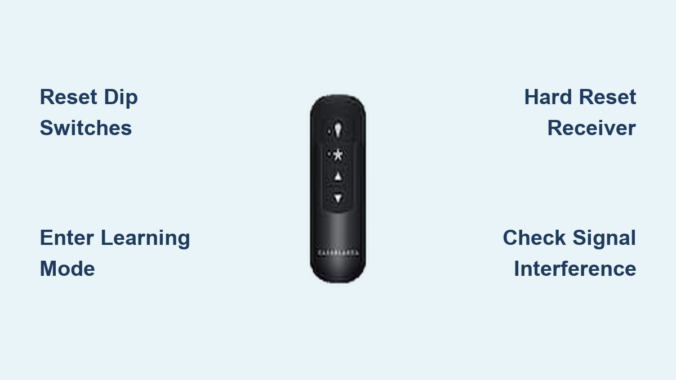
How to Reset Casablanca Ceiling Fan Remote


Your Casablanca ceiling fan suddenly stops responding to the remote—the lights won’t dim, the fan won’t change speeds, and the reverse function seems completely unresponsive. This frustrating scenario affects thousands of homeowners each year, but the solution is often simpler than you think. Knowing how to reset Casablanca ceiling fan remote control can restore functionality in minutes without requiring professional help or expensive repairs. Casablanca fans are renowned for their quality construction, but even these premium units occasionally experience synchronization issues between the remote and receiver.

This guide provides step-by-step instructions for resetting all Casablanca remote control systems, from basic dip switch models to advanced Intellisense technology. You’ll learn specific techniques for Universal Remotes, wall controls, and smart-compatible fans, along with troubleshooting tips for persistent issues. Most Casablanca remote problems can be resolved with these proven reset methods, saving you time and money while restoring convenient operation to your living space.

Prepare for Remote Reset

Before attempting any reset procedure, proper preparation ensures your safety and increases the likelihood of success. Taking just five minutes to verify basic conditions prevents unnecessary complications and electrical hazards during the reset process.

Safety First: Power and Battery Checks

Always turn off power to your ceiling fan at the circuit breaker before accessing the receiver unit or battery compartment. This critical step protects you from electrical shock, as the receiver module connects directly to your home’s electrical supply and contains capacitors that retain dangerous charges even after power disconnection. Use a non-contact voltage tester to confirm power is off before touching any components.

While waiting for capacitors to discharge (10-15 minutes), inspect your remote’s batteries—a leading cause of apparent remote failure. Remove the battery cover and examine cells for leakage, corrosion, or swelling. Even if batteries appear functional, replace them with fresh alkaline cells before proceeding. Weak batteries often cause intermittent operation that mimics more serious problems. Ensure correct polarity when installing new batteries, matching positive and negative terminals to compartment markings.

Gather Required Tools and Materials

Having the right tools ready prevents frustrating interruptions during the reset process. You’ll need a step ladder for canopy access, a small flathead screwdriver for dip switches, and a smartphone to photograph component positions before adjustments. Keep spare AA, AAA, or CR2032 batteries (depending on your model) nearby, as fresh batteries are essential for successful reset procedures.

Create a clear workspace below the fan and ensure adequate lighting for safe operation. If you have a helper available, coordinate roles—one person can manage the receiver while the other handles the remote during pairing procedures. Documenting your current settings with photos or notes provides a safety net if you need to restore original configurations.

Dip Switch Reset Method

Casablanca ceiling fan dip switch settings diagram

Many Casablanca ceiling fan remotes use dip switch systems to establish unique communication channels between the remote and receiver. This reliable method appears on numerous Casablanca models including Universal Remotes and several wall control units. The dip switches are small rocker switches located inside both the remote battery compartment and the receiver unit, typically arranged in rows of four to eight switches.

Access Remote and Receiver Dip Switches

Begin by removing the battery cover from your Casablanca remote to expose the dip switch array. These switches control the frequency and coding that your remote uses to communicate with the fan’s receiver. Each switch can be set to either the “up” position (representing binary “on” or “1”) or the “down” position (representing “off” or “0”). Photograph the current dip switch configuration before making any changes.

Accessing the receiver dip switches requires removing the fan canopy cover with power off at the breaker. Loosen the mounting screws (typically two to four) and carefully lower the canopy housing. The receiver circuit board is usually visible once the canopy is lowered, with a small dip switch assembly similar to the one in your remote. Some models feature a dedicated access panel that doesn’t require full canopy removal.

Match Switch Settings for Communication

The key to successful dip switch reset is ensuring that every corresponding switch on both the remote and receiver is set to the identical position. A single mismatched switch prevents all communication between devices. Compare each switch position carefully, as small differences are easy to miss when working overhead.

Common default dip switch settings for Casablanca remotes include all switches in the “up” position or alternating patterns like up-down-up-down. After setting all switches to match:

  1. Restore power at the breaker
  2. Test all remote functions including each fan speed
  3. Verify light control operation
  4. Confirm reverse function works properly

If the fan doesn’t respond, double-check the switch matching—it’s common to miss a switch position on the first attempt. When troubleshooting, try a different switch pattern if default settings don’t work, as interference from neighboring devices on common frequencies may require an alternate pattern.

Learning Mode Pairing Procedure

Casablanca’s more advanced remote control systems feature electronic learning modes that automatically detect and configure settings without manual dip switch adjustment. This streamlined approach, found in Intellisense and newer Universal Remote models, simplifies the pairing process while reducing configuration errors.

Initiate Receiver Pairing Mode

Locate the “Learn” or “Program” button on your Casablanca receiver circuit board, typically a small black or red pushbutton in the fan canopy. With power restored at the breaker, press and hold this button for three to five seconds. Most receivers indicate successful entry into pairing mode through a rapidly flashing LED indicator or an audible click from the relay. Release the button once you observe this confirmation.

The receiver remains in pairing mode for two to five minutes, after which it returns to normal operation if no remote signal is detected. Work efficiently during this window and ensure your remote is ready before initiating pairing mode. Have someone assist you if possible—one person can watch the receiver indicator while the other operates the remote.

Complete Remote Pairing Process

With the receiver in pairing mode, point your remote directly at the receiver location (typically in the canopy area above the fan) and press any button. The remote transmits a pairing signal that the receiver learns and stores in its memory. Successful pairing is usually confirmed when the receiver LED stops flashing and remains steady, or when you hear a distinct click indicating the relay has engaged.

After pairing completes, test all remote functions thoroughly to confirm proper operation across all speeds, light settings, and the reverse function. If certain features don’t respond, repeat the pairing process as the initial attempt may not have captured all control codes. Some Casablanca models require pressing specific button combinations to complete pairing, such as holding the “High” and “Light” buttons simultaneously for ten seconds.

Hard Reset for Stubborn Issues

Casablanca ceiling fan receiver reset button location

When standard reset procedures fail to resolve persistent remote control problems, a comprehensive hard reset clears corrupted programming and forces complete re-establishment of communication between devices.

Perform Factory Reset on Receiver

To initiate a hard reset, ensure power is on at the breaker and locate the learn/program button on your Casablanca receiver. Press and hold this button for fifteen to twenty seconds. During this period, the indicator LED displays various patterns—rapid flashing indicates normal pairing mode, while slow pulsing typically signals reset mode in progress.

Release the button when the LED indicates reset completion, which most models signal by turning solid or stopping all flashing activity. The receiver’s memory is now completely cleared, eliminating any corrupted settings. After completing the hard reset, perform a fresh pairing procedure using the learning mode steps. Test all functions after re-pairing to confirm that the hard reset resolved your original issues.

Alternative Reset Methods

Some Casablanca receiver models feature a small reset hole requiring paperclip insertion rather than a visible button press. Insert a straightened paperclip into this hole and hold for ten to fifteen seconds to trigger the reset sequence. The reset hole is typically located on the receiver circuit board and may be recessed to prevent accidental activation.

If your Casablanca fan uses a wall control system alongside or instead of a handheld remote, the reset procedure may involve button combinations on the wall unit. Press and hold the “Fan Off” and “Light On” buttons simultaneously for approximately ten seconds, watching for the wall control’s LED indicator to acknowledge the reset command through a flashing pattern.

Troubleshoot Unresponsive Remote

Casablanca ceiling fan receiver wiring diagram

Systematic troubleshooting identifies the underlying cause when reset procedures don’t fully resolve remote control issues. Many problems that appear to be remote-related actually stem from power delivery, receiver damage, or environmental interference.

Verify Power Delivery

Begin troubleshooting by confirming that power actually reaches your ceiling fan system. Check the circuit breaker and ensure it hasn’t tripped—turn it fully off and then back on to reset any partially tripped breakers. Use a lamp to verify that the electrical circuit is functioning normally.

Inspect the receiver connections within the fan canopy with power off at the breaker. Look for signs of burnt components, melted plastic, frayed wires, or loose connections. Tighten any loose wire nuts and ensure no copper wire strands are exposed outside their connections. Pay particular attention to neutral wire connections, as loose neutrals can cause intermittent operation that mimics remote failure.

Address Signal Interference

Electromagnetic interference from other electronic devices can block or degrade remote control signals. Wireless routers, cordless phones, baby monitors, and neighboring garage door openers often operate on similar frequencies and create interference zones. Try turning off potential interference sources temporarily to see if remote operation improves.

The physical orientation of your remote and receiver antenna affects signal quality in RF systems. Ensure the receiver’s antenna wire isn’t tangled, coiled, or pressed against metal components within the canopy—the antenna should hang freely for optimal reception. For IR remotes, confirm that nothing obstructs the line of sight between the remote and receiver, and clean the remote’s IR LED if it appears dirty.

Maintain Remote Performance

Regular maintenance extends your remote’s operational life and prevents many common issues that necessitate reset procedures.

Routine Remote Care

Clean your remote periodically by wiping its exterior with a slightly damp cloth to remove oils, dust, and debris that accumulate around buttons. Avoid harsh chemicals or abrasive materials that could damage button labels or plastic housing. Remotes used in kitchens benefit from more frequent cleaning to prevent button stickiness.

Inspect the battery compartment regularly for signs of corrosion or leakage, even before batteries show obvious failure signs. Replace batteries proactively every twelve to eighteen months as preventive maintenance. Never mix old and new batteries or different brands in the same device, as inconsistent voltage delivery can cause intermittent operation.

Fan System Inspections

Annual inspection of your complete ceiling fan system prevents remote control issues before they develop. With power off at the breaker, remove the fan canopy cover and inspect all wire connections for loosening, corrosion, or heat damage. Tighten any loose wire nuts and replace connections showing signs of overheating.

Clean the receiver circuit board with compressed air to remove accumulated dust and debris that can cause overheating. Inspect the receiver’s LED indicator through any viewing window to confirm normal operation—a flickering or non-illuminated indicator often precedes complete receiver failure.

By following these reset procedures and maintenance practices, you can restore and maintain reliable operation of your Casablanca ceiling fan remote control. Most issues resolve with simple reset procedures, while regular care prevents problems from developing in the first place. When persistent issues resist all troubleshooting efforts, professional diagnosis may be necessary to determine whether receiver replacement or other repairs are needed.

How Much Power Does a Ceiling Fan Use?


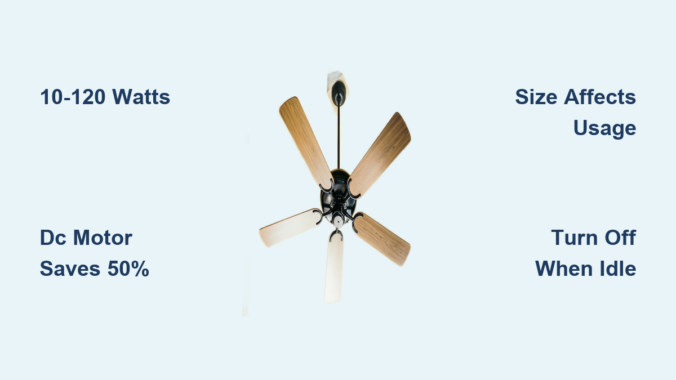
Wondering how many watts a ceiling fan uses? Most residential ceiling fans consume between 10 and 120 watts per hour during operation, with the exact figure depending on fan size, motor type, and speed settings. A standard 48-inch ceiling fan with an AC motor typically operates around 75 watts, providing an effective benchmark for energy calculations. Understanding your ceiling fan’s wattage helps you estimate electricity costs accurately and make smarter purchasing decisions that save money long-term. This guide breaks down exactly how many watts your ceiling fan uses across different sizes, motor types, and usage scenarios—plus practical strategies to minimize energy consumption without sacrificing comfort.

Typical Wattage by Fan Size

ceiling fan wattage chart blade span

The wattage your ceiling fan uses directly corresponds to its blade span since larger fans need more powerful motors to move air across greater surface areas. Selecting the right size fan for your space prevents unnecessary energy expenditure while ensuring adequate airflow.

Fan Size (Blade Span) Watts Consumed
24 inch 41 watts
30 inch 48 watts
36 inch 55 watts
42 inch 65 watts
48 inch 75 watts
52 inch 87 watts
56 inch 100 watts
60 inch 120 watts
72 inch 180 watts

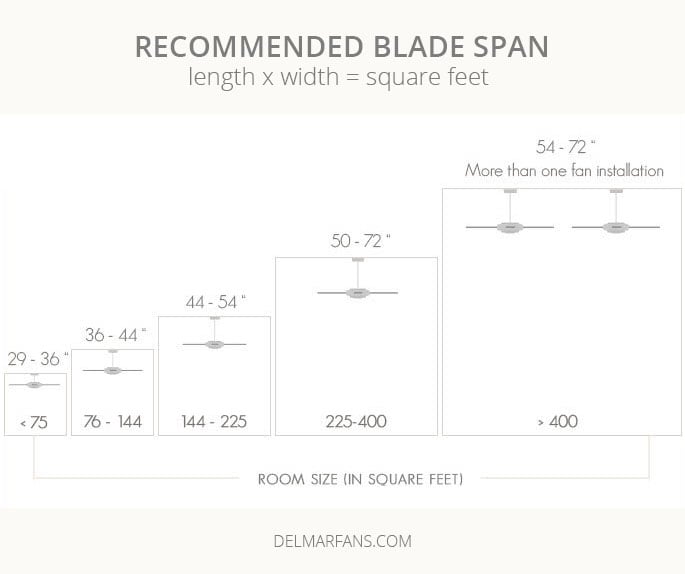
For most homes, fans between 36 and 52 inches deliver optimal balance between cooling performance and energy efficiency. A 36-inch model uses approximately 55 watts, while a 52-inch unit requires about 87 watts—representing a manageable increase for significantly better air circulation. Oversized fans for small rooms waste energy, so always match fan size to room dimensions: 36-42 inches for bedrooms, 44-54 inches for living rooms, and 50-60 inches for larger open spaces.

How Size Affects Your Electricity Bill

Running a fan that’s too large for your space can increase how many watts your ceiling fan uses by 25-50% unnecessarily. A properly sized fan maintains comfort while minimizing energy consumption—critical information when calculating monthly costs. For example, a 48-inch fan running 8 hours daily adds just $1.80 to your bill at average electricity rates, while an oversized 60-inch model could cost $2.70 for the same usage pattern. Always verify your room dimensions against manufacturer size recommendations before purchasing.

DC vs AC Motor Efficiency

DC motor vs AC motor ceiling fan efficiency comparison

The motor type dramatically impacts how many watts your ceiling fan uses during operation, with DC (Direct Current) motors offering revolutionary efficiency improvements over traditional AC (Alternating Current) designs.

Why DC Motors Save Significant Energy

DC motor ceiling fans consume only 5 to 50 watts—50-70% less than AC models—while delivering equal or superior airflow. This efficiency comes from more precise electronic control and better energy conversion. While standard AC fans typically use 50-120 watts on high settings, DC models maintain comfortable air movement at dramatically lower power levels. The difference becomes especially pronounced when running fans for extended periods.

Practical Benefits Beyond Energy Savings

DC motor fans provide six or more speed settings compared to the three-speed limitation of most AC models, allowing you to fine-tune power consumption based on actual comfort needs. These fans also operate more quietly and include remote control functionality as standard. While the initial purchase price is higher, the energy savings often offset this cost within 1-2 years of regular use—particularly valuable when calculating how many watts your ceiling fan uses over its lifetime.

Compare Ceiling Fan Wattage to Other Fan Types

ceiling fan vs tower fan vs pedestal fan wattage comparison chart

Understanding how many watts your ceiling fan uses becomes more meaningful when comparing it to alternative cooling options in your home.

Fan Type Average Watts Used Daily Energy (8 hours)
Ceiling Fan 30W – 120W 0.24 – 0.96 kWh
Tower Fan 30W – 100W 0.24 – 0.80 kWh
Pedestal Fan 40W – 75W 0.32 – 0.60 kWh
Table Fan 20W – 50W 0.16 – 0.40 kWh
Bladeless Fan 20W – 70W 0.16 – 0.56 kWh
Industrial Fan 150W – 1500W 1.2 – 12 kWh

Ceiling fans provide the best coverage-to-efficiency ratio, circulating air throughout entire rooms more effectively than portable options. While table fans consume slightly less power (20-50 watts), they only cool localized areas. Industrial fans represent extreme consumption levels, with some units drawing over 1500 watts—comparable to air conditioning units.

Calculate Daily and Monthly Energy Costs

Determining how many watts your ceiling fan uses enables precise cost calculations using this simple formula:

Daily Cost = (Wattage ÷ 1000) × Hours Used × Electricity Rate

A 48-inch ceiling fan operating at 50 watts for 8 hours daily with electricity at $0.15/kWh costs just $0.06 per day or $1.80 monthly. At maximum 75 watts, costs increase to $0.09 daily or $2.70 monthly. For continuous 24-hour operation, these figures triple.

Fan Size Monthly kWh Use (8 hrs/day)
36 inches 7.2 – 12 kWh
48 inches 12 – 18 kWh
60 inches 18 – 28.8 kWh

Real-World Cost Examples

  • 36-inch fan running 8 hours daily: $0.90-$1.50 monthly
  • 48-inch fan running 12 hours daily: $2.70-$4.05 monthly
  • 60-inch fan running 24/7: $9.07-$14.51 monthly

These calculations help you budget accurately and identify whether your current usage aligns with energy-saving goals.

Reduce Your Ceiling Fan Energy Costs

How many watts your ceiling fan uses isn’t fixed—you can implement several strategies to minimize consumption while maintaining comfort.

Smart Purchasing Decisions

  • Select ENERGY STAR certified models that consume approximately 60% less power through improved motors and blade designs
  • Choose DC motor fans for the most significant efficiency gains
  • Verify wattage specifications before purchasing—don’t assume all fans in the same size category consume equal power

Usage Optimization Tactics

  • Adjust speed settings based on actual needs: Running on low (15-30 watts) instead of high (50-75 watts) can cut energy use by 50-70%
  • Turn fans off when rooms are unoccupied: Fans cool people, not spaces—leaving them running wastes electricity
  • Pair with air conditioning: Raise thermostat settings 4-5 degrees while maintaining comfort, reducing AC costs by 25-30%

Implementing these practices can reduce cooling-related electricity expenses by up to 30%, making your ceiling fan an even more cost-effective solution.

Solar Power Options for Off-Grid Cooling

For homeowners seeking alternative energy solutions, solar generators provide viable options for powering ceiling fans independently of grid electricity.

Sizing Your Solar Generator

Calculate required capacity using this formula:
Watt-hours needed = Fan Wattage × Hours of Operation × 1.15 (efficiency factor)

A 75-watt ceiling fan running 8 hours requires approximately 690 watt-hours of solar generator capacity. The following table shows runtime for different fan sizes with a 1264Wh capacity unit:

Fan Size Runtime on 1264Wh Generator
24-inch (41W) ~26 hours
48-inch (75W) ~14.3 hours
60-inch (120W) ~9 hours
72-inch (180W) ~6 hours

Smaller 518Wh units provide proportionally reduced runtime, powering a 48-inch fan for approximately 5.9 hours. These calculations include real-world efficiency considerations to ensure reliable off-grid cooling.

Key Facts About Ceiling Fan Wattage

Understanding how many watts a ceiling fan uses comes down to several essential facts that guide smart purchasing and usage decisions:

  • Standard residential fans consume 10-120 watts, with most models falling in the 30-75 watt range
  • DC motor fans use 50-70% less power than AC equivalents while offering quieter operation and more speed options
  • Typical residential fans add $1-$15 monthly to electricity bills depending on size and usage patterns
  • Pairing fans with air conditioning can reduce total cooling costs by up to 30% through strategic thermostat adjustments
  • Turning fans off in unoccupied rooms eliminates 100% of that fan’s energy consumption with no comfort penalty

By selecting appropriately sized fans, choosing efficient DC motor models, and implementing smart usage habits, you can maximize comfort while minimizing how many watts your ceiling fan uses—keeping your home cool without cooling your wallet.

Taloya Ceiling Fan Installation Guide


Nothing ruins a DIY victory faster than a wobbling ceiling fan that sounds like a helicopter taking off. When you’ve chosen a Taloya ceiling fan for your living room or bedroom, proper installation determines whether you’ll enjoy silent operation for years or spend weekends troubleshooting annoying vibrations. This guide reveals the exact steps Taloya-certified installers follow to mount these fans correctly the first time—without dangerous electrical mistakes or frustrating wobble issues that send many homeowners scrambling for professional help.

Most Taloya ceiling fan problems stem from skipped preparation steps rather than complex technical failures. By understanding the specific requirements of Taloya’s mounting system and electrical connections, you can complete your installation safely and confidently. Whether you’ve purchased a 42-inch model with integrated lighting or a simpler fan-only version, this guide covers every critical step from verifying your electrical box rating through final testing.

Why Your Existing Electrical Box Might Fail During Taloya Fan Installation

ceiling fan electrical box weight rating comparison

Standard electrical boxes designed for lightweight fixtures cannot handle the vibration and weight of a running ceiling fan. When installed in an inadequate box, your Taloya fan may develop dangerous wobbling or, worse, detach completely from the ceiling. This isn’t theoretical—improper mounting causes thousands of ceiling fan accidents annually.

How to Identify a Non-Fan-Rated Electrical Box in Seconds

Look for a stamped rating label on your existing electrical box that says “Acceptable for Fan Support” or lists a weight capacity of at least 50 pounds. If you see no label or it specifies “For Lighting Fixtures Only,” you need a replacement before proceeding. Never install a Taloya ceiling fan in a box not explicitly rated for fan support—the risk of failure increases dramatically with each use.

Replacing Your Electrical Box: When DIY Becomes Dangerous

Installing a new ceiling fan-rated electrical box requires cutting ceiling material, fishing new cable, and making panel connections—tasks that often exceed DIY capabilities. If your home has aluminum wiring or knob-and-tube systems, special procedures and connectors are mandatory for safe operation. When in doubt, schedule a professional assessment before starting your Taloya ceiling fan installation.

Must-Have Tools for Safe Taloya Ceiling Fan Installation (No Trips to the Store)

ceiling fan installation tool kit

Gathering complete tools before starting prevents dangerous ladder climbs mid-installation. Taloya ceiling fan installation requires more than basic screwdrivers—specialized tools ensure secure connections and safe handling of heavy components.

The Voltage Tester: Your Most Important Safety Tool

Always verify power is off at the circuit breaker using a voltage tester before touching any wires. Simply turning off the wall switch isn’t sufficient, as ceiling fans connect directly to house wiring. Test both wire leads and existing connections—any indication of live current means you must stop immediately and consult an electrician.

Why Standard Light Fixture Tools Won’t Suffice for Taloya Fans

Unlike light fixtures, Taloya ceiling fans require wire strippers for precise electrical connections and pliers for twisting secure wire nuts. The fan’s weight demands a sturdy ladder rated for at least 300 pounds, plus a helper to hold the assembly during mounting. Attempting solo installation often leads to dropped components or unsafe balancing acts on ladders.

How to Verify Your Taloya Fan Package Has All Necessary Components

Missing parts derail installations when you’re halfway through assembly. Before removing packaging materials, verify all components against your model’s parts list—this simple step prevents frustration when you discover a missing downrod coupling or remote control receiver.

Critical Missing Parts That Delay Taloya Installation

Your package must include the motor assembly, blades (typically 4-5), mounting bracket, canopy, hardware kit, and model-specific components like downrods or light kits. If your Taloya fan includes lighting, confirm the presence of all glass shades, diffusers, and appropriate bulbs. Never substitute missing hardware—improper screws can strip threads or create unsafe mounting points.

When to Contact Taloya Support Before Starting Installation

If components are missing or damaged, contact Taloya support immediately with your model number and proof of purchase. Most manufacturers ship replacement parts within 48 hours, but attempting repairs with non-standard hardware voids your warranty and creates safety hazards. Keep all packaging until you’ve completed successful installation testing.

Step-by-Step: Securing the Mounting Bracket for Wobble-Free Operation

The mounting bracket is your Taloya ceiling fan’s foundation—any instability here guarantees wobble during operation. Proper attachment requires precise alignment and secure fastening to the electrical box’s mounting points.

Leveling the Mounting Bracket: The Secret to Silent Operation

After positioning the bracket against the electrical box, place a carpenter’s level across it in multiple directions. An unlevel bracket creates immediate vibration that worsens at higher speeds. Adjust bracket position incrementally until perfectly level before tightening all screws completely. This extra attention prevents hours of troubleshooting later.

Testing Bracket Stability Before Hanging Your Taloya Fan

Apply firm pressure to the mounted bracket from multiple angles—any movement indicates insufficient attachment. The bracket must remain completely rigid when you shake it vigorously. If movement occurs, remove the bracket and verify electrical box integrity before reattaching with longer screws or a fan-rated box replacement.

Taloya Downrod Assembly: Avoiding the #1 Installation Mistake

Taloya ceiling fan downrod canopy assembly diagram

Forgetting to slide the canopy onto the downrod before motor attachment is the most common Taloya installation error. This mistake forces you to disassemble everything when you realize the canopy won’t fit over the connected motor.

Proper Canopy Positioning on the Downrod

Insert the downrod through the canopy before connecting it to the motor shaft. Most Taloya models use a keyed coupling system that only allows correct alignment—never force connections. The canopy should rest at its proper position covering the motor coupling when viewed from below after installation.

Set Screw Tightening: How Tight Is Tight Enough?

Secure the downrod to the motor shaft using the provided hex wrench, tightening each set screw firmly but avoiding overtightening that might crack the coupling. The connection should feel solid with no rotation when you twist the downrod by hand. Recheck tightness after initial operation, as vibration may require slight adjustment.

Correct Wire Color Matching for Taloya Ceiling Fan Electrical Connections

Improper wiring creates immediate operational problems and serious safety hazards. Taloya follows standard color coding, but verifying each connection prevents dangerous mistakes that could damage your fan or cause electrical issues.

Why Wire Nut Security Matters More Than You Think

After twisting matching wires together (black to black, white to white, green to ground), secure connections with wire nuts and wrap each with electrical tape. Loose connections cause arcing that generates heat and fire risk—tug gently on each wire to verify it won’t pull free from the nut. Tuck wires neatly into the electrical box without pinching or crimping.

Troubleshooting Common Wiring Mistakes That Cause Fan Failure

If your Taloya fan doesn’t operate after installation, first verify all connections match color coding exactly. Some models have additional wires for light kits that must connect to corresponding house wires. Check that wire nuts fully cover all exposed copper—any exposed conductor creates shock risk. When in doubt, disconnect power and recheck all connections before testing again.

Blade Attachment Secrets for Silent Taloya Fan Operation

Unevenly tightened blades cause 80% of wobble complaints with new ceiling fan installations. Proper blade attachment requires methodical tightening in a star pattern to maintain even tension across all mounting points.

The Gradual Tightening Method for Perfect Blade Alignment

Start all blade screws by hand to prevent cross-threading, then tighten incrementally in a star pattern rather than sequentially. After initial tightening, run the fan at medium speed for 5 minutes, then retighten all screws completely. This process allows components to seat properly while maintaining blade alignment.

Using the Included Balancing Kit to Eliminate Wobble

If wobble persists after proper blade attachment, use the balancing kit included with your Taloya fan. Attach the balancing clip to each blade and run the fan to identify the problematic blade. Add small weights incrementally until wobble disappears—most issues resolve with 1-2 grams of counterweight.

Why Your New Taloya Fan Wobbles (And How to Fix It in 10 Minutes)

Wobbling isn’t normal operation—it indicates a correctable installation issue. Most wobble problems stem from simple causes that you can address without disassembling your entire Taloya ceiling fan installation.

Blade Screw Tightening: The Most Common Culprit

After initial operation, vibration often loosens blade screws. Power down the fan and systematically check each blade screw, tightening incrementally in a star pattern. Uneven tension between blades creates immediate wobble that worsens at specific speeds. Recheck tightness after the first 24 hours of operation.

When to Use the Balancing Kit vs. Rechecking Mounting Hardware

If blade screw tightening doesn’t resolve wobble, verify mounting bracket security before using the balancing kit. A loose bracket creates significant vibration that balancing weights can’t correct. Only use the balancing kit after confirming all hardware is properly tightened and the bracket is completely secure.

When to Call an Electrician for Taloya Ceiling Fan Installation

While many homeowners successfully install Taloya ceiling fans themselves, certain situations demand professional expertise. Recognizing these scenarios prevents dangerous mistakes and ensures code-compliant installation.

Aluminum Wiring: Why Special Connectors Are Non-Negotiable

Homes with aluminum wiring require special procedures and connectors for safe ceiling fan installation. Attempting DIY connections with standard wire nuts creates fire hazards due to aluminum’s expansion and contraction properties. Never connect aluminum wiring without COPALUM or AlumiConn connectors—this specialized work requires electrician expertise.

High Ceiling Safety: The Hidden Risks of Solo Installation

Installing a Taloya ceiling fan on 10+ foot ceilings introduces significant fall risks when using extension ladders. Professional installers use specialized scaffolding and safety equipment that most homeowners lack. The fan’s weight combined with awkward positioning makes high-ceiling installations particularly dangerous for DIYers—when safety is compromised, professional installation costs ($100-$250) provide valuable peace of mind.

Proper Taloya ceiling fan installation transforms your space with efficient comfort and quiet operation. By following these specific steps and recognizing when professional help is needed, you’ll enjoy reliable performance for years while avoiding common installation pitfalls. Regular seasonal adjustments and simple maintenance keep your fan operating at peak efficiency throughout its lifespan.

How to Install a Noma Ceiling Fan


Installing a Noma ceiling fan transforms your home’s comfort while cutting energy costs during hot months. With their signature 52-inch span and five-blade design, these fans deliver powerful airflow combined with integrated lighting—all controllable via wall switch or remote. Proper Noma ceiling fan installation ensures years of reliable operation, but skipping critical steps leads to frustrating problems like non-functional lights or unresponsive remotes. This guide walks you through every phase of installation, from verifying your electrical box to testing the dual control system, so you avoid common pitfalls that leave DIYers staring at a non-working fan.

Essential Pre-Installation Checks for Your Noma Fan

Before unpacking your Noma ceiling fan, verify your ceiling can safely support this 25-30 pound fixture. Most homeowners make the critical mistake of assuming their existing light fixture box will work, but standard electrical boxes lack the reinforcement needed for fan vibration. Locate your ceiling joists using a stud finder, then confirm you have an approved fan-rated electrical box securely anchored between joists—not just attached to drywall. Without this foundation, your Noma ceiling fan installation will develop dangerous wobble within weeks. Grab your voltage tester now to check for power at the existing fixture location, then flip the correct circuit breaker before proceeding.

Gather These Critical Tools Before Starting

Your Noma ceiling fan installation requires specific tools beyond basic screwdrivers. Collect a non-contact voltage tester (never skip this safety check), wire strippers with gauge markings, 12-14 AWG wire nuts, electrical tape, and a sturdy ladder rated for ceiling work. For the remote control system, you’ll need small needle-nose pliers to manipulate the receiver wires. Most importantly, find your fan’s model number—usually printed on the bottom housing—and have it ready for Noma’s customer service line in case you encounter compatibility questions during installation. This single step prevents hours of frustration when troubleshooting control issues later.

Mounting Your Noma Fan Bracket: The Safety Foundation

ceiling fan bracket installation diagram

The mounting bracket is your entire installation’s structural backbone—get this wrong and your fan becomes a hazard. After removing the old fixture, examine the electrical box: it must have two mounting holes spaced 3-1/2 inches apart for Noma’s bracket. Secure the bracket using the 1/4-inch lag screws provided (never reuse existing hardware), tightening until the bracket sits perfectly flush against your ceiling with zero movement when you apply pressure. If your ceiling slopes more than 15 degrees, you’ll need Noma’s optional angled mounting kit—attempting to install on a steep slope without this accessory creates dangerous instability.

Wire Connections That Prevent Remote Control Failures

ceiling fan wiring diagram with remote receiver

Noma’s dual-control system requires precise wiring to avoid the #1 complaint: lights working but remote unresponsive. Connect household wires to the receiver first—black (hot) to L, white (neutral) to N, green (ground) to ground screw. Next, attach fan motor wires to the receiver’s motor terminals (typically blue and black), then light fixture wires to the light terminals. Wrap all connections with electrical tape before securing with wire nuts—this extra step prevents accidental contact that disrupts remote signals. Crucially, the ground wire must connect to both the electrical box and receiver; skipping this causes intermittent operation that mimics remote failure.

Installing Light Fixtures Within Wattage Limits

Your Noma ceiling fan’s 190-watt limiter automatically shuts off lighting when exceeded—a common oversight during installation. Each socket accepts standard 60-watt bulbs, but using two 60W incandescents (120W total) leaves room for future upgrades. Never install higher-wattage bulbs to “get more light”—this triggers the limiter and requires resetting the entire system. For brighter illumination within limits, choose LED bulbs equivalent to 100W incandescents but drawing only 15W each. When installing, hand-tighten bulbs until snug (no more than 1/8 turn after contact)—overtightening cracks sockets and causes flickering.

Testing the Dual Control System Like a Pro

After mounting the fan canopy, restore power and immediately test both control methods. First, use the wall switch to confirm basic power operation—this should activate the receiver’s indicator light. Then grab your remote and press the “off” button for 10 seconds within 30 seconds of power restoration; you should hear a distinct click from the receiver confirming system reset. Test all speeds and light functions through both controls. If the remote responds intermittently, replace the battery with a fresh CR2032 (not CR2025)—the wrong battery type causes signal dropouts that mimic receiver failure.

Troubleshooting Reset Procedures That Actually Work

When your Noma ceiling fan lights fail but the blades spin, don’t immediately assume bulb failure. First, remove one bulb—if the remaining light works, your total wattage exceeded the 190W limiter. If both sockets remain dark, perform the complete reset: turn off power for 60 seconds (not just flip the switch—wait for LED indicators to die), restore power, then hold the remote’s off button for exactly 10 seconds. This sequence reboots the receiver’s communication protocol, fixing 80% of “dead remote” issues. If problems persist, check for wall switch interference—frequent toggling by children disrupts the control circuitry, requiring a full system reset.

Critical Maintenance Steps Most Owners Forget

Your Noma ceiling fan installation isn’t complete without establishing a maintenance routine. Monthly, clean blades with a microfiber cloth dampened with vinegar solution—accumulated dust creates imbalance that stresses the motor. Annually, shut off power and inspect wire connections inside the canopy; vibration loosens terminals over time, causing arcing that damages the receiver. Most importantly, never ignore unusual sounds: a clicking noise often means the downrod ball isn’t fully seated in the bracket, while grinding indicates failing motor bearings that require professional replacement.

When to Call Noma Customer Support Immediately

Some issues require manufacturer intervention—don’t risk electrical hazards by guessing. Contact Noma’s toll-free support line if you notice: burning smells during operation (indicates overheating wiring), persistent wobble after checking blade alignment, or discoloration on wire nuts (sign of arcing). Have your model number ready—they can often diagnose issues over the phone and ship replacement receivers within 48 hours. Remember, some parts like the remote receiver are only available through Noma directly, not online retailers, so professional assistance saves weeks of frustration.


Your Noma ceiling fan installation should now deliver whisper-quiet operation and responsive dual controls. Remember to keep replacement bulbs under 60W each to avoid triggering the wattage limiter, and perform the remote reset procedure annually as preventative maintenance. When in doubt about electrical connections, consult Noma’s customer service—they’ve resolved thousands of installations and know their systems inside out. With proper setup, your Noma fan will provide reliable cooling for over a decade, making this DIY project one of the most valuable home improvements you’ll ever complete.

How to Install a Ceiling Fan with TaskRabbit


Your ceiling fan sputters to a stop on the hottest day of summer, leaving you sweating while you wonder how to get it fixed safely. Electrical work can be dangerous, but hiring a professional electrician might cost hundreds just for a service call. Taskrabbit offers a middle ground—skilled Taskers who install ceiling fans starting at $45/hour in most markets, often with same-day availability. This guide shows you exactly how to book the right Tasker, avoid hidden costs, and get your fan spinning again without breaking the bank. You’ll learn what determines pricing, how to verify a Tasker’s electrical expertise, and why choosing the wrong professional could lead to safety hazards or costly rework.

Most homeowners don’t realize that improper ceiling fan installation causes nearly 20% of all residential electrical fires related to fans. Taskrabbit connects you with vetted professionals who bring the right tools, knowledge of local electrical codes, and experience handling everything from simple replacements to complex wiring jobs. With most Taskers responding within 60 minutes and completing standard installations in 1-2 hours, you can go from sweltering to comfortable in less time than it takes to order takeout.

Book Your Ceiling Fan Installation in 3 Steps Without Overpaying

Skip generic task descriptions that attract inexperienced Taskers charging premium rates. When booking ceiling fan installation on Taskrabbit, specify exactly what you need to get accurate quotes and qualified professionals. Start by detailing whether you’re replacing an existing fan (which typically takes 1 hour), installing where no fixture exists (requiring wiring work), or need repairs to a malfunctioning unit. Mention your ceiling height, fan model, and whether you’ve purchased the fan already.

Browse Tasker profiles with electrical experience filters—not all Taskers handle wiring safely. Look for profiles listing “electrical,” “ceiling fan installation,” or “light fixture installation” as core skills. Filter by 4.8+ star ratings and at least 50 completed tasks to ensure proven expertise. Before booking, message top candidates with specific questions: “Do you have experience installing fans on vaulted ceilings?” or “Can you verify your electrical box is fan-rated?” This pre-screening prevents mismatched expectations and ensures you hire someone who can actually complete your specific job.

Schedule strategically to maximize value. Book installations for Tuesday-Thursday when Taskers often have more availability and potentially lower rates than weekend slots. If installing multiple fans, schedule them all in one visit to avoid duplicate travel fees. Confirm whether the Tasker brings their own ladder—most do, but it’s worth verifying to avoid unexpected delays when they arrive without necessary equipment.

Avoid These 3 Common Booking Mistakes

Homeowners frequently overpay or get subpar service by making these preventable errors. First, failing to specify if new wiring is needed—Taskers quoting $45/hour for replacement installations may charge double that for wiring work, but won’t know to adjust their quote without clear details. Second, not checking if the Tasker has a fan-rated electrical box—standard light fixture boxes can’t support fan weight, leading to dangerous installations that require costly corrections. Third, skipping the pre-booking chat to confirm tool availability—ceiling fan installation requires specific tools like a voltage tester, wire strippers, and secure mounting hardware that not all Taskers carry.

Calculate Your Exact Ceiling Fan Installation Cost Before Booking

ceiling fan installation cost breakdown chart

Stop guessing whether Taskrabbit or an electrician is cheaper—know your actual costs upfront. For standard ceiling fan replacements where wiring already exists, expect to pay $144-$353 total ($45-$60/hour for 1-3 hours of work). This covers both labor and fan mounting. Replacing just the fan unit (keeping existing wiring and bracket) typically costs $100-$200 in labor alone. But if your ceiling lacks wiring, installation jumps to $250-$700 as Taskers must run new circuits, install proper electrical boxes, and possibly add switches.

Break down your project costs with this formula: Base hourly rate × estimated hours + material costs. In Dallas and El Paso, most Taskers charge $45/hour; in Austin, expect $47/hour. Simple replacements take 1 hour ($45), while adding a switch costs $100-$200 extra. Outdoor installations add 20-30% to pricing since weatherproof units require special mounting and wiring. Downrods for high ceilings cost $5-$100 depending on length—factor this in if your ceiling exceeds 9 feet.

When to Hire a Licensed Electrician Instead of a Tasker

Taskrabbit Taskers handle most standard installations safely, but certain situations require licensed electricians you can’t skip. If your home lacks existing wiring for the fan location, needs circuit breaker upgrades, or requires permit-approved work, hire a licensed pro charging $50-$100/hour. Taskers with electrical experience (like Austin’s Joan B. with 23 years in the field) can assess whether your project falls within their scope, but won’t perform work requiring permits.

Watch for these red flags indicating you need a licensed electrician: aluminum wiring in your home (requires special connectors), ceiling joists more than 12 inches apart (needs reinforced mounting), or plans to install multiple fans on one circuit (risks overload). Your Tasker should identify these issues during assessment—but if they don’t mention them, seek a second opinion before proceeding.

Find Verified Taskers with Real Electrical Experience in Your Area

Taskrabbit Tasker profile example electrical experience

Don’t settle for Taskers who “sometimes do electrical work”—find specialists with documented expertise. In Dallas, look for Javier U. (20+ years with rotating equipment systems) or Luis P. (residential electrical specialist emphasizing code compliance). El Paso residents should consider Eduardo D. (Electrical Engineering student with residential experience) or Ivan V. (15+ years handyman work). Austin homeowners benefit from Christopher C. (handles minor electrical without permits) or Joan B. (23 years electrical experience with apprentice license).

Verify electrical competence by checking three profile elements: 1) Specific electrical skills listed (not just “handyman”), 2) Reviews mentioning electrical work (“fixed my wiring issue safely”), and 3) Task completion count (50+ electrical tasks indicates specialization). Skip Taskers with generic reviews like “nice guy” without electrical specifics—these often lack the expertise for safe fan installation.

What to Ask Before Confirming Your Tasker

Ask these critical questions before booking to ensure safety and value: “Can you show me photos of previous ceiling fan installations?” (proves experience), “Do you carry your own fan-rated electrical box?” (prevents unsafe mounting), and “What’s your process if we discover aluminum wiring?” (tests electrical knowledge). The best Taskers respond with specific details about their tools, safety protocols, and handling of common complications—not generic assurances.

Complete Your Ceiling Fan Installation in 90 Minutes or Less

Skip the guesswork about installation duration—know exactly what to expect. Standard replacements (existing wiring, same location) take 60-90 minutes with a skilled Tasker. They’ll: remove old fan (15 min), verify electrical box rating (5 min), mount new bracket (10 min), connect wiring (20 min), attach blades and light kit (15 min), and test operation (5 min). More complex jobs add time: adding a wall switch (+30 min), installing on vaulted ceiling (+20 min), or replacing damaged wiring (+60+ min).

Prepare your space beforehand to avoid delays. Clear furniture from under the work area, have the new fan unboxed and ready, and turn off power at the breaker (not just the wall switch). Your Tasker should verify power is off with a voltage tester before starting—this safety step is non-negotiable. If they skip it, stop the installation immediately.

Seasonal Adjustments That Double Your Fan’s Efficiency

Most homeowners run fans inefficiently year-round, wasting energy. After installation, set your fan direction correctly: counterclockwise in summer (creates cooling downdraft), clockwise in winter (circulates warm air from ceiling). Your Tasker should demonstrate this switch—located on the fan motor housing—and confirm it works properly before leaving. Set fan speeds appropriately: high for summer cooling, low for winter circulation. These simple adjustments can reduce cooling costs by 40% and heating costs by 10%, paying for installation costs over time.

Avoid These 3 Costly Ceiling Fan Installation Errors

ceiling fan installation mistakes diagram

Taskrabbit makes fan installation accessible, but skipping these steps leads to expensive rework. First, installing without verifying electrical box rating—standard light boxes can’t support fan weight, risking collapse. Second, mismatching fan size to room dimensions (too small = ineffective airflow, too large = excessive noise). Third, improper blade pitch installation causing wobble and premature motor wear.

Prevent these issues by: 1) Confirming your Tasker brings a fan-rated electrical box (required by code), 2) Using this sizing guide (8-10 ft rooms = 29-36″ fans, 10-14 ft = 42-48″, 14+ ft = 50-54″), and 3) Ensuring blades are balanced during installation. The right Tasker handles all three automatically—but verify they’re doing it correctly.

Maximize Value with Taskrabbit’s Happiness Pledge Guarantee

Leverage Taskrabbit’s satisfaction guarantee to ensure quality work. The Happiness Pledge requires Taskers to fix issues if you’re unsatisfied—know how to use it effectively. Document everything before installation (photos of existing wiring), verify work as it progresses (check connections before cover installation), and test thoroughly before final payment. If issues arise, message Taskrabbit support within 24 hours with evidence.

Top reviewers consistently mention Taskers who exceed expectations: assembling fans still in boxes, explaining electrical systems simply, and cleaning up completely. Prioritize these value-add services during booking—they indicate professionals who take pride in their work and deliver long-term satisfaction, not just quick jobs.

Taskrabbit ceiling fan installation delivers professional results at DIY prices when you know how to navigate the platform strategically. By specifying your exact needs, verifying electrical expertise, and understanding true costs, you’ll get safe, code-compliant installations starting at $45/hour. Remember to check electrical box ratings, confirm seasonal direction settings, and leverage the Happiness Pledge for peace of mind. With most installations completed in under two hours, you’ll transform your home’s comfort faster than you thought possible—without the electrician’s markup. Book your installation today, and enjoy cool, efficient airflow by tonight.

« Older posts Newer posts »

© 2026 Hampton Fan Reviews

Theme by Anders NorenUp ↑