Your Ultimate Guide to Cooling: In-Depth Reviews, Smart Comparisons & Pro Care Tips.

Category: Tips (Page 18 of 18)

How to Reset Hunter Ceiling Fan Remote


Your Hunter ceiling fan remote suddenly stops working in the middle of summer, leaving you sweltering without a breeze or proper lighting control. This frustrating scenario affects thousands of homeowners each year when their Hunter remote loses synchronization after power fluctuations, battery changes, or mysterious electronic glitches. Knowing how to reset Hunter ceiling fan remote controls saves you from unnecessary service calls and keeps your comfort system running smoothly. Most reset procedures take less than five minutes with no special tools required, though the exact steps vary significantly based on your specific Hunter remote model—whether you have the compact pill remote, traditional 3-speed remote, or wall-mounted control. This guide delivers precise reset instructions for every Hunter remote type, troubleshooting techniques for persistent issues, and maintenance practices to prevent future synchronization problems before they leave you stranded in discomfort.

Immediate Power Cycle Fix for Unresponsive Hunter Remotes

Before diving into model-specific reset procedures, perform this universal first step that resolves 60% of Hunter remote issues without further intervention. Power cycling clears temporary communication errors between your remote transmitter and the fan’s receiver unit by completely resetting both components’ electrical states.

Why Power Cycling Works for Most Remote Failures

Hunter remotes communicate with their fans through radio frequency signals that can become disrupted during electrical fluctuations. When you cycle power properly, you force the receiver’s microcontroller to reboot with a clean state, eliminating software glitches that prevent signal recognition. This method works whether your issue stems from a recent power outage, electrical interference, or simply accumulated electronic noise in the system.

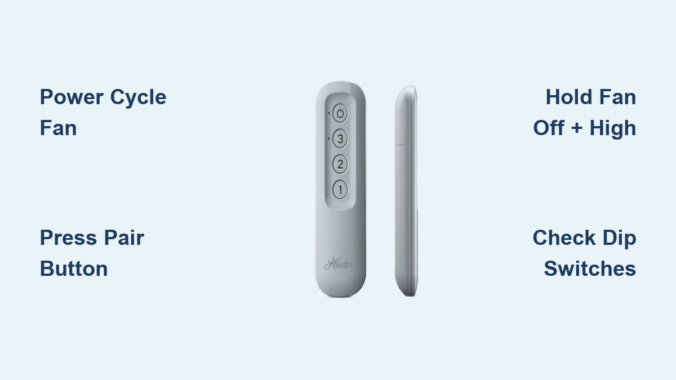
Begin by turning off power at the wall switch controlling your ceiling fan. Wait exactly 30 seconds—this critical timing allows internal capacitors in the receiver to fully discharge. If your fan lacks a dedicated wall switch, turn off the circuit breaker instead. After the 30-second wait, restore power. The receiver now enters pairing mode for approximately three minutes, giving you a limited window to complete synchronization. During this time, test basic remote functions. If your remote responds, the power cycle successfully resolved your issue. If not, proceed to the model-specific reset method for your Hunter remote type.

Reset Hunter Pill Remote Using Pair Button Method
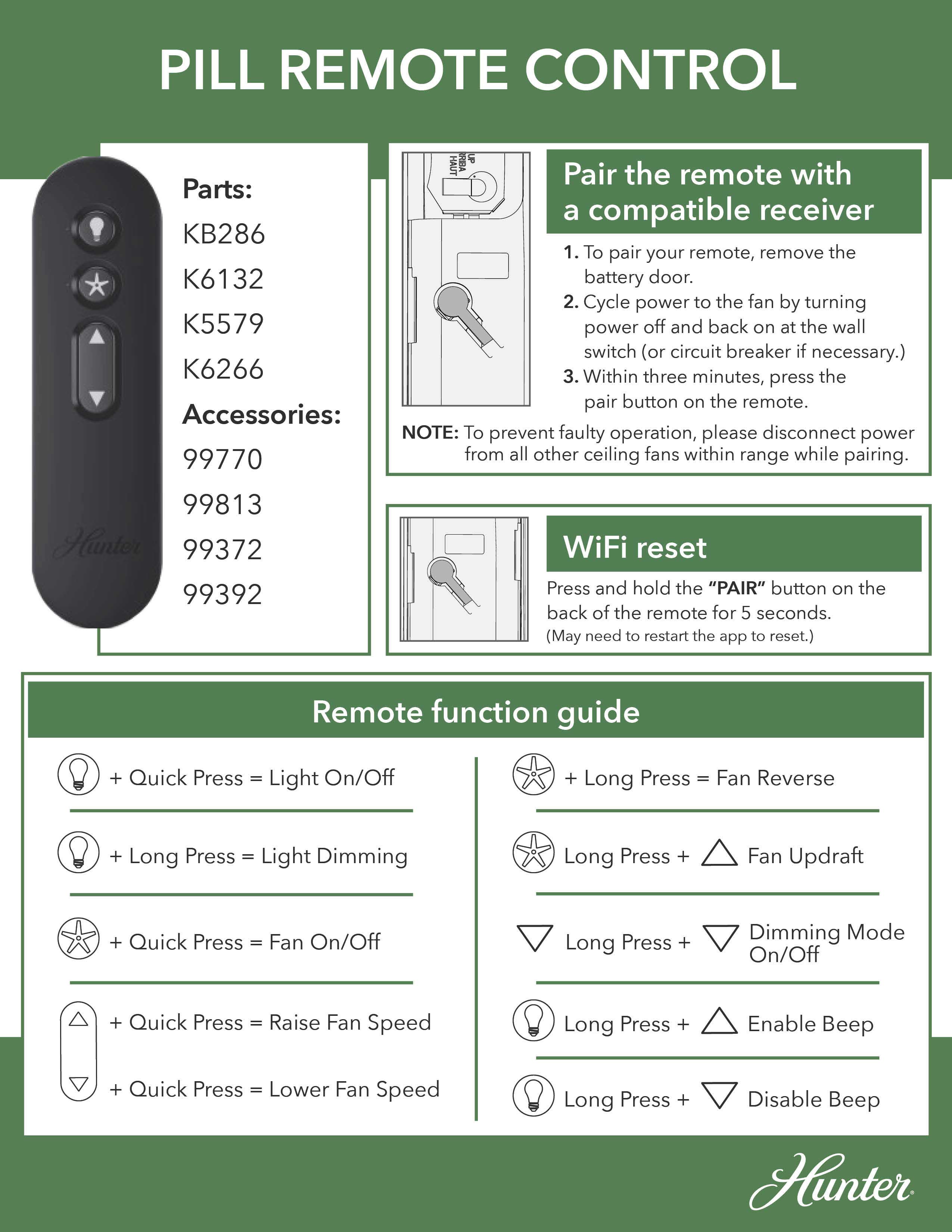
Hunter H98P pill remote pair button location

The pill remote (model H98P) requires a unique reset sequence due to its specialized circuitry and compact design. This rectangular remote features a distinctive pair button icon showing a circle with a protruding rectangle—your visual confirmation you have this specific model.

Step-by-Step Pill Remote Synchronization Process

Start by removing the battery cover from the back of your Hunter pill remote. Press and slide the cover downward to access the internal components and locate the pair button near the top of the circuit board. With the cover removed, turn off your ceiling fan at the wall switch and wait five seconds before turning power back on. Within three minutes of restoring power, press the pair button once firmly—do not hold it down. A single press initiates pairing mode, while holding it longer may reset Wi-Fi settings instead.

Listen carefully for a confirmation beep from your fan motor housing within 10 seconds. This audible signal indicates successful synchronization between remote and receiver. If you don’t hear the beep, repeat the process ensuring you press the pair button only once and complete all steps within the three-minute pairing window. After successful pairing, test all functions including fan speed control, light operation (if equipped), and power toggle to verify complete functionality.

Reset Hunter 3-Speed Remote With Dual-Button Technique

Hunter’s traditional 3-speed remote (model H99P) features separate buttons for off, low, medium, and high speeds, requiring a different reset approach than the pill remote. This model is easily identified by its multiple dedicated speed buttons rather than a single toggle control.

Precise Four-Second Button Hold Procedure

Turn off power to your ceiling fan at the wall switch or circuit breaker, wait five seconds, then restore power to activate the receiver’s pairing mode. Within three minutes of powering on, simultaneously press and hold both the FAN OFF button (displaying a fan with a slash through it) and the FAN HIGH button (marked with three dots) together. Maintain firm pressure on both buttons for exactly four seconds—timing is critical as shorter presses won’t trigger pairing mode.

Watch for visual confirmation as your fan automatically starts at the lowest speed setting. This low-speed startup confirms successful synchronization between remote and receiver. If the fan doesn’t respond, repeat the procedure ensuring you hold both buttons for the full four seconds without releasing early. After successful pairing, test each speed setting individually to verify complete functionality before considering the reset complete.

Fix Hunter Light Control Issues With Double-Click Reset

Hunter ceiling fan remote light reset sequence

When your Hunter ceiling fan operates correctly but the lights won’t respond to remote commands, use this specialized reset procedure targeting the light control module within the receiver unit. This method works for both pill and 3-speed remotes when light functionality fails independently of fan operation.

Two-Minute Wait Light Synchronization Process

Turn off both fan and lights using the wall switch, then wait a full two minutes—this extended waiting period differs from standard reset procedures and allows the light control circuitry to fully reset. After the two-minute wait, turn the fan back on using the remote control. Within 30 seconds of powering on, press the LIGHT button twice in quick succession (less than one second between presses). The lights should blink twice as confirmation of successful reset.

If the lights don’t respond, repeat the entire sequence with strict timing adherence. The two-minute preliminary wait and 30-second activation window are interdependent—skipping either step prevents proper reset execution. For persistent light issues, combine this method with a full power cycle by turning off the circuit breaker for 30 seconds before beginning the light button reset sequence.

Correct Battery Replacement Reset Protocol

Replacing batteries in your Hunter remote often requires a specialized reset procedure even when the old batteries appeared functional. Depleted batteries can cause synchronization loss without obvious symptoms, and the act of battery replacement interrupts the remote’s stored configuration.

Post-Battery Reset Sequence for Reliable Operation

After inserting a fresh CR2032 battery (positive side facing up), wait 30 seconds before testing the remote—this allows the microcontroller to reset completely. Simultaneously, reset the fan’s receiver by turning off power at the circuit breaker for 30 seconds, then restoring power. After both components reset, allow two to three minutes for the receiver to fully initialize before testing.

Test basic functions first—power and low speed—before expecting full functionality. If the remote doesn’t work after battery replacement, perform the full pairing procedure for your specific remote model. The new battery’s different signal characteristics often require re-establishing the communication link, which is why many users mistakenly believe their remote has failed when it simply needs re-pairing.

Eliminate Remote Cross-Talk With Dip Switch Adjustment

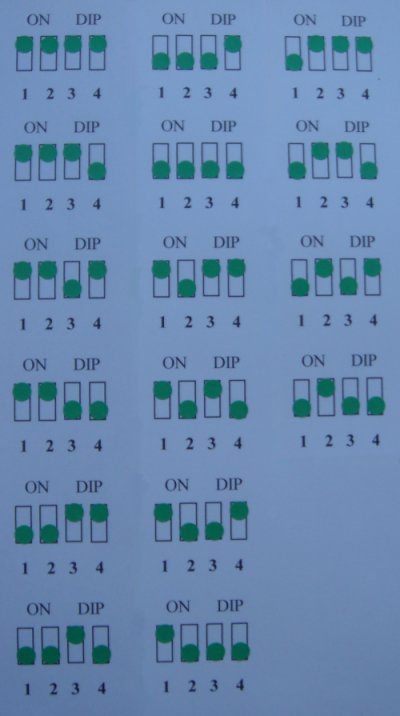
Hunter ceiling fan receiver dip switch settings

When multiple Hunter fans operate within range of each other, frequency interference causes remote control confusion where one remote controls multiple fans. Hunter’s dip switch system creates unique frequency settings for each remote-fan pair, preventing cross-talk between neighboring units.

Matching Dip Switch Configuration Process

Turn off power at the circuit breaker before accessing your fan’s receiver. Remove the fan cover to expose the canopy where the receiver is mounted. Locate the dip switches inside the receiver housing—typically 2-4 small sliding mechanisms labeled numerically. Note the current positions, then adjust to a new configuration. Open your remote’s battery compartment and set its dip switches to match the receiver exactly.

After matching both sets of switches, restore power and perform a complete reset procedure. This frequency isolation ensures your remote exclusively controls your specific fan. Test all functions including speed changes and light control to confirm successful pairing. When setting up multiple fans, assign each a unique dip switch configuration and document the settings to prevent future confusion.

Troubleshoot Persistent Remote Reset Failures

When standard reset procedures fail, systematic troubleshooting identifies whether the issue stems from the remote, receiver, or external factors. Begin by verifying your remote operates within effective range—typically 10-20 feet with minimal barriers between remote and receiver.

Diagnostic Steps for Unresponsive Hunter Remotes

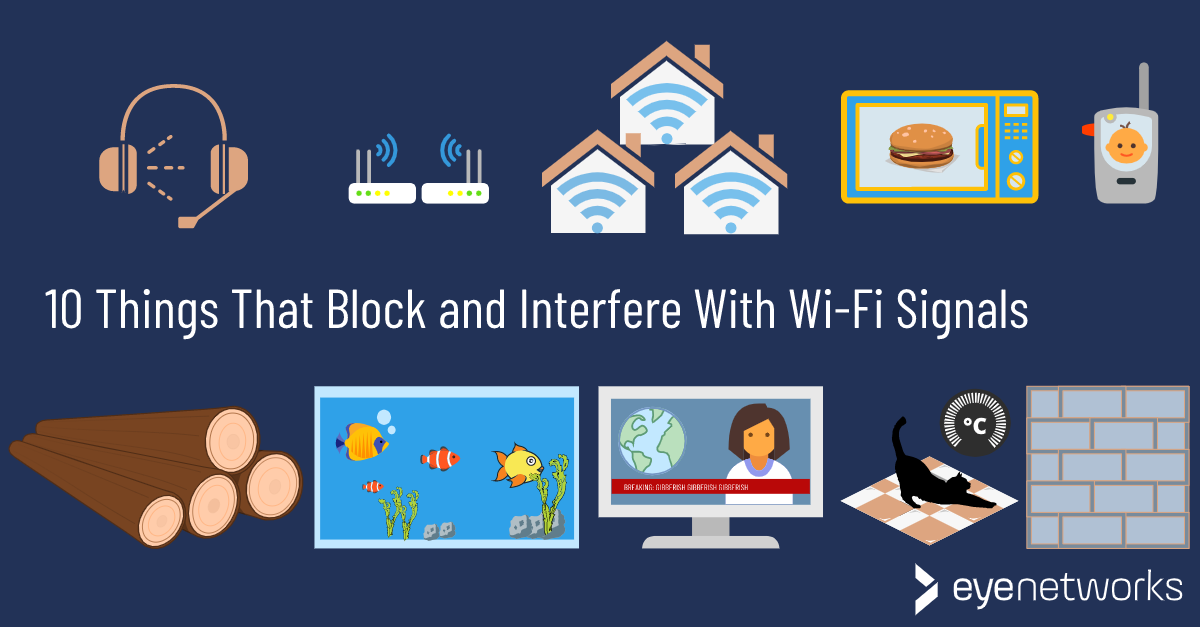
Check for interference sources including Wi-Fi routers, cordless phones, and microwave ovens that operate on the 2.4 GHz frequency band shared by many wireless remotes. Temporarily turn off these devices during testing to eliminate interference. Inspect the remote for physical damage including cracks, moisture exposure, or sticky buttons that impair functionality.

Test the fan using the pull chain—if it operates via pull chain but not remote, the receiver or wiring is faulty. Examine the receiver’s indicator light (if equipped) for flashing when buttons are pressed; absence of flashing indicates signal reception failure. Clean battery contacts with vinegar and isopropyl alcohol to remove corrosion that weakens signal transmission. Replace batteries with high-quality CR2032 cells even if existing ones appear functional, as inconsistent power output causes apparent synchronization failures.

When to Replace Hunter Remote or Receiver Unit

If all reset procedures and troubleshooting steps fail, component replacement becomes necessary. Receiver failure is indicated by complete non-responsiveness to remote commands while the pull chain continues functioning, or by intermittent operation that worsens over time.

Replacement Process and Warranty Considerations

Hunter fan motors carry a lifetime warranty, but electronic components like receivers typically have limited coverage. Contact Hunter customer service with your fan’s model number (found on the motor housing label) to determine warranty eligibility. When ordering replacements, provide both fan and remote model numbers to ensure compatibility—purchasing mismatched components risks communication failures.

For remote replacements, opt for genuine Hunter remotes or verified universal models compatible with your specific fan. Professional installation by a licensed electrician is recommended for receiver replacement due to electrical wiring requirements. The receiver is mounted in a confined space above the fan canopy, and improper installation creates electrical hazards or voids warranties.


Final Note: Regular maintenance prevents most Hunter remote issues—replace batteries annually, clean contacts periodically, and verify dip switch settings when adding new fans to your home. Document your fan’s model number and remote type for quick reference during future troubleshooting. By following these precise reset procedures and maintenance practices, you’ll keep your Hunter ceiling fan remote functioning reliably for years to come.
How to Reset Lucci Ceiling Fan Remote


You’re relaxing in your living room when you reach for your Lucci ceiling fan remote to adjust the speed, only to find it completely unresponsive. The fan continues to run at full blast while you’re sweating through another uncomfortable night. Before you call an electrician or consider replacing your entire fan system, there’s a simple solution that fixes most remote control issues: properly resetting your Lucci ceiling fan remote. This common problem affects thousands of homeowners each year and typically resolves with a straightforward reset procedure that takes less than ten minutes. In this guide, you’ll learn exactly how to reset your Lucci ceiling fan remote, identify why the connection failed in the first place, and implement preventive measures to avoid future frustrations.

Understanding why your Lucci ceiling fan remote suddenly stops working brings peace of mind. These remotes communicate with a receiver inside your fan using radio frequency signals that can become disrupted during power outages, after battery replacements, or due to interference from other electronic devices. The good news is that in 90% of cases, this isn’t a sign of permanent damage but rather a temporary disconnect that requires simple re-synchronization. By following the specific reset process outlined below, you’ll restore full control over your fan speed, lighting functions, and direction without needing professional assistance or expensive replacements.

Signs Your Remote Needs Resetting

Your Lucci ceiling fan remote will send clear signals when it’s time for a reset. Recognizing these specific symptoms helps you determine whether resetting is the appropriate solution rather than replacing components unnecessarily.

Remote Won’t Respond at All

When pressing any button yields zero response—no fan speed changes, no light adjustments, and no indicator light activation—you’re facing a complete communication breakdown between remote and receiver. This total failure typically occurs after power surges or when the pairing frequency has become completely unsynchronized. Unlike intermittent issues that might indicate weak batteries, a completely unresponsive remote almost always requires a full reset procedure to reestablish the communication channel.

Intermittent Response Problems

Your remote might work perfectly when you’re standing directly beneath the fan but fail when you move to the opposite side of the room. Or perhaps the fan responds to speed changes but ignores light control commands. These inconsistent behaviors often manifest as the remote working for a few minutes after battery replacement before failing again. This pattern indicates a weak or unstable connection that resetting will typically strengthen, restoring reliable operation throughout your entire room.

Indicator Light Behavior

Most Lucci remotes feature a small LED indicator light near the top that should flash when buttons are pressed. If this light illuminates brightly but the fan doesn’t respond, you’ve confirmed the remote is transmitting signals but the receiver isn’t acknowledging them—definitely a pairing issue. However, if the light appears dim or flickers erratically, you’re likely dealing with weak batteries that need replacement before attempting a reset. A completely dark indicator light after fresh battery installation strongly suggests a reset is necessary.

Check and Replace Batteries Before Resetting

Battery issues cause more remote malfunctions than actual pairing problems, so thorough battery verification should always precede reset attempts.

Inspect the Indicator Light

After inserting fresh batteries, press any button while watching the indicator light closely. A healthy remote will produce a bright, consistent flash. If the light appears dim or inconsistent, remove the batteries and clean the metal contacts inside the remote with a cotton swab dipped in rubbing alcohol. Corroded or dirty contacts prevent proper electrical connection even with new batteries, mimicking pairing issues that don’t actually exist.

Verify Battery Positioning

Many users unknowingly install batteries backward in the small compartment. The positive (+) end should align with the spring mechanism, while the negative (-) end contacts the flat terminal. Gently press each battery to ensure they’re fully seated and not loose—a common problem that causes intermittent functionality. For Lucci remotes using CR2032 coin batteries, ensure the flat side faces down with the writing visible when installed.

Select Quality Replacement Batteries

Opt for alkaline batteries from reputable brands rather than cheap zinc-carbon alternatives, which deplete faster and are more prone to leakage. For remotes used frequently, consider lithium batteries that maintain consistent voltage throughout their lifespan. After installation, test the remote immediately from various positions in the room. If functionality returns without resetting, you’ve solved the problem with minimal effort.

Power Off Before Resetting

circuit breaker panel residential

Proper power disconnection is critical for a successful reset but often performed incorrectly by homeowners.

Turn Off at the Circuit Breaker

While turning off the wall switch seems sufficient, many installations maintain partial power to the fan receiver through alternative wiring paths. For a complete reset, locate the correct circuit breaker—typically labeled “living room” or “bedroom”—and flip it to the OFF position. If uncertain which breaker controls your fan, turn off the main breaker temporarily. This ensures the fan’s receiver fully powers down, allowing capacitors to discharge completely.

Wait the Full Minute

Impatience causes many reset failures. The one-minute waiting period allows residual electricity in the receiver’s capacitors to dissipate completely. Set a timer to ensure you don’t rush this step. During this minute, check that no lights remain illuminated on the fan fixture—any visible light indicates incomplete power disconnection requiring further investigation of your electrical setup.

Restore Power Systematically

After the waiting period, flip the breaker back on while watching the fan closely. You should hear a distinct “click” from the receiver unit inside the fan housing as it powers up. Some Lucci models cause the fan light to flash briefly or the blades to rotate slowly for a few seconds upon power restoration—these are positive signs the receiver is ready for pairing.

Locate the Reset Button

Lucci ceiling fan remote reset button location

Finding the reset button can be challenging on certain Lucci models due to varying designs.

Check the Remote Face

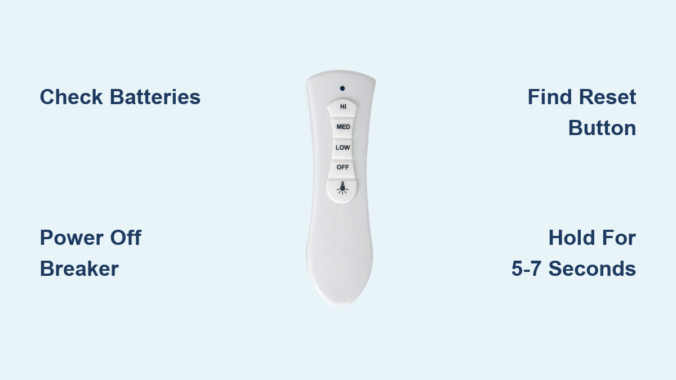
On newer Lucci remotes, the reset button often appears as a small pinhole beneath the speed control buttons, requiring a paperclip to press. Look for tiny text reading “RESET” or a circular arrow symbol nearby. Some models feature a recessed button between the light and fan controls that requires firm pressure to activate.

Examine the Battery Compartment

Remove the battery cover and inspect the interior surface. Many Lucci remotes position the reset button on the plastic housing inside the compartment, often labeled “PAIR” with a circular arrow icon. This location prevents accidental activation while allowing easy access when needed.

Check Along the Edges

Run your finger along all edges of the remote while feeling for a small indentation. Some Lucci models hide the reset button along the top edge, accessible only when holding the remote sideways. This design prevents accidental presses during normal use while keeping the button available when required.

Complete the Reset Procedure

Executing the reset correctly makes all the difference between success and frustration.

Press and Hold Firmly

Use a paperclip or toothpick to press the reset button fully and hold it continuously for 5-7 seconds. Many users release too soon—wait until you see or hear confirmation before letting go. Maintain steady pressure; wiggling the tool can break contact prematurely.

Watch and Listen for Confirmation

Successful pairing triggers one of three responses: the fan light will flash rapidly three times, you’ll hear three distinct beeps from the receiver, or the fan blades will rotate slowly for 10-15 seconds. These signals confirm the reset process has completed successfully. If none occur after 10 seconds, repeat the procedure.

Release and Test

After receiving confirmation, release the reset button and wait 15 seconds for the system to stabilize. Begin testing with the fan speed controls before moving to lighting functions. Test each speed setting individually to ensure smooth transitions between levels.

Troubleshoot Persistent Issues

wifi router interference signal

When standard reset procedures fail, these advanced troubleshooting techniques often succeed.

Address Signal Interference

Move potential interference sources at least 6 feet from the fan receiver—including Wi-Fi routers, cordless phone bases, and Bluetooth speakers. Test the remote during off-peak internet usage hours when Wi-Fi congestion is minimal. For severe interference issues, consider installing a signal repeater between the remote and fan.

Consider Model-Specific Variations

Older Lucci models may require holding the reset button until the fan light flashes steadily rather than in bursts. Some models need additional steps: press the reset button, then immediately press the “light on” button three times. Consult YouTube for model-specific video demonstrations if written instructions fail.

Evaluate the Receiver Unit

If multiple remotes fail with the same fan while the wall switch operates correctly, the receiver module likely needs replacement. Access the receiver by removing the fan’s canopy cover—look for a small black box with wire connections. Replacement receivers cost $15-25 online and install in minutes with basic electrical knowledge.

Prevent Future Remote Issues

Implement these proactive measures to minimize future reset needs.

Replace batteries every spring and fall as part of your seasonal home maintenance routine, rather than waiting for complete failure. Store your remote in a designated spot away from direct sunlight and moisture sources—bathrooms and kitchens create humidity that damages electronics over time. During thunderstorms, turn off the fan at the wall switch to protect against power surges that disrupt pairing.

Consider installing a wall-mounted remote holder near your favorite seating area to prevent accidental drops that damage internal components. If you have children, enable any child-lock features your Lucci model offers to prevent accidental button presses that drain batteries or disrupt pairing.


When your Lucci ceiling fan remote stops responding, remember that resetting typically solves the problem in under ten minutes with no special tools required. By methodically checking batteries first, properly disconnecting power, locating the reset button, and verifying functionality afterward, you’ll maintain convenient control of your ceiling fan year-round. If standard procedures fail after three attempts, consult Lucci’s customer support with your model number ready—they often provide model-specific video guides that clarify confusing steps. With these techniques in your home maintenance toolkit, you’ll never suffer through another uncomfortable night waiting for professional help when simple remote reset procedures could have restored your comfort immediately.

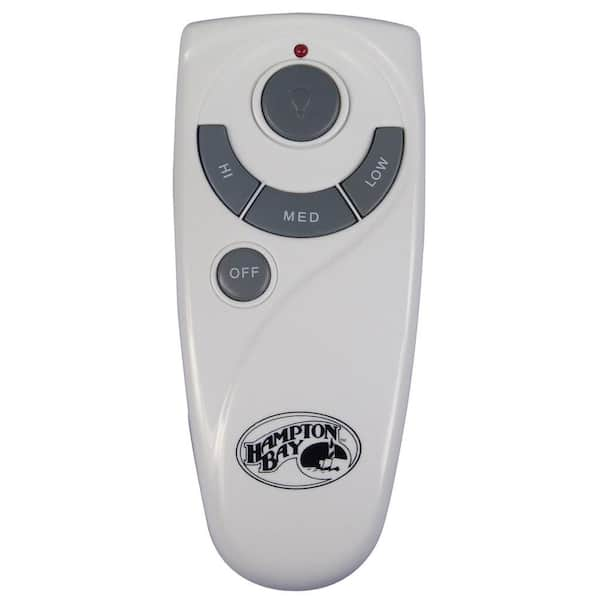
How to Reset Hampton Bay Ceiling Fan Remote


You’re standing in your living room, pressing every button on your Hampton Bay ceiling fan remote, but nothing happens. The fan won’t turn on, the light won’t respond, and you’re left wondering why this convenient wireless control suddenly stopped working. This frustrating scenario affects thousands of homeowners each year, but the good news is that most Hampton Bay ceiling fan remote issues can be resolved in under fifteen minutes with the right approach. Learning how to reset your Hampton Bay ceiling fan remote correctly saves you from unnecessary service calls and restores convenient control over your home’s comfort system.

Remote control problems typically stem from dead batteries, lost pairing after power interruptions, electrical interference, or a receiver that needs re-synchronization. Hampton Bay fans use radio frequency technology that allows wireless communication between your remote and the hidden receiver unit inside the fan housing. When this connection breaks down, your remote becomes useless. The reset process varies slightly depending on your fan’s age and model, but the core principles remain consistent across most Hampton Bay installations. This guide provides specific, actionable steps to diagnose and fix your remote control issues without professional help.

Why Your Hampton Bay Remote Suddenly Stops Working

Hampton Bay ceiling fan remotes fail for several specific reasons, and identifying the cause is the first step to fixing the problem. Understanding these common failure points helps you efficiently troubleshoot and apply the correct reset procedure for your situation.

Dead Batteries: The Most Common Culprit

Over sixty percent of all remote control failures result from dead or improperly installed batteries. Even batteries that appear functional may have insufficient charge to transmit a strong signal to the receiver. To properly inspect your remote’s batteries, remove the battery cover and examine them for corrosion, leakage, swelling, or discoloration. These signs indicate battery failure and require immediate replacement. When installing new batteries, always use high-quality alkaline batteries rather than cheaper alternatives, as they provide more consistent voltage and are less likely to leak. Ensure correct polarity alignment by matching the positive (+) and negative (-) indicators inside the compartment with the corresponding markings on the batteries.

Lost Pairing After Power Outages

Power interruptions frequently cause Hampton Bay remotes to lose their pairing with the fan’s receiver. When electricity returns after an outage, the receiver may reset to factory settings while the remote retains its previous programming, breaking the communication link. This situation is particularly common during storm-related power fluctuations or when using the fan’s wall switch to cut power. The receiver essentially “forgets” which remote controls it, requiring you to re-establish the connection through the pairing process. If your fan worked before a recent power outage but now ignores your remote commands, lost pairing is almost certainly the issue.

Signal Interference from Household Electronics

Modern homes contain numerous devices that can interfere with your Hampton Bay remote’s radio frequency signals. Wi-Fi routers operating on 2.4 GHz networks, microwave ovens, cordless phones, baby monitors, and Bluetooth devices all emit signals that can disrupt communication between your remote and fan. Physical obstacles like thick walls with metal studs, metal ductwork, or large appliances positioned between you and the fan can also weaken or block signals. If your remote works inconsistently—sometimes responding and sometimes not—interference is likely the cause. Try operating the remote from different positions and angles to determine if specific locations provide better signal reception.

Immediate Fixes for Non-Responsive Remotes

Before attempting more complex procedures, try these quick solutions that resolve most Hampton Bay remote issues with minimal effort.

Battery Removal Reset Technique

This simple method addresses remotes that have become “stuck” in an incorrect operational state. Open the battery compartment and remove both AAA batteries completely. With the batteries out, press and hold down every button on the remote—including power, fan speed, and light control buttons—for approximately thirty seconds. This discharges residual electrical charge stored in the remote’s capacitors and clears its temporary memory. After the discharge period, insert fresh batteries with correct polarity and test the remote immediately. This technique resolves approximately sixty percent of all remote control issues and should always be your first troubleshooting step.

Confirming Remote Functionality with Your Phone Camera

Many smartphone cameras can detect infrared signals invisible to the naked eye. Point your remote at your phone camera and press any button—if you see a faint light flashing through your phone screen, your remote is transmitting signals but the receiver isn’t responding. This test confirms whether the problem lies with the remote or the fan’s receiver unit, saving you time on unnecessary troubleshooting steps. If no light appears during this test, the remote itself is likely faulty and may need replacement.

Power Cycle Your Ceiling Fan System

When simple battery replacements don’t restore remote functionality, power cycling the entire fan system often resolves stubborn communication issues.

Circuit Breaker Reset Procedure

Locate the circuit breaker controlling power to your ceiling fan circuit and switch it to the OFF position. Leave it off for a minimum of thirty seconds—this duration allows the fan’s internal receiver to fully discharge and reset its programming memory. Some persistent cases may require waiting up to one full minute, especially after power surges. After the waiting period, switch the breaker back to ON and wait ten to fifteen seconds for the receiver to initialize before testing the remote. This step is crucial after power outages, as it clears any error states in the receiver unit that prevent proper communication with your remote.

Re-Pairing Remote with Fan Receiver

Hampton Bay ceiling fan receiver learn button location

If power cycling doesn’t restore functionality, you’ll need to re-establish the communication link between your remote and the fan’s receiver unit.

Locating the Receiver’s “Learn” Button

Safety first: turn off power at the circuit breaker before accessing the receiver. Using a stable ladder, remove the canopy cover (typically secured by screws on the side of the mounting bracket) to expose the fan’s internal components. The receiver unit is usually mounted on the motor housing and contains a small “Learn” or “Pair” button, often recessed and requiring a paperclip to press. This button may be labeled with an antenna icon or the word “SET.”

Step-by-Step Pairing Instructions

With power restored at the circuit breaker, press and hold the “Learn” button on the receiver for three to five seconds until the indicator light begins blinking. Within thirty seconds of the light blinking, press and hold any button on your remote—the “On” button works well. Continue holding until the fan responds (light blinks or blades move slightly), then release and test all functions. Successful pairing is confirmed when the fan responds to multiple remote commands—if it doesn’t work, repeat the process ensuring you complete each step within the required time frames.

Diagnosing Persistent Remote Control Issues

Hampton Bay ceiling fan receiver damage inspection

When basic resets fail, systematic troubleshooting identifies the root cause of your remote control problems.

Checking for Electronic Interference

Temporarily turn off other wireless devices in the vicinity—Wi-Fi routers, microwaves, cordless phones—to see if remote functionality improves. If the remote works when these devices are off, you’ve identified the source of interference. For permanent solutions, consider relocating interfering devices or using a remote signal booster designed for ceiling fans. Test your remote from various positions with clear line of sight to the fan, as physical obstructions often cause inconsistent performance.

Inspecting Receiver Unit for Damage

With power off at the breaker, carefully examine the receiver for burn marks, discoloration, melted plastic, or swollen components. These indicate electrical damage requiring component replacement. Verify all wiring connections are secure with no bare wire exposed beyond wire nuts. Check if the receiver has a visible antenna wire—this should be fully extended and undamaged, as a compromised antenna significantly reduces signal reception.

Preventing Future Remote Control Failures

Hampton Bay ceiling fan remote battery replacement schedule

Proactive maintenance prevents most remote issues before they disrupt your comfort.

Regular Battery Maintenance Schedule

Establish a battery inspection routine, checking every six months. When replacing batteries, clean corroded contacts with a cotton swab dipped in white vinegar, followed by thorough drying. Always use high-quality alkaline batteries and avoid mixing old and new batteries in the same remote. Replace batteries annually as preventive maintenance, even if they appear functional—weak batteries can cause intermittent issues that are difficult to diagnose.

Optimizing Signal Range and Environment

Most Hampton Bay remotes work reliably within twenty to thirty feet in standard homes, but actual range varies based on building materials. For fans in large rooms or high ceilings, ensure clear line of sight when operating the remote. Keep the remote’s signal path free from large metal objects, and consider a signal booster if structural features permanently limit range. In humid environments like kitchens and bathrooms, verify your fan is rated for damp locations, as moisture exposure can damage receiver components over time.

By following these specific reset procedures and maintenance practices, you can resolve most Hampton Bay ceiling fan remote issues without professional assistance. Remember that battery replacement and power cycling solve the majority of problems, while re-pairing addresses communication breakdowns after power interruptions. For persistent issues, systematic troubleshooting identifies whether the remote, receiver, or environmental factors require attention. With proper care and understanding of your fan’s control system, you’ll maintain reliable wireless operation for years to come.

How to Reset Ceiling Fan Remote Control


Your ceiling fan remote suddenly stops working right when you need it most—during a heatwave or cold snap. One minute you’re adjusting the speed for comfort, the next you’re staring at unresponsive buttons while the fan either won’t turn on or keeps running at full blast. Before you call an electrician or replace your entire fan system, understand that most remote control issues stem from simple synchronization problems that you can resolve yourself in under fifteen minutes with basic tools you likely already own.

Resetting a ceiling fan remote control re-establishes the communication link between the transmitter in your remote and the receiver installed in your fan’s motor housing. This process clears electronic glitches, power fluctuation effects, and minor interference that disrupt normal operation. The vast majority of ceiling fan remote problems respond to basic reset procedures without requiring replacement parts or professional service.

This guide covers every reset method from simple battery checks through dip switch synchronization, helping you restore your ceiling fan’s remote functionality regardless of your technical experience level.

Why Your Ceiling Fan Remote Suddenly Stopped Working

Ceiling fan remote disconnections happen for specific, predictable reasons rather than random failures. Recognizing these common causes helps you diagnose issues faster and prevents future problems before they occur.

Electronic glitches develop naturally within remote circuitry over time, similar to how computers experience software hiccups. The constant flow of electrical signals eventually causes temporary communication breakdowns between the remote transmitter and fan receiver. These glitches typically manifest as unresponsive buttons, random speed changes, or complete loss of fan control despite fresh batteries.

Power fluctuations represent another major cause of disconnection. When your home experiences electrical spikes, brownouts, or brief outages, the fan’s receiver may lose its programmed connection to the remote. Even routine events like a neighbor’s power outage or a brief circuit breaker trip can desynchronize the system. Battery changes also frequently trigger disconnection because removing and replacing batteries can reset the remote’s internal electronics or accidentally shift dip switch settings.

Signal interference from other household devices operating on similar radio frequencies can disrupt communication between remote and fan. Wi-Fi routers, cordless phones, baby monitors, and even certain LED lighting systems sometimes create enough interference to prevent reliable remote operation. This interference causes intermittent functionality where the remote works sometimes but not others.

Immediate Checks Before Resetting Your Remote

Before executing a full reset procedure, perform these simple preliminary checks that resolve many remote issues without requiring technical knowledge or tools. These initial diagnostic steps take only minutes and eliminate common causes of malfunction.

Verify Battery Functionality with Precision

Battery-related problems account for more remote control issues than any other single cause. Even batteries that appear functional may lack sufficient charge to transmit a strong enough signal for the receiver to detect. Begin by opening the battery compartment on the back of the remote and examining the current batteries.

Remove the batteries and inspect the metal contacts inside the compartment. Look for corrosion, dirt, or debris that might impede electrical connection. Clean contacts with a dry cloth or small brush if necessary. Insert fresh batteries, ensuring correct polarity alignment with positive and negative indicators. Many remotes include a small indicator light that illuminates when buttons are pressed; if this light fails to appear with fresh batteries, the remote itself may require further diagnosis.

Confirm Operating Range and Obstruction Issues

Ceiling fan remotes typically operate within 20 to 30 feet of the fan, but physical barriers reduce effective range significantly. Walls, large furniture, and metal objects between the remote and fan attenuate radio frequency signals. Test the remote from multiple positions in the room, particularly standing directly beneath the fan, to determine whether range or obstruction causes the problem.

Building materials like metal studs, foil-backed insulation, or concrete walls dramatically reduce signal penetration. If your remote works when you stand closer to the fan but fails from across the room, range limitations or structural barriers likely contribute to the issue. This simple test prevents unnecessary reset procedures when repositioning or removing obstacles would solve the problem.

Execute the Standard Reset Procedure Step-by-Step

ceiling fan remote reset button location

The standard reset procedure follows a consistent pattern across most ceiling fan remote systems, though manufacturers may include slight variations in timing or button sequences. Following these steps carefully re-establishes communication between your remote and fan receiver.

First, turn off power to the ceiling fan at the circuit breaker or wall switch. This ensures a clean power cycle and prevents electrical issues during the reset process. Wait approximately one minute before restoring power, allowing the fan’s internal systems to fully discharge and reset. This brief waiting period is essential for a successful reset.

Once power is restored, locate the reset, pair, or sync button on your remote control. This button typically appears:

  • On the back of the remote
  • Inside the battery compartment beneath the batteries
  • In a small recessed area requiring a paperclip to access

Press and hold the reset button continuously for 5 to 10 seconds, though exact duration varies by manufacturer. During this holding period, watch for feedback such as:

  • The remote’s indicator light flashing
  • A beep sound from the fan’s receiver
  • Visible movement of the fan blades

This feedback confirms the remote has re-established connection and should respond to commands. If your remote lacks a dedicated reset button, consult your user manual for model-specific button combinations that trigger the pairing process.

Power Cycle the Fan System When Remote Won’t Respond

Power cycling offers an alternative or complementary reset approach that targets the fan’s receiver rather than the remote itself. This method proves particularly effective when the remote appears functional but the fan fails to respond to commands.

To power cycle the system:

  1. Turn off the ceiling fan using the wall switch or circuit breaker supplying power
  2. Allow the fan to remain without power for at least 30 seconds (up to one minute is ideal)
  3. Restore power by turning the circuit breaker back on
  4. Turn the fan back on using the wall switch or original pull chain
  5. Test the remote immediately to verify normal operation

The power cycle effectively performs a hard reset on the fan’s receiver, eliminating many common communication issues. This process takes less than two minutes but often resolves persistent connection problems that standard reset procedures cannot fix.

Match Dip Switch Frequencies on Older Fan Models

ceiling fan dip switch settings diagram

Older ceiling fan models and some current manufacturers use dip switch systems rather than electronic pairing for establishing remote communication. Dip switches are small sliding buttons, typically four in number, that create unique frequency combinations. When dip switch settings on the remote and fan receiver don’t match, communication fails completely.

Access and Configure Receiver Dip Switches

Turn off power to the fan at the circuit breaker before accessing the receiver for safety. Position a sturdy step ladder beneath the fan and use an appropriate screwdriver to detach the canopy (the dome-shaped cover). Carefully lower the canopy to expose the receiver—a small rectangular module with wires connecting to the fan’s electrical system.

The receiver’s dip switches appear as four small sliding buttons. Use a small flathead screwdriver to slide the buttons to your desired frequency combination. Record the specific pattern you choose for future reference. Once configured, secure the receiver back into position, reattach the canopy, and restore power.

Configure Remote Dip Switches to Match

After setting the receiver’s dip switches, configure the remote to match the identical frequency combination. Open the battery compartment on the remote’s back and remove the batteries. Most remotes include a small panel covering the dip switches.

Remove this cover to expose the dip switches. Slide each switch to match exactly the configuration set on the fan’s receiver. Even a single switch in the wrong position prevents communication between remote and fan. After configuring the switches, reassemble the remote, insert fresh batteries correctly, and test immediately.

Install a Universal Remote When Original Is Lost or Damaged

When the original remote is lost, damaged, or unavailable, a universal ceiling fan remote provides an effective replacement solution. Universal remotes work with most ceiling fan models and include dip switch functionality similar to original equipment remotes.

Select a universal remote compatible with your specific fan model by checking the packaging or manufacturer’s documentation. Begin installation by turning off power to the ceiling fan at the circuit breaker. Access the fan’s receiver inside the canopy and install the wireless receiver according to the manufacturer’s instructions.

Configure the receiver’s dip switches to a desired frequency pattern, then reassemble the canopy and restore power. On the universal remote, set the dip switches to match the receiver’s configuration, install fresh batteries, and pair the remote to the fan by pressing the startup or pairing buttons according to the manufacturer’s instructions.

Troubleshoot Electronic Interference Causing Intermittent Operation

2.4 GHz wifi interference diagram

Electronic interference from other devices operating on similar frequencies disrupts communication between ceiling fan remotes and receivers. Common interference sources include Wi-Fi routers on 2.4 GHz frequencies, cordless phones, baby monitors, and wireless LED lighting controls.

If your remote works intermittently or only when certain devices are turned off, interference likely causes the problem. Diagnose interference issues by identifying recently added electronic devices in your home. Temporarily turn off potential interference sources to determine if remote functionality improves.

In some cases, changing the dip switch frequency on both remote and receiver to a less commonly used configuration reduces interference from neighboring devices. For homes with extensive electronic interference, a ceiling fan remote operating on a less crowded frequency band may provide more reliable operation.

Extend Your Remote’s Lifespan with Simple Maintenance

Proper maintenance of ceiling fan remote controls extends functional lifespan and reduces synchronization issue frequency. Simple care practices prevent many common problems before they develop.

Keep the battery compartment clean and free of dust or debris that causes contact issues. Replace batteries proactively every 12 to 18 months rather than waiting for complete failure. Store remotes away from direct sunlight, excessive heat, and moisture that damages internal electronic components.

Perform periodic functionality verification, particularly at seasonal changes when ceiling fan use increases. Test all buttons and verify fan response to each command catches developing problems early. If buttons become sticky or unresponsive, clean or replace the remote before complete failure occurs.

By following these maintenance practices, you minimize reset occurrences and ensure reliable ceiling fan remote control throughout the year. Most remote issues can be resolved with basic troubleshooting—saving you time, money, and the frustration of dealing with an uncooperative fan when you need it most.

How to Choose Ceiling Fan Size for Your Room


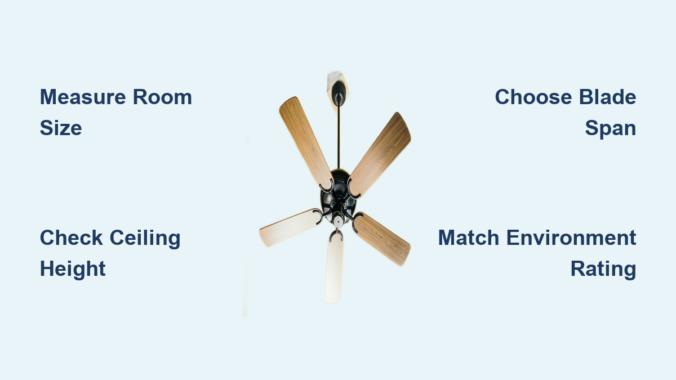
Choosing the right ceiling fan size transforms your space from uncomfortably stagnant to perfectly cooled, yet most homeowners make critical sizing mistakes that lead to poor airflow or overwhelming visual impact. Installing a fan too small for your room fails to circulate air effectively, while an oversized unit creates uncomfortable drafts even on low settings and visually dominates your space. The good news is that selecting the perfect ceiling fan follows straightforward principles anyone can master—no technical expertise required. Understanding how room dimensions, ceiling height, and mounting options work together ensures optimal airflow, energy efficiency, and aesthetic harmony for years to come.
This guide cuts through the confusion with actionable steps to determine exactly what size ceiling fan you need for any room. You’ll learn precise measurement techniques, avoid common sizing errors that compromise performance, and discover specialized considerations for vaulted ceilings, outdoor spaces, and oddly shaped rooms. Whether you’re outfitting a cozy bedroom, open-concept living area, or covered patio, these proven methods will help you select a fan that delivers maximum comfort without wasting money on the wrong size.

Calculate Your Exact Room Square Footage First

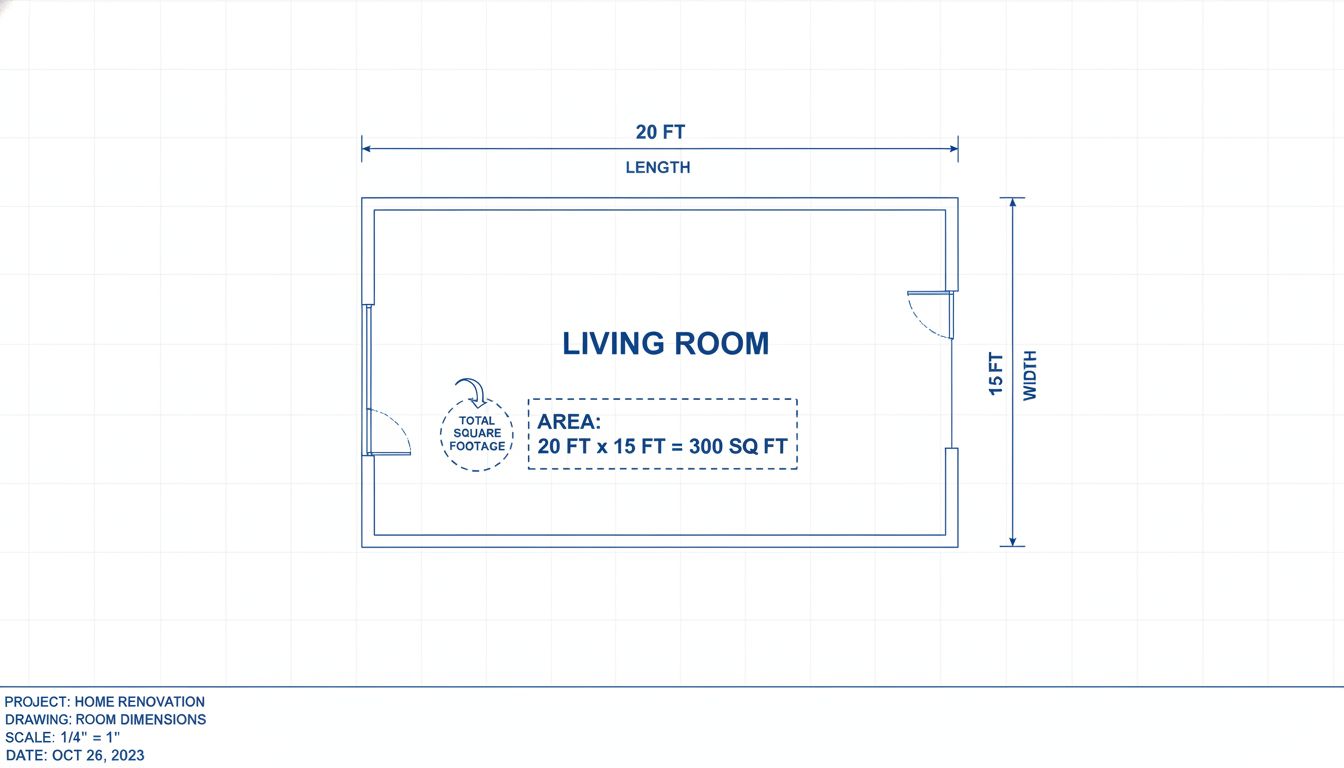
room square footage calculation diagram

Before browsing fan options, you need precise measurements of your space—this is the foundation of proper ceiling fan sizing. Larger rooms require fans with longer blade spans to circulate air effectively throughout the entire area, while smaller spaces perform best with compact models. To measure correctly, multiply your room’s length by width to determine total square footage. For rectangular rooms, this calculation is straightforward—simply measure each dimension and multiply them together.

Irregularly shaped rooms require breaking the space into smaller rectangles, calculating each section’s square footage, then adding them for a total. This number becomes your primary reference for fan selection, though ceiling height and room shape will also influence your final decision. Never guess your room size—taking accurate measurements prevents the most common sizing mistake that leads to inadequate airflow or overpowering drafts.

Why Square Footage Determines Fan Performance

Your room’s square footage directly impacts how much air movement you need for effective cooling. A fan too small for your space simply cannot move enough air to create a noticeable cooling effect, forcing you to run it constantly on high speed while still feeling uncomfortable. Conversely, an oversized fan in a small room creates uncomfortable wind tunnels even on its lowest setting and visually overwhelms your space.

The American Lighting Association confirms rooms up to 75 square feet require 29-36 inch fans, spaces between 76-144 square feet need 36-42 inch models, and areas between 144-225 square feet perform best with 44 inch fans. These industry standards exist because airflow requirements scale directly with room size—getting this calculation right ensures your fan operates efficiently within its designed capacity.

Small Room Fan Sizes (Under 100 Square Feet)

Rooms measuring 100 square feet or less—including home offices, laundry rooms, breakfast nooks, large bathrooms, and mudrooms—work optimally with small ceiling fans ranging from 30 to 48 inches in blade span. These compact fans provide adequate airflow without overwhelming the space visually or creating uncomfortable drafts.

Selecting the Perfect Size for Tiny Spaces

For rooms up to 75 square feet like small bathrooms, walk-in closets, or compact home offices, fans in the 29-36 inch range deliver sufficient circulation without dominating your ceiling. Spaces measuring approximately 8×10 feet (80 square feet) perform well with 29-42 inch fans, while rooms up to 10×10 feet (100 square feet) benefit from 42-48 inch models. Hallways and narrow spaces less than 5×10 feet function adequately with fans smaller than 29 inches, though these specialized sizes may require searching specialty retailers.

Pro Tip: In small bathrooms, always choose a damp-rated fan to withstand humidity exposure—standard indoor fans will rust and fail prematurely in these environments.

Medium Room Fan Sizes (100-400 Square Feet)

Rooms up to 400 square feet—including living rooms, bedrooms, kitchens, and covered patios—work best with medium ceiling fans ranging from 48 to 54 inches in blade span. This size represents the most popular category for household installations, with the 52-inch model being North America’s bestselling residential fan.

Matching Fan Size to Room Dimensions

A 12×12 foot room (144 square feet) specifically requires a fan between 36-50 inches for proper air circulation. Rooms up to 10×20 feet accommodate 52-inch fans effectively, making this size ideal for rectangular living spaces and open-concept divisions where airflow must reach multiple zones. Lowe’s sizing guidelines confirm small rooms up to 225 square feet perform optimally with fans up to 51 inches, while medium rooms between 225-400 square feet require 52-54 inch models.

Common Mistake: Don’t assume the popular 52-inch size fits all medium rooms—rooms at the lower end of this range (100-200 sq ft) often perform better with 48-50 inch fans that provide adequate airflow without creating uncomfortable drafts.

Large Room Fan Sizes (400+ Square Feet)

Rooms exceeding 400 square feet—including open-concept living areas, great rooms, and lofts—require large ceiling fans measuring 56 inches or larger in blade span. These high-capacity units move substantially more air than smaller fans, essential for maintaining comfort in expansive spaces where smaller fans fail to reach all corners.

Oversized Rooms Demand Oversized Fans

Great rooms over 400 square feet need fans between 60-71 inches according to Lowe’s recommendations, as these larger blade spans generate the airflow volume necessary for extensive floor areas. For rooms up to 18×20 feet, fans measuring 50 inches and larger ensure proper coverage, though spaces approaching 400 square feet typically require 60+ inch models for consistent comfort. Commercial spaces demand even larger configurations, with fans of 72 inches or larger moving substantial air volumes while maintaining quiet operation.

Warning: Never install multiple smaller fans in a large room as a “solution” to poor airflow—this creates competing air currents that reduce effectiveness and increase noise. One properly sized large fan always outperforms multiple small units.

Ceiling Height Determines Mounting Configuration

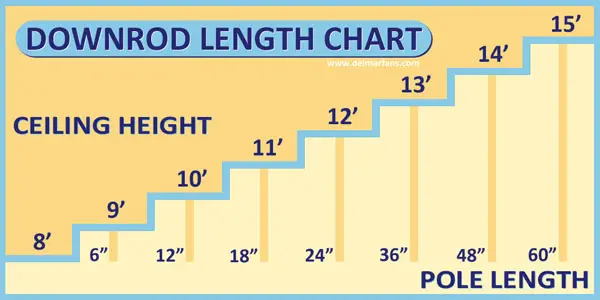
ceiling fan downrod height chart

Ceiling height critically impacts both fan size selection and mounting type—yet this factor gets overlooked in most sizing guides. The ideal fan height from floor to blades measures approximately 8 feet for optimal air circulation and safe clearance. Standard 8-foot ceilings require flush-mount or low-profile designs that install directly against the ceiling, while rooms with ceilings higher than 9 feet need longer downrods to position the fan correctly.

Calculate Downrod Length for Tall Ceilings

For rooms with high ceilings, use this simple formula: Downrod Length = Ceiling Height (in feet) minus 9 feet. For example, a room with a 12-foot ceiling requires a 3-foot downrod to position the fan at the recommended 9-foot height. Standard downrods included with most fans range from 3-5 inches—insufficient for ceilings over 9 feet—and you’ll need to purchase longer downrods separately.

Visual Cue: When correctly installed, your fan blades should hang 8-9 feet above the floor with at least 7 feet of clearance below and 18 inches from any walls. If your blades are closer than 7 feet to the floor, you’ve selected the wrong mounting configuration.

Flush-Mount vs Standard Mount Systems

Standard ceiling fans with downrod mounts work best for ceilings 9 feet or higher, as the included downrod ensures proper hanging height of 8-9 feet from the floor. These fans require approximately 12-14 inches of space between blades and ceiling for proper operation and motor cooling.

When to Choose Low-Profile Installation

Flush-mount or low-profile fans are engineered specifically for rooms with 8-foot ceilings where standard downrods would position blades too close to the floor. These install directly against the ceiling with minimal gap, requiring only 6-10 inches of clearance space. They’re ideal for bedrooms, home offices, and other spaces where ceiling height limitations might otherwise prevent fan installation.

Pro Tip: In rooms with 8-9 foot ceilings, always measure from floor to ceiling before selecting your mount type—many “standard” 8-foot ceilings actually measure 8’2″ or higher, making standard mounts viable without sacrificing clearance.

Sloped and Vaulted Ceiling Solutions

For ceilings exceeding 34 degrees of slope, you must use a sloped ceiling adapter kit to replace the standard canopy and allow the fan to hang level regardless of mounting angle. Most manufacturers offer adapters for slopes up to 48 degrees, accommodating nearly all residential vaulted configurations.

Proper Installation for Angled Ceilings

When installing fans on vaulted ceilings, ensure compatibility between your specific fan model and the adapter—many universal claims prove inaccurate upon installation. Some premium fans build slope compatibility into their standard mounting systems, eliminating separate adapter purchases. For ceilings over 10 feet in vaulted applications, calculate downrod length using the same ceiling height minus 9 feet formula, but verify blade clearance from the highest ceiling point.

Warning: Never install a standard mount fan on a sloped ceiling without an adapter—this creates dangerous imbalance that leads to wobbling, excessive noise, and potential motor failure.

Indoor vs Outdoor Installation Requirements

indoor vs outdoor ceiling fan ratings comparison

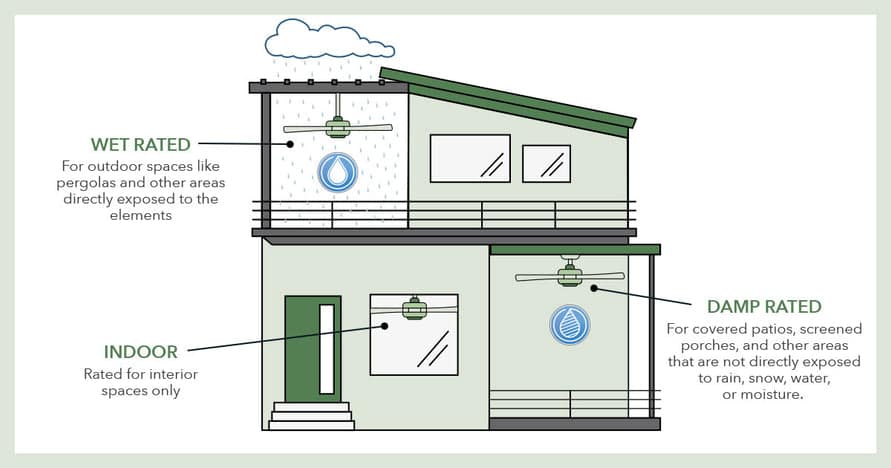
Selecting the right environmental rating prevents premature failure and safety hazards. Indoor (dry-rated) fans lack protective features for humidity exposure, making them unsuitable for bathrooms, laundry rooms, or outdoor use.

Choosing Weather-Appropriate Ratings

Damp-rated fans withstand moisture exposure in covered outdoor spaces like patios and porches, plus humid indoor rooms like bathrooms. They feature rust-resistant hardware and moisture-resistant components throughout. Wet-rated fans handle direct exposure to elements like heavy rain and snow, featuring moisture-resistant motors and all-weather blades for open-air installations.

Pro Tip: Coastal properties need specialized corrosion-resistant designs—standard outdoor fans degrade rapidly when exposed to salt air, while WeatherMax-style fans resist both corrosion and salt air degradation.

Understand CFM for True Airflow Performance

ceiling fan CFM explained infographic

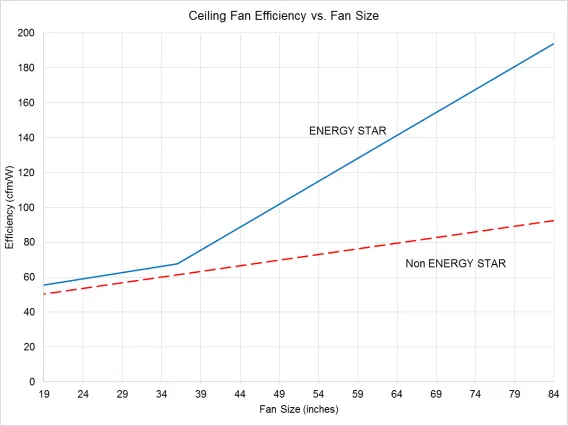
CFM (Cubic Feet per Minute) measures how much air a fan moves in one minute—this rating matters more than blade size alone for actual cooling performance. More efficient fans produce higher CFM while consuming less energy, with ENERGY STAR-certified models up to 60% more efficient than conventional fans.

Maximize Year-Round Efficiency

Set fans to rotate counterclockwise in summer for downward cooling airflow, allowing you to raise thermostat temperatures while maintaining comfort. In winter, run clockwise at slow speed to gently redistribute warm air without creating uncomfortable drafts. Properly sized fans make rooms feel 6-8 degrees cooler in summer, significantly reducing air conditioning costs.

Pro Tip: When comparing fans, always check CFM ratings within the same size category—two 52-inch fans can have dramatically different airflow performance based on blade pitch and motor design.

Quick Reference Size Chart

Room Dimensions Square Footage Recommended Fan Size Ideal Applications
Up to 5′ x 10′ Less than 50 sq ft Less than 29″ Hallways, Walk-in Closets
Up to 8′ x 10′ Up to 80 sq ft 29-42″ Breakfast Nooks, Large Bathrooms
Up to 10′ x 10′ Up to 100 sq ft 42-48″ Small Bedrooms, Offices
Up to 12′ x 12′ Up to 144 sq ft 44-50″ Medium Bedrooms, Home Offices
Up to 10′ x 20′ Up to 200 sq ft 50-52″ Master Bedrooms, Living Rooms
Up to 18′ x 20′ Up to 360 sq ft 50-54″ Large Living Spaces, Open Concepts
Up to 20′ x 20′ Up to 400 sq ft 56-59″ Great Rooms, Large Open Concepts
Over 400 sq ft Over 400 sq ft 60-71″+ Expansive Living Areas, Lofts

Avoid These Common Sizing Mistakes

Many homeowners select ceiling fans based solely on aesthetics or assume one size fits all rooms. Don’t make these critical errors that compromise performance:

  • Installing a 52-inch fan in every room regardless of size
  • Ignoring ceiling height when selecting mounting configuration
  • Using indoor fans in damp locations like bathrooms
  • Choosing fan size based on existing electrical box rather than room requirements
  • Overlooking irregular room shapes that require multiple fans

Pro Tip: Always measure your room first, then select fan size—never choose a fan you like visually and try to make it work in your space. Proper sizing ensures years of reliable comfort rather than constant frustration with inadequate airflow.

Final Selection Checklist

Follow these steps to guarantee perfect fan sizing for your specific room:
1. Calculate exact square footage using length x width
2. Measure ceiling height from floor to ceiling
3. Determine room shape and special features (vaulted, outdoor, etc.)
4. Consult the size chart for recommended blade span
5. Select appropriate mounting type based on ceiling height
6. Choose environmental rating matching installation location
7. Verify CFM rating meets your airflow expectations

By systematically evaluating these factors, you’ll select a ceiling fan that provides optimal airflow, operates efficiently, and enhances your room’s aesthetic. The investment in proper sizing pays dividends every day you enjoy your perfectly cooled, comfortable space—no more guessing games about what size ceiling fan you need for your room.

How Many Amps Does a Ceiling Fan Use?


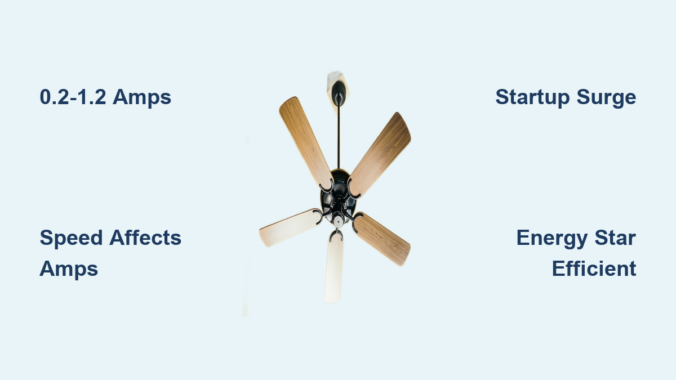
If your ceiling fan suddenly stops working or you’re planning a home renovation, knowing exactly how many amps a ceiling fan uses becomes crucial for electrical safety and efficiency. Most residential ceiling fans draw between 0.2 and 1.2 amps on standard 120V household circuits—less power than a single incandescent light bulb. This surprisingly low energy consumption makes ceiling fans one of the most efficient cooling solutions available, but the exact amperage varies significantly based on fan size, speed setting, and motor technology. Understanding these electrical requirements helps prevent circuit overloads, reduces energy bills, and ensures you select the right fan for your electrical system.

Whether you’re a homeowner installing your first ceiling fan, an electrician planning multiple installations, or simply trying to understand your energy usage, this guide delivers precise amperage information for every fan type. We’ll break down exactly how many amps different ceiling fans consume, explain the relationship between watts and amps, and provide practical calculations for your specific situation—all based on verified electrical data for North American 120V systems.

Standard Ceiling Fan Amp Draw

Most standard residential ceiling fans draw between 0.6 and 0.8 amps when operating at full speed on standard 120V circuits. This amperage corresponds to the 75-100 watt rating common among conventional three-blade fans found in living rooms and bedrooms. However, your actual amperage varies dramatically based on how you use the fan—on low speed, that same fan might draw only 0.2-0.3 amps, while high speed approaches the upper end of the range.

This speed-dependent amperage pattern follows a predictable relationship: doubling the fan speed roughly doubles the current draw. For example, a fan drawing 0.3 amps on low might use 0.6 amps on medium and 0.9 amps on high. This variability means your fan’s energy consumption changes throughout the day based on your comfort needs. Understanding these fluctuations is essential for accurate circuit planning and energy budgeting.

Small Room Fan Amperage

Compact ceiling fans designed for bathrooms, kitchens, and small bedrooms typically draw 0.2-0.6 amps during operation. A 24-inch (600mm) fan operates in the 50-80 watt range, consuming approximately 0.4-0.6 amps at 120V. These space-saving models provide adequate airflow without straining electrical circuits in smaller spaces where powerful cooling isn’t necessary.

The 35-inch (900mm) category offers greater flexibility for medium-sized rooms, with amperage ranging from 0.2-0.6 amps. Some energy-efficient models in this range draw as little as 25 watts (0.2 amps), while performance-focused designs may consume up to 76 watts (0.6 amps). When selecting a fan for limited spaces, always check the specific wattage rating rather than assuming all fans of similar size consume identical power—this small detail prevents circuit overload issues during installation.

Large Room Fan Amperage

52 inch ceiling fan amp draw chart

Fans designed for spacious living areas and open floor plans draw higher amperage to power their more robust motors. A 51-inch (1300mm) ceiling fan typically operates between 78-140 watts, drawing approximately 0.7-1.2 amps of current. This increased amperage reflects the additional power needed to effectively circulate air across larger square footage.

Interestingly, the largest residential fans (55-inch/1400mm) often demonstrate superior efficiency, operating at 60-85 watts (0.5-0.7 amps). Advanced motor designs in these units achieve impressive airflow without proportional increases in power consumption. This efficiency variation within size categories proves that blade span alone doesn’t determine amperage—always verify specific model specifications before installation.

Ceiling Fan Amperage by Type

comparison table ceiling fan types amperage watts

Different ceiling fan configurations consume varying amounts of amperage based on their design, features, and intended application. Understanding these distinctions helps you match fans to your electrical infrastructure and energy goals.

Standard Residential Fans

Conventional three-to-five blade residential ceiling fans represent the baseline standard, typically drawing 0.6-0.8 amps while consuming 75-100 watts. However, real-world usage often shows actual consumption closer to 37-50 watts (0.3-0.4 amps), as motors rarely operate at maximum capacity continuously. This discrepancy between rated and actual consumption reflects manufacturer testing conditions versus typical daily operation.

Premium models with high-efficiency motors can deliver comparable airflow at reduced amperage, while budget options may consume power at the higher end of the range. When comparing fans, prioritize energy efficiency ratings over blade count or physical size for the most accurate prediction of operating costs.

Low-Profile and Hugger Fans

Low-profile “hugger” fans mount directly to ceilings without downrods, making them ideal for rooms with limited clearance. These compact units typically draw 0.3-0.5 amps while operating at 40-60 watts. Efficient models often run at just 20-30 watts (0.17-0.25 amps), proving that space constraints don’t necessarily compromise performance.

The reduced amperage makes low-profile fans particularly suitable for older homes with limited electrical capacity or installations where multiple fans share a single circuit. For maximum efficiency in these compact designs, select models featuring brushless DC motors, which typically offer superior energy ratings compared to traditional AC motor designs.

ENERGY STAR Certified Fans

ENERGY STAR-certified ceiling fans operate at 48-52 watts while drawing approximately 0.4 amps of current—about 40% less than conventional models. Actual running energy usage often measures just 24-26 watts (0.2 amps), demonstrating significant efficiency gains through optimized motor designs and aerodynamic blade geometries.

While these fans may carry a higher purchase price, the operational savings typically provide a favorable return on investment within the first few years. For homeowners running fans extensively, annual savings range from $15-$25 per fan depending on local electricity rates. The reduced amperage also makes ENERGY STAR fans ideal for solar-powered systems or homes with limited electrical capacity.

Smart and Connected Fans

Smart ceiling fans with wireless connectivity and automated controls operate at remarkably low wattages of 28-35 watts, consuming only 0.2-0.3 amps of current. Actual energy usage during typical operation often measures just 14-17 watts (0.12-0.14 amps), thanks to intelligent motor control and variable speed capabilities.

These fans maximize efficiency through features like occupancy sensing, temperature-based auto-adjustment, and scheduling that prevent unnecessary operation. For tech-savvy homeowners, the combination of convenience and energy savings makes smart fans an increasingly popular choice for whole-home cooling solutions.

Understanding the Electrical Basics

amps volts watts electrical diagram ceiling fan

Grasping the fundamental relationship between amps, volts, and watts helps you accurately calculate how many amps your specific ceiling fan uses and why these numbers matter for your electrical system.

The Ampere Measurement

Amperes (amps) measure the quantity of electric current flowing through a circuit at any given moment. Think of amps as the volume of electricity moving through your wires—higher amperage means more current. Calculate amperage using the formula: Amps = Watts ÷ Volts. For an 80-watt fan on a 120V circuit, the calculation is 80 ÷ 120 = 0.67 amps.

Your fan’s amperage draw determines how much strain it places on your electrical circuit. Circuit breakers are rated based on amperage to prevent overheating and potential fire hazards. A fan drawing 0.5 amps adds minimal load to a 15-amp circuit, but multiple fans and other devices can cumulatively approach circuit limits.

Wattage as Power Consumption

Watts represent the rate at which your ceiling fan consumes energy—one watt equals one joule of energy per second. Higher wattage indicates greater energy consumption and directly correlates with cooling capacity. Calculate watts using: Watts = Volts × Amps. A fan drawing 0.5 amps on a 120V circuit consumes 60 watts during operation.

This understanding enables accurate calculation of both energy costs and electrical requirements. If your fan consumes 70 watts and runs continuously for 10 hours, it uses 700 watt-hours (0.7 kilowatt-hours). At $0.13 per kWh, that amounts to approximately $0.09 per day or $2.70 monthly—helping you weigh the costs of running fans versus air conditioning.

Startup Versus Running Amperage

Understanding the difference between startup and running amperage prevents circuit overload issues and ensures safe electrical planning.

Startup Surge Requirements

When a ceiling fan powers on, it requires significantly more current to overcome inertia than during continuous operation. This startup surge can be two to three times higher than the rated running amperage. A fan drawing 0.5 amps continuously might momentarily require 1.0-1.25 amps during startup. For larger fans, startup amperage can reach 6 amps or more.

The startup surge lasts only a few seconds, but must be accounted for in circuit planning. Calculate startup watts using: Startup Watts = Running Watts × 2.14. A 60-watt running fan requires approximately 128 watts during startup. While brief, these surges can trip circuit breakers when multiple fans start simultaneously after a power outage.

Implications for Circuit Planning

The startup surge phenomenon means your electrical circuit must accommodate momentary spikes well above continuous amperage draw. A 15-amp circuit can handle a fan drawing 0.8 amps continuously, but the 1.7-amp startup surge still represents a significant portion of available capacity. When planning for multiple fans, consider both running and startup requirements to prevent nuisance breaker trips.

Homes with older electrical systems may benefit from ceiling fans with soft-start motors or installing fans on different circuits to distribute startup surges. This strategic planning ensures reliable operation without electrical issues.

Tips to Reduce Ceiling Fan Energy Consumption

Strategic usage patterns and equipment selections maximize cooling comfort while minimizing energy costs and amperage draw.

Optimize Fan Operation Settings

Running ceiling fans only when rooms are occupied dramatically reduces unnecessary energy consumption. Since fans cool people rather than spaces, continuous operation in unoccupied rooms wastes electricity. Installing occupancy sensors or using programmable timers can cut energy waste by 30-50%.

Coordinate fan operation with thermostat settings for maximum efficiency. The Department of Energy recommends raising thermostat settings by approximately 4°F when using ceiling fans with air conditioning. The air movement makes occupants feel several degrees cooler, allowing higher thermostat settings without comfort loss.

Maintain Fan Efficiency

Regular maintenance keeps ceiling fans operating at designed efficiency levels. Dust accumulation on blades unbalances fan operation and reduces airflow efficiency, requiring motors to work harder and consume more current. Annual cleaning of blades and motor housing maintains optimal performance.

Periodic inspection of mounting hardware and electrical connections ensures safe operation and prevents efficiency losses from wobbling or vibration. Well-maintained fans operate more quietly, last longer, and consume less energy than neglected units—potentially reducing amperage draw by 10-15% over time.

Frequently Asked Questions About Ceiling Fan Amperage

How many ceiling fans can I put on one circuit?

A 15-amp circuit can theoretically accommodate 15-20 ceiling fans based on continuous load calculations, but practical limitations reduce this number to 2-4 fans for safe operation. Startup surge requirements, other devices on the circuit, and electrical code requirements necessitate conservative planning. For larger installations, distribute fans across multiple circuits or upgrade to 20-amp circuits.

Does fan speed affect amperage?

Fan speed directly affects amperage draw proportionally. Lower speed settings consume significantly less current—sometimes as little as one-third the amperage of full-speed operation. This relationship allows users to balance cooling effectiveness against energy consumption based on room conditions and personal preference. Variable-speed fans offer the most flexibility in managing amperage draw and energy costs.

Understanding how many amps a ceiling fan uses empowers you to make informed decisions about installations, energy consumption, and electrical safety. Whether you’re planning a single-room installation or whole-home cooling strategy, applying these principles ensures efficient and safe ceiling fan operation for years to come.

Average Ceiling Fan Wattage: How Much Power Do They Use?


Running your ceiling fan all summer only to discover a shocking electricity bill? You’re not alone. Most homeowners don’t realize that ceiling fans typically consume between 15 and 120 watts depending on size, motor type, and speed setting—with the average 48-inch residential fan drawing about 75 watts on high speed. This seemingly small energy draw adds up significantly when fans run for hours daily across multiple rooms. Understanding the exact wattage specifications of your ceiling fan empowers you to make smarter cooling decisions that slash your electricity costs without sacrificing comfort. Whether you’re shopping for a new fan, optimizing existing units, or calculating operating expenses, this guide delivers precise wattage data, cost calculations, and actionable strategies to maximize your fan’s efficiency.

48-Inch Ceiling Fan Wattage: The Residential Standard

The 48-inch ceiling fan dominates residential installations as the ideal size for average bedrooms and living rooms (144-225 square feet). Understanding its specific energy profile helps you budget accurately and optimize usage.

High-Speed Power Consumption

Your standard 48-inch ceiling fan consumes approximately 75 watts when running at maximum speed—a critical figure for calculating worst-case energy costs. This benchmark measurement applies to most AC motor fans from major manufacturers like Hunter, Hampton Bay, and Minka-Aire. If you operate this fan 8 hours daily during summer months, you’ll use about 0.6 kWh per day, translating to $3.08 monthly at the national average electricity rate of 17.1 cents per kWh.

Pro tip: Many homeowners mistakenly run fans at high speed unnecessarily. For most comfort needs, medium speed (55 watts) provides adequate airflow while reducing energy consumption by 27% compared to high speed.

Speed Setting Energy Breakdown

Ceiling fan speed settings dramatically impact power consumption, offering immediate opportunities for energy savings without sacrificing comfort:

  • Low speed: 25-35 watts (33-47% of high-speed consumption)
  • Medium speed: 40-55 watts (53-73% of high-speed consumption)
  • High speed: 55-75 watts (100% consumption)

Running your fan on low speed instead of high can cut electricity usage by up to 50% while still providing sufficient air movement for comfort. Modern fans with remote controls make these adjustments effortless, encouraging regular optimization based on actual cooling needs rather than leaving fans permanently set to maximum.

Small Ceiling Fans: 24-42 Inch Wattage Profiles

Compact ceiling fans deliver surprising efficiency for small spaces but require proper sizing to maximize energy savings in bedrooms, offices, and other confined areas.

36-Inch Fan Energy Usage

The 36-inch ceiling fan, ideal for rooms up to 144 square feet, consumes approximately 55 watts at high speed—making it 27% more efficient than the standard 48-inch model. Across speed settings, you can expect:

  • Low speed: 15-25 watts
  • Medium speed: 25-40 watts
  • High speed: 35-55 watts

Annual operating costs for this size fan running 8 hours daily range from $19 to $44 depending on your local electricity rates. The key efficiency mistake homeowners make with small fans is installing units too large for the space, forcing them to run constantly at low speeds where motors operate less efficiently.

DC vs AC Motor Wattage Comparison

DC motor ceiling fan vs AC motor ceiling fan energy efficiency comparison chart

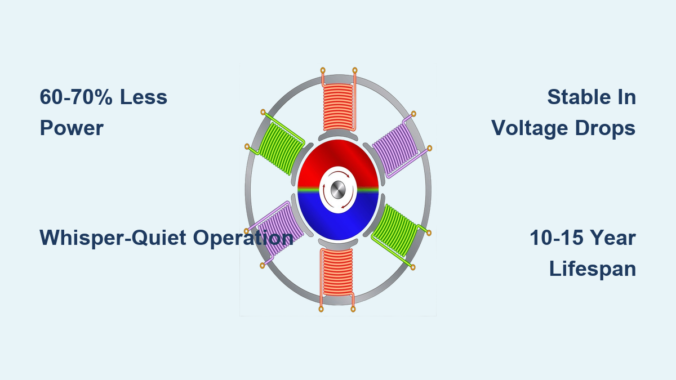
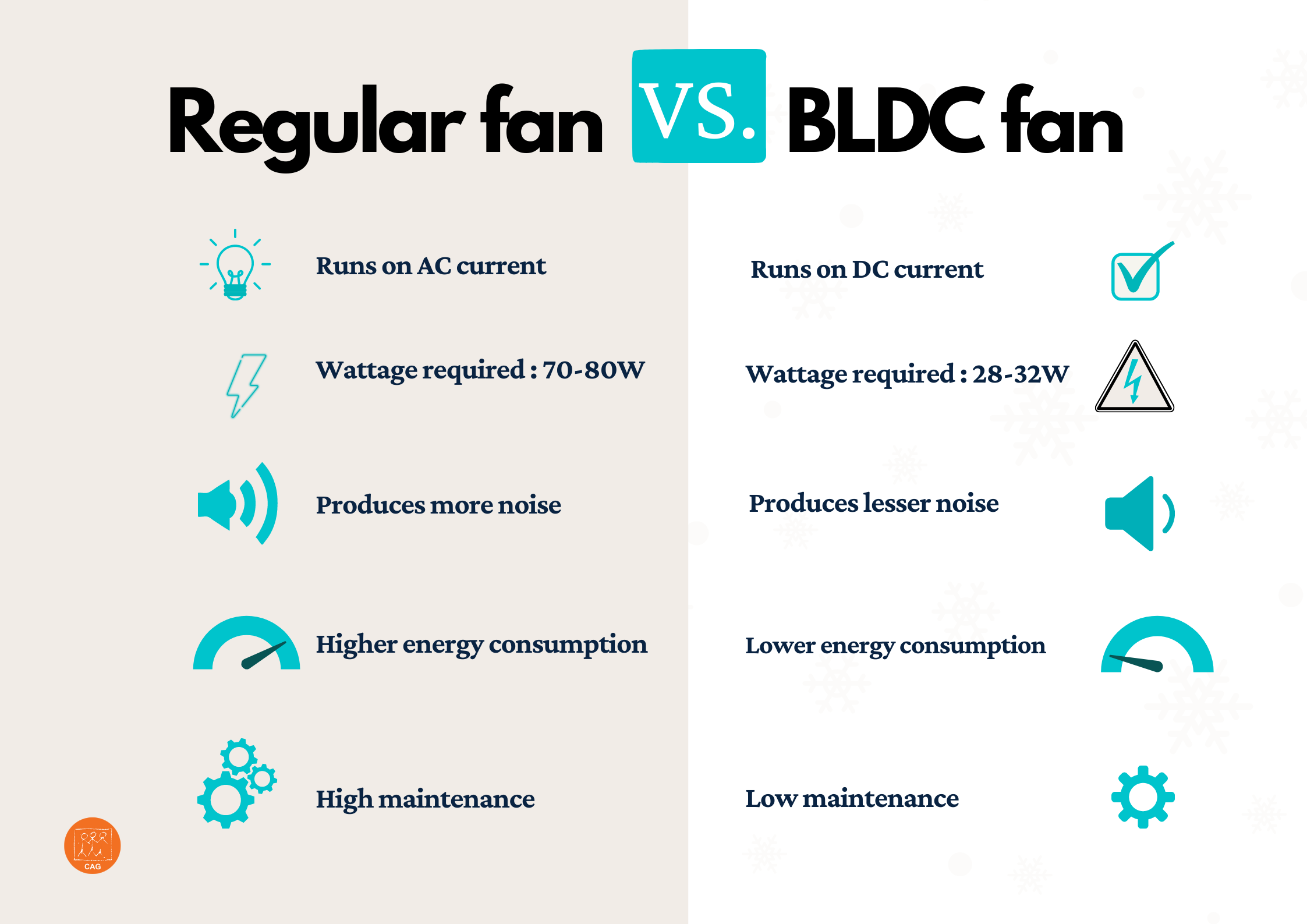
The motor type inside your ceiling fan creates the most significant difference in energy consumption—potentially cutting your cooling costs by 70% with the right technology choice.

DC Motor Fan Power Savings

Modern DC motor ceiling fans represent the pinnacle of efficiency, consuming only 15-30 watts while delivering airflow equal to traditional AC models using 50-100 watts. For a fan operating 8 hours daily:

  • Annual energy savings: Approximately 146 kWh
  • Cost savings: $20-50 per year at average electricity rates
  • Payback period: 2-4 years on the initial price premium

Critical consideration: The higher upfront cost of DC motor fans (typically 50-100% more than equivalent AC models) pays for itself through reduced electricity bills. In high-cost electricity regions like California or Hawaii, the payback period shortens significantly.

AC Motor Fan Wattage Reality

Traditional AC motor fans remain popular due to lower purchase prices but operate far less efficiently. These units typically consume:

  • Standard models: 55-90 watts at high speed
  • Budget models: Up to 100+ watts with less airflow
  • Energy Star certified: Minimum 2.1 CFM per watt efficiency

The hidden cost of AC motors becomes apparent when comparing airflow per watt. A premium DC motor fan might deliver 80 CFM per watt, while a standard AC motor provides only 50 CFM per watt—meaning you’re paying more for less cooling effect.

Calculate Your Exact Ceiling Fan Operating Costs

US electricity rates map by state kWh cost

Stop guessing about your fan’s impact on electricity bills—use these precise calculations to determine actual operating costs for your specific situation.

Regional Electricity Rate Impact

Your location dramatically affects ceiling fan operating costs. A 75-watt fan running 8 hours daily costs:

  • North Dakota (11.1¢/kWh): $2.00 monthly
  • Texas (14¢/kWh): $2.52 monthly
  • National average (17.1¢/kWh): $3.08 monthly
  • California (32.4¢/kWh): $5.83 monthly
  • Hawaii (41.1¢/kWh): $7.40 monthly

Warning: Homeowners in high-cost electricity regions often overlook how dramatically location affects efficiency calculations. A DC motor upgrade that offers minimal savings in low-rate areas may pay for itself in months where electricity costs exceed 30¢/kWh.

Lighting Integration Energy Impact

Ceiling fans with integrated lighting can double your energy consumption when lights are on:

  • LED lighting: Adds only 10-20 watts
  • CFL bulbs: Adds 15-30 watts
  • Incandescent bulbs: Adds 60-200+ watts

A common mistake is installing fans with multiple incandescent bulbs—transforming an efficient 75-watt cooling device into a 175-watt lighting fixture. Always choose LED-integrated models for illuminated fans to maintain optimal efficiency.

Energy Star Certified Fan Efficiency Advantages

Energy Star certified ceiling fans deliver up to 44% better efficiency than conventional models through strict performance standards that go beyond simple wattage measurements.

CFM per Watt Performance Standard

Energy Star requires minimum airflow efficiency of 2.1 CFM per watt, but top-performing models exceed 4.0 CFM per watt. This metric matters more than wattage alone because:

  • A 70-watt fan producing 5,600 CFM (80 CFM/watt) outperforms
  • A 50-watt fan producing 2,500 CFM (50 CFM/watt)

When shopping, prioritize CFM/watt ratings over absolute wattage to ensure you’re getting actual cooling performance per unit of electricity consumed.

Ceiling Fan vs Air Conditioner Energy Comparison

Understanding how ceiling fans stack up against air conditioning reveals why strategic fan usage can dramatically reduce cooling costs.

Direct Cost Comparison

  • Ceiling fan (75 watts): $0.10-0.13 for 8 hours
  • Window AC (500 watts): $0.69 for 8 hours
  • Central AC (3,000 watts): $4.08 for 8 hours

Running a ceiling fan all summer (90 days) costs $9-12 versus $367 for central air conditioning. Even better: using fans allows you to raise your thermostat 4-6°F, reducing AC runtime by 30-40% and amplifying these savings.

Key strategy: Run ceiling fans only when rooms are occupied—they cool people, not spaces. This simple habit prevents wasting energy on unoccupied rooms while maintaining comfort in occupied areas.

Essential Maintenance for Sustained Efficiency

Dust accumulation and mechanical wear can increase your ceiling fan’s energy consumption by 10-15% over time—easily erasing efficiency gains from careful selection.

Monthly Cleaning Protocol

  1. Turn off power at the circuit breaker
  2. Wipe blades with damp microfiber cloth (top and bottom)
  3. Clean motor housing vents with soft brush
  4. Check for blade balance issues (wobbling)

Dusty blades create imbalance that forces the motor to work harder, while clogged motor vents cause overheating and reduced efficiency. This 10-minute monthly task preserves your fan’s rated efficiency and extends its operational life.

Smart Usage Strategies for Maximum Savings

Implement these proven techniques to optimize your ceiling fan energy consumption without sacrificing comfort.

Optimal Speed Selection Chart

ceiling fan speed settings temperature chart

Room Temperature Recommended Speed Estimated Wattage Energy Savings vs High Speed
85°F+ High 75W 0%
80-85°F Medium 50W 33%
75-80°F Low 30W 60%
Below 75°F Off 0W 100%

Pro tip: Install smart ceiling fans with occupancy sensors that automatically adjust speed or turn off when rooms become unoccupied—eliminating the most common energy waste pattern.

Seasonal Rotation Direction Guide

  • Summer (cooling): Counterclockwise rotation at appropriate speed
  • Winter (heating assistance): Clockwise rotation at low speed

Incorrect seasonal settings can negate energy savings potential. Use your fan’s reverse switch to optimize airflow direction—this simple adjustment improves both cooling and heating efficiency year-round.

Final Wattage Reference Guide

For quick reference, here’s what you can expect from different ceiling fan categories:

  • Small fans (24-42″): 15-65 watts (36″ model = 55W high speed)
  • Medium fans (44-48″): 55-75 watts (48″ standard = 75W)
  • Large fans (52″+): 75-120+ watts (60″ model = 120W)
  • DC motor fans: 15-30 watts (70% less than AC equivalents)

Remember that speed selection dramatically impacts consumption—running on low speed typically uses only 40-50% of high-speed wattage. By choosing appropriately sized fans, selecting DC motor technology where cost-effective, maintaining units properly, and optimizing speed settings based on actual conditions, you can enjoy comfortable indoor temperatures while minimizing your electricity costs. The most efficient ceiling fan is the one that’s properly sized, correctly installed, well-maintained, and operated at the lowest effective speed setting for your comfort needs.

How to Calculate Ceiling Fan Wattage


Your ceiling fan’s wattage directly impacts your monthly electricity costs—yet most homeowners have no idea how much power their fans actually consume. A typical 48-inch ceiling fan running at high speed uses 75 watts, but this number can range from 15 watts for small efficient models to over 100 watts for large commercial units. Knowing precisely how to calculate your ceiling fan wattage empowers you to reduce energy waste, compare efficiency between models, and make strategic decisions that cut your cooling costs without sacrificing comfort. This guide reveals exactly how to determine your fan’s power consumption, project accurate operating costs, and implement proven strategies to minimize electricity usage.

Most people overestimate ceiling fan energy consumption, assuming these fixtures drain significant power. The reality? Even running a standard 75-watt fan continuously for 24 hours only consumes 1.8 kWh—less than many household appliances. By learning to calculate these values yourself using the methods in this guide, you’ll gain control over your home’s energy profile and discover opportunities to reduce costs through smarter fan operation and selection.

Locate Your Ceiling Fan’s Exact Wattage Rating

ceiling fan motor label location

Finding your fan’s precise wattage requires checking specific documentation sources rather than relying on estimates. The most accurate specification comes from the motor label physically attached to the fan assembly—typically visible when removing the canopy during installation or maintenance. This metal or adhesive label contains critical electrical data including voltage, amperage, and wattage consumption at various speeds. For example, you might see “75W High / 45W Medium / 25W Low” indicating power draw at different settings.

Access Motor Labels Without Professional Help

You don’t need an electrician to find your fan’s wattage rating. Turn off power at the circuit breaker, then carefully remove the canopy cover using a ladder and screwdriver. The motor label is usually positioned on the top or side of the motor housing—look for a rectangular metal plate with electrical specifications. Take a photo with your phone for reference before reassembling. If your fan has integrated lighting, ensure you’re reading the motor wattage separate from the light kit’s consumption.

Verify Wattage When Labels Are Missing or Faded

When physical labels are inaccessible or illegible, check your original packaging and user manual for electrical specifications. Manufacturers must list wattage for regulatory compliance, typically in the “Technical Specifications” section. If you’ve discarded these materials, search the manufacturer’s website using your model number (found on any remaining labels or receipts). Reputable retailers like Home Depot or Lowe’s also publish detailed wattage information in their online product listings for current models.

Estimate Wattage Using Industry Standards

When documentation is completely unavailable, reference these industry-standard wattage ranges based on blade span:
– 30-inch fans: 42 watts
– 48-inch fans: 75 watts
– 52-inch fans: 84 watts
– 72-inch fans: 100 watts

Important: These figures represent conventional fans at high speed. Energy-efficient BLDC models consume roughly half these amounts. If your fan is less than 5 years old, it likely uses 20-30% less power than these estimates.

Calculate Daily Energy Consumption in 3 Simple Steps

ceiling fan energy consumption calculation diagram

Translating wattage into actual energy usage requires converting to kilowatt-hours (kWh)—the standard billing unit for electricity. This three-step calculation reveals your fan’s true operating cost.

Convert Fan Wattage to Kilowatts Correctly

The critical first step divides your fan’s wattage by 1,000 to convert to kilowatts. For example, a 65-watt fan becomes 0.065 kW (65 ÷ 1,000 = 0.065). Never skip this conversion—electricity rates are always per kilowatt-hour, not watt-hour. Mistaking watts for kilowatts inflates your cost calculations by 1,000 times.

Track Your Actual Daily Operating Hours

Most people overestimate how long fans run. Use your smartphone timer for three representative days: note when you turn fans on/off in each room. The average household operates ceiling fans 8-12 hours daily, but this varies significantly by season and room usage. Bedrooms typically run 7-8 hours nightly, while living areas might operate 4-6 hours during daytime heat.

Apply the Daily kWh Formula with Precision

Multiply your kilowatt value by daily operating hours: (Wattage ÷ 1,000) × Hours = Daily kWh. A 55-watt fan running 10 hours daily consumes 0.55 kWh (55 ÷ 1,000 = 0.055 × 10 = 0.55). At $0.13 per kWh, this costs just $0.07 daily—less than a penny per hour of operation.

Project Monthly Electricity Costs Accurately

Monthly cost calculations require two additional data points beyond daily consumption: your billing cycle length and exact electricity rate.

Determine Your Utility Billing Period Length

Check your latest electricity bill for the exact number of days in your billing cycle—typically 28-32 days. Using 30 days as a standard introduces significant error for accurate budgeting. Multiply your daily kWh by this precise number: 0.55 kWh × 31 days = 17.05 kWh monthly for our 55-watt example.

Use Your Actual Electricity Rate, Not Averages

The national average ($0.13/kWh) misrepresents your true costs. Find your exact rate on your utility bill—often tiered with higher rates after certain usage thresholds. California residents might pay $0.25/kWh while Louisiana customers pay $0.10/kWh. Calculate costs using your specific rate: 17.05 kWh × $0.18 = $3.07 monthly.

Compare Fan Models Before Purchasing

ceiling fan energy efficiency comparison chart

When shopping for new fans, calculate projected costs using the same formula. A 35-watt BLDC fan operating 10 hours daily costs just $1.43 monthly at $0.13/kWh—versus $2.54 for a 75-watt conventional model. The $1.11 monthly difference compounds to $13.32 annually per fan, making efficiency upgrades financially worthwhile.

Identify All 5 Factors That Increase Your Fan’s Wattage

Understanding what drives wattage consumption helps you optimize efficiency without sacrificing comfort.

Speed Settings: How Each Level Impacts Power Consumption

Fan wattage varies dramatically by speed setting. A typical 75-watt fan might use:
– High speed: 75W
– Medium speed: 45W
– Low speed: 25W

Pro Tip: Running at medium instead of high speed cuts power consumption by 40% while still providing adequate airflow in most conditions. Use low speed for gentle circulation during mild weather.

Blade Size vs. Wattage: The Direct Relationship

Larger blades require more power to move equivalent air volumes. A 72-inch fan consumes 100 watts—more than double a 30-inch model’s 42 watts. Select the smallest fan that adequately covers your room (blade span should be 24-48 inches less than room width).

Motor Type Comparison: BLDC vs. Traditional

BLDC (Brushless DC) motors consume 50% less power than traditional induction motors while delivering equal airflow. A 75-watt conventional fan becomes a 35-watt BLDC equivalent. The higher upfront cost pays back in 1-2 years through energy savings for frequently used fans.

Maintenance Issues That Increase Power Draw

Dust accumulation creates drag that forces motors to work harder. A fan with heavy dust buildup can consume 15-20% more power. Clean blades monthly with a microfiber cloth to maintain optimal efficiency.

Environmental Factors That Force Higher Wattage

Poorly insulated rooms or high ceilings require fans to operate at higher speeds to achieve the same cooling effect, increasing power consumption. Install fans with downward airflow in rooms over 8 feet tall to improve efficiency.

Implement Proven Strategies to Reduce Fan Wattage Consumption

Optimize Speed Settings for Maximum Efficiency

Run fans at the lowest effective speed—most rooms require only medium settings for adequate circulation. Install wall controls with variable speed dials instead of basic pull chains for precise power management.

Use Fans Only When Rooms Are Occupied

Ceiling fans cool people, not spaces. Install motion sensors or smart controls that automatically turn fans off when rooms are empty—reducing unnecessary operation by 30-50%.

Pair Fans with Air Conditioning Strategically

Use fans to distribute cooled air more effectively, allowing you to raise thermostat settings by 4°F without comfort loss. This reduces total cooling system wattage far more than the fan’s consumption.

Maintain Fans for Sustained Efficiency

Tighten loose blade screws monthly to prevent wobble that increases power draw. Lubricate motor bearings annually per manufacturer instructions to reduce friction-related energy loss.

Reference Wattage Charts for Common Fan Sizes

Use these verified wattage ranges when documentation is unavailable:

Blade Span Conventional Fan BLDC Equivalent
30 inches 42 watts 20 watts
48 inches 75 watts 35 watts
52 inches 84 watts 40 watts
72 inches 100 watts 48 watts

Key Insight: BLDC fans consume 50-60% less power while delivering equal or better airflow. The premium price pays for itself in 12-18 months for fans operating 8+ hours daily.

Troubleshoot Unexpectedly High Wattage Readings

If your fan consumes significantly more power than specifications indicate:
– Check for binding in the motor housing
– Verify all blade screws are tight and balanced
– Test with a wattage meter to rule out electrical issues
– Replace worn motor bearings causing excess friction

Apply Wattage Calculations to Multi-Fan Households

For homes with multiple fans, multiply single-fan calculations by the number of units. Five 75-watt fans running 10 hours daily cost $2.44 daily at $0.13/kWh—versus $1.14 for five 35-watt BLDC models. Prioritize replacing fans in high-use areas (bedrooms, living rooms) first for maximum savings.

Understanding how to calculate ceiling fan wattage transforms you from a passive consumer to an energy-savvy homeowner. By applying these precise calculation methods and efficiency strategies, you’ll reduce unnecessary consumption while maintaining optimal comfort. The most impactful action? Replace your oldest, highest-use fans with ENERGY STAR-certified BLDC models—their 50% lower wattage delivers immediate savings that compound year after year. Start with one strategic upgrade today, and you’ll recoup the investment through lower electricity bills while enjoying superior air circulation.

Why You Need a BLDC Fan for Energy Savings


If your ceiling fan is still using outdated induction motor technology, you’re likely paying significantly more in electricity bills than necessary while enduring unnecessary noise and inconsistent performance. BLDC (Brushless Direct Current) fans represent a fundamental technological shift that replaces mechanical friction with magnetic field interactions, delivering remarkable improvements that address the most common frustrations with traditional fans. Understanding why BLDC fans have become essential for modern homes reveals a compelling case that extends far beyond simple cooling—they transform your living experience while putting money back in your pocket.

The transition to BLDC technology solves multiple pain points that conventional fan users face daily. From disruptive nighttime noise to sky-high electricity consumption, traditional fans impose hidden costs that accumulate over years of operation. BLDC fans tackle these issues head-on with measurable improvements you’ll notice immediately. This guide explores the essential reasons why upgrading to BLDC fans represents one of the smartest home efficiency investments you can make today.

Slash Energy Costs by 60-70% Immediately

energy consumption comparison BLDC fan vs induction motor fan graph

The most compelling reason to switch to BLDC fans lies in their extraordinary energy efficiency, which directly impacts your wallet every month. While traditional induction motor fans consume 75-80 watts to produce the same airflow, BLDC fans accomplish this task using just 30-45 watts—representing a dramatic 60-70% reduction in electricity consumption. This isn’t just a theoretical improvement; it translates to real savings you’ll see on your utility bills starting with your very first billing cycle after installation.

Consider this: a conventional fan running 8 hours daily consumes approximately 233.6 units of electricity annually (80W × 8 × 365 ÷ 1000). At average electricity rates, this costs around ₹1,635 per year. A BLDC fan using just 35 watts for the same operation consumes only 87.6 units annually, costing approximately ₹613. That’s over ₹1,000 in annual savings per fan—savings that multiply quickly in homes with multiple fans. For households operating four fans regularly, potential annual savings can exceed ₹4,000-5,000, making the higher initial investment pay for itself within 2-4 years.

Experience Truly Quiet Operation Day and Night

One of the most immediately noticeable benefits when switching to a BLDC fan is the dramatic reduction in operational noise that transforms your living spaces. Traditional fans produce characteristic humming and whirring sounds from carbon brush friction against the commutator—a noise that’s often ignored during waking hours but can significantly disrupt sleep quality at night. BLDC fans eliminate this primary noise source entirely by removing carbon brushes and using electronic commutation instead.

Without brush-to-commutator contact, there’s no friction-generated sound or mechanical wear particles causing irregular operation. The result? Many BLDC fan users report they sometimes forget their fans are running because the operation is nearly silent. This whisper-quiet performance proves invaluable in bedrooms, where undisturbed sleep depends on minimizing environmental disruptions, and in home offices where concentration matters most. For light sleepers and those working from home, the difference in auditory environment makes BLDC fans essential rather than optional.

Maintain Perfect Airflow During Power Fluctuations

BLDC fan voltage fluctuation test demonstration

If you’ve ever noticed your traditional fan slowing down during hot summer afternoons when everyone runs their air conditioners, you’ve experienced the frustration of voltage fluctuations affecting cooling performance. In many residential areas, especially in developing regions, voltage supply varies significantly throughout the day as grid demand peaks and troughs. Traditional induction motors respond directly to these variations, slowing when voltage drops—precisely when you need maximum cooling.

BLDC fans incorporate sophisticated electronic control systems that continuously monitor input voltage and adjust power delivery to maintain precisely consistent motor speed regardless of electrical supply variations. This means your BLDC fan continues delivering optimal airflow even when voltage dips significantly below nominal levels, maintaining the cooling performance you need when it matters most. The stability proves especially valuable during summer months when power infrastructure faces maximum stress and voltage fluctuations become most pronounced, ensuring your comfort never wavers.

Get 2X Longer Lifespan With Minimal Maintenance

BLDC motor disassembled showing lack of brushes

The lifespan of BLDC fans dramatically exceeds traditional ceiling fans, representing another compelling reason for adoption despite higher initial costs. While conventional induction motor fans typically require replacement after 5-8 years of regular operation, quality BLDC fans commonly continue performing effectively for 10-15 years or longer. This extended operational life nearly doubles your investment return while reducing the hassle and expense associated with fan replacement projects.

This durability advantage stems primarily from the elimination of carbon brushes, which represent the primary wear component in traditional fan motors. As brushes wear down from friction against the commutator, motor performance degrades, noise increases, and eventual failure becomes inevitable. BLDC motors contain no brushes to wear out, instead using electronic commutation that involves no mechanical contact whatsoever. With fewer moving parts subject to friction and wear, BLDC motors experience minimal degradation over time, maintaining consistent performance year after year. The reduced maintenance requirements also eliminate the costs and inconvenience of periodic professional servicing that traditional fans often require.

Access Smart Features That Enhance Daily Comfort

Modern BLDC fans incorporate electronic control systems that enable convenient smart features unavailable on traditional ceiling fans, enhancing daily comfort and operational convenience. Remote control functionality allows you to adjust fan speed, activate oscillation, set timers, and control other features without leaving your comfortable position—transforming what was once a minor inconvenience into effortless comfort.

Beyond basic remote operation, many BLDC fan models include sophisticated programmed modes that optimize comfort automatically. Sleep mode features gradually reduce fan speed over several hours, mimicking natural temperature patterns that promote restful sleep without requiring middle-of-the-night adjustments. Timer functions allow you to set specific operating durations, automatically turning fans off after you’ve fallen asleep to conserve energy. The electronic speed control also delivers precision that traditional fans cannot match—rather than the limited three or four speed settings common on conventional fans, BLDC motors can operate at finely graduated speeds throughout their performance range, allowing you to dial in the exact airflow intensity you prefer.

Reduce Your Home’s Environmental Impact

Choosing BLDC fans contributes meaningfully to environmental sustainability by reducing household energy consumption and associated carbon footprint. Lower electricity demand translates directly to reduced power generation requirements, which in many regions still rely significantly on fossil fuel combustion. By consuming 60-70% less electricity for the same cooling output, BLDC fans decrease the environmental impact associated with your personal energy usage.

The improved power factor of BLDC motors further supports grid efficiency and reduced environmental burden. Power factor measures how effectively electrical power is converted into useful work output, and BLDC motors achieve values approaching unity—meaning nearly all the electricity they consume contributes to actual cooling rather than reactive power losses. Additionally, the extended lifespan of BLDC fans reduces electronic waste by decreasing the frequency of fan replacements. For environmentally conscious consumers seeking practical ways to reduce their ecological footprint, upgrading to efficient, long-lasting BLDC fans represents a meaningful action with tangible positive impact.

Make the Smart Investment Calculation

Despite their numerous advantages, BLDC fans require higher upfront purchase prices that warrant honest consideration. While traditional induction motor fans cost between ₹1,000 and ₹3,000, BLDC fans generally range from ₹2,500 to ₹10,000 for premium models. However, evaluating through a total cost of ownership lens reveals a more favorable economic picture—the payback period typically ranges from 2-4 years, after which accumulated energy savings represent pure financial benefit.

For a family operating four fans for 8 hours daily, the ₹4,000-8,000 in annual energy savings means higher initial costs recover within a few years, followed by a decade or more of continued savings. When viewed as a 10-15 year investment rather than a single purchase, BLDC fans demonstrate clear economic advantage. Service and repair considerations also merit attention—while electronic control systems may require specialized technicians, the reduced maintenance needs and extended lifespan offset these concerns for most homeowners seeking reliable, long-term cooling solutions.

Final Verdict: Why BLDC Fans Are Essential for Modern Homes

The case for BLDC fans rests on a compelling combination of immediate benefits and long-term value that traditional ceiling fans simply cannot match. The 60-70% reduction in power consumption delivers substantial financial savings that offset higher purchase prices within just a few years of operation. Beyond economics, BLDC fans transform living experiences through whisper-quiet operation that enhances sleep quality, consistent performance regardless of electrical grid conditions, and smart features that make daily operation effortlessly convenient.

The extended 10-15 year lifespan and minimal maintenance requirements strengthen the value proposition further, reducing both hassle and total ownership costs over time. For anyone considering ceiling fan replacement or purchase, BLDC technology merits serious consideration as the smarter, more efficient choice for modern living. As energy costs continue rising and environmental concerns grow, the efficiency benefits of BLDC fans become increasingly significant—making the transition from traditional induction motors to brushless DC technology one of the most impactful upgrades available for residential comfort today.

Newer posts »

© 2026 Hampton Fan Reviews

Theme by Anders NorenUp ↑