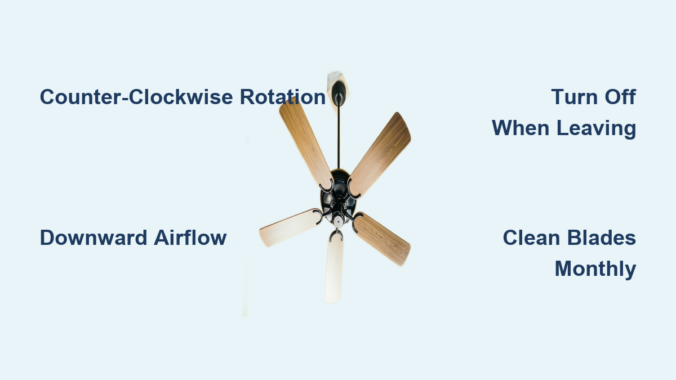
That sticky summer feeling when your home just won’t cool down? Before you crank the air conditioning and watch your energy bill soar, check your ceiling fan direction. Most homeowners completely overlook this simple adjustment that costs nothing to implement but delivers immediate cooling benefits. When properly set for summer, your ceiling fan creates a powerful wind-chill effect that makes you feel up to 8 degrees cooler without actually lowering the room temperature. This single tweak allows you to raise your thermostat setting significantly while maintaining comfort, translating to real savings on your cooling costs throughout the warm months.
The magic happens because ceiling fans don’t actually cool the air—they cool you. By rotating in the correct summer direction, your fan pushes air downward in a column that creates a breeze across your skin, accelerating evaporation of perspiration and making your body feel cooler. This physiological effect means you can comfortably set your thermostat 3-4 degrees higher than you normally would, potentially reducing your air conditioning costs by up to 30% during peak summer months. The best part? Switching your fan direction takes less than a minute and requires no special tools or expertise.
Why Counter-Clockwise Rotation Beats the Summer Heat
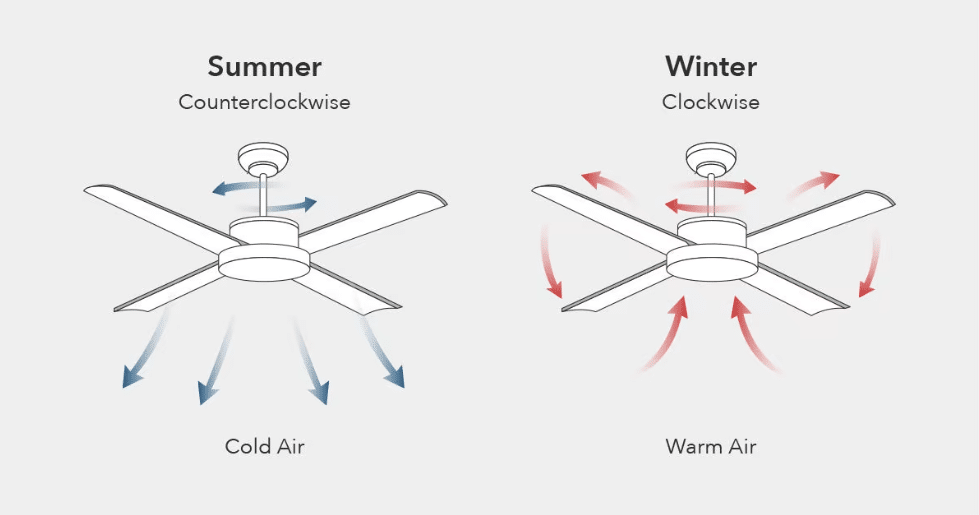
Your ceiling fan’s rotation direction fundamentally changes how air circulates in your room, and for summer cooling, counter-clockwise rotation is essential. When your fan spins counter-clockwise (as viewed from below), the angled blades force air downward toward the floor, creating that crucial breeze you feel when sitting beneath it. This downward airflow pattern is what generates the wind-chill effect that makes your skin feel cooler.
If your fan runs clockwise during summer—a common mistake—you’re actually working against yourself. Clockwise rotation pulls air upward toward the ceiling, drawing the cooler air (which naturally settles near the floor where you live) up and away from your breathing zone. This creates a vacuum effect that pulls warm air down from the ceiling, making your room feel stuffier and forcing your air conditioning to work harder to maintain temperature. It’s like having your fan actively fight against your cooling system.
The energy implications are significant. Studies show that running your fan in the wrong direction during summer can increase cooling costs by 10-15% as your air conditioner compensates for the inefficient air circulation. By contrast, properly set summer fans can reduce the perceived temperature by 4-8 degrees, allowing you to comfortably set your thermostat higher without sacrificing comfort. This simple adjustment represents one of the highest-impact, lowest-effort energy-saving measures available to homeowners.
How to Verify Your Fan’s Current Direction in Seconds
Before changing anything, confirm which way your fan is currently rotating. Stand directly beneath your fan with it running at medium speed and watch the blade movement. If the blades appear to move from your left to your right as they pass overhead (like a clock’s hands moving backward), your fan is spinning counter-clockwise—the correct summer setting. If they move right to left, it’s running clockwise and needs adjustment.
The breeze test provides immediate confirmation: when properly set for summer, you should feel a noticeable downward draft when sitting directly beneath the fan. If you’re sitting in the room and can’t feel much of a breeze despite the fan running at medium or high speed, your fan is likely spinning clockwise and needs direction adjustment. This simple sensory check works even if you can’t safely stand directly beneath the fan to observe blade movement.
For fans with remote controls, check for a direction indicator light or symbol on the remote itself. Many modern remotes feature a circular arrow button that toggles between settings, often with a small icon showing the current rotation direction. Pressing this button typically produces an audible click from the motor housing as it changes direction. If you’re unsure, consult your fan’s manual for model-specific direction indicators—most manufacturers include clear visual cues to help you identify the current setting.
Changing Your Fan Direction: Three Simple Methods
Most ceiling fans feature a small toggle switch located on the motor housing, usually on the side where the downrod connects. Before adjusting, turn off the fan completely and wait for blades to stop. Locate the switch (often labeled with summer/winter icons or directional arrows) and slide it to the counter-clockwise position. Turn the fan back on and verify the direction change by observing blade movement or feeling for the downward breeze.
For fans controlled by wall switches, the direction change process works similarly but requires accessing the fan’s housing. After turning off power at the switch, use a sturdy ladder to reach the motor housing. Find the direction switch, flip it to summer position, restore power, and test the new setting. Always ensure the power is completely off before touching any electrical components to prevent shock or injury.
Remote-controlled fans offer the easiest adjustment—simply press and hold the direction button (usually marked with a circular arrow) while the fan is running. You’ll typically hear a distinct click from the motor housing within 3-5 seconds indicating the direction has changed. Some remotes require the fan to be off during direction changes, so consult your manual if the first attempt doesn’t work. The entire process takes less than 30 seconds once you know which button to press.
Critical Signs Your Fan Direction Is Working Against You
The most obvious indicator of incorrect summer fan direction is a lack of noticeable breeze while the fan runs at medium or high speed. If you’re sitting beneath your fan during summer and can’t feel air movement on your skin, your fan is likely spinning clockwise and needs adjustment. This common mistake means you’re wasting energy while actually making your room feel warmer.
Unusually high cooling bills during summer months often trace back to improperly set fan direction. When fans run clockwise during warm weather, they pull cool air upward and force your air conditioning to work harder to maintain temperature. If your energy costs spike despite normal summer temperatures, check your fan direction before calling an HVAC technician—this simple fix solves the problem in most cases.
Stuffy corners and persistent hot spots in rooms with ceiling fans frequently result from clockwise rotation during summer. Proper counter-clockwise rotation creates a consistent circulation pattern that eliminates temperature stratification, while incorrect direction creates dead zones where warm air accumulates. If certain areas of your room never seem to cool down properly despite the fan running, direction adjustment should be your first troubleshooting step.
Maximizing Summer Cooling Efficiency with Smart Fan Practices
Run your fan at medium to high speed during peak heat to maximize the cooling wind-chill effect, but lower the speed during milder evenings to avoid uncomfortable drafts. The optimal speed creates noticeable airflow without causing papers to blow off desks or creating excessive noise. Most people find medium speed provides the best balance of cooling and comfort during typical summer conditions.
Always turn off fans when leaving a room for more than 15 minutes. Since fans cool people, not spaces, they provide zero benefit when no one is present to feel the breeze. This simple habit prevents unnecessary energy consumption while maintaining comfort where it matters. Consider installing smart switches or motion sensors that automatically turn fans off when rooms become unoccupied.
Position seating areas within the direct airflow path of your fan for maximum cooling benefit. The center of the downward airflow column provides the strongest cooling effect, so arrange furniture to take advantage of this natural circulation pattern. For larger rooms, multiple fans create overlapping airflow patterns that eliminate hot spots and provide consistent cooling throughout the space.
Common Summer Fan Mistakes That Waste Energy
Forgetting to change direction after winter represents the most frequent oversight. Many homeowners set fans to clockwise rotation for winter heating and simply never switch back when summer arrives. Create a seasonal reminder on your calendar to check fan direction when you first turn on your air conditioning each year—this simple habit ensures optimal performance throughout the cooling season.
Running fans in unoccupied rooms wastes significant energy without providing any comfort benefit. Unlike air conditioners that cool spaces, fans only provide cooling through direct skin contact, making them useless in empty rooms. Make it a household rule to turn off ceiling fans whenever you leave a room, and consider placing visible reminders near doorways until the habit becomes automatic.
Using the wrong fan speed for current conditions reduces effectiveness. High speed during mild weather creates uncomfortable drafts, while low speed during heat waves fails to produce meaningful cooling. Adjust speed settings throughout the day based on temperature and personal comfort needs—the right speed creates noticeable but gentle airflow that enhances comfort without disruption.
Troubleshooting Persistent Cooling Issues

If your correctly set summer fan still isn’t providing adequate cooling, check for dust buildup on blades and motor housing. Dirty blades significantly reduce airflow efficiency—clean them monthly during peak season using a damp microfiber cloth, working from center to edge while the fan is off. Pay special attention to the top surfaces of blades, which collect dust that disrupts airflow patterns.
Verify your fan size matches your room dimensions. An undersized fan in a large room won’t circulate air effectively throughout the space. As a general rule, rooms under 75 square feet need 29-36 inch fans, 75-144 square feet require 36-42 inch fans, and larger spaces need 44 inch or larger models. Installing multiple smaller fans often creates better coverage than one oversized unit in irregularly shaped rooms.
Check your home’s air sealing and insulation levels if fan adjustments don’t improve comfort. Even perfectly set ceiling fans can’t overcome significant air leaks around windows, doors, or through the attic. Address these issues first—properly sealed and insulated homes allow ceiling fans and air conditioning to work together efficiently, maximizing cooling benefits while minimizing energy waste.
Setting your ceiling fan to counter-clockwise rotation for summer represents one of the simplest, most cost-effective cooling strategies available to homeowners. This minute-long adjustment creates immediate comfort improvements while reducing air conditioning demands and lowering energy bills. By verifying your fan direction regularly, maintaining proper speed settings, and avoiding common operational mistakes, you’ll maximize cooling efficiency throughout the warm months. Remember to make seasonal direction changes part of your regular home maintenance routine—these small efforts deliver significant comfort and savings all summer long. With your fan properly configured, you’ll enjoy cooler comfort while watching your energy consumption drop, proving that sometimes the simplest solutions deliver the most powerful results.
Leave a Reply