Nothing disrupts your home ambiance quite like a ceiling fan whose light stops working while the fan itself continues to spin. You flip the switch, pull the chain, or press the remote—but darkness remains. This frustrating electrical puzzle affects thousands of homeowners each year, yet most cases can be resolved with systematic troubleshooting. In this guide, you’ll discover exactly why your ceiling fan LED light isn’t working and how to fix it, whether the problem requires a simple bulb swap or professional electrical assistance. By following these steps, you’ll restore proper lighting to your space without unnecessary expense or frustration.
Why Your Ceiling Fan LED Light Suddenly Stopped Working
LED lights in ceiling fans fail for specific reasons distinct from traditional bulb failures. Unlike incandescent bulbs that burn out dramatically, LEDs typically degrade gradually or fail due to environmental factors unique to ceiling fan installations. The most common culprits include incompatible dimmer switches, overheating in enclosed fixtures, remote control receiver malfunctions, and wiring issues that affect only the lighting circuit while leaving the fan motor operational.
Overheating represents a primary cause of premature LED failure in ceiling fans. The confined space of most fan light kits traps heat that significantly shortens LED lifespan. Standard LED bulbs not rated for enclosed fixtures can fail within months despite their advertised 25,000-hour lifespan. If your light flickers before dying completely or only works when the fan is off, heat buildup has likely damaged the LED driver circuitry. Look for dark spots on the bulb’s base or discoloration around the heat sink as telltale signs of thermal damage.
Incompatible dimmer switches cause nearly 30% of ceiling fan LED light failures according to electrical repair surveys. Traditional dimmers designed for incandescent bulbs deliver power in a way that confuses LED drivers. Symptoms include complete failure to illuminate, persistent flickering, or audible buzzing when the light should be on. Even if your LED worked initially, replacing an old dimmer with a new one without verifying LED compatibility often creates this problem. Modern LED-compatible dimmers solve this issue by providing the constant minimum load LEDs require.
Immediate Checks That Solve Most LED Light Failures
Before climbing ladders or touching electrical components, perform these three critical checks that resolve the majority of ceiling fan LED problems within minutes.
First, test all control methods thoroughly. Try the wall switch, pull chain (if equipped), and remote control with fresh batteries. Many homeowners mistakenly believe their light is broken when actually the remote has lost pairing or a household member turned off the wall switch. Hold the remote within three feet of the fan receiver while pressing buttons firmly, as weak signals often fail to activate the light circuit. If multiple control methods produce no response, you’ve confirmed an electrical issue rather than user error.
Next, verify power to the circuit by testing other fixtures on the same electrical circuit. Turn on lamps and overhead lights in adjacent rooms—if they work normally, your ceiling fan circuit remains energized. Check your breaker panel for partially tripped breakers that might power the fan motor while cutting electricity to the light kit. A breaker that appears “on” might actually be in an intermediate position requiring you to flip it fully off before resetting to “on.”
Finally, examine the LED bulbs themselves with power disconnected at the breaker. Look for visible damage like darkened areas inside the bulb, bulging bases, or cracked lenses. Try swapping suspect bulbs with known-working LEDs from other fixtures—remember that ceiling fan vibrations can damage filaments even in LED bulbs. If a replacement bulb works, you’ve solved your problem. If not, proceed to more advanced diagnostics.
Decoding Remote Control Indicator Lights for Precise Diagnosis

Modern ceiling fans with remote controls feature diagnostic indicator lights that reveal the exact problem without complex testing. Understanding these signals saves hours of unnecessary troubleshooting and prevents misdiagnosis.
A rapidly flashing receiver light (typically 3-5 flashes per second) indicates a pairing failure between remote and receiver. This commonly occurs after power outages or when replacing remote batteries. Fix this by turning off power at the breaker for 30 seconds, then restoring power while holding the “light” button on your remote for 10 seconds. The receiver should respond with a solid light, confirming successful re-pairing.
No receiver light when attempting to activate the light circuit points to a power supply failure specific to the lighting circuit. This could indicate a blown fuse within the receiver module (many have 3-amp replaceable fuses), completely failed receiver electronics, or a wiring disconnect that interrupts power only to the light kit. Check your owner’s manual for fuse location—if present, replace with an identical amperage fuse before proceeding.
A solid red or green indicator light that doesn’t change when pressing remote buttons suggests insufficient battery power. Even “new” batteries can be defective or improperly installed. Clean battery contacts with isopropyl alcohol and a cotton swab, then reinsert batteries ensuring correct polarity. Test with name-brand alkaline batteries rather than cheap alternatives that often deliver inconsistent voltage.
Proper LED Bulb Replacement for Ceiling Fan Fixtures
When bulb failure causes your ceiling fan light problem, selecting and installing the correct replacement matters as much as the replacement itself. Standard LED bulbs fail prematurely in ceiling fan applications due to vibration and heat—using the right bulb prevents repeat failures.
Always turn off power at the circuit breaker before removing bulbs—wall switches don’t provide sufficient safety during this procedure. Allow the fixture to cool for 15 minutes if recently operational, then carefully unscrew bulbs while supporting the glass shade. Note the base type (E26 standard or E12 candelabra are most common) and check for “enclosed fixture rated” markings on the bulb base.
Purchase replacement bulbs specifically labeled for enclosed fixtures and ceiling fan use. These feature enhanced heat dissipation through aluminum heat sinks and reinforced internal components that withstand vibration. Avoid the cheapest bulbs—reputable brands like Philips, Cree, or GE offer 3-5 year warranties on their enclosed-rated LEDs. For standard ceiling fan globes, 60W-equivalent bulbs (800-850 lumens) provide optimal brightness without excessive heat.
Install bulbs by hand only—never use tools that might crack the base or damage internal components. Screw in just until snug (about 1/8 turn after contact), as overtightening breaks the delicate electrical connections inside LED bulbs. Test operation before reassembling the entire fixture to verify your solution.
Testing Pull-Chain and Wall Switch Components

When new bulbs don’t restore function, faulty switches often interrupt power to the light circuit while leaving the fan operational. Testing these components requires basic electrical knowledge but solves many persistent problems.
For pull-chain switches inside the light kit, turn off power at the breaker and remove the glass shade. Locate the cylindrical switch attached to the socket housing—typically with two wires connected to brass terminals. Disconnect the wires and set your multimeter to continuity mode. With the chain pulled to “on,” you should hear a beep indicating circuit completion. No continuity means a failed switch requiring replacement (available from fan manufacturers for $5-$15).
Wall switches controlling ceiling fan lights develop similar failures. Turn off power, remove the switch cover, and test with a multimeter set to ohms. A functioning single-pole switch shows near-zero resistance when on and infinite resistance when off. Any intermediate readings indicate a worn switch needing replacement. Match the new switch type exactly (single-pole, three-way, or dimmer) to your circuit configuration.
Remote receiver modules fail most frequently in fans with integrated lighting controls. Symptoms include lights working with the wall switch but not the remote, or requiring multiple button presses for response. Replacement involves purchasing an identical receiver kit from the manufacturer ($15-$40), turning off power, and transferring wires from the old to new unit following color-coded connections.
When Professional Electrical Help Becomes Essential
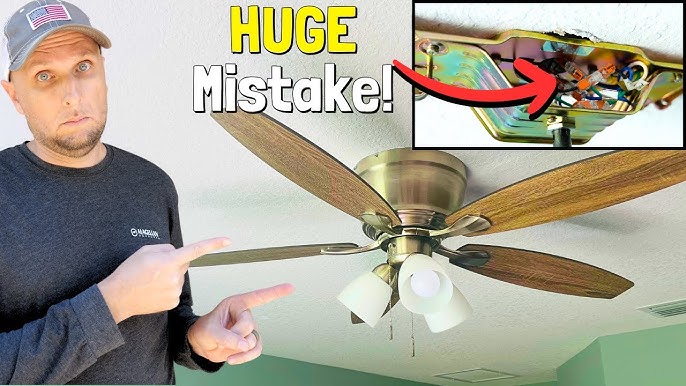
Certain ceiling fan LED light problems demand professional intervention to prevent electrical hazards. Recognize these critical warning signs that require immediate electrician consultation:
- Burning smells or visible scorch marks around the fan canopy or switch plates
- Audible buzzing or sizzling sounds from the electrical box
- Warm switch plates or wiring connections (a serious fire hazard)
- Intermittent operation that causes lights to flicker violently
- Tripped breakers that won’t stay reset when the light circuit activates
Complex wiring situations involving three-way switches (multiple control locations), smart home integration, or dimmer circuits also warrant professional assistance. Incorrect wiring in these systems creates hidden dangers that may not manifest immediately but can cause electrical fires months later.
If your troubleshooting extends beyond 90 minutes without resolution, call an electrician. Most professionals diagnose and repair ceiling fan light problems within an hour for $75-$150, a small investment compared to potential damage from improper repairs. Licensed electricians carry proper insurance and guarantee their work meets National Electrical Code requirements—essential protection for your home.
Preventing Future LED Light Failures in Ceiling Fans
After restoring your ceiling fan light, implement these preventive measures to avoid repeat failures and extend component lifespan.
Select quality enclosed-rated LED bulbs from the start, avoiding bargain-bin options with inferior heat management. Premium bulbs cost 20-30% more but last 3-5 times longer in ceiling fan applications, providing better long-term value. Look for bulbs with aluminum heat sinks and explicit “enclosed fixture” certification on packaging.
Maintain proper fixture ventilation by cleaning light globes quarterly with a microfiber cloth and mild glass cleaner. Dust buildup traps heat that degrades LED components—never use abrasive cleaners that scratch glass and reduce heat dissipation. For fans in hot climates, install bulbs rated for higher temperature ranges (look for “damp location” or “wet location” ratings).
Address electrical issues immediately when symptoms appear. Replace flickering bulbs right away rather than waiting for complete failure, as inconsistent power stresses LED drivers. Upgrade incompatible dimmer switches to modern LED-compatible models that provide smooth dimming without flicker. Install whole-house surge protection to prevent voltage spikes from damaging sensitive LED electronics during storms.
Schedule annual maintenance by tightening mounting bracket screws, verifying wire connections haven’t loosened from vibration, and testing all control methods. Catching a loose wire connection early prevents arcing that eventually causes complete failure and potential fire hazards.
By following this systematic approach, you’ll solve your immediate ceiling fan LED light problem and prevent future failures through proper component selection and maintenance. Remember that most issues stem from simple causes like incompatible bulbs or loose connections—methodical troubleshooting saves time, money, and unnecessary frustration while keeping your home safely illuminated.
Leave a Reply