You’ve just installed your Hampton Bay ceiling fan, but something’s wrong—the fan only runs at one speed or doesn’t respond to your remote control settings. This frustrating problem affects thousands of homeowners each year, leaving them searching for solutions to their Hampton Bay ceiling fan speed problem. When your fan won’t adjust properly, it’s more than just an inconvenience; it impacts your comfort, energy efficiency, and potentially your home’s electrical system. This guide addresses the most common speed control failures in Hampton Bay models and provides actionable steps to diagnose and fix these issues without unnecessary guesswork.
Unfortunately, comprehensive technical documentation for specific Hampton Bay fan models can be difficult to access. Many online resources contain incomplete information or generic advice that doesn’t address model-specific quirks. In this guide, we’ll focus on practical approaches to identify and resolve speed control problems while acknowledging the limitations of available information. You’ll learn what specific details to look for in your model’s documentation and how to safely troubleshoot without risking further damage to your fan.
Identifying Your Specific Hampton Bay Fan Model
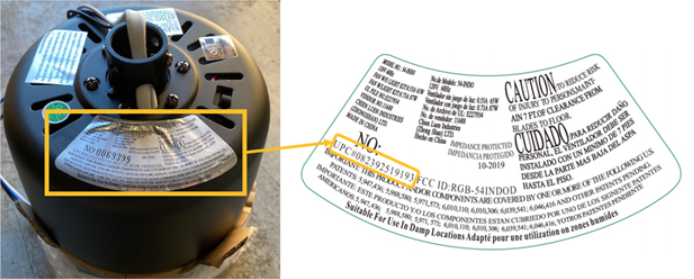
Before attempting any repairs, you must determine your exact fan model to access accurate troubleshooting information. Hampton Bay fans come in numerous variations with different electrical components that require specific solutions.
Where to Find Your Model Number
Locate your fan’s model number by checking these critical positions:
– The metal bracket connecting the fan to the ceiling
– A sticker on the top of the motor housing (requires fan removal)
– The original packaging or purchase receipt
– The pull chain housing or remote control documentation
Critical warning: Never assume your fan’s components match another model—even fans with identical appearances can have different internal wiring configurations. Attempting repairs without your specific model information risks electrical damage or safety hazards.
Why Model-Specific Information Matters for Speed Problems
Hampton Bay ceiling fan speed problems often stem from component variations between models. The capacitor size, wiring configuration, and control mechanism differ significantly across product lines. A capacitor that works for one model could cause permanent damage to another. Without knowing your exact model, you’re essentially troubleshooting blindfolded—potentially wasting time and money on incorrect parts.
Common Causes of Hampton Bay Fan Speed Control Failures
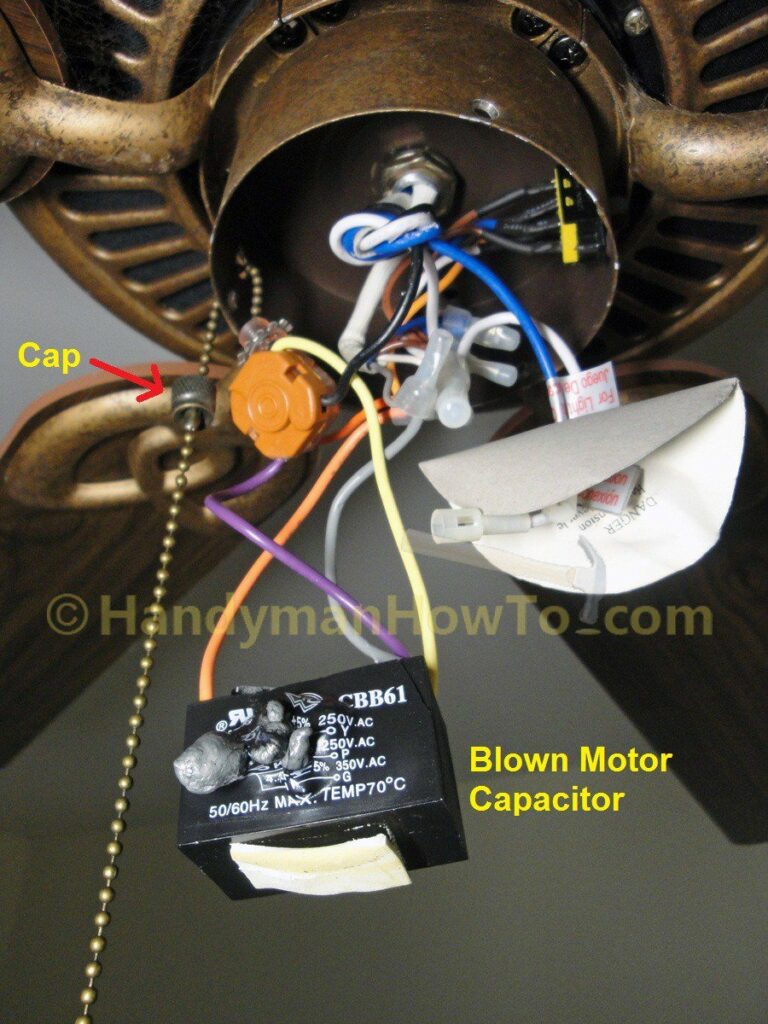
Understanding the root causes of speed control issues helps prioritize your troubleshooting efforts. These problems typically fall into specific categories based on symptom patterns.
Why Your Fan Only Runs at One Speed
When your Hampton Bay ceiling fan operates at a single speed regardless of settings, these components are most likely at fault:
– Failed speed control capacitor: The most common culprit, especially in older models
– Malfunctioning pull chain mechanism: Worn contacts prevent proper speed selection
– Defective wall control unit: Modern installations with hardwired controls
– Remote control receiver issues: Signal processing failures in the fan’s receiver
Pro tip: If your fan suddenly stopped changing speeds after a power surge, check the capacitor first—it’s often the first component to fail during electrical fluctuations.
Why Your Fan Won’t Respond to Remote Control Settings
Remote control issues create unique speed problems that require different troubleshooting:
Is Your Remote Battery the Real Problem?
- Replace batteries with high-quality alkaline types (not rechargeable)
- Clean battery contacts with isopropyl alcohol
- Test remote functionality by standing directly under the fan
When Remote Programming Fails
- Reset the remote control following manufacturer instructions
- Reprogram the remote to match your fan’s receiver
- Check for interference from nearby electronic devices
Critical mistake to avoid: Never attempt to disassemble the remote control receiver inside the fan housing unless you’ve disconnected power at the circuit breaker—this component contains capacitors that can deliver dangerous shocks even when the fan is off.
Step-by-Step Hampton Bay Fan Speed Diagnosis
Effective troubleshooting requires a systematic approach that eliminates potential causes in order of complexity and safety.
Safety First: Essential Pre-Diagnosis Steps
Before touching any components, complete these critical safety procedures:
1. Turn off power at the circuit breaker (not just the wall switch)
2. Use a non-contact voltage tester to confirm power is off
3. Allow the fan to cool completely if recently operated
4. Secure your work area with a drop cloth to catch falling parts
Time estimate: 15-20 minutes for proper safety preparation
Basic Speed Control Testing Without Disassembly
Perform these checks before removing any components:
– Test with alternative control methods (pull chain vs remote vs wall control)
– Listen for clicking sounds when changing speeds (indicates mechanical operation)
– Check for unusual burning smells near the motor housing
– Observe if the light kit functions properly (shared circuit issues)
Visual cue: If the fan works on some speeds but not others, the problem is likely in the speed selector mechanism rather than complete component failure.
When to Call a Professional for Hampton Bay Speed Problems
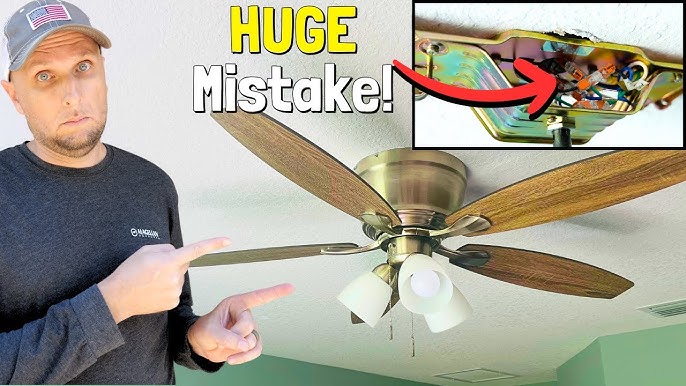
Not all speed control issues can be safely fixed by homeowners. Recognizing these red flags prevents dangerous mistakes.
Dangerous Situations Requiring Professional Help
- Burning smells or visible scorch marks on wiring
- Tripped circuit breakers when operating the fan
- Exposed or damaged wiring visible in the housing
- Water damage near electrical components
- Persistent humming without fan movement
Cost consideration: Professional diagnosis typically costs $75-$150, but could save you from costly mistakes. If your fan is under warranty, unauthorized repairs may void coverage—always check warranty terms first.
Finding Reliable Hampton Bay Fan Repair Information
The biggest challenge in fixing speed problems is accessing accurate, model-specific information. Generic advice often leads to wasted time and money on incorrect parts.
Where to Find Authentic Technical Documentation
- Hampton Bay’s official website (search by model number)
- Home Depot’s Hampton Bay support section (primary retailer)
- Original installation manuals (often available online)
- Reputable appliance parts websites with model-specific schematics
Critical warning: Avoid YouTube tutorials or forum posts that don’t specify your exact model number—what works for one fan could damage another. Always verify information against official documentation when possible.
What Proper Repair Documentation Should Include
Authentic technical resources for Hampton Bay ceiling fan speed problems will contain:
– Wiring diagrams specific to your model
– Component specifications (capacitor microfarad ratings)
– Step-by-step disassembly instructions
– Safety warnings for your specific model
– Approved replacement part numbers
If documentation lacks these elements, it’s not reliable for your repair project.
Preventing Future Hampton Bay Fan Speed Issues
Once you’ve resolved your current speed problem, implement these maintenance practices to avoid repeat issues.
Monthly Maintenance for Reliable Speed Control
- Clean dust from speed control components (when power is off)
- Tighten loose wire connections in the housing
- Lubricate moving parts of pull chain mechanisms
- Test all speed settings to ensure smooth operation
Pro tip: Keep a record of your fan’s model number, purchase date, and any repairs performed—this documentation helps with future troubleshooting and warranty claims.
When to Consider Replacement Over Repair
For older Hampton Bay fans with recurring speed problems, replacement may be more cost-effective than repeated repairs. Consider upgrading if:
– Your fan is over 10 years old
– Replacement parts are discontinued
– Repair costs exceed 50% of a new fan’s price
– You experience frequent electrical issues
Modern fans offer better energy efficiency and more reliable speed controls that reduce long-term maintenance headaches.
Final Note: Hampton Bay ceiling fan speed problems require model-specific solutions that aren’t always readily available. Always prioritize safety by confirming power is off before inspection, and never force components during disassembly. If you cannot locate accurate documentation for your specific model, consult a qualified electrician rather than risking improper repairs. For ongoing maintenance, keep your fan clean and periodically check connections to prevent many common speed control issues. When in doubt about any repair step, stop and seek professional assistance—your safety is more important than saving a few dollars on a DIY fix.
Leave a Reply