When your wireless ceiling fan responds instantly to a remote click or smartphone tap, you’re witnessing sophisticated radio technology working behind the scenes. Unlike traditional fans requiring pull chains or wall switches, wireless ceiling fans operate through invisible radio signals that travel between your control device and the fan’s hidden receiver. Understanding how these systems function helps you troubleshoot issues, maximize efficiency, and make informed purchasing decisions. This guide reveals the engineering marvel that lets you control airflow without a single control wire connecting your switch to the fan motor.
The magic happens through radio frequency communication that replaces physical wiring between controls and the fan. When you press your remote, encoded signals transmit through the air to a receiver inside the fan housing, instructing it to change speed, reverse direction, or adjust lighting. Modern wireless fans integrate with smart home ecosystems, allowing voice commands and remote access. By the end of this guide, you’ll know exactly how your fan receives commands, converts signals to motion, and delivers comfortable airflow throughout your home.
Radio Signal Transmission and Reception Process

Your wireless ceiling fan relies on two critical components working in perfect harmony: the transmitter (in your remote or smartphone) and the receiver (hidden inside the fan housing). When you press a button, the transmitter sends encoded radio waves at specific frequencies—typically 433MHz for basic models or 2.4GHz for Wi-Fi enabled units—which travel through walls and furniture to reach the fan’s receiver. This communication happens almost instantly, with signals covering distances up to 50 feet in standard RF models and unlimited range for internet-connected fans.
The receiver module contains an antenna, signal processor, and relay switches that translate incoming radio commands into electrical instructions. Unlike traditional fans requiring physical wiring between wall switches and motor, wireless systems eliminate this complex installation step. Rolling code technology enhances security by generating a new code sequence with each button press, preventing unauthorized access through signal interception. This sophisticated communication happens without interfering with your Wi-Fi or other household electronics, thanks to frequency separation and signal encoding protocols.
How Your Remote Transmits Commands to the Fan
Wireless remotes operate on simple battery power—typically two or three AAA cells—that energize a microcontroller monitoring your button presses. When you select “medium speed,” the microcontroller encodes this command and activates the transmission circuit, which generates the radio carrier signal modulated with your specific instruction. Basic remotes use crystal oscillators to maintain precise frequency, while advanced units incorporate proximity sensors that wake the device when lifted, conserving battery life.
Transmission power remains deliberately low (under 10 milliwatts) to comply with regulatory limits while providing sufficient residential range. Premium remotes often include LED indicators confirming successful transmission, which proves invaluable when troubleshooting unresponsive fans. If your fan stops responding, check for weak batteries first—dim indicators or delayed responses typically signal impending battery failure requiring immediate replacement.
Motor Technology and Airflow Generation

At the heart of your wireless ceiling fan lies the electric motor that converts electrical energy into the rotational motion moving air through your space. Most modern units employ either permanent split capacitor (PSC) motors operating on standard AC current or more efficient brushless DC (BLDC) motors offering superior speed control. PSC motors use capacitors to create the phase shift necessary for rotation, while BLDC motors rely on electronic commutation controlled directly by the wireless receiver for precise speed adjustments.
The receiver module acts as the crucial intermediary between your remote commands and the motor’s operation. For fans with multiple speed settings, the receiver contains solid-state circuitry that modulates voltage delivery to the motor windings. When you select “high speed,” the receiver completes the circuit delivering full voltage, while “low speed” engages circuitry that reduces power flow. BLDC motors in premium models achieve even finer control through pulse-width modulation (PWM), varying the duty cycle of power delivery for smoother transitions between speeds and energy savings up to 70% compared to traditional AC motors.
Direction Reversal Mechanism Explained
Your wireless ceiling fan’s ability to reverse direction isn’t just a convenience feature—it’s engineered for seasonal efficiency. In summer mode (counterclockwise rotation), the fan creates downward airflow that produces a cooling wind-chill effect, making you feel up to 8°F cooler. During winter (clockwise rotation), it gently circulates warm air trapped near the ceiling back into your living space, reducing heating costs by up to 10%.
This directional change happens through a reversing switch activated by your remote command. The switch alters the phase relationship of the motor windings, causing the rotor to spin in the opposite direction. Advanced models include automatic seasonal mode switching, where integrated temperature sensors detect room conditions and adjust rotation direction accordingly—no manual intervention required.
Smart Integration and Advanced Control Features
Wi-Fi enabled wireless ceiling fans connect to your home network using standard 802.11 protocols, typically on the 2.4GHz band for better wall penetration. Once connected through the manufacturer’s app, these fans become part of your smart home ecosystem, allowing remote access from anywhere with internet connectivity. Voice control through Amazon Alexa or Google Assistant lets you say “Set living room fan to medium” without touching your phone, while scheduling features automatically adjust speeds based on time of day or occupancy.
Premium models support geofencing technology that detects when your smartphone leaves or approaches home, triggering automatic fan operation. Imagine your fan powering up 15 minutes before your arrival, pre-cooling your space without wasting energy while you’re away. Some systems integrate with thermostats to create comprehensive climate control—when temperatures rise, your fan automatically increases speed to maintain comfort before the AC kicks in, saving significant energy.
Troubleshooting Common Wireless Connectivity Issues
When your fan stops responding to remote commands, systematic troubleshooting saves unnecessary service calls. First, check your remote batteries—weak power causes intermittent operation or complete failure. Next, verify power at the fan by checking your circuit breaker; many issues stem from tripped breakers rather than faulty electronics. If problems persist, re-pair your remote by pressing the receiver’s learn button (usually accessed with a paperclip) while holding the remote close to the fan.
Interference from other wireless devices often causes erratic behavior. Microwaves, baby monitors, and neighboring Wi-Fi networks operating on similar frequencies can disrupt signals. Change your remote’s frequency channel if available, or relocate Wi-Fi fans to less congested channels through your router settings. Persistent issues may require power-cycling the fan—turn off the circuit breaker for 30 seconds to reset the receiver electronics—before contacting manufacturer support for further assistance.
Installation Requirements and Power Considerations
Installing a wireless ceiling fan requires secure mounting to a ceiling electrical box rated for fan weight (typically 50-70 pounds), not standard light fixture boxes. The wireless receiver installs inside the fan’s canopy, connecting between household power and the motor. For new installations, you’ll run standard 12/2 NM electrical cable from your wall switch to the fan location, connecting black (hot), white (neutral), and green/bare (ground) wires to corresponding terminals on the receiver.
Unlike traditional multi-switch installations requiring multiple wires for speed and light control, wireless systems simplify wiring by eliminating control wires between switch and fan. Battery backup systems in premium models provide 2-8 hours of operation during power outages, though typically at reduced speeds to conserve energy. The receiver itself consumes minimal standby power (1-3 watts), making the wireless functionality virtually negligible to your electricity bill.
Energy Efficiency and Performance Metrics
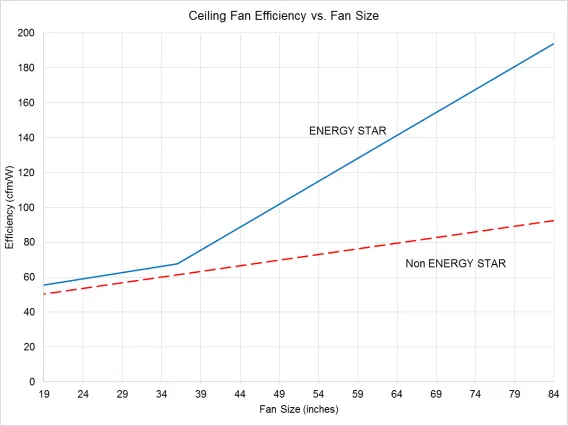
Wireless ceiling fans vary significantly in energy consumption based on motor technology. Traditional AC motor fans consume 50-100 watts at high speed, while BLDC motor fans use only 15-35 watts for the same airflow—a 70% reduction. Efficiency is measured in cubic feet per minute per watt (CFM/W), with premium wireless models achieving 90-150 CFM/W compared to 50-80 CFM/W for standard AC motor fans.
This efficiency translates directly to operating costs. A highly efficient fan running 8 hours daily might cost less than $5 annually to operate, while a less efficient model could cost $15-25 for the same usage. Standard 52-inch fans typically deliver 3,000-5,500 CFM at high speed, with larger blades moving more air but requiring more power. Look for Energy Star certification when purchasing, indicating the fan meets strict efficiency guidelines using at least 20% less energy than conventional models.
Final Note
Understanding how wireless ceiling fans work empowers you to maximize their performance and troubleshoot issues independently. From radio signal transmission to motor control and smart home integration, these systems combine mechanical engineering with modern wireless technology to deliver convenient, efficient airflow control. Regular maintenance—primarily cleaning blades and replacing remote batteries—keeps your fan operating smoothly for years. As wireless technology continues evolving, expect even greater integration with home automation systems, further enhancing comfort while reducing energy consumption. Whether you’re selecting a new fan or optimizing your current system, this knowledge ensures you’ll enjoy reliable, efficient cooling with the simple press of a button.
Leave a Reply