Your ceiling fan’s rotation direction dramatically impacts home comfort year-round, yet many homeowners struggle when their fan lacks a direction switch. Without the proper counterclockwise summer spin pushing cool air downward or clockwise winter rotation redistributing warm air, your fan becomes significantly less effective. This common frustration hits hardest when you discover your fan has no visible reverse switch on the motor housing or wall control. Fortunately, you can change your ceiling fan direction without a dedicated switch using several reliable methods that require only basic tools and electrical awareness. Whether your switch broke, your fan never had one, or you’re dealing with an older model, these practical solutions restore full functionality to your cooling system.
Understanding your fan’s internal wiring is crucial before attempting any modification. Ceiling fans operate using separate motor windings for each direction, controlled by how electrical current flows through the system. The reverse switch merely redirects this current flow between windings. When no switch exists, you’re essentially making that connection manually. Always begin by turning off power at the circuit breaker and verifying with a voltage tester—never work on live electrical components. This article walks you through proven methods to change your fan direction safely, regardless of your fan model or electrical experience level.
Accessing Hidden Fan Motor Connections
Removing the Fan Canopy Safely
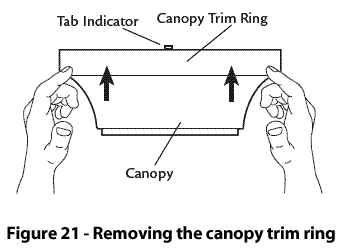
Before you can modify wiring, you need access to the motor housing where direction control occurs. Start by turning off power at your home’s electrical panel and confirming it’s off with a voltage tester. Locate the canopy—the dome-shaped cover connecting your fan to the ceiling—and identify its mounting mechanism. Most models have two small set screws on the sides that, when loosened, allow the canopy to slide down the downrod. Use one hand to support the fan’s weight while loosening these screws with the other to prevent strain on electrical wires.
Once the canopy lowers, you’ll see the electrical junction box and wire connections. Carefully pull the canopy down just enough to expose these connections without straining wires. If your fan has a light kit, disconnect it first by removing the light fixture’s mounting screws. Document the current wiring configuration with your phone camera before making any changes—this reference image becomes invaluable if you need to restore original connections. Keep all removed screws in a safe container to prevent losing them during the process.
Identifying Direction Control Wires
Inside the motor housing, locate the wire connections controlling fan direction. Standard ceiling fan wiring uses black for hot power, white for neutral, green for ground, and blue (sometimes red) for direction control. The direction wire typically connects to a small switch mechanism or runs directly to the motor windings when no reverse switch exists. If your fan has a pull chain for speed control, the direction wire may connect to that mechanism instead.
Look for a capped blue wire tucked inside the canopy—this often indicates your fan supports direction change but lacks the switch. Some fans have the direction wire connected directly to the black power wire, making reverse operation impossible without modification. Trace each wire to its termination point on the motor housing, noting any labels like “FWD” (forward) or “REV” (reverse). If you see two wires connected to what appears to be a switch terminal, these likely control direction. Without clear labeling, you may need to consult your fan’s model number (usually on a sticker inside the canopy) to find specific wiring diagrams online.
Rewiring Methods for Direction Change
Direct Wire Swapping Technique
The most straightforward method for changing direction involves swapping wire connections inside the motor housing. After turning off power and documenting current connections, locate the blue direction wire and the black power wire. If the blue wire connects directly to the black power wire, carefully disconnect it using wire strippers. Instead of connecting to the black wire, attach the blue wire to the terminal where the white neutral wire connects—this reversal changes the current flow direction through the motor windings.
Secure the connection with a new wire nut, ensuring no copper is exposed. Tuck all wires neatly back into the junction box, reattach the canopy, and restore power to test. If the fan now spins in the opposite direction but won’t switch back, you’ve successfully changed the permanent direction. For fans that must toggle between directions, you’ll need to install a dedicated switch rather than making permanent wiring changes.
Installing a Universal Direction Switch

When you need to switch directions regularly without a built-in mechanism, adding a universal reverse switch provides the most practical solution. Purchase a ceiling fan-specific reverse switch from any hardware store ($15-$30), ensuring it matches your fan’s voltage requirements. These switches typically have three terminals: LINE (power input), FWD (forward), and REV (reverse).
Mount the switch housing inside the canopy or on the fan’s downrod using the included hardware. Connect the black power wire to the LINE terminal, the existing blue direction wire to REV, and run a new blue wire from FWD to the motor’s forward terminal. If your motor lacks labeled terminals, connect one direction wire to the terminal currently powering the fan and the other to the opposite terminal. After securing all connections with wire nuts, restore power and test both directions before fully reassembling the fan.
Alternative Methods for Switchless Fans
Pull Chain Direction Modification
Many fans without wall switches use pull chains for speed control, but few realize these can often be modified for direction changes. If your fan has multiple pull chains (one for light, one for fan), the second chain may already control direction—you just need to pull it multiple times to cycle through settings. For single-chain fans, you can replace the standard speed control switch with a 4-position pull chain that includes a dedicated reverse setting.
Turn off power and remove the pull chain housing to access the switch mechanism. Disconnect the old switch and install the new 4-position unit, connecting wires to matching terminals. The fourth position creates the reverse circuit by redirecting current flow through different motor windings. Reassemble the housing, restore power, and pull the chain four times to activate reverse mode. This modification costs under $10 and takes less than 30 minutes, providing convenient direction control without complex wiring.
Remote Control System Upgrade
For the most user-friendly solution, replace your entire control system with a modern remote kit that includes direction control. These kits ($25-$50) include a handheld remote, receiver module, and wall mounting bracket, working with virtually any fan model regardless of existing controls. The receiver installs inside the canopy, connecting between your power source and fan motor, while the remote sends wireless signals to control speed and direction.
Installation involves connecting four wires: black to black (power), white to white (neutral), blue to blue (direction), and grey or yellow to the fan motor. Most kits include clear diagrams showing exact connections for your specific fan type. Once installed, simply press the direction button on your remote to switch between summer and winter modes. This upgrade not only solves your direction problem but also adds convenient speed control and eliminates the need for hard-to-reach pull chains.
Safety Protocols and Professional Guidance
Essential Electrical Safety Measures
Working with ceiling fan wiring demands strict safety protocols to prevent shock or fire hazards. Always turn off the correct circuit breaker—not just the wall switch—and verify power is off using a non-contact voltage tester at multiple points. Wear rubber-soled shoes and stand on a dry surface while working. When handling wires, keep one hand behind your back to prevent current from flowing across your chest if accidental contact occurs.
After completing modifications, double-check all connections before restoring power. Ensure wire nuts are tight with no exposed copper, ground wires are securely connected, and no wires are pinched by the canopy. Test fan operation at low speed first, listening for unusual noises that indicate incorrect wiring. If the fan hums but doesn’t spin, turn off power immediately—this suggests reversed windings that could damage the motor.
When to Call an Electrician
Certain situations warrant professional assistance rather than DIY modification. If your home has aluminum wiring (common in 1960s-70s construction), attempting fan modifications creates serious fire risks due to aluminum’s expansion properties. Similarly, fans mounted over stairwells or at significant heights require professional equipment for safe access. If your fan shows signs of damage—burning smells, discolored wires, or unusual noises—have a licensed electrician inspect it before attempting any repairs.
The $100-$200 cost for professional installation provides peace of mind through code-compliant work and warranty protection. Electricians can quickly identify your fan’s specific requirements, install appropriate controls, and ensure all modifications meet local electrical codes. For vintage fans or models without clear documentation, professional expertise prevents costly mistakes that could require complete fan replacement.
Seasonal Direction Optimization Tips
Maximizing Summer and Winter Efficiency
Once you’ve successfully modified your fan for direction control, using the correct rotation for each season significantly improves home comfort. During summer months, set your fan to counterclockwise rotation at higher speeds to create a cooling downdraft that makes rooms feel 4-8 degrees cooler. In winter, switch to clockwise rotation at low speeds to gently circulate warm air trapped near the ceiling back into living spaces without creating uncomfortable drafts.
Test your direction settings by standing directly under the fan—you should feel a distinct breeze for summer operation. If air feels stagnant or rises toward the ceiling, your direction is incorrect. Many homeowners place small seasonal stickers near their wall controls to remind them when to change directions. Remember that direction changes matter most at lower speeds; high-speed operation moves air effectively in either direction but still impacts overall energy efficiency.
Maintenance Practices for Reliable Operation
Regular maintenance prevents direction control issues and extends your fan’s lifespan. Clean fan blades monthly with a microfiber cloth to prevent dust buildup that strains the motor. Annually check all wire connections inside the canopy for looseness or corrosion, tightening screws and replacing damaged wire nuts as needed. Lubricate the motor housing with manufacturer-recommended oil every 2-3 years to prevent bearing wear that affects rotation smoothness.
If your fan suddenly stops changing directions after successful modification, check for loose wire connections or a failed capacitor—these common issues often cause directional control problems. Listen for unusual buzzing or clicking sounds that indicate electrical problems requiring immediate attention. Proper maintenance ensures your direction modification continues working reliably for years, maximizing your fan’s year-round comfort benefits.
Leave a Reply