Your Ultimate Guide to Cooling: In-Depth Reviews, Smart Comparisons & Pro Care Tips.

Category: Tips (Page 4 of 22)

How to Install Bathroom Exhaust Fan Without Attic Access


Installing a bathroom exhaust fan without attic access can feel like solving a puzzle. You have limited overhead space, no way to see inside the ceiling cavity, and must work through tight clearances. Yet this is a common upgrade that thousands of homeowners complete successfully every year. Whether you are replacing a noisy builder-grade unit or adding ventilation to a bathroom that has never had proper exhaust, it is entirely possible with the right approach.

This guide walks you through every step of the process. You will learn how to align ducts blindly, choose between roof and wall venting, and secure your fan without joist access. The methods covered here work for vaulted ceilings, cathedral roofs, and any situation where you cannot reach the space above your bathroom ceiling.

Measure Ceiling-to-Roof Clearance First

Before purchasing a fan or cutting any drywall, you must determine how much space exists between your bathroom ceiling and the roof. This single measurement dictates your entire installation strategy.

Determine Available Depth

Use a stud finder to locate ceiling joists, then drill a small exploratory hole between them near the intended fan location. Insert a stiff wire or depth gauge to estimate the cavity depth.

  • Less than 12 inches: You likely have a cathedral or vaulted ceiling. Work quickly because space is extremely tight.
  • 12 to 36 inches: Moderate clearance allows flexible duct routing or even dropped rigid duct.
  • More than 36 inches: Possible to run longer ducts, but you still need indirect methods for alignment.

Visual cue: If your drill bit hits roofing nails or sheathing within 12 inches, you are in a low-clearance zone.

Select Vent Route Based on Clearance

  • Low clearance: Vent through the roof using a short duct run.
  • Moderate clearance: Either roof or wall venting works. Wall venting is typically easier.
  • No roof access possible: Switch to wall venting near the ceiling.

Drill a Pilot Hole to Align Roof Vent

bathroom exhaust fan roof vent pilot hole drilling technique

Without attic access, you need a way to perfectly align the interior fan housing with the exterior roof vent. A long drill bit solves this problem.

Use an Extra-Long Drill Bit

  • For low clearance (12 inches or less): Use a 12-inch extension bit.
  • For deeper cavities (up to 6 feet): Use a 48- to 72-inch flexible or rigid auger bit.
  • Attach the bit to a powerful drill. A corded drill is preferred for better torque.

Drill Straight Up from Fan Location

  1. Mark the center of your planned fan housing.
  2. Drill upward through the roof sheathing.
  3. Confirm plumb alignment by using a level on the drill or bit guide.

Pro tip: Wrap tape around the bit at your measured depth to avoid over-penetration into the roof cavity.

Locate the Pilot Hole on the Roof

Go outside and find the protruding tip of the drill bit. If it is not visible, use a flathead screwdriver to probe the roof felt or shingles nearby.

Once found:
* Cut a 5-inch hole using a hole saw.
* Install a roof cap with flashing and backdraft damper.
* Seal edges with roofing cement to prevent leaks.

Mount the Fan Without Joist Access

Securing the fan is challenging when joists are not accessible or blocking is missing.

Install Blocking for Stability

If the fan does not align with ceiling joists:
1. Cut a rectangular access hole (12 inches by 12 inches) between joists.
2. Insert 2×4 blocking and secure with screws or nails.
3. Mount the fan to the blocking using side flanges or hanger bars.

Alternative: Use toggle bolts or adhesive-mounted brackets if wood framing is completely unreachable.

Use Adjustable Hanger Bars

Most modern fans include telescoping hanger bars that span between joists. Expand them until snug, then tighten the set screws.

  • Ensure bars rest on solid wood, not just drywall.
  • Test stability before connecting any wiring.

Run Ductwork Blindly
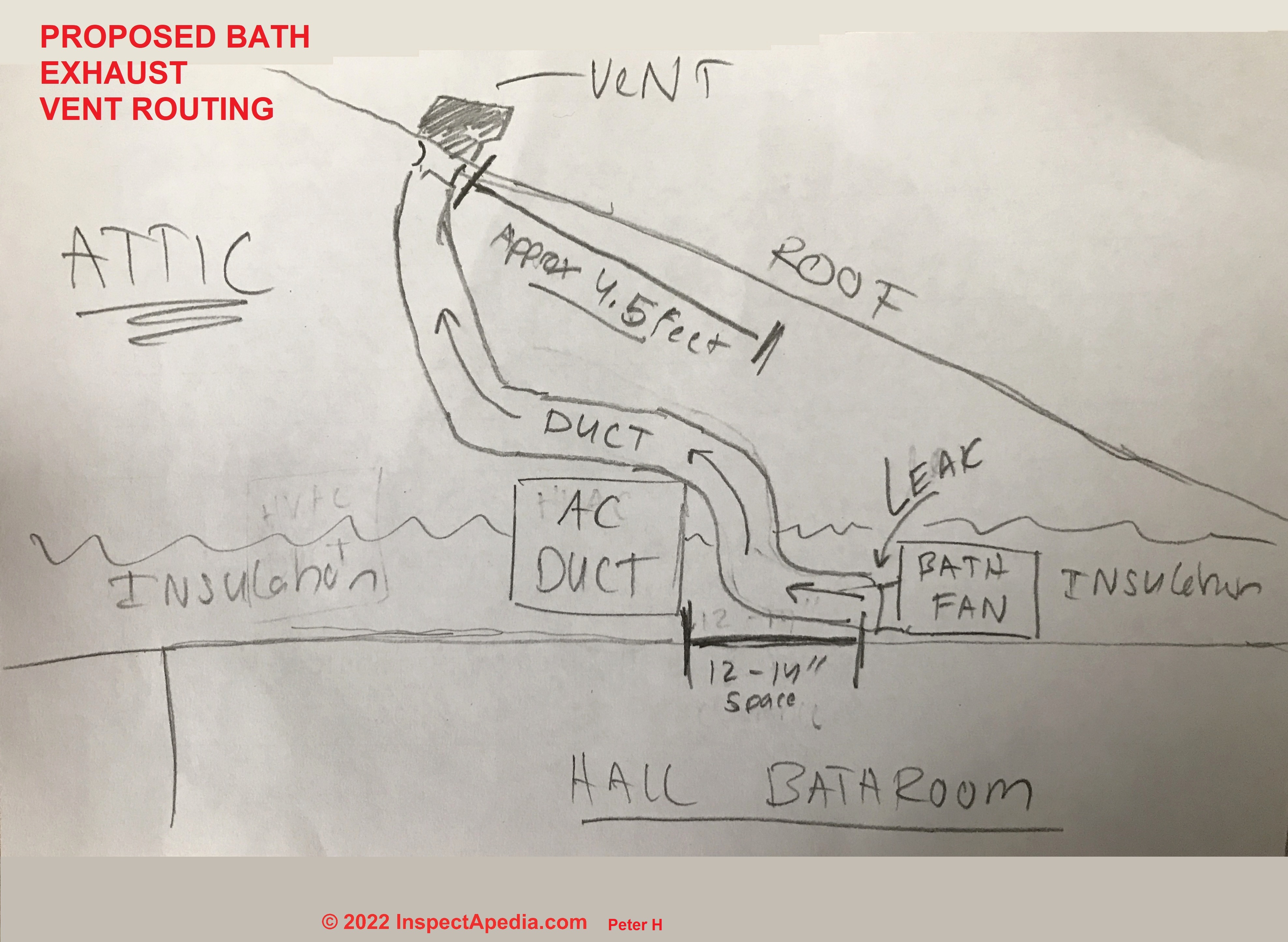
bathroom exhaust fan ductwork routing flexible duct support

Routing duct without seeing the cavity requires strategy and the right materials.

Choose Flexible Duct for Tight Spaces

  • UL-listed aluminum flex duct (4-inch diameter) is ideal for concealed runs.
  • Fully stretch it to avoid sagging.
  • Support every 4 feet with wire or straps, even if hidden.

Avoid: Plastic or foil duct not rated for continuous flex. These collapse and restrict airflow.

Use Rigid Duct When Alignment Is Certain

  • Galvanized metal or PVC pipe offers better airflow performance.
  • Drop it from the roof: After cutting the roof hole, lower the rigid duct into the cavity and guide it over the fan outlet.
  • Secure with foil tape or duct clamps. Never use duct tape.

Vent Through Wall Instead

If roof access is unsafe or impractical, vent through an exterior wall near the ceiling. This method is often easier and results in shorter duct runs.

Cut Wall Opening Near Ceiling

  1. Locate a spot within 12 inches of the ceiling.
  2. Use a stud finder to avoid wall studs.
  3. Drill a pilot hole outside to confirm placement.
  4. Cut a 4- to 5-inch hole through siding and sheathing.

Install Wall Cap with Damper

  • Use a weatherproof wall vent cap with a backdraft damper.
  • Seal edges with exterior-grade caulk.
  • Connect duct directly from fan to cap.

Advantage: Shorter duct runs mean better airflow, less condensation buildup, and no roof penetration.

Connect Wiring Safely and Correctly

Electrical work must meet code, even in retrofit situations.

Turn Off Power at Breaker

  • Shut off the bathroom circuit at the main panel.
  • Test wires with a non-contact voltage tester before touching.

Reuse Existing Wiring if Possible

Most fans connect using standard wiring:
* Black (hot) to black
* White (neutral) to white
* Ground (bare or green) to ground

Use wire nuts and tuck connections into the housing. No exposed copper should remain.

Warning: If the circuit powers a GFCI outlet or nearby sink, ensure the fan is on the load side or protected by GFCI.

Add Junction Box if Splicing

  • Any wire splice must be in an accessible junction box.
  • Mount it nearby, such as in a closet ceiling, if attic access is unavailable.

Select the Right Fan for Tight Spaces

Not all fans fit in low-clearance ceilings. Choose wisely.

Prioritize Low-Profile Models

  • Depth: 3 to 4 inches maximum
  • Recommended brands: Panasonic FV-0511VQ1, Broan 688, NuTone 678RP
  • Sone rating: 0.7 to 1.0 for quiet operation

Match CFM to Bathroom Size

  • Under 50 square feet: 50 CFM minimum
  • Over 50 square feet: 1 CFM per square foot
  • With shower or tub: 80 to 110 CFM

Example: A 6×8 bathroom (48 square feet) needs at least 50 CFM.

Avoid Common Installation Mistakes

Even experienced DIYers make errors that reduce performance or create hazards.

Do Not Use Duct Tape on Joints

  • Duct tape melts over time and fails under heat.
  • Use aluminum foil tape or duct clamps instead.

Do Not Allow Sagging Flexible Duct

  • Sagging creates airflow resistance and traps moisture.
  • Stretch fully and support every 4 feet.

Do Not Vent Into Attic or Soffit

  • This violates building code and causes mold growth.
  • Vent must exit outside the building, at least 12 inches from windows or doors.

Do Not Ignore Backdraft Damper

  • Without a working damper, cold air flows back into the bathroom during winter.
  • Ensure roof or wall cap includes a functional backdraft damper.

Test and Finish the Installation

Final steps ensure performance and aesthetics.

Test Fan Before Closing Up

  1. Temporarily install the grille.
  2. Turn on power and verify:
    * Strong airflow at vent exit
    * No unusual noise or vibration
    * Damper opens when fan runs

Pro tip: Hold a tissue near the grille. It should stick when the fan is running.

Patch and Paint Drywall

If you enlarged the opening:
* Cut along stud lines for clean edges.
* Reuse the original drywall piece if possible.
* Tape, mud, and sand smooth.
* Prime and paint to match.

Maintain for Long-Term Performance

A well-installed fan lasts 10 to 15 years, but only with proper care.

Clean Every 6 to 12 Months

  1. Remove the grille.
  2. Wipe blades and housing with a damp cloth.
  3. Vacuum dust from intake and duct entrance.

Inspect Roof or Wall Vent Annually

  • Clear leaves, animal nests, or ice buildup.
  • Confirm damper moves freely.
  • Re-seal roof flashing if leaks appear.

Replace Motor if Needed

  • Some brands, such as Broan, offer replaceable motors.
  • This extends the life of your fan without requiring new ductwork or wiring.

When to Call a Professional

Consider professional help in these situations:
* You are uncomfortable working on a roof.
* Electrical wiring needs upgrading.
* The cavity has obstructions such as pipes or existing wires.
* You are unsure about vent alignment.

Cost note: Professional installation averages $300 to $600, but ensures code compliance and maintains warranty coverage.

Frequently Asked Questions About Installing a Bathroom Exhaust Fan Without Attic Access

Can I install a bathroom exhaust fan if my bathroom has a vaulted ceiling?

Yes. Vaulted ceilings often have very limited clearance between the ceiling and roof, but you can still install a fan. Use a low-profile fan (3 to 4 inches deep) and route ducting through a short vertical run to the roof. The key is using a long drill bit to create a pilot hole for precise alignment.

What is the best venting option when I cannot access the attic?

Wall venting is often the best alternative when attic access is impossible. Cut a hole through an exterior wall near the ceiling, install a wall cap with damper, and connect a short duct run. This method eliminates the need for roof penetration and results in better airflow due to shorter duct runs.

How do I secure the fan when there are no ceiling joists nearby?

Install 2×4 blocking between existing joists to create a secure mounting surface. Cut a small access hole between joists, insert the blocking, secure with screws, then mount the fan. Alternatively, use toggle bolts or adhesive-mounted brackets if wood framing is completely unreachable.

What type of duct should I use for hidden ceiling spaces?

Use UL-listed aluminum flex duct for tight, invisible cavities. Fully stretch it to prevent sagging, and support every 4 feet with wire or straps. For short, straight runs where alignment is certain, rigid duct offers better airflow performance.

Do I need a permit to install a bathroom exhaust fan?

Permit requirements vary by location. Most jurisdictions require a permit for electrical work, and some require permits for any exhaust fan installation. Check with your local building department before starting the project.

Key Takeaways for Installing a Bathroom Exhaust Fan Without Attic Access

Installing a bathroom exhaust fan without attic access requires different techniques than standard installations, but it is absolutely achievable with the right approach.

The most critical steps are measuring your ceiling-to-roof clearance first, then choosing between roof venting (using a long pilot hole for alignment) or wall venting (easier and shorter runs). Secure the fan using blocking between joists or adjustable hanger bars, and always use aluminum foil tape or duct clamps instead of standard duct tape.

Remember to select a low-profile fan that fits your clearance (3 to 4 inches deep), match CFM to your bathroom size (50 CFM minimum for small bathrooms), and choose ultra-quiet models (0.7 to 1.0 sone) for comfortable operation. Finally, vent must always terminate outside the building with a backdraft damper to prevent cold air from entering during winter months.

Now that you understand the techniques professionals use, you can tackle this project with confidence. Take your time with the pilot hole alignment, and test the fan before closing up the ceiling. Your bathroom will stay dry, mold-free, and properly ventilated for years to come.

How to Install an Exhaust Fan: Step-by-Step Guide


Is your garage stuffy, humid, or filled with lingering fumes from paint, gasoline, or lawn equipment? Installing an exhaust fan is one of the most effective ways to improve air quality, reduce moisture, and keep temperatures under control. Whether you use your garage as a workshop, storage space, or parking area, knowing how to install an exhaust fan properly can make a dramatic difference in comfort and safety.

This guide walks you through every step, from selecting the right fan to sealing the exterior like a pro. You will learn how to choose the correct CFM, cut a wall opening safely, prevent leaks, wire controls, and avoid common installation mistakes.

Choose the Right Fan for Your Garage Size

garage exhaust fan CFM chart

Before picking up tools, select an exhaust fan that matches your garage size and usage. The wrong fan can underperform or waste energy.

Calculate Required CFM

The fan airflow capacity measured in Cubic Feet per Minute (CFM) must match your space. Use this formula:

(Garage Volume × Air Changes per Hour) ÷ 60 = Required CFM

For general use, aim for 5 air changes per hour. For workshops with fumes, dust, or solvents, target 8 to 10 air changes per hour.

Garage Size Square Footage Recommended CFM
1-Car Garage 240 to 540 200 to 450
2-Car Garage 360 to 660 300 to 550
3-Car Garage 600 to 1,260 500 to 1,050

Pro tip: For 10-foot ceilings, increase CFM by 25 percent. Double it for heavy-duty fume applications.

Select the Fan Type

Wall-mounted fans with built-in shutters offer the best balance of performance and simplicity for most garage installations. They exhaust directly outside without requiring attic venting.

Type Best When
Wall-mounted Direct exterior access is available
Ceiling-mounted Wall access is limited
Roof-mounted No wall or ceiling options exist

Pick the Installation Location

Your fan position affects efficiency and durability. Mount the fan high on an exterior wall because hot air and fumes rise.

Ideal Spot Criteria

The fan should be mounted between wall studs, above head height (6.5 feet or higher), on a wall with direct outdoor access, and away from insulation, wiring, or beams. It should be on the opposite side from any intake vents you plan to install.

Avoid: South-facing walls (overheating risk), street-visible locations (aesthetics), or areas near garage doors (obstruction risk).

Cut the Wall Opening Safely

This step requires precision to avoid structural or moisture issues.

Mark and Cut Steps

  1. Turn off power to nearby circuits.
  2. Use a stud finder to locate framing on both sides of the wall.
  3. Mark the cutout using the fan template (typically 14 by 14 inches for a 14-inch fan).
  4. Drill starter holes in each corner.
  5. Cut through interior drywall, insulation, sheathing, and exterior siding using a jigsaw.

Warning: If you have vinyl siding, use a siding removal tool to pop out panels first, then reinstall them after mounting.

Seal and Frame the Interior Opening

Prevent air from leaking into wall cavities instead of exiting outside.

Install the Backing Frame

  1. Cut two horizontal 2x4s to fit the top and bottom of the opening.
  2. Screw them into the wall studs to create a solid base for the fan.
  3. Seal edges with flashing tape or peel-and-stick membrane.

Why it matters: Without this step, air escapes into the wall, reducing efficiency and risking moisture buildup.

Build a Weatherproof Exterior Frame

exhaust fan exterior flashing installation

Keep rain out and ensure long-term durability with proper exterior framing.

Install J-Channel for Waterproofing

  1. Cut four pieces of J-channel (vinyl or metal) to form a rectangular frame around the opening.
  2. Nail or screw the frame to wall studs, overlapping the cut siding edges.
  3. Add a drip cap above the top channel to shed water.
  4. Seal all joints with silicone caulk.

Result: A clean, professional finish that prevents water intrusion and protects insulation.

Mount the Exterior Vent and Shutter

Ensure unobstructed airflow and automatic closure when the fan is not in use.

Insert and Secure the Shutter

  1. From the outside, insert a 14-inch aluminum shutter vent into the opening.
  2. Fasten with corrosion-resistant screws into the wall studs.
  3. Test that shutters open freely and close tightly when the fan is off.
  4. Apply caulk around the perimeter to seal gaps.

Common issue: If shutters bind, the hole may be too tight. Build a spacer frame to fix this.

Fix Shutter Binding with a Spacer Frame

A common problem occurs when compressed housing prevents shutters from closing properly.

Build a Wooden Spacer Frame

  1. Cut four 2x4s to match fan dimensions (such as 14 by 14 inches).
  2. Join corners with pocket hole screws.
  3. Attach the frame to wall studs using lag bolts (countersink with a Forstner bit).
  4. Mount the fan onto the spacer.

Benefit: This creates clearance, improves sealing, and allows smooth shutter operation.

Mount the Exhaust Fan Unit

garage exhaust fan mounting bracket installation

Now install the fan securely and correctly.

Final Mounting Steps

  1. Hold the fan against the spacer or wall opening.
  2. Verify airflow direction. The fan must push air out, not pull it in.
  3. Secure with heavy-duty screws into the 2×4 frame.
  4. Manually test internal and external shutters to ensure they operate smoothly.

Check: Look for an arrow on the fan label indicating exhaust direction.

Wire the Fan and Add Controls

Choose a safe, convenient way to operate the fan.

Electrical Options

Option Best For
Plug-in model DIYers avoiding electrical work
Hardwired Permanent setup with junction box

Safety first: Turn off the circuit breaker before handling wires.

Recommended Control Upgrades

Consider adding a timer switch for auto-shutoff after 30 minutes, one hour, or two hours. A wireless remote allows control from across the garage. A humidistat or thermostat can auto-activate the fan at set conditions.

User tip: Adding a timer two years post-install improved convenience and cut energy use significantly.

Seal, Test, and Verify Performance

Complete final checks to ensure efficiency, safety, and weather resistance.

Complete the Installation

  1. Caulk all gaps around the fan housing.
  2. Restore power and turn on the fan.
  3. Test airflow by holding a tissue near the exterior shutter. It should blow outward.
  4. Listen for smooth, quiet operation (3 sones or less is ideal).
  5. Check for leaks after rain or with a hose test.

Pro tip: Install a louvered intake vent on the opposite wall to balance airflow and boost efficiency.

Maintain the Fan for Long Life

A little upkeep keeps your system running strong for years.

Annual Maintenance Checklist

Clean blades and shutters with a damp cloth or soft brush. Inspect seals and caulk for cracks or wear. Check electrical connections for looseness. Lubricate motor bearings only if specified by the manufacturer.

Lifespan: Expect 8 to 15 years with proper care. Aluminum shutters resist rust while vinyl may degrade in extreme cold.

Avoid These Common Mistakes

Even small errors can reduce performance or cause damage.

Top Installation Errors

Cutting the hole too tight distorts the housing and jams shutters. Skipping J-channel leads to water leaks, rot, and mold. Not sealing wall edges lets air escape into the cavity. Installing the fan backward pulls air in instead of out. Omitting an intake vent limits airflow due to negative pressure. Skipping safety gear risks injury during cutting.

Fix: Always plan for intake by adding a passive louvered vent on the opposite wall.

Cost and Time Estimate

This project is affordable and manageable for most DIYers.

Item Cost
14-inch Exhaust Fan (800 CFM) $80 to $120
Exterior Shutter Vent $20 to $40
J-Channel and Flashing Tape $10 to $20
Timer or Wireless Switch $15 to $30
Total (DIY) $130 to $200

Time required is approximately one full day (8 hours). DIY installation avoids $200 to $400 in professional labor costs.

Frequently Asked Questions About Installing an Exhaust Fan

What size exhaust fan do I need for a 2-car garage?

A 2-car garage (360 to 660 square feet) typically requires 300 to 550 CFM. Calculate your exact needs using the formula: (garage volume × air changes per hour) ÷ 60. Multiply by 1.25 for 10-foot ceilings or double it for heavy workshop use.

Can I install an exhaust fan myself, or do I need an electrician?

You can install a plug-in exhaust fan yourself without electrical work. For hardwired models, you need basic electrical knowledge or an electrician. Always turn off the circuit breaker if doing any wiring yourself.

Where should I mount the exhaust fan?

Mount the exhaust fan high on an exterior wall (near the ceiling) to capture rising hot air and fumes. It should be between wall studs, on the opposite side from intake vents, and away from obstructions like garage doors.

How do I know if my exhaust fan is working properly?

Turn on the fan and hold a tissue near the exterior shutter. The tissue should blow outward forcefully. Shutters should open fully when running and close completely when off. The motor should run quietly without rattling or buzzing.

Do I need an intake vent for my exhaust fan to work?

Yes, an intake vent is essential. Without one, the fan creates negative pressure that limits airflow. Install a louvered intake vent on the opposite wall to allow fresh air to enter while the fan exhausts stale air.

How often should I maintain my exhaust fan?

Clean the shutters and blades every 6 to 12 months. Inspect seals and caulking annually. Check electrical connections yearly. Proper maintenance extends the fan lifespan to 8 to 15 years.

Key Takeaways for Installing Your Exhaust Fan

Installing an exhaust fan transforms a stuffy garage into a fresh, functional workspace. The most critical steps are choosing the correct CFM for your space size, mounting the fan high on an exterior wall, and installing proper weatherproofing with J-channel and flashing. Always add an intake vent on the opposite wall to ensure balanced airflow. Use a timer or wireless switch for convenience and energy savings. With proper installation and annual maintenance, your exhaust fan will provide 8 to 15 years of reliable ventilation.

Now you know how to install an exhaust fan the right way: efficiently, safely, and without leaks. Start planning your installation today and breathe easier in your garage tomorrow.

How to Install a Roof Exhaust Fan: Step-by-Step Guide


Installing a roof exhaust fan is one of the most effective ways to improve attic ventilation, reduce indoor temperatures, and prevent moisture damage. Whether you’re upgrading your home’s energy efficiency with a solar-powered attic fan or installing a commercial upblast exhaust system, proper installation ensures long-term performance and leak-free operation. This guide walks you through every critical step, from site selection and cutting the roof opening to waterproofing, wiring, and final testing.

Choose the Right Roof Exhaust Fan

Remington 20-watt solar attic fan vs Jet Fan 727 electric attic fan comparison

Selecting the correct roof exhaust fan depends on your specific application. For residential attics, you have two primary options: powered electric fans or solar-powered models. Solar fans like the Remington 20-watt require no wiring, operate at zero electricity cost, and are perfect for DIYers. Electric models such as the Jet Fan 727 offer continuous operation with thermostat control but must be hardwired by a licensed electrician.

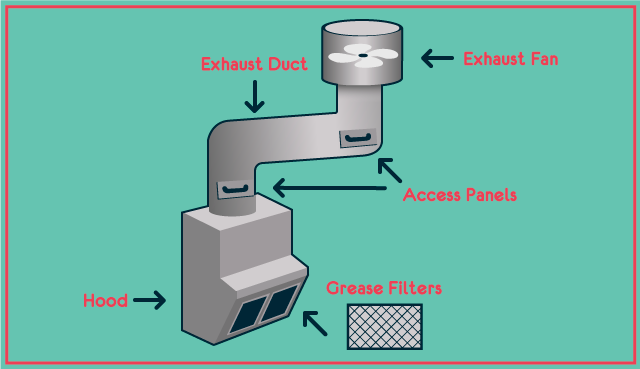
For commercial kitchens, upblast exhaust fans are required to remove smoke, heat, and grease-laden vapors. These units mount on prefabricated curbs, comply with NFPA 96, and often include hinged access for cleaning and fire suppression integration. Match your fan type to your application before purchasing.

Power and Placement Considerations

Solar fans only run during daylight, so ensure your roof has full sun exposure, ideally on a south-facing slope in the Northern Hemisphere. Electric models need a dedicated circuit, GFCI protection, and compliance with NEC outdoor wiring codes. Always verify voltage and amperage match the motor nameplate before installation.

Find the Optimal Installation Location

Installing the fan in the right spot directly impacts performance. Install the unit within 2 feet below the ridge line to maximize hot air extraction, since heat rises and accumulates near the peak. Avoid installing over living areas unless noise insulation is added.

Ensure the unit fits between two rafters, typically spaced 16 inches on center. Cutting into rafters compromises structural integrity. Use the ridge vent as a guide since no rafter runs directly underneath, simplifying framing clearance. Drive a screw from inside the attic through the sheathing to mark the exact center point for perfect alignment when cutting.

Maintain Required Clearances

Keep the discharge outlet at least 40 inches above the roof surface for commercial units per NFPA 96. Maintain 10 feet clearance from air intakes to prevent contaminated air recirculation. Provide adequate space for maintenance access, especially for commercial fans requiring regular grease trap cleaning.

Gather Essential Tools and Materials

Before starting, collect all required tools and materials. Essential tools include a drill with paddle bit for starter holes, a jigsaw or reciprocating saw for cutting decking, a pry bar to lift shingles, a tape measure and level, a chalk line, a caulking gun, and a ladder with stabilizer. You also need fall protection harness for roofs steeper than 4:12.

Required materials include the roof exhaust fan unit, manufacturer-provided flashing, silicone-based roofing sealant, stainless steel screws or roofing nails, Romex wiring for electric models, wire nuts, a grounding screw, and an electrical box. A thermostat is needed if not built into the unit. Confirm all hardware and flashing are included before starting.

Mark and Cut the Roof Opening

Use the manufacturer’s template to mark the opening. For Jet Fan 727, draw a 16-inch diameter circle; for Remington solar fans, use a 14.5-inch diameter. Trace with a white Sharpie or crayon for visibility on dark shingles. Double-check that the circle fits entirely between rafters with at least 1 inch clearance on all sides.

To cut the opening safely, drill a starter hole near the edge using a paddle bit. Insert the jigsaw blade and cut along the line, cutting through shingles first, then roof decking. Acceptable shapes are a perfect circle or square with rounded corners if the unit design allows. Hold the saw at a 45-degree angle initially to avoid cutting too deep into rafters. Work in dry, calm weather to prevent water intrusion.

Install Base and Flashing Correctly

Roof vent flashing installation details diagram

Slide the fan base into the opening, guiding any integrated electrical box through the hole. Center the unit and align it with the roof slope. For commercial curb-mounted fans, install a prefabricated curb at least 14 inches high, securing it with anchor bolts and sealing flanges with silicone. Fasten the fan to the curb with at least eight stainless steel fasteners.

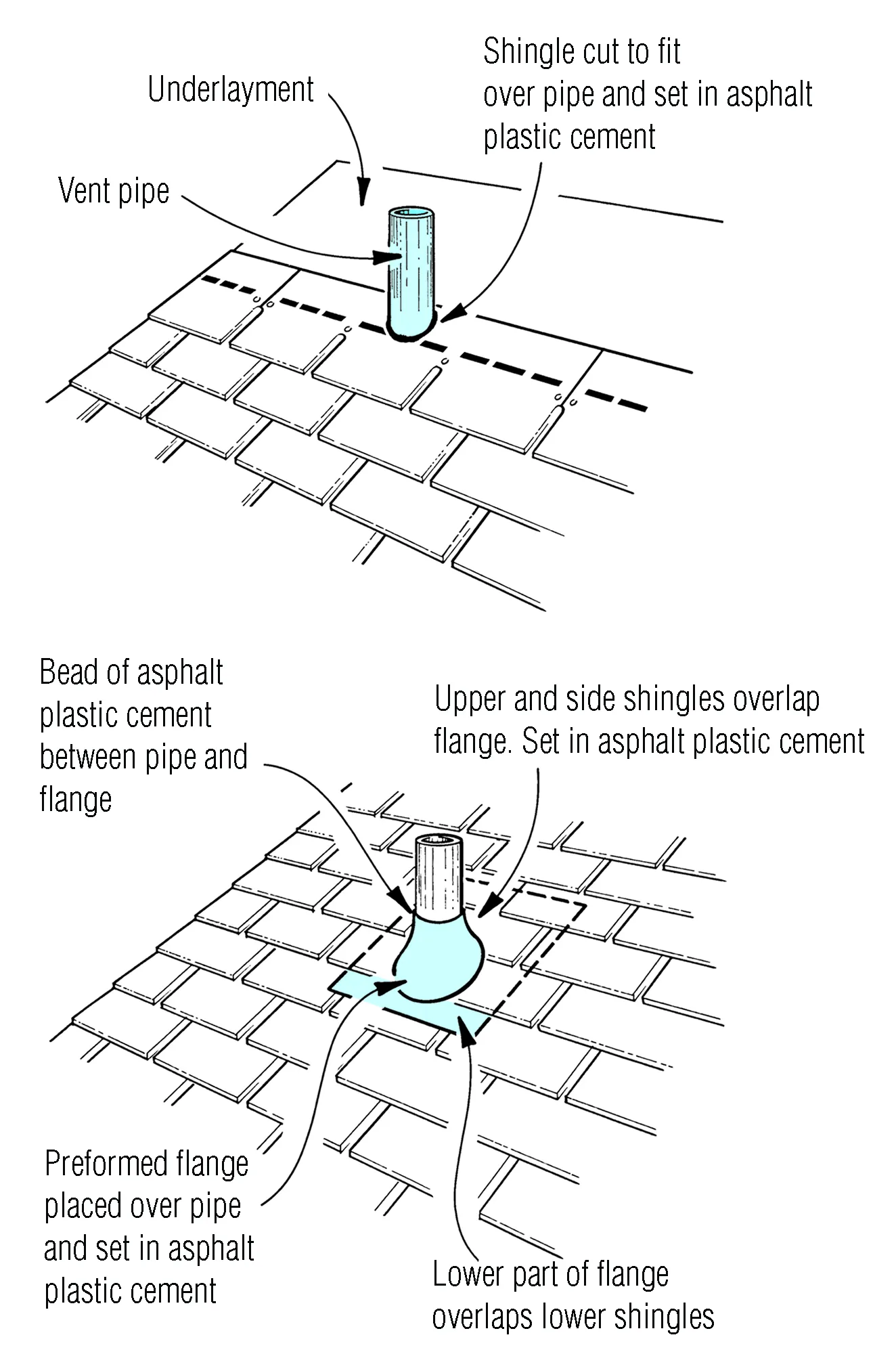
Flashing is your primary defense against leaks. At the top, slide flashing under upper shingles so water flows over it. At the bottom, place flashing over lower shingles, never under, to allow proper drainage. Use wide flashing to cover the full base and provide ample overlap. Fasten the base every 4 inches along the bottom edge, positioning nail heads just inside the vertical edge to avoid water paths.

Wire Electric Models Safely

Before starting electrical work, turn off the breaker and lock out/tag out the disconnect. Use a multimeter to confirm no voltage is present. Remove the electrical box cover using a flat-blade screwdriver. Pull Romex wiring through the base opening and secure the connector at the box base.

Connect the ground wire to the grounding screw, the black hot wire to the black terminal using a wire nut, and the white neutral wire to the white terminal. Tug wires to ensure connections are tight, then tuck them neatly without blocking the cover or thermostat. Insert the built-in thermostat into its slot; it activates the fan at 90 to 110 degrees Fahrenheit depending on adjustment. Use Type TW wire if replacing original wiring, and ensure the power supply matches motor nameplate specs on a dedicated circuit.

Optimize Airflow and Ductwork

Minimize bends, transitions, and flexible ducts as they increase static pressure and reduce CFM by up to 50 percent. Use rigid metal ducts with smooth, gradual turns and ensure the fan outlet and duct are aligned and sealed tightly. For commercial kitchen exhaust, NFPA 96 bans dampers in grease-laden systems unless explicitly permitted by local code.

Seal and Secure the Installation

Apply a continuous bead of silicone around all fastener heads and base edges. Silicone remains flexible, resists UV, and bonds better than plastic cement. Reapply annually during inspections if cracking or shrinkage occurs. Tighten screws until snug, not forced, as over-tightening warps the housing or damages the roof deck. Use shims under commercial curbs to level the unit before fastening.

Test and Inspect Before Use

Before startup, confirm all fasteners are tight, reinstall the motor dome after checking for debris, ensure the blower wheel spins freely, and verify no tools or materials are left inside. Restore power and for solar fans, expose the panel to sunlight; the fan should start automatically. For thermostatic models, wait for attic temperature to rise or use a heat gun; the fan should engage at the set point. Listen for smooth operation with no vibration, rattling, or grinding.

Conduct a water flow inspection by observing how water runs over the flashing during rain or with a hose. Water must flow downhill without pooling, with no gaps or lifted shingles, and drainage channels must be clear of obstructions.

Maintain for Long-Term Performance

Schedule routine maintenance to extend your fan’s lifespan. Clean the exterior screen every 6 to 12 months to remove leaves, dust, and nests. Inspect sealant and fasteners annually, reapplying silicone as needed. Check for corrosion, shifting, or storm damage. For commercial fans, clean blades, housing, and grease traps monthly, and verify fire suppression system integration.

High-quality units last 15 to 20 years, with motors lasting over 10 years with seasonal use. Solar panels remain functional after 25 years though efficiency declines gradually. Most brands offer 5 to 10 year warranties.

Avoid Common Installation Mistakes

Several mistakes can compromise your installation. Placing flashing under shingles at the bottom blocks drainage and causes leaks; only slide flashing under shingles at the top. Trimming top shingles creates entry points for rain and pests; only trim side shingles for drainage. Skipping sealant or using plastic cement leads to cracks and leaks; use silicone and apply generous, continuous beads on all fasteners and joints.

Installing too low on the roof reduces hot air extraction; install within 2 feet of the ridge for maximum efficiency. Ignoring wind direction increases rain entry; angle the flashing away from dominant winds such as southwest in many regions.

Frequently Asked Questions About Installing Roof Exhaust Fans

Can I install a roof exhaust fan myself?

Yes, solar-powered attic fans can be installed as DIY projects since they require no wiring. Electric models require hardwiring by a licensed electrician, but you can handle the structural preparation, cutting, flashing, and mounting yourself.

How do I know if my roof exhaust fan is working properly?

Test by restoring power and observing operation. For solar fans, expose the panel to direct sunlight; the fan should start automatically. For thermostatic models, the fan should engage when attic temperature reaches the set point, typically 90 to 110 degrees Fahrenheit. Listen for smooth operation without vibration or unusual noises.

Where should a roof exhaust fan be placed?

Install the fan within 2 feet below the ridge line on the roof, positioned between rafters spaced 16 inches on center. This location maximizes hot air extraction since heat rises and accumulates near the peak.

How often should I maintain my roof exhaust fan?

Clean the exterior screen every 6 to 12 months to remove debris, dust, and nests. Inspect sealant and fasteners annually and reapply silicone as needed. For commercial kitchen fans, clean blades and grease traps monthly.

What happens if I don’t balance intake and exhaust ventilation?

Without balanced ventilation, negative pressure can develop and pull conditioned air from living spaces into the attic. Maintain a 50/50 ratio between intake vents (such as soffit vents) and exhaust vents for optimal airflow and energy efficiency.

Key Takeaways for Installing Your Roof Exhaust Fan

A properly installed roof exhaust fan delivers continuous ventilation, lower energy bills, and long-term protection against mold, rot, and roof damage. The most critical success factors are installing high on the roof within 2 feet of the ridge, properly flashing under the top shingles and over the bottom shingles, and applying silicone sealant generously around all fasteners and edges.

Whether you’re a homeowner reducing cooling costs with a solar attic fan or a technician installing a commercial kitchen exhaust system, following these steps ensures a professional-grade result. Choose quality materials, maintain proper ventilation balance, and perform annual inspections to maximize performance and extend the lifespan of your roof exhaust fan.

How to Install Kitchen Hood Exhaust Fan


Installing a kitchen hood exhaust fan improves air quality, removes cooking odors and grease, and protects your home from moisture damage. Whether you’re upgrading an old unit or adding ventilation to a new kitchen, proper installation is crucial for performance and safety. This guide covers every step, from selecting the right hood and planning ductwork to electrical connections and code compliance.

You’ll learn how to install a ducted range hood correctly, avoid common mistakes, and ensure your system meets building codes, especially if you’re using a high-CFM model that requires makeup air. By the end, you’ll know exactly what tools to use, how to vent properly, and when to call in a licensed contractor.

Choose the Right Range Hood Type for Your Kitchen

Select Based on Your Cooktop Layout

Your kitchen layout determines the best hood type. Wall-mounted hoods fit above standard cooktops against a wall and offer strong suction with direct vertical ducting. Under-cabinet models save space and blend into cabinetry, ideal for smaller kitchens. Island hoods hang from the ceiling over a central cooking station and require overhead support and ceiling-to-roof duct runs. Insert hoods are built into custom cabinetry for seamless, high-end finishes.

Match the hood width to your cooktop. Ideally, the hood should be at least as wide as the cooking surface, or up to 6 inches wider for better capture efficiency. For gas ranges, especially high-BTU models, choose a hood rated for 600+ CFM to handle heavy smoke and steam.

Pick Ducted Over Ductless Whenever Possible

A ducted hood vents air outside, removing contaminants completely. This is the preferred option for health, cleanliness, and long-term performance. Ductless hoods filter air through charcoal or mesh filters and blow it back into the kitchen. They’re easier to install but less effective, especially at controlling humidity and strong odors.

Only use ductless if exterior venting isn’t feasible, such as in rental units or apartments where structural modifications aren’t allowed. Even then, expect more frequent filter replacements and reduced air quality compared to ducted systems.

Size the Fan by Your Cooking Needs

Airflow is measured in CFM (cubic feet per minute). A higher CFM means stronger suction. Use these guidelines:

  • Electric cooktops: Minimum 400 CFM
  • Gas cooktops: 600+ CFM
  • Commercial-grade gas ranges: 760+ CFM

Some models allow upgrading from 400 to 760 CFM for gas compatibility. However, hoods over 400 CFM trigger code requirements. IRC Section M1503.4 mandates a motorized makeup air system to prevent negative pressure, which can cause dangerous backdrafting of carbon monoxide from furnaces or water heaters.

Gather the Required Tools and Materials

kitchen hood installation tools layout

Essential Tools for Installation

You’ll need specific tools to complete this installation properly. A 6-inch hole saw cuts through drywall and siding. An oscillating multi-tool or reciprocating saw handles precise cuts around obstructions. A drill with reverse function is critical when drilling through aluminum siding. A laser level or bubble level ensures straight, balanced mounting. A stud finder locates framing for secure fastening. A voltage tester confirms power is off before electrical work. A measuring tape provides accurate layout and alignment. A vacuum controls dust during drilling. A caulking gun applies weatherproof sealant.

Having a helper is highly recommended, especially when lifting and aligning heavy stainless steel hoods.

Required Materials by System Type

For ducting, use 6-inch rigid metal duct. It resists grease buildup and maintains airflow better than flexible duct. Limit flexible aluminum duct to short runs under 10 feet and avoid it entirely if possible. Seal all joints with aluminum HVAC foil tape, never duct tape, which degrades over time.

For exterior components, include a 6-inch wall cap or vent cover, a PVC or metal mounting block that is rot-resistant for wet climates, a beveled block (optional) with angled top to shed water, and exterior-grade silicone caulk to prevent moisture intrusion.

Electrical supplies include 12-AWG wire for hardwired units, wire nuts or quarter-inch yellow connectors, and a junction box inside the hood.

Finishing touches include stainless steel crown molding (approximately 18½ inches) to blend the hood with cabinetry and a paint-matched vent cap for aesthetic continuity.

Turn Off Power and Prepare Wiring Safely

Shut Off the Circuit Before Electrical Work

Before touching any wires, turn off the breaker powering the range hood circuit. Verify the line is dead using a non-contact voltage tester. Never work on live circuits. This is a critical safety rule that cannot be emphasized enough.

If you’re replacing an existing hood, check for a nearby junction box or existing wiring behind the wall. Most modern hoods connect via a knockout panel in the back, accessed with a flathead screwdriver.

Run a New Circuit If Needed

For new installations without existing power, a licensed electrician should install a dedicated 15-amp circuit with 12-AWG wire from the breaker panel. Route wire separately from ducting to prevent interference and meet code. Feed the wire through the hood’s knockout before mounting the unit.

Connect wires inside the hood’s terminal block: black to black (hot), white to white (neutral). Secure with wire nuts or connectors. No bare copper should be exposed. Only restore power after all connections are complete and insulated.

Set the Correct Mounting Height and Locate Wall Studs

Follow Recommended Clearance Standards

Mounting height affects performance and safety. For electric cooktops, mount the hood 24 to 30 inches above the surface. For gas cooktops, mount it 30 to 36 inches above the surface.

Too low, and pots may hit the hood. Too high, and smoke escapes before capture. Use a laser level to mark a level line across the wall. Align with visual cues like tile grout lines or cabinet edges for a clean look.

Find and Mark Wall Studs

Use a stud finder to locate framing behind drywall. Mark screw points approximately 7 inches apart. These will support the mounting flange.

If studs don’t align with mounting holes, install quarter-inch yellow wall plugs (drywall anchors) for secure fastening. Ensure the flange is perfectly level before driving screws. This prevents misalignment and stress on the hood.

Plan the Vent Path and Avoid Common Obstructions

kitchen range hood ductwork diagram

Choose the Shortest, Straightest Route

Three common vent paths exist. Through an exterior wall is most efficient for wall-mounted hoods. Through the ceiling and roof is required for island hoods. Through cabinetry to a side wall works as an alternative when direct access is blocked.

The goal is to minimize bends and length. Each 90-degree elbow reduces effective airflow by up to 25 percent. Keep total duct run under 30 feet if possible.

Use Rigid Duct and Minimize Bends

Always prefer 6-inch rigid metal duct. It maintains shape, resists grease, and allows easy cleaning. Avoid flexible duct. It collapses slightly, traps grease, and restricts airflow.

If a bend is necessary, use a smooth-radius 90-degree elbow with at least 2 to 3 inches of clearance in the wall cavity. Keep duct runs short and straight. Avoid flexible ducting, as it traps grease and restricts airflow.

Do not route duct through cold attics without insulation, as condensation can form and drip back into the hood.

Cut the Exterior Wall Opening Properly

Locate and Mark the Vent Exit Point

Measure from a fixed interior reference such as a window frame. For example, 27 inches horizontally and 6 inches up, centered between wood battens.

Drill a pilot hole from inside using a long 1/8-inch or 1/4-inch bit to confirm alignment on the exterior. Check for obstructions like studs, pipes, or wiring.

Cut a Clean 6-Inch Hole

Use the pilot hole to position a 6-inch hole saw. For aluminum siding, start the drill in reverse to cut cleanly through the metal without tearing. Switch to forward once past the siding to cut through sheathing.

For wood or vinyl, drill multiple half-inch dot-to-dot holes around the perimeter, then connect with a reciprocating saw. Work on a dry day to prevent brittle siding from cracking.

Use flexible duct as a template to mark the correct size. After cutting, vacuum debris and inspect from both sides.

Install Ducting and Seal Every Joint

Connect Interior and Exterior Duct Sections

Insert rigid 6-inch duct through the wall opening. Connect one end to the hood’s exhaust outlet and the other to the exterior wall boot.

For models with adjustable exhaust extensions, unscrew, measure, and reattach for perfect fit.

Route flexible duct only if unavoidable and keep under 10 feet. Never compress it. Maintain full diameter.

Seal Every Connection with Foil Tape

Use aluminum HVAC-rated foil tape on all joints. This is heat- and moisture-resistant. Never use duct tape. It dries out, cracks, and fails within months.

Fill the cavity around the duct with expansion foam to insulate and act as a fireblock. Maintain at least 2 inches of clearance behind the hood for connections.

Ensure the exterior vent cap opens outward and isn’t blocked by wind or debris.

Mount the Hood and Secure the Flange

Lift and Align with a Helper

Have a partner hold the hood in place while you align it with the mounting marks. Heavy stainless steel units are awkward and can scratch surfaces if dropped.

Ensure the mounting flange is level and fits snugly against the wall.

Fasten with Weather-Resistant Screws

Secure the flange using exterior deck screws. Hide the caulk bead behind the flange for a clean, professional finish.

If wiring from the back, feed the electrical cable through the knockout before final tightening.

Do not overtighten screws. This can warp the flange or crack tile.

Complete Electrical Connections Safely

Wire the Hood to the Terminal Block

Inside the hood, connect black (hot) to black and white (neutral) to white. Secure with quarter-inch yellow connectors or wire nuts.

Tuck wires neatly into the junction box. Ensure no copper is exposed. For plug-in models, leave the plug accessible. Never bury it behind walls.

Restore Power Only After Final Check

Double-check all connections, mounting, and duct seals before turning the breaker back on. Test the fan and lights.

If the hood doesn’t power on, recheck wire connections, confirm power at the breaker, and verify switch functionality.

Finish and Weatherproof the Installation

Install Crown Molding and Trim

Attach stainless steel crown molding (approximately 18½ inches) to cover the top edge and blend with upper cabinets. This hides the mounting hardware and improves aesthetics.

Seal Exterior Gaps Against Weather

On the outside, press the mounting block (PVC or metal) into the opening. Cut a 6-inch hole in the block to match the duct. For clapboard siding, cut a beveled top edge so water runs off.

Fasten the block to framing and caulk all edges with exterior-grade silicone. This prevents water intrusion, rot, and pest entry.

Match the vent cap color to siding for a seamless look.

Address Air Pressure and Safety Risks

kitchen hood makeup air system diagram

Understand Negative Pressure Hazards

High-CFM hoods over 400 CFM remove large volumes of air. If not replaced, they create negative pressure, pulling unconditioned air through cracks, attics, or crawlspaces.

Worse, they can cause carbon monoxide backdrafting from gas furnaces or water heaters. For every cubic foot of air exhausted, one must enter the home.

Install Makeup Air for High-CFM Hoods

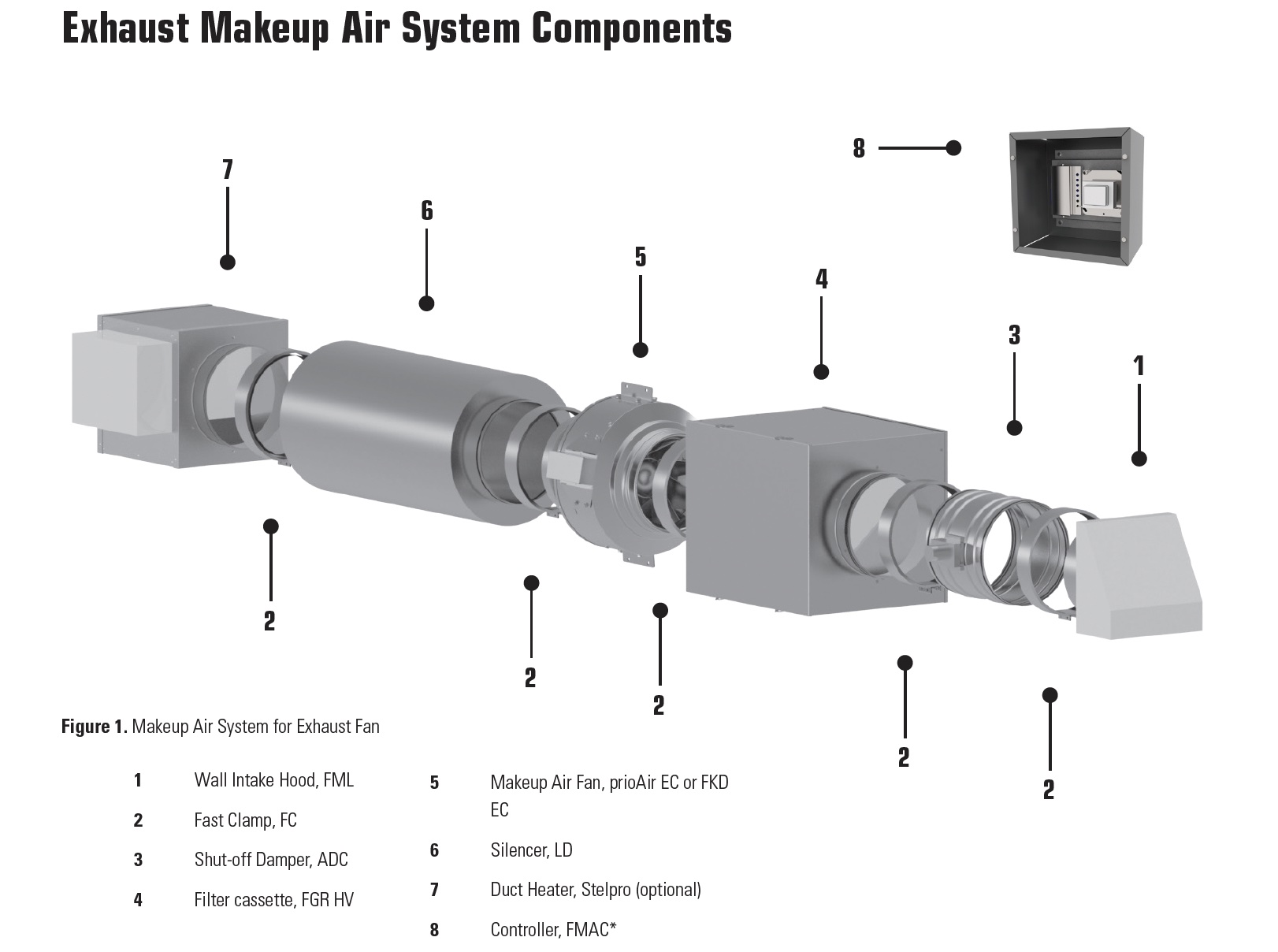
Per IRC M1503.4, any exhaust system over 400 CFM must have a motorized makeup air system. This delivers fresh, conditioned air when the hood runs, maintaining neutral pressure.

Components include a dedicated makeup air unit, ductwork to living space, and a motorized damper activated by hood operation.

Have an HVAC professional design and install this system, especially in tight, energy-efficient homes built after 2000.

Test Performance and Prevent Common Issues

Conduct Post-Installation Checks

After setup, turn on the fan and feel for strong, consistent airflow at the exterior cap. Check for air leaks at joints by listening for whistling. Look for vibrations or rattling and tighten loose screws or ducts. Confirm the exterior vent cover opens outward.

If airflow feels weak, inspect for long or bent duct runs, replace flexible duct with rigid, and clean grease filters.

Monitor for Moisture and Noise

Condensation around the exterior cap may indicate poor sealing or backdrafting. Re-caulk and ensure proper slope. Beveled blocks help shed water.

Noise usually means loose hardware. Tighten mounting screws and duct connections. Ensure the fan wheel isn’t hitting the housing.

Maintain Your Hood for Long-Term Performance

Clean Filters Monthly

Wash grease filters in warm, soapy water or dishwasher monthly. Clogged filters reduce airflow and increase fire risk.

For ductless models, replace charcoal filters every 6 to 12 months.

Inspect Annually

Once a year, check ductwork for blockages, pests, or condensation. Clean interior fan blades. Test exterior cap operation. Re-caulk if needed.

Clean stainless steel with a buffing pad to maintain finish. Avoid abrasive cleaners.

Register your hood and keep installation and maintenance records for warranty claims, typically 1 to 5 years.

When to Hire a Professional Installer

Know Your Limits

DIY installation is feasible when replacing an existing hood with pre-existing duct and power and when you’re comfortable with drilling, leveling, and wiring.

Call a professional for cutting new wall or roof penetrations, running new electrical circuits, installing island hoods with overhead supports, and homes with tight construction needing combustion safety testing.

Professionals can perform blower door tests and CO monitoring to ensure safe operation, especially critical with hoods over 1,000 CFM.

Final Thoughts on Installing Your Kitchen Hood

A properly installed kitchen hood enhances comfort, protects your home, and keeps air clean. Follow these steps to ensure safe, code-compliant, and efficient ventilation. Prioritize ducted systems over ductless whenever possible. Use rigid metal ducting, seal every joint with foil tape, and install makeup air when required by code, especially for hoods over 400 CFM.

With the right tools and careful attention to air pressure safety, you can achieve professional-grade results. If your project involves new electrical circuits, roof penetrations, or high-CFM systems in tight homes, don’t hesitate to bring in a licensed contractor. The investment in proper installation pays off in performance, safety, and peace of mind.

Frequently Asked Questions About Installing Kitchen Hood Exhaust Fans

Can I install a kitchen hood exhaust fan myself, or do I need a professional?

DIY installation is feasible if you’re replacing an existing hood with pre-existing ductwork and electrical connections and are comfortable with basic carpentry, drilling, leveling, and electrical wiring. Call a professional for new wall or ceiling penetrations, running new electrical circuits, or installing island hoods.

What is the minimum CFM I need for a gas cooktop?

For gas cooktops, minimum recommended airflow is 600 CFM or higher. For high-output commercial-grade gas ranges, choose 760 CFM or higher for adequate smoke and steam capture.

Do I need a makeup air system for my range hood?

Yes, IRC Section M1503.4 requires a motorized makeup air system for any exhaust system rated over 400 CFM. This prevents negative pressure that can cause carbon monoxide backdrafting from gas appliances.

Should I choose a ducted or ductless range hood?

Choose ducted (exterior-exhaust) whenever possible. Ducted hoods remove smoke, steam, grease, and odors completely outside, providing far better indoor air quality. Only use ductless if exterior venting isn’t feasible due to rental restrictions or structural limitations.

How far should a range hood be mounted above the cooktop?

For electric cooktops, mount the hood 24 to 30 inches above the cooking surface. For gas cooktops, mount it 30 to 36 inches above the surface. Too low creates a fire hazard, and too high reduces capture efficiency.

What type of duct should I use for my range hood?

Use 6-inch rigid metal duct whenever possible. It maintains airflow, resists grease buildup, and allows easy cleaning. Avoid flexible ducting, which traps grease and restricts airflow. If flexible duct is unavoidable, keep runs under 10 feet.

Commercial Ceiling Fan Installation Guide


Your warehouse staff complains about hot spots near the loading dock while your office workers bundle up near the AC vents. This common scenario in large facilities isn’t just uncomfortable—it’s costing you thousands in wasted energy. Commercial ceiling fan installation solves these problems by creating uniform temperatures across expansive spaces, but only when done correctly. Unlike residential installations that take an afternoon, commercial projects require specialized expertise to handle large-scale equipment, complex electrical systems, and structural considerations. This guide reveals the critical steps you must follow for successful commercial ceiling fan installation that delivers maximum comfort, energy savings, and safety in warehouses, retail spaces, and industrial facilities.

Commercial ceiling fans move dramatically more air than residential models—often 50,000+ CFM compared to 5,000-10,000 CFM in homes. This capacity difference means installation isn’t just about mounting a larger fan; it demands structural reinforcement, electrical upgrades, and precise airflow planning. When properly installed, commercial ceiling fans reduce HVAC energy consumption by up to 30% while extending equipment lifespan. In this guide, you’ll learn exactly how to select, install, and optimize commercial ceiling fans for your specific facility needs.

Why Residential Fan Installations Fail in Commercial Spaces

Commercial ceiling fan installation requires fundamentally different approaches than residential projects. Attempting to install residential-grade fans in large facilities creates immediate performance issues and long-term safety hazards.

Commercial fans weigh significantly more—HVLS models can exceed 200 pounds—demanding structural mounting points that residential installations ignore. Standard ceiling joists supporting residential fans often can’t handle commercial unit weight combined with rotational forces. Installers must locate and reinforce structural elements like roof trusses or add dedicated mounting plates rated for dynamic loads.

Electrical requirements differ substantially. Commercial fans often need 208-240V circuits with dedicated breakers, while residential units typically run on standard 120V circuits. HVLS fans with Variable Frequency Drives (VFDs) introduce additional electrical complexities including harmonic distortion that requires filtering to prevent interference with other equipment.

Blade design and motor engineering create operational differences. Commercial fans use steeper blade pitches (typically 12-14 degrees) optimized for moving massive air volumes across large spaces. Their industrial-grade motors feature sealed bearings and thermal protection for continuous 24/7 operation—a critical consideration for facilities running multiple shifts.

How to Choose & Size Commercial Ceiling Fans for Your Facility

commercial ceiling fan sizing chart warehouse

Selecting the right commercial ceiling fan prevents costly rework and ensures optimal performance from your installation investment. Follow these specific sizing guidelines based on your facility characteristics.

Determine Blade Span Based on Ceiling Height and Square Footage

HVLS fans require specific height-to-blade span ratios for effective air movement. For ceilings 20-30 feet high (common in warehouses), use 8-14 foot diameter fans. Facilities with 30-50 foot ceilings need 14-24 foot fans for proper air displacement. Measure your square footage and divide by the fan’s coverage area (typically 22,000 sq ft per fan for 24-foot models) to determine quantity.

Match Motor Power to Your Environmental Conditions

Industrial environments demand motors with specific protection ratings:
– NEMA 4X rating for washdown areas
– Explosion-proof motors for chemical facilities
– Corrosion-resistant coatings for high-humidity spaces

Verify that your electrical infrastructure supports the motor’s full load amperage plus 25% headroom for startup surges. HVLS fans with VFDs require additional electrical planning to address harmonic distortion.

Certified Commercial Ceiling Fan Installation Prevents Safety Hazards

HVLS fan installation safety checklist

HVLS fan installation demands manufacturer-certified technicians—this isn’t optional for facility safety. Improperly installed commercial ceiling fans create serious risks:

  • Structural failure from inadequate mounting (fans can weigh 200+ pounds)
  • Electrical hazards from improper wiring of high-voltage systems
  • Falling components from vibration-induced fastener loosening

Top manufacturers like Big Ass Fans require installers to complete rigorous certification programs covering:
– Structural mounting protocols for various building types
– Electrical safety standards for commercial power systems
– Load calculation methods for dynamic rotational forces
– Fall protection requirements for elevated installations

Verify installer credentials by requesting proof of current manufacturer certification and checking their insurance coverage for commercial installations. Never proceed without documentation showing certification specific to the fan model you’re installing.

7 Critical Pre-Installation Checks for Commercial Projects

Skip these steps and your commercial ceiling fan installation will face delays, safety issues, or performance failures.

Conduct Airflow Mapping Before Mounting

Identify optimal fan placement by analyzing:
– Building layout and obstruction locations (racking, machinery)
– Existing HVAC airflow patterns
– Problem areas with temperature stratification
– Employee work zones requiring focused comfort

HVLS fans perform best in open areas with minimal obstructions—position them where air can move freely downward and outward. Avoid mounting within 10 feet of walls or large equipment.

Verify Structural Mounting Capacity

Use a stud finder to locate structural elements capable of supporting dynamic loads. Commercial fans require mounting to:
– Roof trusses (not just ceiling joists)
– Steel purlins in metal buildings
– Reinforced concrete structures

When structural elements don’t align with optimal airflow positions, install steel mounting plates spanning between supports. Torque all fasteners to manufacturer specifications—typically 45-60 ft-lbs for commercial applications.

Step-by-Step Commercial Ceiling Fan Installation Process

Follow this sequence for safe, effective installation of commercial ceiling fans in large facilities.

Mounting System Installation Protocol

  1. Mark mounting points based on airflow mapping
  2. Locate and verify structural elements with stud finder
  3. Install mounting plate using grade 8 bolts torqued to 50 ft-lbs
  4. Attach fan mount to plate with vibration-dampening hardware
  5. Double-check level and alignment before proceeding

VFD and Electrical Connection Procedure

  1. Install VFD in accessible, ventilated location per manufacturer specs
  2. Run dedicated circuit from electrical panel with appropriate gauge wire
  3. Connect power supply to VFD inputs following wiring diagram
  4. Program motor parameters using nameplate data
  5. Test operation at low speed before full activation

VFD Installation Cuts Commercial Fan Energy Costs by 50%

Variable Frequency Drive wiring diagram commercial fan

Variable Frequency Drives are essential for maximizing ROI from commercial ceiling fan installation. Proper VFD setup delivers dramatic energy savings through:

  • Soft-start capability reducing electrical stress during startup
  • Precise speed control matching airflow to actual conditions
  • Cubic energy savings relationship (50% speed reduction = 87.5% energy reduction)

Configure VFDs to operate fans at 60-70% speed during normal conditions—this provides adequate airflow while minimizing energy consumption. Program seasonal adjustments that automatically reduce winter speeds to circulate warm air without creating drafts.

Commercial Ceiling Fan Maintenance Checklist

Schedule these maintenance tasks to prevent downtime and extend equipment life:

Monthly:
– Inspect blade balance and alignment
– Check for unusual vibration or noise
– Verify secure mounting hardware

Quarterly:
– Clean blades with non-abrasive cleaner
– Inspect electrical connections for corrosion
– Test emergency stop functions

Annually:
– Perform full torque check on all fasteners
– Verify motor temperature during operation
– Calibrate VFD parameters against baseline

Maximizing ROI: Commercial Fan Speed Settings for Every Season

Optimize your commercial ceiling fan installation with these seasonal adjustments:

  • Summer: Run fans at 70-80% speed with downward airflow (forward rotation) to enhance evaporative cooling
  • Winter: Reduce to 30-40% speed with upward airflow (reverse rotation) to gently circulate warm air
  • Shoulder Seasons: Use demand-based control with occupancy sensors to operate only when spaces are occupied

HVLS fans in warehouses should run continuously at reduced speeds rather than cycling on/off—this maintains consistent temperatures while using less energy than startup surges from frequent cycling.

Commercial Ceiling Fan Installation Cost vs. Energy Savings Breakdown

A typical 20,000 sq ft warehouse installation with two 24-foot HVLS fans costs $12,000-$18,000 including equipment and professional installation. The return comes quickly:

  • 25-35% reduction in HVAC energy consumption
  • $1,500-$2,500 annual savings on a $6,000 cooling bill
  • HVAC equipment lifespan extended by 25-40%

Most commercial ceiling fan installations achieve full payback within 2-3 years through energy savings alone—before accounting for productivity gains from improved worker comfort.

Commercial ceiling fan installation transforms large facilities into more comfortable, efficient spaces when done correctly. Focus on certified installation, proper sizing, and strategic placement to maximize your investment. Start with a professional airflow assessment, choose manufacturer-certified installers, and implement a maintenance schedule to ensure your fans deliver decades of reliable service. The most successful installations treat fans as integrated components of your building’s environmental system—not standalone devices—coordinating them with HVAC operation for maximum comfort and energy savings.

How to Fix Ceiling Fan Capacitor Not Working


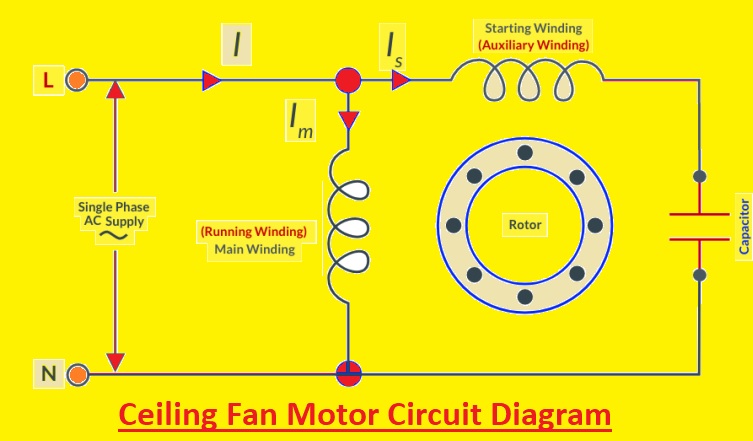
A ceiling fan that spins slowly, makes clicking noises, or refuses to start altogether often points to one common culprit: a failing capacitor. This small but essential component acts as the heart of your fan’s motor system, storing and releasing electrical energy to create the rotational force that powers the blades. When the capacitor fails, the entire fan malfunctions—yet many homeowners overlook this simple part during troubleshooting. Understanding how to diagnose, replace, and maintain your ceiling fan capacitor can save you both time and the cost of a professional service call.

The good news is that capacitor replacement ranks among the most DIY-friendly electrical repairs. With basic tools, a modest investment in a replacement part (typically $5-$15), and adherence to safety protocols, most homeowners can restore a non-working ceiling fan to full operation within an hour. This guide walks you through every step of the process, from recognizing failure symptoms to testing components and performing a safe replacement.

Identify Specific Capacitor Failure Symptoms

ceiling fan capacitor failure symptoms diagram

Pinpointing capacitor issues requires understanding the distinct malfunction patterns they create. Unlike other electrical problems, capacitor failures produce characteristic warning signs that help isolate the problem from motor or wiring issues.

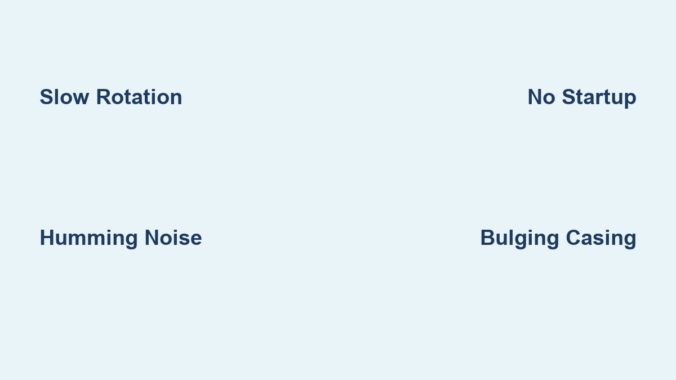
Slow or weak rotation at specific speeds reveals which capacitor section has failed. Ceiling fans with multiple speeds use capacitors with separate sections for each speed setting. If your fan spins normally on high but struggles on medium or low settings, the capacitor section dedicated to those speeds has degraded. The blades might take 5-10 seconds to reach half speed rather than accelerating smoothly.

Distinctive humming followed by clicking indicates a capacitor unable to maintain consistent power delivery. A healthy capacitor provides the motor with a steady electrical supply. When failing, it causes the motor to repeatedly attempt startup, creating a rhythmic “hum-click… hum-click” pattern every 2-3 seconds. This differs from a continuous buzz that might indicate motor bearing problems.

Single-direction operation failure points to issues with specific capacitor terminals. Many modern ceiling fans use dual-run capacitors where one section controls forward rotation and another handles reverse. If your fan works perfectly in one direction but won’t start in the other, the capacitor section dedicated to the non-working direction has failed.

Visible physical damage provides undeniable evidence of capacitor failure. Carefully inspect the component for bulging sides, ruptured vents, or oily residue leaking from the casing. A capacitor that appears swollen like a puffed pastry or shows brownish fluid stains has definitely failed and requires immediate replacement.

Safety Protocol for Capacitor Replacement

electrical safety lockout tagout procedure

Proper safety preparation prevents electrical shock and ensures a successful repair. Many DIYers underestimate the dangers of working with capacitors, which can store lethal charges even when power is disconnected.

Implement a double-lockout power system by turning off both the circuit breaker and removing the fan’s pull chain. After switching off the breaker, remove the pull chain that controls the fan’s light or speed settings. This creates a physical barrier preventing accidental re-energizing while you work. Place the removed chain in your toolbox as a visual reminder that power is disconnected.

Verify complete de-energization using two separate testing methods. First, use a non-contact voltage tester on the fan housing and wiring connections. Then, confirm with a multimeter set to AC voltage across the capacitor terminals. Both tests must show zero voltage before proceeding. Test repeatedly throughout the process—capacitors can sometimes develop residual charges.

Create a safe work zone by clearing the area beneath the fan and securing your ladder. Place a soft blanket or drop cloth directly under your work area to catch any dropped screws or components. Ensure your ladder sits on a level surface and has rubber feet contacting solid flooring. Have a helper stabilize the ladder if possible, especially in rooms with high ceilings.

Wear appropriate protective gear including rubber-soled shoes, insulated gloves rated for electrical work, and safety glasses. These simple precautions prevent accidental contact with live components and protect your eyes from falling debris when removing the fan canopy.

Precise Capacitor Testing Methodology

Accurate testing determines whether replacement is truly necessary or if another component has failed. Many homeowners replace capacitors unnecessarily because they lack proper testing knowledge.

Perform an in-circuit resistance test before complete disconnection. With power confirmed off, set your multimeter to the highest ohms setting (typically 20MΩ). Touch one probe to the common terminal (usually labeled “C”) and the other to each speed terminal in turn. A functioning capacitor shows increasing resistance as it charges, eventually reaching infinity. A failed capacitor shows no resistance change or immediate zero resistance.

Conduct an out-of-circuit capacitance measurement for definitive results. After safely discharging the capacitor (by briefly shorting terminals with an insulated screwdriver), remove it from the circuit. Set your multimeter to capacitance mode and connect probes to corresponding terminals. Compare readings to the capacitor’s labeled value—anything more than 15% below specification indicates failure. For example, a 4.5µF capacitor reading below 3.8µF needs replacement.

Execute a voltage retention test to identify weak capacitors. Charge the capacitor by briefly connecting it to a 9V battery, then disconnect and measure voltage across terminals with your multimeter. A healthy capacitor maintains 80%+ of its initial voltage for 30+ seconds. One that drops below 50% within 10 seconds has degraded significantly and will fail soon.

Document all test results in a simple table format for reference:
| Test Type | Expected Reading | Actual Reading | Pass/Fail |
|———–|—————–|—————-|———–|
| In-Circuit Resistance | Gradual increase to ∞ | Immediate ∞ | Fail |
| Capacitance | 4.5µF ±10% | 3.7µF | Fail |
| Voltage Retention | >80% at 30s | 45% at 10s | Fail |

Streamlined Replacement Procedure

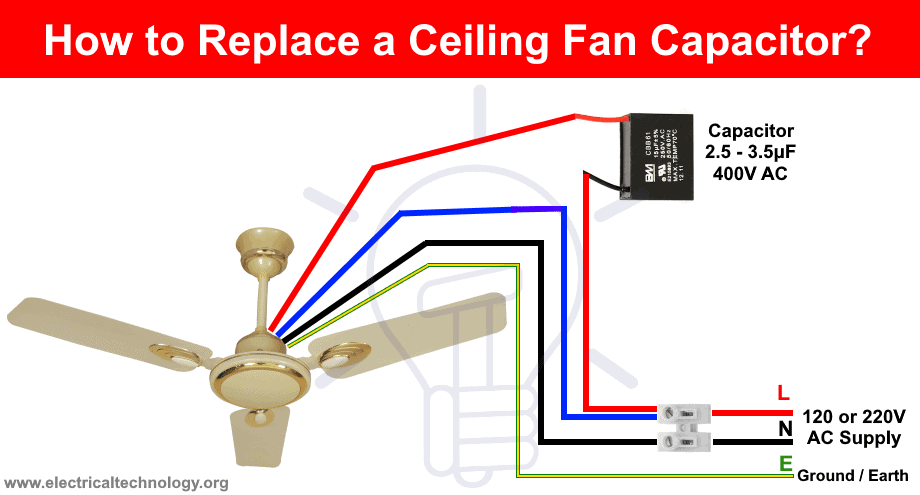
ceiling fan capacitor wiring diagram labeled

A systematic replacement approach minimizes errors and ensures proper installation. Following these precise steps takes most homeowners 20-40 minutes from start to finish.

Label connections before disconnection using color-coded tags matching terminal designations. Purchase small wire markers (available at hardware stores) labeled “C,” “1,” “2,” and “R” corresponding to common, speed 1, speed 2, and reverse terminals. Slide these onto wires before removing them from the old capacitor. This eliminates guesswork during reinstallation.

Clean terminal connections before attaching to the new capacitor. Use a small wire brush or folded emery board to gently remove oxidation from both wire ends and capacitor terminals. This ensures maximum conductivity and prevents future connection issues. Apply a thin coat of electrical contact cleaner to each terminal for optimal performance.

Secure the new capacitor using the manufacturer’s mounting method. Most capacitors have a metal strap or plastic clip that attaches to the fan’s switch housing. Ensure the capacitor sits parallel to the mounting surface with terminals facing outward for easy access. Avoid twisting or bending the capacitor body during installation, as this can damage internal components.

Implement the “one wire at a time” replacement method to prevent cross-connections. Remove and reconnect each wire individually rather than disconnecting all at once. Complete the common wire connection first, followed by speed wires, and finally the reverse wire. Test each connection by gently tugging on the wire to ensure it’s secure before moving to the next.

Post-Replacement Verification Protocol

Thorough testing after installation confirms successful repair and identifies potential issues before they cause damage.

Conduct a graduated startup sequence beginning with the lowest speed setting. Allow the fan to run for 2 minutes at low speed before advancing to medium, then high. This gradual approach prevents electrical stress on the new capacitor and allows you to detect subtle problems at lower loads. Listen for smooth acceleration without hesitation or unusual noises.

Measure operational temperature after 15 minutes of continuous use. A properly functioning capacitor should remain cool to the touch—never exceeding 104°F (40°C). Use an infrared thermometer to check both the capacitor and motor housing. Temperatures above 122°F (50°C) indicate improper installation, incorrect capacitor specifications, or underlying motor problems.

Perform a vibration analysis by placing your palm lightly on the fan housing. A successfully repaired fan operates with minimal vibration—less than 0.1 inches per second on a vibration meter. Excessive vibration (more than 0.3 ips) suggests wiring errors or motor imbalance that requires further investigation.

Document baseline performance metrics for future reference. Note the exact startup time (should be 1-2 seconds from standstill), operational noise level (should be a quiet hum), and power consumption using a watt meter. These measurements help identify future problems by providing comparison points.

Proactive Maintenance Strategies

Implementing these simple maintenance practices extends capacitor lifespan by 30-50% and prevents premature failures.

Schedule seasonal capacitor inspections coinciding with daylight saving time changes. During these inspections, check for bulging, listen for unusual sounds at startup, and verify all speed settings function correctly. Early detection of minor issues prevents complete failures during peak usage seasons.

Install a thermal fuse as additional protection against overheating. Solder a 220°F (104°C) thermal fuse between the capacitor and motor leads. This inexpensive component (under $2) automatically disconnects power if temperatures exceed safe levels, preventing capacitor damage from overheating.

Apply dielectric grease to all electrical connections during replacement. This specialized grease prevents corrosion, improves conductivity, and creates a moisture barrier. Use sparingly—just enough to coat terminal surfaces—without getting grease on the capacitor body.

Monitor voltage stability in your home’s electrical system. Frequent voltage fluctuations (above 125V or below 110V) significantly shorten capacitor life. Consider installing a whole-house voltage regulator if your area experiences regular power surges or brownouts.

A failing ceiling fan capacitor doesn’t have to mean expensive professional service or fan replacement. By recognizing the specific symptoms, following proper safety protocols, and executing precise replacement techniques, you can restore full functionality to your ceiling fan with minimal investment. Remember that regular maintenance and prompt attention to early warning signs can extend your capacitor’s lifespan significantly, keeping your fan running smoothly for years to come. When performed correctly, this straightforward repair delivers immediate comfort improvements while saving you the cost of professional service calls.

How to Ground a Ceiling Fan: Easy Steps


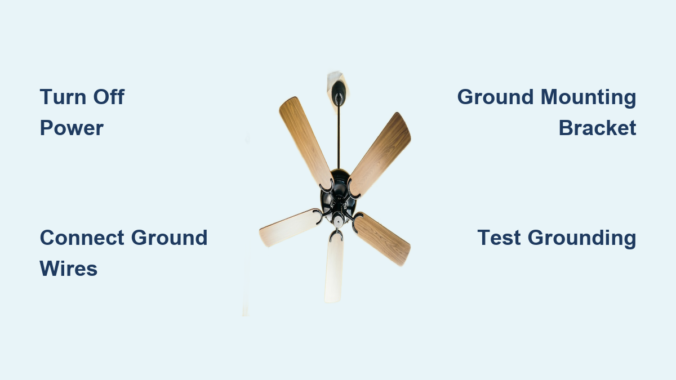
Grounding a ceiling fan is a critical safety step that protects your home from electrical faults and prevents potential shock hazards. Without proper grounding, electrical surges can travel through the fan’s metal components, creating dangerous situations for anyone in the room. Whether you’re installing a new ceiling fan or troubleshooting an existing one that lacks proper grounding, understanding the correct procedures ensures your installation meets electrical code requirements and keeps your household safe. This comprehensive guide walks you through everything you need to know about ceiling fan grounding, from identifying ground wires to testing your completed installation.

Why Proper Ceiling Fan Grounding Prevents Electrical Hazards

Electrical grounding creates a safe pathway for stray current to flow into the earth if a fault develops in your ceiling fan’s wiring or metal components. When a live wire inside the fan accidentally touches any metal part—the canopy, motor housing, or fan blades—the grounding wire redirects that dangerous current away from anyone who might touch the fan and into your home’s grounding system instead. This protection becomes especially important in bedrooms and living spaces where people spend extended periods and where ceiling fans often operate for hours at a time.

Beyond safety concerns, many jurisdictions require compliant grounding as part of their building and electrical codes. The National Electrical Code mandates grounding for all ceiling fans, and local code officials may flag ungrounded installations during home inspections or when selling your property. Proper grounding also protects the fan’s electrical components from power surges and lightning strikes, potentially extending the fan’s operational lifespan by preventing damage to sensitive electronics inside the motor housing. An ungrounded fan might operate normally for years, but when a fault occurs, the lack of proper grounding could turn your ceiling fan into a serious shock hazard.

Locate Your Ceiling Fan Ground Wires Before Starting Work

Finding the ground wires in your ceiling fan installation requires understanding wire color coding and typical placement. The ground wire in your ceiling electrical box is almost always green, bare copper, or green-and-yellow striped, running alongside the black (hot) and white (neutral) wires. This wire connects somewhere in your home’s electrical system to a ground rod, water pipe, or the neutral bus bar in your main electrical panel, creating that essential pathway to earth ground.

Your ceiling fan itself includes a ground wire, typically green or green with a yellow stripe, attached to the fan’s mounting bracket or internal wiring. This wire may be connected to the fan canopy’s green grounding screw, or it may be a loose wire waiting to be joined with the house ground wire using a wire connector. Some fans feature a separate ground wire for the light kit if your fan includes lighting components. Taking photos before disconnecting any wires helps you remember correct placement and prevents confusion during reassembly—this simple step saves significant troubleshooting time later.

Verify Power Is Off Before Handling Any Wires

Never skip testing for live voltage before touching any wires during your ceiling fan grounding project. Turn off power at the circuit breaker serving the fan’s circuit and use a reliable voltage tester to confirm no electricity is flowing. Test both at the fan location and at the wall switch controlling the fan. Remember that wall switches often control only one of the two “hot” wires in a circuit, meaning other wires may still be energized even when the switch is off. Testing at multiple points ensures your safety throughout the installation process.

Connect Ground Wires Using Proper Electrical Techniques

electrical wire twisting techniques with wire nuts

Making proper ground wire connections ensures electrical continuity from your fan through your home’s grounding system. Begin by stripping approximately ¾ inch of insulation from the end of each ground wire if they’re not already prepared, using your wire strippers to avoid nicking the copper conductor. Hold the bare copper ends of the fan’s ground wire and the house ground wire together side by side, ensuring they’re parallel and the stripped portions align completely.

Twist these wires together clockwise using your needle-nose pliers or a wire connector tool, creating a tight, secure connection that no wire can pull free from. Finish by screwing a green wire nut over the twisted connection, turning it clockwise until it feels snug and no bare copper is visible. Some electricians prefer to create a hook shape in each wire end before connecting them—bend the bare copper into a hook using your pliers, interlock the hooks, and then tighten the connection. This hook method creates an especially secure connection that won’t separate even under stress.

Ground Your Ceiling Fan Mounting Bracket Properly

ceiling fan mounting bracket grounding screw location

The mounting bracket that secures your ceiling fan to the electrical box must also be properly grounded, as this metal component provides a direct path to the fan’s motor housing. Most brackets include a green grounding screw, usually located where the bracket attaches to the electrical box or near the canopy attachment point. This screw may have a pre-drilled hole with a green-painted head, or it may simply be a standard brass or green screw designated for grounding purposes.

Connect the house ground wire to the mounting bracket by loosening the grounding screw, placing the stripped end of the ground wire under the screw head in a clockwise direction (so the wire wraps around the screw as you tighten), and then tightening the screw firmly. Some brackets feature a ground wire pigtail already attached—simply connect this pre-installed wire to your house ground wire using a green wire nut. If your bracket lacks a dedicated grounding point, the bracket should still make contact with a grounded electrical box, but adding a ground pigtail screw to the box provides extra assurance against loose connections.

Test Your Grounding Installation Before Final Assembly

Verifying that your grounding installation actually works prevents dangerous surprises after you button everything up. Once the fan is fully assembled and mounted, restore power at the circuit breaker and use a multimeter or plug-in circuit tester to confirm proper grounding. Set your multimeter to the AC voltage setting, touch one probe to a known hot wire (black) and the other to a ground connection—the reading should show approximately 120 volts, confirming that current can flow through the ground path when needed.

Alternatively, use a three-prong circuit tester with GFCI functionality, plugging it into a nearby outlet to check that the outlet itself is properly grounded, then test the fan by turning it on and checking for any unusual humming, tingling sensations when touching metal parts, or intermittent operation that might indicate loose connections. For thorough verification, a plug-in receptacle tester with GFCI and ground fault indicators provides clear readouts showing whether ground, neutral, and hot connections are correct. If your tests reveal any issues, turn the power back off and re-examine all connections for security and proper wire placement before proceeding.

Avoid These Common Ceiling Fan Grounding Mistakes

incorrect ceiling fan wiring examples

Even experienced DIYers sometimes make errors during ceiling fan grounding that compromise safety or code compliance. Stripping too much insulation from ground wires creates fire hazards when excess bare copper contacts other wires or metal components inside the electrical box—only ¾ inch of bare copper should be visible beyond any wire nut. Connecting ground wires to the wrong terminals, such as attaching a ground wire to a neutral screw or wrapping it around hot wire screws, creates dangerous fault conditions that can energize metal parts unexpectedly.

Failing to connect all ground wires—including any separate light kit ground wire—leaves portions of your installation ungrounded and potentially hazardous. Using regular (non-green) wire nuts for ground connections makes future maintenance confusing and doesn’t provide the visual identification that green connectors offer. Some installers skip connecting the mounting bracket to ground entirely, assuming the bracket makes sufficient contact with the grounded electrical box, but loose connections at either point can interrupt the grounding path. Taking your time and double-checking each connection prevents these common pitfalls.

When Professional Electrical Help Is Necessary for Ceiling Fan Grounding

While many homeowners can successfully ground a ceiling fan themselves, certain situations require professional expertise to ensure safety and code compliance. If your ceiling electrical box lacks a ground wire entirely, you’ll need an electrician to run a proper ground conductor from your fan’s location to the grounding system—this typically involves fishing wire through walls and may require opening ceilings or running conduit. Homes with aluminum wiring instead of copper require special connectors and techniques that most electricians are trained to handle but which pose fire risks if installed incorrectly.

If you encounter confusing wire configurations, such as multiple ground wires of different gauges, cables running in unexpected directions, or junction boxes with more wires than expected, professional assessment prevents dangerous mistakes. Any signs of previous amateur work—such as reversed wires, improper connectors, or damaged insulation—suggest calling an electrician to evaluate and correct potential hazards. Similarly, if local codes require permits or inspections for ceiling fan installation, a licensed electrician can handle the paperwork and ensure your installation passes official review.


Properly grounding your ceiling fan protects your family from electrical hazards, prevents damage to the fan itself, and ensures your installation meets electrical code requirements. By following these steps—identifying ground wires, making secure connections, testing your work, and maintaining the installation over time—you create a safe, reliable ceiling fan that operates without risk for years to come. When in doubt, always consult a licensed electrician to verify that your grounding installation provides the complete protection that proper electrical safety requires. Regular maintenance checks during seasonal cleaning ensure your grounding connection remains secure, preventing potential hazards before they become dangerous situations in your home.
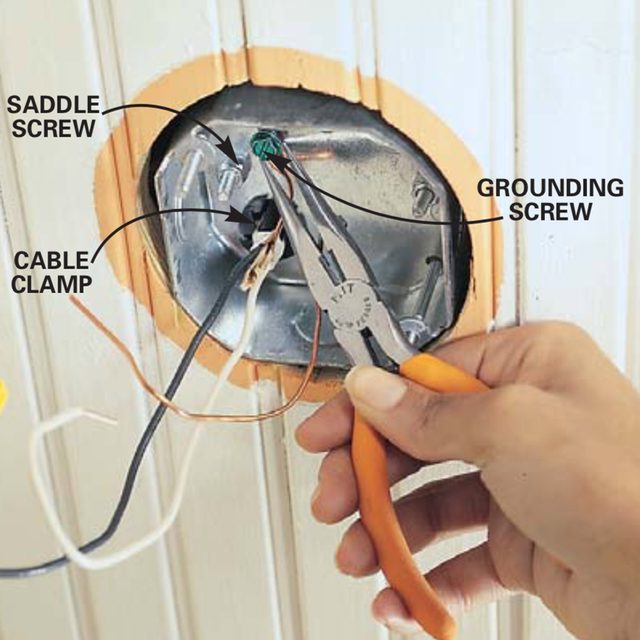
Ceiling Fan Position Guide


Ceiling fans can slash your energy bills by up to 40% when positioned correctly, yet most homeowners install them without understanding the critical relationship between fan placement and performance. A poorly positioned ceiling fan creates uncomfortable drafts, wastes energy, and fails to circulate air effectively—turning what should be a cost-saving comfort device into a noisy, inefficient eyesore. The difference between a fan that barely moves air and one that creates perfect comfort lies entirely in strategic ceiling fan position. Whether you’re installing a new fan or optimizing an existing one, understanding the precise height, clearance, and orientation requirements will transform your home’s comfort while reducing both heating and cooling costs.

Most homeowners don’t realize that ceiling fan position affects more than just airflow—it directly impacts safety, noise levels, and even the longevity of the fan itself. When installed just 6 inches too high or too low, a fan’s efficiency can drop by nearly a third, forcing you to run air conditioning longer or crank up the heat unnecessarily. This guide reveals the exact measurements, positioning techniques, and seasonal adjustments that turn your ceiling fan into an invisible comfort machine that works silently while saving you money every month.

8-Foot Rule for Optimal Mounting Height

Your ceiling fan blades must sit precisely 8 feet above the floor for maximum comfort and safety in standard residential spaces. This measurement isn’t arbitrary—it’s the sweet spot where airflow reaches seated and standing occupants without creating disruptive drafts or safety hazards. Fans mounted lower than 7 feet create uncomfortable wind tunnels that disturb papers and cause annoyance, while those above 9 feet fail to deliver sufficient airflow at occupant level, negating the fan’s primary purpose.

For rooms with standard 8-9 foot ceilings, use a 3-6 inch downrod to achieve perfect positioning. High-ceiling rooms require careful calculation: add 4 inches of downrod length for each additional foot of ceiling height beyond 9 feet. A 12-foot ceiling needs approximately 18 inches of downrod to position the blades at the ideal 8-foot height. Skip the guesswork by using the “elbow test”—stand directly beneath your planned installation point; when you raise your arm to shoulder height, your elbow should clear the fan blades with room to spare.

Hugger or low-profile fans become essential when working with ceilings under 8 feet. These flush-mount designs eliminate the downrod entirely, positioning blades just 10-12 inches from the ceiling while maintaining the critical 7-foot minimum clearance from the floor. Don’t compromise safety by installing standard fans in low-ceiling spaces—they’ll create dangerous clearance issues and operate inefficiently.

18-Inch Wall Clearance Minimum for Unobstructed Airflow

ceiling fan airflow diagram wall clearance

Your ceiling fan must maintain at least 18 inches of clearance from all walls to prevent air turbulence and maintain efficient circulation patterns. This distance ensures the fan can draw air freely from all directions without creating pressure differentials that reduce performance by up to 25%. In practice, this means positioning the fan at least 24 inches from walls whenever possible—the extra space creates symmetrical airflow that reaches corners effectively.

Measure twice before drilling by creating a paper template the size of your fan’s blade span. Tape this circle to the ceiling at your planned installation point and step back to verify adequate clearance from walls, light fixtures, and architectural features. Pay special attention to sloped ceilings where blade tips might approach walls at certain angles during rotation.

Furniture placement dramatically impacts effective ceiling fan position. Avoid installing fans directly over the center of seating areas—offset the position slightly toward the room’s center point to create balanced airflow across all seating zones. In rectangular rooms, position the fan along the long axis rather than the center point to maximize coverage across the entire space. Test your positioning by sitting in each primary seating area before final installation to confirm comfortable airflow reaches all occupants.

Summer vs. Winter Rotation Settings That Save Energy

Flip your fan’s direction switch every season to unlock maximum energy savings—counterclockwise at high speed during summer, clockwise at low speed during winter. This simple adjustment changes how air circulates, creating completely different comfort effects with the same hardware. In summer mode, the downward airflow creates a wind-chill effect that makes you feel up to 8°F cooler, allowing you to raise your thermostat setting without sacrificing comfort.

Winter positioning works differently—you want the fan to pull cool air upward gently while pushing warm air down from the ceiling. Set your fan to clockwise rotation at the lowest speed setting; you shouldn’t feel a direct breeze at floor level. This subtle circulation prevents heat stratification where warm air pools uselessly near the ceiling, reducing heating costs by up to 10% according to Department of Energy studies.

Verify your settings are correct with the paper test: hold a single sheet of paper near the fan blades while running. In summer mode, the paper should be pushed downward; in winter mode, it should lift gently upward. Many homeowners leave their fans in summer mode year-round, missing out on significant heating cost reductions and creating uncomfortable drafts during colder months.

Room-Specific Positioning Strategies That Work

ceiling fan placement guide bedroom kitchen bathroom

Bedrooms require different ceiling fan position considerations than living spaces—offset the fan 12-18 inches from the bed’s center point to avoid direct airflow while sleeping. Direct breeze over your body disrupts sleep cycles and creates discomfort, yet complete lack of airflow reduces summer comfort. The ideal compromise positions the fan to circulate air across the room without targeting the bed directly, creating gentle movement that cools without disturbance.

Kitchens demand strategic placement over primary cooking zones but with critical safety clearances. Position fans at least 36 inches from stove surfaces to prevent grease accumulation on blades while still capturing cooking heat and odors. In open-concept kitchens, center the fan between cooking and dining areas to optimize both air quality and comfort during meals.

Bathrooms need moisture-specific positioning—install directly over shower/tub areas with at least 24 inches clearance from fixtures. This placement captures steam at its source before it can condense on surfaces, reducing mold risk and improving air quality. Ensure your bathroom fan has appropriate moisture resistance ratings; standard fans deteriorate quickly in humid environments.

Home offices benefit from rear-positioned fans that circulate air across workspaces without disturbing papers or computer monitors. Place the fan toward the back of the room relative to your desk, creating airflow that moves from behind you toward the front of the workspace. This positioning provides cooling benefits without creating screen glare or document displacement.

Downrod Length Mistakes That Destroy Fan Performance

ceiling fan downrod length chart

Using the wrong downrod length ranks among the most common ceiling fan position errors that homeowners make. Too short a downrod traps the fan too close to the ceiling, restricting its ability to draw air upward and reducing efficiency by 20-30%. Too long a downrod creates clearance issues and disrupts airflow patterns, causing turbulence that increases noise while decreasing effectiveness.

Calculate your ideal downrod length using this formula: subtract 8 feet from your ceiling height, then multiply the result by 4. For a 10-foot ceiling: (10-8) × 4 = 8 inches of downrod. Round up to the nearest standard size (most fans offer 3″, 6″, 12″, 18″, and 24″ options). Always measure from finished floor to ceiling surface—not from baseboards or crown molding—to ensure accuracy.

Avoid the temptation to use multiple downrod connectors to achieve extreme lengths. Each connection point introduces potential vibration and instability. For ceilings over 14 feet, consider specialty high-ceiling fan systems designed specifically for those applications rather than jury-rigged solutions that compromise safety and performance.

Three-Month Maintenance Routine for Peak Performance

Clean your fan blades thoroughly every three months using a microfiber cloth and mild detergent solution to maintain optimal ceiling fan position effectiveness. Dust accumulation creates blade imbalance that reduces airflow by up to 15% while increasing noise and vibration. Focus on both upper and lower blade surfaces—the top collects more dust but the bottom affects aerodynamics more significantly.

Check blade tightness monthly by gently wiggling each blade at its mounting point. Loose blades create dangerous wobble that stresses motor components and reduces efficiency. Tighten any loose blade screws using a screwdriver—don’t overtighten, as this can strip mounting holes. Balance the fan annually using the included balancing kit to correct minor weight variations that develop over time.

Test seasonal direction settings each spring and fall before extreme temperatures hit. Verify the direction switch operates smoothly and the fan achieves proper speeds in both directions. Listen for unusual noises during operation that might indicate bearing wear or motor issues requiring professional attention.

Professional Installation Indicators You Shouldn’t Ignore

Call a licensed electrician immediately if your ceiling has plaster construction or lacks visible joists—these installations require specialized mounting hardware that DIYers often mishandle. Homes built before 1980 frequently lack proper electrical boxes rated for fan support, creating serious safety hazards when standard light fixture boxes bear the weight and vibration of a rotating fan.

High-ceiling installations above 12 feet demand professional expertise and equipment. Attempting these installations with standard ladders creates fall risks while compromising positioning accuracy. Professionals use specialized lifts and laser measurement tools to ensure perfect ceiling fan position even on soaring ceilings.

Smart fan installations with app control or home automation integration often require technical knowledge beyond basic electrical skills. Incorrect wiring can damage control systems or create compatibility issues with your home network. Professionals ensure proper integration while maintaining optimal positioning for both performance and aesthetic considerations.

Proper ceiling fan position transforms an ordinary fixture into a silent comfort machine that saves energy year-round. By maintaining the critical 8-foot blade height, ensuring adequate wall clearance, adjusting seasonal rotation, and following room-specific placement strategies, you’ll maximize both comfort and efficiency. Remember that a well-positioned fan works so effectively you’ll barely notice it’s running—delivering perfect comfort while quietly reducing your energy bills with every rotation.

Types of Ceiling Fan Blades Explained


Your ceiling fan blades do far more than just spin—they’re precision-engineered components that determine how effectively your home stays cool, how quietly your space remains, and how seamlessly your decor comes together. Choosing the right type of ceiling fan blades isn’t just about aesthetics; it directly impacts airflow performance, energy consumption, and long-term durability. With so many different types of ceiling fan blades available today, from standard residential configurations to specialized outdoor-rated assemblies, understanding what makes each type unique empowers you to make a decision that perfectly balances form with function. This guide cuts through the confusion to show you exactly which blade types deliver optimal comfort for your specific living environment.

Most homeowners don’t realize that something as seemingly simple as blade count dramatically affects both performance and noise levels. Whether you’re dealing with a low-ceiling bedroom that needs quiet operation or a high-ceiling living space requiring powerful circulation, the specific blade configuration you select will determine whether your fan becomes a barely noticeable comfort companion or a constant source of frustration. By the end of this guide, you’ll know precisely which ceiling fan blade types work best for your room dimensions, ceiling height, and lifestyle needs—saving you time, money, and the hassle of returns.

Why Four-Blade vs. Five-Blade Configurations Make or Break Your Comfort

ceiling fan four blade vs five blade airflow comparison

Four-blade ceiling fans deliver noticeably stronger airflow than their five-blade counterparts because reduced blade count creates less aerodynamic resistance during rotation. This configuration allows the motor to spin faster while consuming similar energy, making four-blade fans ideal for spaces where powerful circulation takes priority—like living rooms, home gyms, or kitchens during cooking season. The minimalist visual profile also complements modern and contemporary interiors where clean lines enhance your decor rather than compete with it.

Five-blade configurations provide smoother, quieter operation perfect for bedrooms, nurseries, and home offices where noise sensitivity matters most. The additional blade surface area compensates for slower rotational speeds, maintaining comparable overall airflow while reducing the mechanical noise that can disrupt sleep or concentration. When selecting between these different types of ceiling fan blades, consider your room’s primary function: choose four blades for maximum airflow in high-traffic areas and five blades for whisper-quiet performance in rest spaces.

How Blade Pitch Affects Your Fan’s Real-World Performance

Blade pitch—the angle at which blades cut through the air—directly impacts how much air your fan moves with each rotation. Standard residential fans typically feature blade pitches between 12-15 degrees, but ENERGY STAR-certified models often incorporate precisely engineered pitches that maximize airflow while minimizing energy consumption. Higher-pitched blades (16+ degrees) move more air per rotation but require more powerful motors and generate slightly more noise, making them better suited for industrial applications than residential bedrooms.

When evaluating different types of ceiling fan blades, check the manufacturer’s specifications for blade pitch to ensure it matches your performance priorities. Residential spaces generally benefit from moderate pitch angles that balance airflow with quiet operation, while commercial environments often require steeper pitches to move air across vast square footage.

Hugger Fan Blades: The Smart Solution for Low-Ceiling Rooms

Hugger ceiling fans (also called flush-mount or low-profile fans) solve the clearance problem in rooms with ceilings under 8 feet by eliminating the standard downrod entirely. These fans mount directly to the ceiling with blades positioned just inches below the motor housing, creating a streamlined profile that prevents head bumps while maintaining effective airflow. Contrary to popular belief, hugger fans don’t sacrifice performance—their blades are carefully engineered with optimized pitch angles to compensate for the reduced vertical clearance between blades and floor.

Critical Installation Considerations for Flush-Mount Blades

Before installing hugger fan blades, verify your ceiling height meets minimum safety requirements. Building codes mandate at least 7 feet of clearance between blade tips and finished floor, which means 8-foot ceilings represent the absolute minimum height for safe operation. Measure your room carefully and remember that sloped ceilings require special mounting considerations that may affect blade clearance at the lowest point.

Hugger fan blades come in the same material varieties as standard fans—wood, composite, and metal—so you won’t need to compromise your design vision. However, avoid oversized blade spans in small rooms, as the reduced vertical clearance magnifies noise issues from blades moving too much air too quickly.

Wet-Rated vs. Damp-Rated Blades: Outdoor Performance You Can Trust

wet rated vs damp rated ceiling fan blades outdoor

Installing standard indoor blades outdoors guarantees premature failure—moisture infiltration causes warping, corrosion, and electrical hazards within months. Outdoor ceiling fans require specific environmental ratings that match your installation location’s exposure level:

  • Dry-rated blades: For indoor use ONLY (never install outdoors)
  • Damp-rated blades: Suitable for covered patios and screened porches protected from direct rain
  • Wet-rated blades: Engineered for pool areas, open decks, and locations with direct weather exposure

Wet-rated blades feature fully sealed motor housings and blade mounting systems that prevent moisture intrusion from any angle. These specialized different types of ceiling fan blades incorporate marine-grade polymers, epoxy-coated metals, or treated composites that resist UV degradation, salt corrosion, and constant moisture exposure without warping or losing structural integrity.

Coastal Climate Considerations for Outdoor Blades

If you live within 15 miles of the ocean, standard damp-rated blades won’t survive long-term exposure to salt spray. Coastal environments demand wet-rated fans with additional corrosion-resistant coatings specifically designed to withstand salt-laden air. Look for blades with stainless steel hardware and non-corrosive composite materials that won’t degrade when regularly exposed to ocean breezes.

ENERGY STAR Blades: The Secret to Silent, Efficient Cooling

ENERGY STAR-certified ceiling fan blades incorporate aerodynamic refinements that reduce energy consumption by 20-30% compared to standard models while delivering equal or greater airflow. These blades feature computational fluid dynamics-optimized profiles with refined leading edges and precisely calculated surface areas that slice through air with minimal resistance. The result? You get the same cooling comfort while using significantly less electricity—especially important when running fans continuously during hot summer months.

The lightweight composite materials used in ENERGY STAR blades reduce rotational inertia, allowing smaller, more efficient motors to achieve required airflow specifications. This weight reduction also contributes to quieter operation and faster speed response times when you adjust settings. When shopping for different types of ceiling fan blades, look for the ENERGY STAR label to ensure you’re getting maximum efficiency without sacrificing performance.

Smart Fan Blades: Automated Comfort That Learns Your Preferences

Modern smart ceiling fans integrate blade control with home automation systems to create truly responsive comfort environments. These advanced different types of ceiling fan blades automatically adjust speed and direction based on real-time inputs from:

  • Smart thermostats (increasing speed when room temperature rises)
  • Occupancy sensors (turning off when rooms are empty)
  • Weather APIs (pre-cooling spaces before afternoon heat arrives)
  • Time-based schedules (gently waking you with increased airflow)

The most sophisticated models incorporate machine learning algorithms that analyze your usage patterns over time, eventually anticipating your comfort needs without manual input. Remote control functionality eliminates the frustration of reaching for pull chains on high-mounted fans, while voice control through Alexa or Google Assistant lets you adjust blade speed without lifting a finger.

Compatibility Checklist Before Buying Smart Blades

Before investing in smart fan blades, verify these critical compatibility factors:
– Existing smart home ecosystem (Alexa, Google Home, Apple HomeKit)
– Wi-Fi network strength in installation location
– Electrical box weight capacity (smart fans are heavier)
– Ceiling height requirements for optimal sensor performance

Replacement Blade Upgrades: Transform Your Existing Fan’s Performance

ceiling fan blade replacement kit installation

You don’t need to replace your entire fan to improve performance—quality replacement blades can dramatically enhance airflow, reduce noise, and refresh your decor. Homeowners frequently upgrade from four to five blades (or vice versa) to better match room requirements, with kits typically including all necessary hardware and installation instructions. When selecting replacement different types of ceiling fan blades, maintain consistent weight distribution by replacing all blades simultaneously with identical materials.

Material Matters: Choosing the Right Replacement Blades

Each blade material delivers distinct performance characteristics:

  • Solid wood blades: Traditional look, moderate weight, susceptible to warping in humidity
  • Engineered composites: Dimensionally stable, lightweight, moisture-resistant
  • Metal blades: Modern aesthetic, durable, but potentially noisier at high speeds
  • Recycled polymer: Eco-friendly option with excellent moisture resistance

Pro tip: For bedrooms, choose heavier composite blades that operate more quietly at lower speeds. For living areas where maximum airflow matters most, lighter wood or polymer blades allow faster rotation with less motor strain.

Blade Span Guidelines: Match Fan Size to Room Dimensions

Your fan’s blade span—the diameter created by rotating blades—must correspond to room size for optimal performance. Undersized fans struggle to circulate air effectively, while oversized units create uncomfortable drafts and unnecessary noise. Follow these industry-standard guidelines:

  • Rooms under 75 sq. ft. (bathrooms, small bedrooms): 29-36 inch blade span
  • Rooms 75-144 sq. ft. (standard bedrooms, offices): 36-42 inch blade span
  • Rooms 144-225 sq. ft. (living rooms, master bedrooms): 44-50 inch blade span
  • Rooms over 225 sq. ft. (great rooms, open floor plans): 52-60+ inch blade span

When selecting different types of ceiling fan blades, remember that ceiling height affects optimal blade span too—higher ceilings can accommodate larger spans without creating uncomfortable downdrafts. Measure your space carefully before purchasing to ensure your new blades deliver perfect airflow without compromise.

Final Note: The right ceiling fan blades transform your comfort experience from merely functional to perfectly tailored. By matching blade configuration to your specific room requirements, environmental conditions, and performance priorities, you’ll enjoy optimal airflow, energy efficiency, and aesthetic harmony for years to come. Whether you’re replacing damaged blades or upgrading your entire cooling system, understanding these critical differences ensures you’ll never settle for subpar performance again.
How to Fix Harbor Breeze Ceiling Fan Remote Not Working


You’re standing in your living room, pressing the remote control buttons repeatedly, but your Harbor Breeze ceiling fan ignores every command. The lights won’t turn on, the fan won’t change speeds, and you’re left waving a useless plastic device in frustration. This common issue affects thousands of Harbor Breeze owners each year, turning what should be a convenient feature into a daily annoyance. When your Harbor Breeze ceiling fan remote control not working, it disrupts your comfort and forces you to manually operate your fan—and many models don’t even have pull chains as a backup. In this guide, you’ll discover the seven most effective solutions to restore your remote functionality, understand why these problems occur, and learn how to prevent future remote control failures with your Harbor Breeze ceiling fan.

Immediate Checks Before Deep Troubleshooting

Replace Batteries Properly in Your Harbor Breeze Remote

The most common reason your Harbor Breeze ceiling fan remote control not working is dead or improperly installed batteries. Most Harbor Breeze remotes use CR2032 coin batteries that typically last 6-12 months with regular use. Remove the battery compartment cover and check for corrosion—white or green powdery buildup indicates battery leakage that can damage contacts. Clean any corrosion with a cotton swab dipped in white vinegar, then dry thoroughly. Insert a fresh battery with the positive side facing up, ensuring it’s fully seated. Test the remote immediately after replacement. Pro tip: Use name-brand batteries rather than cheap alternatives, as inconsistent power delivery from low-quality batteries often causes intermittent remote issues.

Verify Line of Sight Between Remote and Receiver

Harbor Breeze remotes operate on infrared (IR) technology, requiring direct line of sight to function properly. Your Harbor Breeze ceiling fan remote control not working might simply be blocked by obstacles. Stand directly under the fan and point the remote straight at the receiver unit, usually located near the fan’s motor housing. Remove any objects between you and the fan—curtains, ceiling decorations, or even tall furniture can interfere with the signal. Try moving closer to the fan (within 10-15 feet) and press buttons slowly with deliberate presses. If the remote works at close range but not across the room, you likely have a weak signal issue rather than complete failure.

Remote and Receiver Troubleshooting

Reset Your Harbor Breeze Remote Control System

When your Harbor Breeze ceiling fan remote control not working consistently, a system reset often solves the problem. First, turn off power to the fan at the circuit breaker for 30 seconds—this resets the receiver unit. While power is off, remove batteries from the remote. Restore power to the fan, then reinsert fresh batteries into the remote. Press and hold the “Fan Off” button on the remote for 10 seconds until the fan light blinks, indicating successful reconnection. This process clears any signal interference or synchronization errors that develop over time. Warning: Never skip the circuit breaker step—just turning off the wall switch won’t fully reset the receiver.

Check for Signal Interference from Other Electronics

infrared signal interference diagram home electronics

Electronic interference frequently causes your Harbor Breeze ceiling fan remote control not working properly. Modern homes contain numerous devices emitting signals that can disrupt IR communication. LED light bulbs, plasma TVs, smartphones, and even sunlight can interfere with remote signals. Temporarily turn off nearby electronics and close window coverings to eliminate potential interference sources. If the remote works when other devices are off, you’ve identified the culprit. Consider replacing older LED bulbs with “dimmer-compatible” versions, as some cheaper LEDs emit IR frequencies that conflict with fan remotes. Position your router and other wireless devices away from the fan’s receiver unit.

Advanced Repair Solutions

Clean Remote Control Buttons and Contacts

Dirt, dust, and hand oils gradually build up on remote buttons, causing poor electrical contact. When your Harbor Breeze ceiling fan remote control not working intermittently (some buttons work while others don’t), this is likely the cause. Remove the battery cover and carefully pry open the remote casing using a plastic tool. Gently clean the rubber button pads and circuit board contacts with isopropyl alcohol (90% or higher) and a cotton swab. Ensure all components are completely dry before reassembly. Expert note: Avoid using water or household cleaners, as residue can create conductive paths that damage the circuitry.

Test and Replace the Receiver Module

If basic troubleshooting fails, your Harbor Breeze ceiling fan remote control not working may indicate a faulty receiver. Access the receiver module by removing the fan’s light kit or canopy cover. Look for a small black box (typically 2-3 inches square) wired between the fan motor and power source. Check for visible damage like burnt components or loose wires. With power off, disconnect the receiver and temporarily wire the fan directly to test basic operation. If the fan works when bypassing the receiver, you need a replacement. Harbor Breeze receivers are model-specific—check the label on your existing unit for exact part numbers before ordering.

Preventing Future Remote Control Failures

Proper Remote Storage and Handling Practices

Protect your Harbor Breeze remote from common damage sources that cause it to stop working. Always store the remote in a designated spot away from moisture, direct sunlight, and extreme temperatures—bathrooms and kitchens are particularly problematic environments. Use a small fabric pouch to prevent accidental button presses in drawers or bags. Avoid placing heavy objects on top of the remote, as this can crack internal components. When not in use for extended periods, remove batteries to prevent leakage damage. Pro tip: Keep a spare remote programmed and stored safely for emergencies—most Harbor Breeze models allow multiple remotes to be paired simultaneously.

Upgrade to a More Reliable Control System

Harbor Breeze wall control vs remote comparison

If your Harbor Breeze ceiling fan remote control not working persists despite multiple repairs, consider upgrading your control system. Many homeowners replace problematic remotes with wall-mounted control units that provide more reliable operation. Harbor Breeze offers compatible wall controls that bypass the remote system entirely. Alternatively, install a universal ceiling fan remote kit designed for better signal range and reliability. For tech-savvy users, smart home integration with devices like Alexa or Google Home provides voice control while maintaining manual remote functionality as backup.

When to Seek Professional Help

Identifying Unfixable Hardware Failures

Some Harbor Breeze ceiling fan remote control not working issues indicate irreparable damage. If you notice burning smells, visible smoke damage on the receiver, or frequent tripping of circuit breakers when operating the remote, stop using the system immediately. These symptoms suggest serious electrical problems that require professional attention. Water damage from leaks or humidity exposure often permanently damages electronic components beyond economical repair. If your fan is under warranty, contact Harbor Breeze customer support before attempting repairs that might void coverage.

Finding Qualified Repair Services

When DIY solutions fail, locate certified technicians who specialize in ceiling fan repairs. Not all electricians have experience with Harbor Breeze specific systems. Check the Harbor Breeze website for authorized service centers in your area. Expect to pay $75-$150 for professional diagnosis and repair, which may be worthwhile for high-end models. Before scheduling service, document all troubleshooting steps you’ve already attempted—this helps technicians diagnose the problem more efficiently and avoid unnecessary repairs.

Final Note

When your Harbor Breeze ceiling fan remote control not working, systematic troubleshooting usually restores functionality without expensive replacements. Start with simple solutions like battery replacement and system resets before moving to advanced repairs. Most remote issues stem from preventable causes like dead batteries, signal interference, or dirty contacts—not permanent hardware failure. By following these steps, you’ll regain control of your fan comfort while extending the lifespan of your remote system. Remember to implement preventive measures like proper storage and periodic maintenance to avoid future remote control frustrations. If all else fails, upgrading to a more reliable control system provides a permanent solution to recurring remote problems.

« Older posts Newer posts »

© 2026 Hampton Fan Reviews

Theme by Anders NorenUp ↑