Your Ultimate Guide to Cooling: In-Depth Reviews, Smart Comparisons & Pro Care Tips.

Category: Tips (Page 3 of 22)

How to Clean Exhaust Fan Blades: Easy Steps


Dust, grease, and moisture silently build up on exhaust fan blades, turning a once-quiet ventilation system into a noisy, inefficient hazard. Over time, this grime reduces airflow by over 50%, strains the motor, traps allergens, and even increases fire risk. Whether it is a bathroom fan struggling to clear steam or a kitchen hood dripping with grease, cleaning exhaust fan blades is a simple yet powerful maintenance task that restores performance and safety.

Most homeowners overlook this chore until the fan starts rattling, smells musty, or fails to prevent mirror fogging. With just 30 minutes, a few basic tools, and the right technique, you can revive your unit is efficiency, reduce noise, and improve indoor air quality. This guide walks you through every step from power shutdown to final testing.

Safety First: Turn Off Power

electrical panel circuit breaker switch off

Before touching any part of the fan, eliminate electrical risk.

Cut Power at the Breaker

Flip the circuit breaker that controls the fan. While turning off the wall switch is a start, it does not guarantee the unit is de-energized. Cutting power at the panel ensures no accidental shock during handling.

Confirm No Live Current

Use a non-contact voltage tester near the fan housing or switch. If it beeps or lights up, double-check the correct breaker is off. Never skip this step even older fans can carry lethal current.

Wear Protective Gear

Safety goggles shield eyes from falling dust and debris. A face mask or respirator prevents inhalation of mold spores, dust, and allergens. Gloves protect hands from grime, especially in greasy kitchen hoods. Hair covering keeps hair out of moving parts and dust.

Gather Cleaning Tools and Supplies

Use the right tools to clean thoroughly without damaging the fan.

Essential Supplies

Warm (not hot) water and mild dish soap form the base of your cleaning solution. You will need microfiber cloths (both damp and dry) for wiping and drying. A soft-bristled brush such as an old toothbrush works perfectly for scrubbing tight spaces. Have a towel or absorbent mat ready to catch debris.

Cleaning Tools

A vacuum with brush and crevice attachments removes loose dust before scrubbing. A screwdriver is essential for removing screws or acorn nuts. Optional tools include compressed air for blowing dust from motor fins and a soft plastic scraper for stubborn buildup.

Avoid: Harsh chemicals like bleach, oven cleaners, or degreasers. They can warp plastic or corrode metal components.

Remove the Fan Cover Safely

bathroom exhaust fan cover removal types spring clips tabs screws

Access begins with removing the cover carefully.

Identify Mounting Type

Most covers use one of three fasteners. Spring clips require gently pulling one side down, squeezing the clips, and releasing. Tabs need pressing inward while lowering the cover. Screws require a screwdriver to remove acorn nuts or fasteners.

Handle with Care

Set the cover on a soft towel to avoid scratches. If the unit has a light, disconnect wiring or remove the lens per manufacturer instructions.

Pro Tip: Note the cover is orientation. Some models have alignment marks. Match them on reinstallation.

Clean the Vent Cover Thoroughly

A dirty cover restricts airflow just as much as grimy blades.

Soak and Scrub

Fill a basin with warm, soapy water. Submerge the cover for 5 to 10 minutes to loosen grime. Use a toothbrush to scrub between louvers and along edges. Rinse under clean water, ensuring all soap residue is gone.

Dry Completely

Pat dry with a microfiber cloth or air-dry fully. Reinstalling a wet cover risks water dripping into the motor.

Warning: Never use steel wool, scouring pads, or abrasive cleaners. They scratch surfaces and trap more dirt over time.

Access the Fan Blades

Now reach the blades either by removing the assembly or cleaning in place.

Inspect the Interior

After removing the cover, look inside to identify the fan type. A squirrel cage (centrifugal) design is common in bathrooms with an enclosed structure and radial fins. An axial (propeller-type) design appears in older or kitchen units with exposed blades.

Remove the Fan Assembly If Possible

Locate one or two screws on the motor plate. Unscrew and gently lower the unit. Unplug any electrical connector if accessible.

Note: Some models do not allow full removal. If stuck, clean blades in place.

Clean the Fan Blades Properly

Tailor your method based on rotor accessibility.

Remove Rotor for Deep Cleaning

If the fan has a C-clip, snap ring, or setscrew, remove the fastener from the motor shaft. Slide the rotor off carefully. Soak in warm, soapy water for 10 minutes. Scrub between blades, along edges, and inside the hub with a toothbrush. Rinse and dry completely. No moisture should remain in crevices.

Never soak the motor or wiring. Only the plastic rotor can be submerged.

Clean Blades In Place

For fixed assemblies, vacuum first using a brush attachment to remove loose dust from blades and housing. Wipe each blade using a slightly damp microfiber cloth, rotating the fan by hand. Dip a toothbrush in soapy water for caked-on grime. Avoid wetting the motor. Never spray or drip liquid near electrical parts. Finish with compressed air or a dry brush to remove residue.

Goal: Restore smooth, balanced blades. Any warping or debris disrupts airflow.

Clean Internal Components and Duct

Do not stop at the blades. Clean the whole system.

Vacuum the Interior

Focus on the motor housing, wiring compartments (without touching wires), duct opening, and flapper valve if present.

Inspect the Flapper Damper

Ensure it opens when the fan runs and closes when off. Clean hinges and seals with a damp cloth to prevent sticking.

Check the Duct Connection

Confirm the duct is secure and kink-free. Look for mold, lint, or rodent nests. Clean accessible sections with a long-handled brush.

Clear the Exterior Vent

Go outside and remove leaves, nests, or ice blocking the cap. Ensure the backdraft damper moves freely. Confirm no pests have entered the duct.

Pro Tip: Clean the exterior vent annually even if the indoor fan looks fine.

Dry and Reassemble the Unit

Moisture is the enemy. Dry everything before reassembly.

Wipe and Air-Dry

Use dry cloths to remove surface moisture. If the motor got damp, wait 6 to 12 hours before powering on. Never rush this step. Water near wiring causes shorts.

Reinstall the Fan Assembly

Slide rotor back onto the shaft if removed. Replace the C-clip or setscrew. Secure the motor plate with screws. Reconnect electrical plugs. Align and snap the cover back into place.

Check clearance: Ensure the cover does not touch the blades when spinning.

Restore Power and Test Operation

Final step: turn it on and verify performance.

Power Up Safely

Flip the circuit breaker back on. Turn on the fan at the wall switch.

Listen and Feel

Listen for strange noises. Grinding, buzzing, or scraping means misalignment or debris. Feel for strong airflow. Hold your hand near the vent. Air should feel brisk. Confirm smooth shutdown. Fan should stop completely when turned off.

Run for 5 to 10 Minutes

Let it operate to confirm stability. Many users report immediate improvements, quieter operation, faster steam removal, and no more foggy mirrors.

User Feedback: After cleaning a neglected fan, one homeowner said it sounds like a brand-new unit.

Measure Airflow to Confirm Results
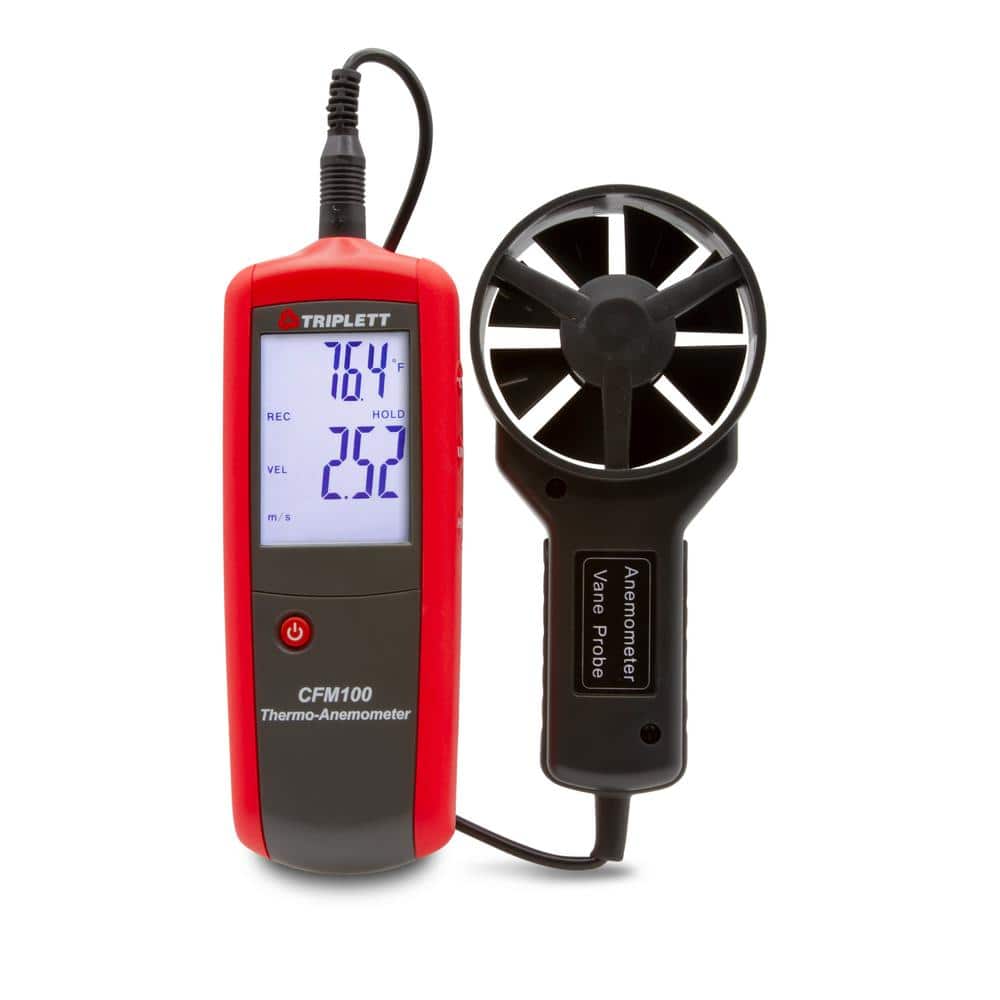
digital anemometer measuring airflow CFM exhaust fan

Verify cleaning success with objective data.

Use a Digital Anemometer

Hold it near the vent outlet. Record air velocity in feet per minute (fpm). Calculate CFM (cubic feet per minute) using velocity multiplied by duct area.

Compare to Rated CFM

Check the manufacturer label for the fan is rated airflow. If post-cleaning CFM is below 70%, the motor may be failing.

Note: Low-cost anemometers are not lab-accurate but work well for before and after comparisons.

Recognize When to Replace the Fan

Cleaning helps but not forever.

Replace If

The fan is still noisy after cleaning. Blades are cracked or warped. Motor won not spin or hums without starting. No steam removal occurs despite clean blades. Unit is 10 to 15 years or older. CFM remains low after maintenance.

Example: A 20-year-old fan replaced by an electrician in 30 minutes now clears steam in under a minute. Age matters.

Prevent Future Buildup with Smart Habits

Keep fans clean longer with simple routines.

Run Fan Strategically

In bathrooms, run during and 15 to 20 minutes after showers. In kitchens, turn on before frying or boiling and run 5 to 10 minutes after. Avoid leaving fans on unattended for hours. This reduces fire risk.

Schedule Regular Maintenance

High-use bathrooms need cleaning every 3 to 6 months. Kitchen internals need cleaning every 6 months (filters monthly). Low-use areas need cleaning every 1 to 2 years.

Pro Tip: Mark cleaning dates on a calendar or use a home maintenance app.

Avoid Harsh Chemicals

Stick to mild soap and water. Degreasers or bleach can degrade plastic, create fumes, or void warranties.

Know When to Call a Pro

Some jobs are best left to experts.

Call a Technician If

You are uncomfortable with electrical work. The fan is hardwired into a light fixture. Burning smell persists after cleaning. Ductwork is damaged or disconnected. Motor needs lubrication (if serviceable). Manufacturer recommends professional servicing.

Safety First: If you smell smoke or see sparks, shut off power and call an electrician immediately.

Real-World Cleaning Tips from Users

Homeowners share what actually works.

I Was Shocked by the Dust

One user placed a towel under the fan. Hundreds of dust clumps fell during cleaning. Always catch debris before it lands on your bathroom floor.

15 Minutes with a Toothbrush

Even if the cover looks okay, blades can be caked with hidden grime. Scrub thoroughly. Do not assume it is clean.

Finally Quiet

Multiple users reported dramatic noise reduction after cleaning fans neglected for 2 to 3 years.

Mirror Does Not Fog Anymore

Improved airflow means faster moisture removal. This is a clear sign the cleaning worked.

Key Takeaways for Cleaning Exhaust Fan Blades

Clean exhaust fan blades every 6 to 12 months (3 to 6 months in high-use areas) to maintain efficiency, safety, and air quality. Always cut power at the breaker before servicing. Use a vacuum, toothbrush, and damp cloth but never submerge the motor. Remove the rotor if possible for deep cleaning. Dry all parts completely before reassembly. Test airflow and noise after reinstallation. Replace the fan if it remains ineffective or damaged. Measure CFM for objective results. Inspect exterior vents annually. Label cleaning dates to stay on schedule.

Cleaning exhaust fan blades is not just about performance. It is about safety, air quality, and efficiency. A 30-minute job can prevent mold, reduce fire risk, and extend your fan is life by a decade. Make it part of your seasonal routine and breathe easier knowing your home is ventilation is working as it should.

Frequently Asked Questions About Cleaning Exhaust Fan Blades

How often should I clean my exhaust fan blades?

Cleaning frequency depends on usage. High-use bathrooms (daily showers) need cleaning every 3 to 6 months. Moderate-use bathrooms or kitchens need cleaning every 6 to 12 months. Low-use or guest bathrooms need cleaning every 1 to 2 years.

Can I use bleach or harsh chemicals to clean exhaust fan blades?

No. Avoid bleach, oven cleaners, degreasers, or solvents. These chemicals can warp plastic components, corrode metal finishes, create toxic fumes, or void warranties. Stick to mild dish soap and warm water.

What happens if I do not clean my exhaust fan blades?

Neglected fans accumulate dust, grease, and moisture. This reduces airflow by over 50%, strains the motor, increases fire risk, and degrades indoor air quality. You may notice increased noise, slow steam removal, musty odors, and mold growth.

Can I spray water directly on the fan blades to clean them?

No. Never spray water or cleaning solutions directly into the fan housing. Do not allow liquid to pool near electrical components. Use a damp cloth for wiping and avoid saturating the motor. Moisture near wiring causes short circuits.

How do I know if my exhaust fan needs replacement instead of cleaning?

Replace the fan if it remains noisy after cleaning, blades are cracked or warped, the motor won not spin or hums without starting, steam removal is ineffective despite clean blades, or the unit is over 10 to 15 years old with low CFM readings.

Do I need special tools to clean exhaust fan blades?

No special tools are required. Basic supplies include warm water, mild dish soap, microfiber cloths, a soft-bristled toothbrush, a vacuum with brush and crevice attachments, and a screwdriver for removing the cover. Optional tools include compressed air and a soft plastic scraper.
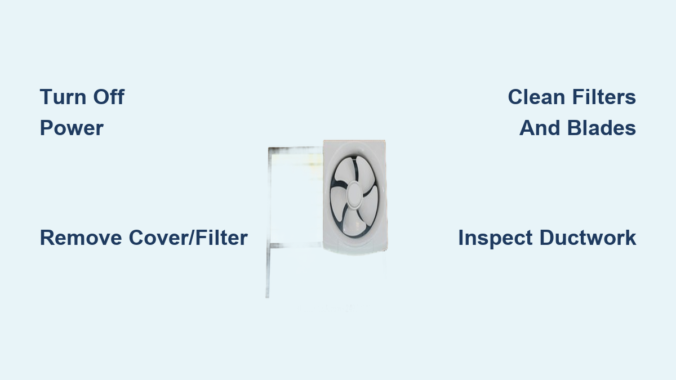
How to Clean Exhaust Fan: Easy Steps


Is your bathroom still foggy after a hot shower? Does cooking leave a haze in the kitchen that lingers for hours? These are classic signs your exhaust fan needs cleaning. Over time, dust, grease, and moisture build up on fan blades, filters, and ducts, choking airflow, increasing noise, and raising health and fire risks. The good news? With just 30 minutes and basic household tools, you can restore your fan to peak performance.

Cleaning an exhaust fan is not just about freshness. It is essential maintenance. A clogged bathroom fan traps moisture, inviting mold and mildew. A greasy kitchen hood becomes a fire hazard. But a clean unit removes 90% of steam in under 10 minutes and clears smoke in seconds. This guide walks you through every step, from power-off to reassembly, using only what you likely already have at home.

Turn Off Power Safely Before Cleaning

electrical panel breaker switch off safety

Before touching any part of the fan, you must cut power completely. This step is non-negotiable for your safety.

Flip the wall switch to off. Go to your circuit breaker and shut off the correct breaker, especially for hardwired bathroom or kitchen units. For plug-in range hoods, unplug from the outlet. If the fan has a light or sensor, ensure both circuits are off.

Never skip this step. Live wires inside the housing can cause shock or short circuits when damp.

Place a towel or sheet underneath to catch falling dust and debris. Use a step stool or ladder on a flat, stable surface. Never stand on chairs or countertops.

Remove Fan Cover or Filter

Bathroom Fan Covers

Most bathroom units use one of three mounting systems. Spring clips require you to gently pull the cover down, then squeeze the metal clips together to release. Snap-in tabs mean you press along the edges to unclip. Acorn nuts or screws are often hidden behind a light cover, so remove them first. Handle plastic covers carefully because older models may be brittle.

Kitchen Grease Filters

Most slide out or unclip easily. Look for release levers or tabs. Lift or slide the filter out horizontally. Some filters are magnetic and detach with a gentle pull.

Take a photo before disassembly. It helps during reassembly, especially with multi-part housings.

Clean Filters and Covers

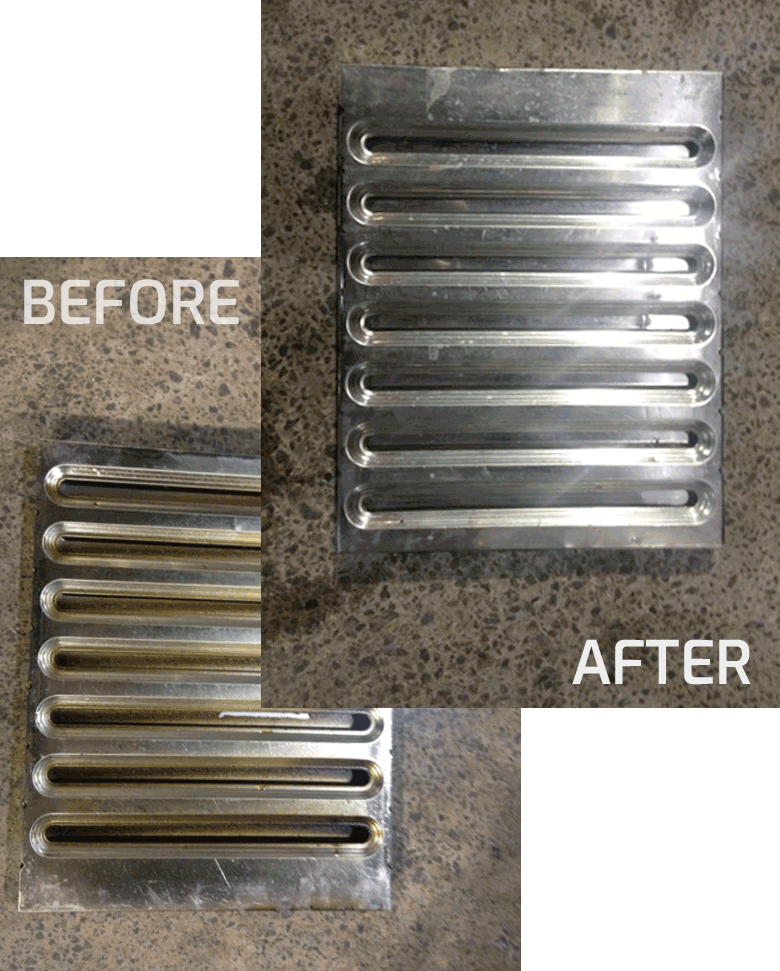
kitchen range hood grease filter cleaning before after

Plastic Bathroom Covers

Soak the cover in a basin of warm water with a few drops of dish soap for 5 to 10 minutes. Use a soft toothbrush to scrub grime from textured surfaces. Rinse thoroughly and dry flat on a towel. Never hang the cover to dry, which can warp the plastic.

Avoid hot water. It can melt or distort plastic components.

Metal Kitchen Grease Filters

Fill your sink with hot water, dish soap, and 1 to 2 tablespoons of baking soda. Soak the filter for 15 to 20 minutes, or up to 2 hours for heavy buildup. Scrub with a soft brush, rinse well, and air dry completely.

For baked-on grease, mix dish soap with 2 to 3 caps of household bleach into a paste. Apply with a spray bottle, let sit 5 to 10 minutes, then scrub. Rinse thoroughly. Use this method only on metal, never on plastic.

Never submerge light fixtures, motors, or electronic sensors in water.

Vacuum Internal Components

With the cover off, vacuum all accessible parts. Use the brush attachment to sweep dust from fan blades, housing, and motor casing. Switch to the crevice tool for tight corners and fins.

Take the unit outside and use compressed air to blow out stubborn dust from motor fins and squirrel cage. Do this before brushing because it prevents dust clouds indoors.

Avoid wet cleaning the motor unless you are doing a deep clean.

Deep Clean Fan Blades and Motor

exhaust fan motor impeller cleaning disassembly

Only proceed with this step if you are comfortable with light disassembly.

Remove the Motor If Needed

Unscrew the 1 to 3 mounting screws. Gently lower the motor. Do not yank the wires. Some models have a C-clip securing the impeller, which is the fan rotor. Use a C-clip tool or needle-nose pliers to remove it.

Clean the Impeller

Soak the impeller in soapy water. Scrub with a soft brush. Rinse and dry completely before reattaching.

Wipe the Motor

Use a slightly damp microfiber cloth. Never soak the motor. Clean fins with a toothbrush. Reinstall only when the motor is 100% dry.

Do not lubricate the motor. Most modern units have sealed bearings. Oil attracts dust and can damage components.

Inspect and Clean the Ductwork

Even a spotless fan fails if the duct is blocked.

Check Visible Duct Sections

Use a flashlight and mirror to inspect. Vacuum accessible parts with a brush attachment. Look for kinks, sagging, or compressed insulation. All of these reduce airflow.

Clean the Exterior Vent

Go outside to the roof, wall, or soffit vent. Clear leaves, bird nests, ice, or insect hives by hand or with a long brush. Ensure the flapper opens when the fan runs and closes when off.

A blocked exterior vent forces moisture back into the attic or kitchen, risking mold and fire.

Clean Light Fixtures and Sensors

Light Bulbs and Sockets

Wipe with a dry or slightly damp cloth. Use a crevice vacuum for dust in corners. Replace bulbs if dim or flickering.

Humidity Sensors

Gently wipe with a dry cloth. Grime can delay automatic startup. Test by running a hot shower. The fan should activate within 2 to 3 minutes.

LED-Integrated Units

Clean lenses with a lint-free cloth. Avoid ammonia-based cleaners because they can cloud plastic lenses.

Reassemble and Test the Fan

Reinstallation Steps

Ensure all parts are fully dry with no damp filters or covers. Reattach the motor by aligning it properly, reconnecting wiring or plugging in the connector, and securing with screws. Do not over-tighten. Snap or screw the cover back in place. Replace light bulbs or covers if removed. Restore power at the breaker.

Performance Test

Turn on the fan. Feel airflow at the grille. It should be strong and steady. Listen for rattling, buzzing, or grinding, which are signs of imbalance or debris. Check light and sensor function.

A clean fan removes steam in 5 to 10 minutes and kitchen smoke in 2 to 3 minutes.

How Often to Clean Exhaust Fans

Bathroom Fans

Clean every 6 to 12 months. Clean twice a year if the fan is used daily. High-humidity homes should clean every 6 months.

Kitchen Range Hoods

Clean every 1 to 3 months, depending on cooking frequency. Clean grease filters monthly if frying or grilling often. Replace charcoal filters every 6 months because they are not washable.

Mark cleaning dates in your calendar or home maintenance log.

Signs Your Exhaust Fan Needs Cleaning

Clean It Now If

The fan runs but airflow is weak and steam or smoke stays in the room. There is visible dust or grease on the cover. The fan makes rattling or loud humming sounds during operation. There are mold spots near the vent or ceiling. Paint is bubbling, which is a sign of trapped moisture.

Time to Replace If

The fan is noisy after cleaning. The motor smells burnt or overheats. Blades are cracked or wobbling. The unit is over 10 years old and underperforming. The circuit breaker trips when the fan turns on.

Modern fans are quieter, more efficient, and easier to clean.

Avoid These Common Mistakes

What Not to Do

Do not spray water into the motor. It causes short circuits. Do not use steel wool or abrasive pads. They scratch surfaces and trap grime. Do not reinstall wet parts. It leads to mold, rust, or electrical failure. Do not use oven cleaner or undiluted bleach. They corrode metal and warp plastic. Do not lubricate sealed motors. Oil attracts dust and ruins bearings.

Use only mild soap, soft brushes, and microfiber cloths for safe, effective cleaning.

Boost Performance with Pro Tips

Maximize Airflow

Measure CFM with a digital anemometer. Over 80% of rated CFM means the fan is healthy. Under 50% indicates likely duct blockage or motor failure. Replace long, sagging ducts with rigid metal piping. Add a duct silencer to reduce noise from turbulence.

Prevent Future Buildup

Run the bathroom fan 15 to 20 minutes after showering. Keep the kitchen hood on during cooking and 5 minutes after. Install a timer switch for automatic shutoff. Paint near the vent? Remove and clean the cover afterward because paint can clog airflow.

When to Call a Professional

While most cleaning is DIY, professional service is recommended annually for deep duct cleaning, motor inspection, CFM testing, and hard-to-reach installations like attic-mounted units. Expect to pay $100 to $200, but it prevents costly repairs and fire risks.

Final Checklist for Clean Exhaust Fans

Power turned off at breaker. Cover or filter removed. Filter soaked and scrubbed. Interior vacuumed and wiped. Motor and blades cleaned if needed. Duct and exterior vent inspected. All parts fully dry before reassembly. Power restored and fan tested.

Key Takeaways for Cleaning Your Exhaust Fan

Cleaning your exhaust fan takes less time than baking a cake, but the benefits last months. You will breathe easier, reduce fire risks, and extend your fan is life by years. Do it every 6 months and you will never wonder why the bathroom stays damp or the kitchen smells greasy. With this guide, you are not just cleaning a fan. You are protecting your home.

Frequently Asked Questions About Cleaning Exhaust Fans

How do I know if my exhaust fan needs cleaning?

Check for weak airflow when the fan runs. Look for visible dust or grease on the cover. Listen for rattling or unusual noise. Notice if steam or smoke lingers longer than normal. These are clear signs the fan needs cleaning.

Can I clean my exhaust fan without removing it?

You can clean the cover and filter without full removal. Vacuum visible dust from the grille. Wipe the exterior with a damp cloth. However, deep cleaning requires removing the cover to access fan blades and motor.

What happens if I do not clean my exhaust fan?

A dirty fan reduces airflow and forces the motor to work harder. In bathrooms, this leads to mold and moisture damage. In kitchens, grease buildup becomes a fire hazard. Performance drops 20 to 40% with clogged filters.

Can I use a pressure washer on exhaust fan parts?

Never use a pressure washer. The high-pressure water damages motor components and electrical parts. Use mild soap, warm water, and soft brushes instead.

How long does it take to clean an exhaust fan?

Basic cleaning takes 20 to 30 minutes. Deep cleaning with motor access takes 45 to 60 minutes. Most of that time is soaking and drying.

Should I hire a professional to clean my exhaust fan?

Most homeowners can handle basic cleaning themselves. Hire a pro annually for duct cleaning, motor inspection, or if the fan is difficult to reach. It costs $100 to $200 but prevents major issues.

How to Wire Bathroom Exhaust Fan with Light


Wiring a bathroom exhaust fan with light can feel intimidating, but with the right guidance, it is a manageable DIY project that improves comfort, air quality, and energy efficiency. Whether you are replacing an old unit or installing one for the first time, understanding how to wire the fan and light, especially with single or dual switches, is essential for safe, code-compliant operation. This guide walks you through every step, from choosing the correct cable and tools to grounding, connecting wires, and testing your setup.

Understanding Single-Switch vs Dual-Switch Wiring for Bathroom Fans

Your wiring method depends on how you want to control the fan and light. A single-switch configuration simplifies wiring because both fan and light turn on and off together. This works well for smaller bathrooms where simultaneous operation is acceptable. A dual-switch configuration offers greater flexibility, allowing you to run the fan without the light or keep the light on without the noise. This is ideal for bathrooms used at night when you want ventilation without bright lighting, or during the day when you need airflow without illumination.

Selecting the Correct Cable Type for Your Setup

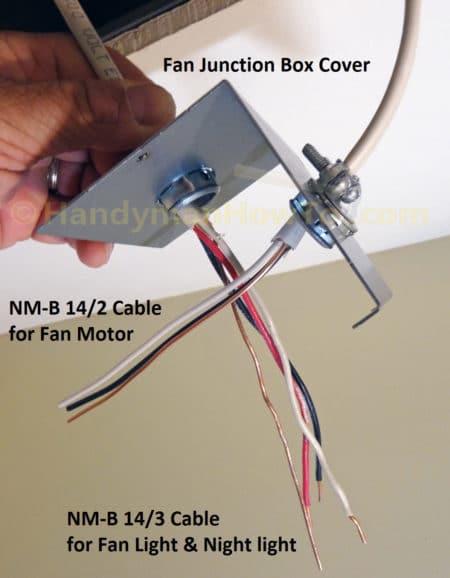
Use the appropriate cable based on your switch configuration. For single-switch control, use 14/2 with ground wire. This cable provides the hot, neutral, and ground conductors needed to power both fan and light from one switch. For dual-switch control requiring independent operation, use 14/3 with ground wire. The additional red conductor serves as the second switched hot, allowing separate control of the fan and light. For 20-amp circuits, upgrade to 12/2 or 12/3 respectively, matching the wire gauge to your breaker size.

Essential Tools and Materials for Wiring a Bathroom Exhaust Fan

electrician tool kit bathroom fan wiring

Required Tools

Collect these tools before starting your installation. A voltage tester confirms power is off before you begin working. Wire strippers remove one-half inch of insulation cleanly without damaging conductors. Needle-nose pliers twist wires and handle connectors in tight spaces. A screwdriver set includes both Phillips and flathead options for securing connections. A cable ripper or utility knife opens sheathing without damaging the wires inside.

Required Materials

Gather these materials for a complete installation. Wire connectors include standard wire nuts or WGO lever nuts, which are easier to disconnect later. Cable clamps secure cables entering the boxes. Grounding pigtails bond ground wires to switches and fixtures. Dual rocker switches or two single-pole switches provide independent control. Electrical tape insulates switch bodies when installed in metal boxes.

Critical Safety Steps: Turning Off Power Before Wiring

Shutting Off the Circuit

Begin by turning off the breaker controlling the bathroom circuit. Test the wires at both the switch location and the ceiling box using a non-contact voltage detector. Confirm no power is present on black, white, or red wires before touching any conductors. Never assume the power is off based on breaker position alone. A single mistake can lead to serious injury.

Labeling the Breaker

Place tape over the breaker with a note reading “Bathroom Fan, Do Not Turn On.” This prevents accidental re-energizing while you are working. Have someone else in the household understand that the circuit should not be touched until you confirm the work is complete.

Installing the Junction Box and Running Cable

bathroom exhaust fan junction box installation remodel box

Box Size and Placement

Use a remodel box if working above existing drywall. Ensure the box volume meets NEC 314.16(B) requirements by calculating based on wire count. Each 14 AWG wire requires 2.0 cubic inches of space. Ground wires count as one wire total. Each device such as a switch counts as two wires. Cable clamps count as one wire each. For example, a dual-switch metal box with two 14/3 cables needs at least 21.0 cubic inches.

Securing the Cable

Feed the 14/3 cable from the switch box to the fan location. Use cable clamps to secure wires inside each box. Leave 6 to 8 inches of slack in both boxes for easy connections. Never stretch wires tightly because slack prevents strain on terminals during installation and future maintenance.

Ceiling Box Wiring: Connecting Fan and Light Wires

Connecting Ground Wires

Join all bare copper ground wires with a wire nut. Add a ground pigtail and connect it to the green grounding screw on the fan housing. Wrap the wire clockwise around the screw and tighten securely. All metal parts must be grounded, and even plastic-housed fans require fixture grounding for safety.

Joining Neutral Wires

Connect all white neutral wires together. This includes the source neutral from the cable, the fan neutral, and the light neutral. Use a three-conductor lever nut or wire nut for a secure connection. Neutrals are never switched; they run straight through to the fixture regardless of switch position.

Connecting Hot Wires by Configuration

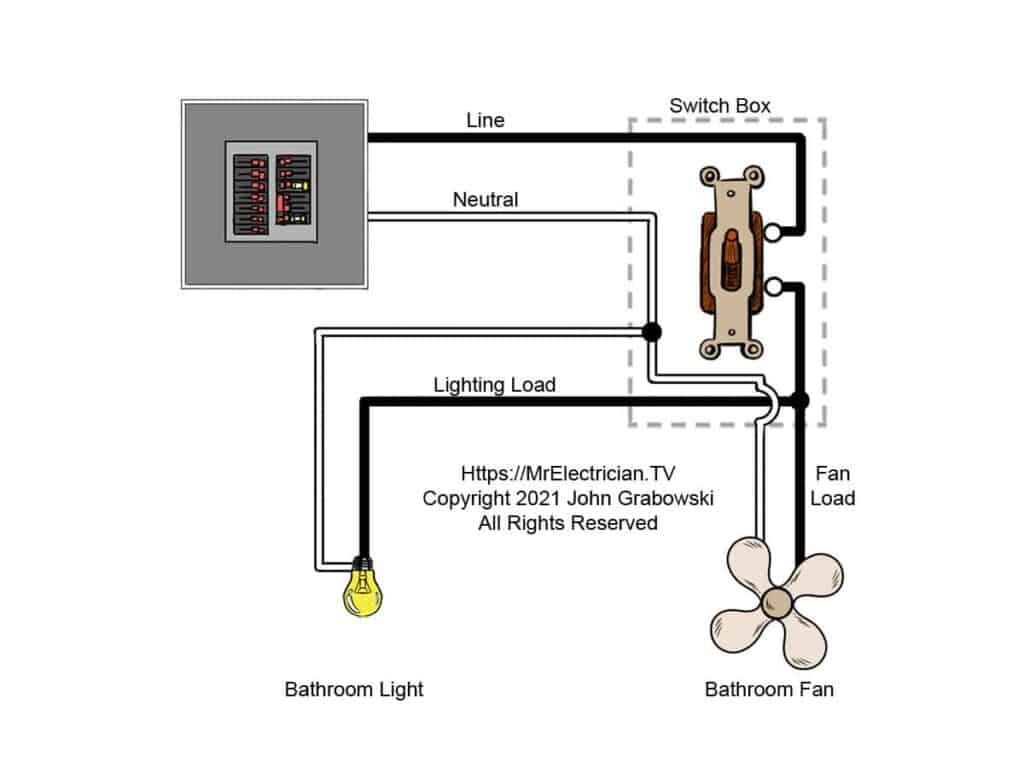
For a single-switch setup, the incoming black switched hot connects to both the fan black wire and the light blue wire. Use a wire nut to join all three conductors. The result is one switch that powers both devices simultaneously.

For a dual-switch setup, connect the black wire from the cable to the fan black wire. Connect the red wire from the cable to the light blue wire. Use separate two-conductor lever nuts for clean, reliable connections. Keep all connections tight and insulated because exposed copper can cause short circuits.

Switch Box Wiring: Connecting Power and Switches

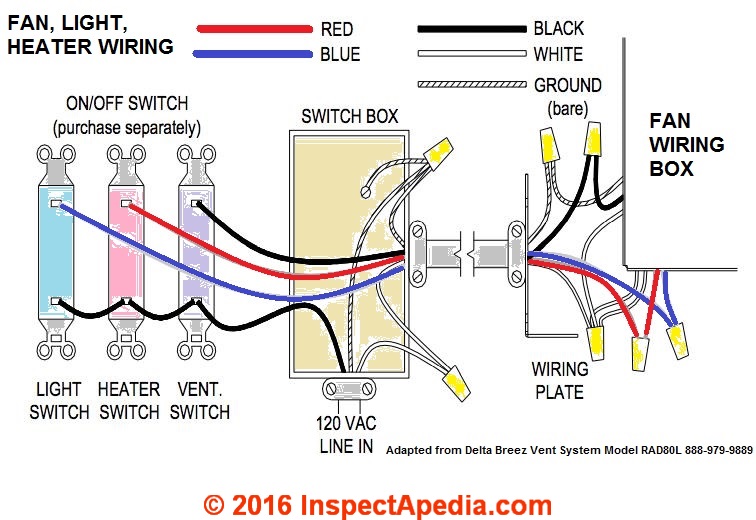
bathroom fan switch wiring diagram dual switch

Feeding Power to the Switch

Most bathroom fan circuits receive power at the switch box. The incoming 14/2 cable brings constant power with black as hot, white as neutral, and bare copper as ground.

Grounding All Components

Join the incoming ground, the cable ground going to the fan, and the metal box ground if applicable. Attach a pigtail to the green terminal on each switch. Metal boxes must be bonded to the grounding system for safety.

Tying Together Neutrals

Connect all white wires with a wire nut even if the switches do not use them. This is required by NEC 2011 and later for smart switch compatibility. Never cap off the neutral; leave it connected and accessible for future upgrades.

Distributing Constant Hot

Connect the incoming black constant hot to both switches. Use a pigtail, which is a short 6-inch black wire, to feed both switches from one source. Alternatively, connect to a common terminal if using a dual rocker switch. Secure all connections with screw terminals.

Connecting Switched Hots

Connect the red wire going to the light to the top terminal of one switch to control the light. Connect the black wire going to the fan to the bottom terminal of the second switch to control the fan. Label terminals with tape if they are not clearly marked. Wrap the switch body in black electrical tape if installing in a metal box to prevent accidental contact.

Completing Connections and Mounting Your Fan Unit

Tuck Wires Neatly

Fold all wires into the box without pinching them. Ensure no bare copper is exposed beyond the wire nuts. Proper wire management prevents damage and makes final assembly easier.

Mount the Fan Unit

Secure the fan housing to the joists or mounting brackets. Attach the grill and light cover. Install bulbs or LEDs if they are not pre-installed. Do not overtighten screws because plastic housings can crack under pressure.

Testing Your Installation: Restoring Power and Verifying Function

Turning On the Breaker

Double-check all connections before restoring power. Turn the breaker back on at the panel.

Testing Each Switch

Test the top switch, which should turn on the light only. Test the bottom switch, which should turn on the fan only. Try all combinations including light on with fan off, fan on with light off, both on, and both off. All combinations should function correctly.

Fixing Common Issues

If the light does not work, check for a loose red or blue wire connection at both the switch and the fixture. If the fan does not run, verify the black connection or test the motor. If both devices are dead, check for a tripped breaker or loose hot wire. If the wrong device turns on, swap the red and black wires at either the switch or the fixture. If you hear a buzzing sound, tighten all connections and confirm the switch is a standard switch, not a dimmer, because exhaust fans require standard switches.

Electrical Code Compliance and Safety Best Practices

NEC Compliance Checklist

Ensure the neutral wire is present in the switch box, which is required since 2011. Ground all metal parts including fixtures, boxes, and switches. Keep all junction boxes accessible with no buried splices. Calculate correct box fill based on wire and device count. Secure all cables within 8 inches of the box per NEC 314.17(C).

Safety Tips

Always turn off power at the breaker before touching any wires. Use lever nuts for reliable, tool-free connections. Label your switches after testing to identify which controls the fan and which controls the light. Install a GFCI breaker if an outlet is present in the bathroom, though this is not required for fan-only circuits.

Troubleshooting Common Bathroom Fan Wiring Issues

No Power? Check These First

Start by checking if the breaker has tripped and reset it if needed. Inspect for a loose neutral connection in the white wire bundle. Verify that the ground wire is properly bonded. Test the switch for continuity to confirm it is functioning.

Verifying with a Multimeter

Test voltage between black and ground, which should read approximately 120 volts. Test the switched red and black wires at the fan box with the switch in the on position. Confirm neutral continuity with ground, which should show as open.

Practical Example: Wiring a Commercial Electric 7132-12-CE Fan

Commercial Electric 7132-12-CE fan wiring diagram

This popular fan and light combination features an 80 CFM quiet fan rated at 1.5 sones, an adjustable white LED with color temperatures ranging from 3000K to 5000K, and a night light feature. The blue wire controls the light, the black wire controls the fan, and the white wire is neutral.

Run 14/3 cable from the dual switch location to the ceiling. At the ceiling box, connect all grounds together with a pigtail to the green screw. Tie all white neutrals together. Connect the black cable wire to the fan black wire. Connect the red cable wire to the light blue wire. At the switch box, connect the constant hot pigtailed to both switches. Connect the red wire to the top switch controlling the light. Connect the black wire to the bottom switch controlling the fan. Tie all neutrals together and bond all grounds with a pigtail. The result is full independent control that is code-compliant and operates quietly.

Maintenance Tips to Prevent Future Wiring Issues

Regular Upkeep

Clean fan blades and grille every six months to maintain airflow and prevent dust buildup. Replace bulbs as needed, noting that LEDs last significantly longer than incandescent bulbs. Check for loose wires during cleaning sessions. Listen for unusual noises that could indicate motor wear or mounting issues.

Upgrade Ideas

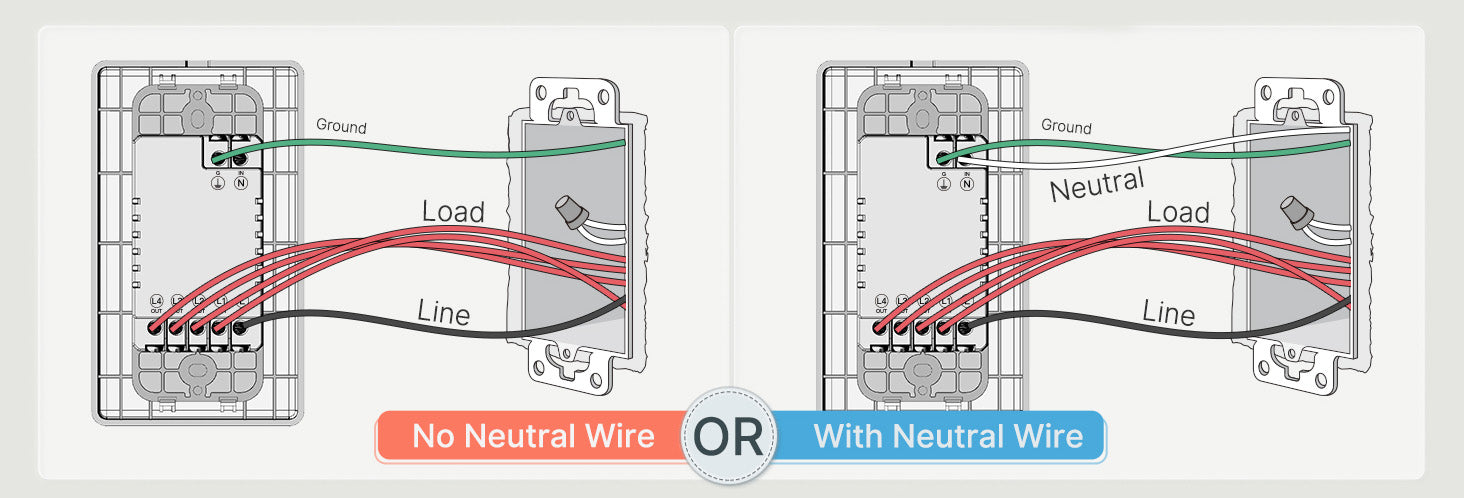
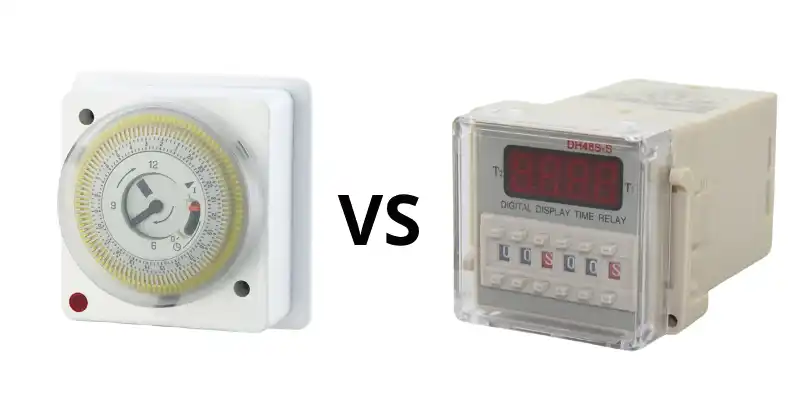
Consider replacing standard switches with timer switches such as the Lutron Maestro for automatic shutoff. Install a humidity sensor switch that activates the fan based on moisture levels. Use smart switches with app control, ensuring your box has both neutral and ground wires required for smart switch operation.

Key Takeaways for Successfully Wiring Your Bathroom Exhaust Fan

Remember these fundamental wiring rules. Neutrals always connect together and are never switched. Ground all metal parts for safety. For single-switch setups, use 14/2 cable and connect black to both fan and light. For dual-switch setups, use 14/3 cable with black for the fan and red for the light. The switch box must have a neutral wire present, which is an NEC 2011 requirement. Junction boxes must remain accessible, never bury splices. Always turn off power at the breaker and test before touching any wires. Test each function separately to verify independent operation.

If you are unsure at any point, especially with older wiring, aluminum conductors, or shared circuits, consult a licensed electrician. Bathrooms involve moisture, and mistakes can lead to shocks or fire hazards. However, with this guide, most homeowners can confidently wire a bathroom exhaust fan with light safely and correctly.

Frequently Asked Questions About Wiring a Bathroom Exhaust Fan with Light

What cable do I need for a bathroom exhaust fan with light?

You need 14/2 with ground for single-switch operation where the fan and light turn on together. Use 14/3 with ground for dual-switch operation allowing independent control of the fan and light.

Can I wire a bathroom fan and light on the same switch?

Yes, you can wire both on the same switch using 14/2 cable. Connect the black switched hot to both the fan black wire and the light blue wire with a wire nut.

Does a bathroom exhaust fan need a neutral wire?

Yes, the NEC 2011 and later codes require a neutral wire in the switch box even if the switch does not use it. This is necessary for smart switch compatibility and proper circuit function.

How do I know if my bathroom fan wiring is correct?

Test each switch function independently. One switch should control only the light, and the other should control only the fan. Verify all combinations work including both on, both off, and each individually.

What happens if I wire the fan and light wires backwards?

If the wires are reversed, the switch labeled for the light will control the fan and vice versa. Simply swap the red and black wires at either the switch or the fixture to correct this.

How to Wire a Canarm Exhaust Fan – Step-by-Step Guide


If your workshop or garage needs powerful ventilation, a Canarm exhaust fan is a top-tier solution. But before it starts pulling out fumes and freshening the air, you need to wire it correctly. Whether you are installing a P1107-F, P1170 CG, or another single-phase model, improper wiring can lead to motor failure, safety hazards, or no operation at all. This guide walks you through every step, from identifying voltage requirements to connecting wires safely and testing the unit.

You will learn exactly how to wire a Canarm exhaust fan for 115V or 230V systems, interpret color-coded leads, and avoid common mistakes that damage motors. Let us get your fan running safely and efficiently.

Identify Your Canarm Fan Model and Voltage Requirements

Before touching any wires, confirm your Canarm exhaust fan model and required voltage. Most units like the P1107-F and P1170 CG support dual-voltage operation, but they must be wired specifically for your supply.

Locate the Motor Wiring Diagram

Find the wiring diagram on the motor housing. This label shows acceptable voltage, wire grouping instructions, and terminal numbers. Look for two diagrams: one for low voltage on the left side and one for high voltage on the right side. Always match your supply voltage to the correct diagram.

Verify Your Power Supply

Use a multimeter to test your circuit before connecting anything. For 115V systems, you need one hot wire (black), one neutral wire (white), and a ground wire. For 230V systems, you need two hot legs (black and red) plus ground, with no neutral used. Never assume your outlet type matches the correct voltage without verifying first.

Match Your Model to the Correct Wiring Type

Different Canarm models use different connection methods. The P1107-F uses loose colored leads that require manual grouping. The P1170 CG uses numbered terminal posts for simpler connections. Some models like the XFS12 come with a plug (NEMA 5-15P) and require no hardwiring at all.

Wire the Canarm P1107-F Motor for 115V or 230V

The P1107-F uses individual colored wires that must be grouped based on your voltage selection. Incorrect grouping can burn out the motor immediately, so follow these steps precisely.

Connect the P1107-F for 115V Single-Phase Operation

This configuration uses a neutral wire and is common in residential workshops.

Attach Line 1 (Hot) to P1

Connect the black circuit wire (hot) to the P1 terminal on the motor. Use a wire nut or appropriate terminal connector to secure the connection firmly.

Join Black, White, and Yellow Wires to Neutral

Twist together the motor black, white, and yellow leads. Connect this group to the Line 2 (neutral/white circuit wire). Strip one-half inch of insulation and use a UL-listed wire nut. Tug each wire after connecting to ensure security.

Cap Off P2 and Orange Wire Together

Twist the P2 lead and orange lead together, then insulate with a wire nut. Do not connect this group to any power source.

Insulate All Remaining Unused Leads

Any wires not specifically mentioned should be capped individually. Tuck them neatly into the junction box to prevent accidental contact with terminals or metal parts.

Connect the P1107-F for 230V Single-Phase Operation

In 230V mode, both lines are hot and no neutral is used. This configuration is typical for heavy-duty commercial applications.

Attach Line 1 (Hot) to P1

Connect the circuit black wire to P1 on the motor. This serves as the primary hot input.

Link Black and Yellow to Line 2 (Hot)

Twist the motor black and yellow leads together. Connect this group to the second hot leg (red circuit wire).

Isolate Red, Orange, and White Leads

Group the red, orange, and white motor leads together and cap them with a wire nut. These windings are not used in 230V operation.

Cap P2 Alone

The P2 lead must be capped off by itself. Do not connect it to any other wire or terminal.

Warning: In 230V mode, never connect anything to neutral. Doing so creates a direct short circuit that can damage the motor or trip breakers.

Wire the Canarm P1170 CG Motor Using Terminal Posts

Canarm P1170 CG wiring diagram terminal posts

The P1170 CG simplifies wiring by using numbered terminals instead of loose leads. This reduces confusion and makes connection more straightforward.

Use Terminals 1 and 4 for Power in Both Voltage Configurations

Both 115V and 230V setups use the same two terminals. Only the power source connection changes.

For 115V Operation: Hot and Neutral

Connect L1 (hot) to Terminal 1. Connect L2 (neutral) to Terminal 4. Attach the ground wire to the grounding screw on the motor housing.

For 230V Operation: Two Hot Legs

Connect L1 (hot) to Terminal 1. Connect L2 (hot) to Terminal 4. The motor does not distinguish neutral from hot. It simply sees the voltage difference between the two terminals.

Ground the Motor Housing Properly

Locate the green grounding screw on the motor frame. Attach the bare copper or green circuit wire. Loop the wire clockwise around the screw for better grip, then tighten securely. After connection, tug the wire gently to confirm it will not pull out.

Understand Five-Wire Color Codes for Multi-Speed Fans

Canarm exhaust fan 5 wire color code diagram

Some Canarm fans include five wires: black, white, yellow, blue, and brown. These indicate multi-speed or capacitor connections that require proper identification.

Decode Each Wire Function

The black wire serves as the main power input and is always connected. The white wire carries neutral in 115V systems only. The yellow wire connects to the capacitor or start winding and is critical for startup. The blue wire provides the medium speed tap on three-speed models. The brown wire offers the low speed tap when used with pull-chain switches.

Test Wire Functions with a Multimeter

Set your multimeter to resistance (Ω) mode. Test between pairs of wires to identify winding connections. The highest resistance reading typically indicates the start winding (often yellow combined with black). The lower resistance indicates the run winding. Match your findings to the manufacturer diagram.

Follow Critical Safety Protocols Before Wiring

Electric shock and motor damage are real risks. Follow these safety steps every time you work on your Canarm fan.

Turn Off Power at the Breaker

Switch off the circuit breaker supplying power to the fan location. Apply Lockout/Tagout (LOTO) procedures if working in a commercial setting. Test all wires with a non-contact voltage tester before touching any conductors. Never rely on a wall switch alone to ensure power is off.

Inspect Wires and Junction Box

Check all wiring for frayed insulation, burns, or corrosion. Ensure the junction box is dry, accessible, and code-compliant. Use a weatherproof box if installing outdoors or in damp areas like workshops.

Use Proper Tools and Personal Protective Equipment

Wear insulated gloves and safety glasses during all electrical work. Use wire strippers designed for the gauge you are working with. Choose only UL-listed wire nuts or lever connectors. Keep a fire extinguisher rated for electrical fires nearby throughout the project.

Install a Code-Compliant Junction Box

All connections must be enclosed in an accessible junction box that meets electrical codes.

Choose the Right Box

Select a minimum 4-inch by 4-inch by 1.5-inch box for most fan installations. Both metal and PVC boxes are acceptable if properly rated. The box must allow full access without removing the fan from its mounting position.

Mount the Box and Route Wires

Mount the junction box as close to the motor as possible. Keep wire runs short and direct. Use clamps or strain reliefs where wires enter the box to prevent damage from vibration.

Seal Against Moisture

Use grommets or bushings on knockout entries. Apply silicone sealant around outdoor box seams. Ensure the lid seals tightly. For outdoor installations, use a rainsafe cover with drip loop wiring.

Test the Fan After Wiring

Never assume the fan works correctly. Verify every connection before finalizing the installation.

Perform a Visual Inspection First

Check that all wire nuts are tight and secure. Look for any exposed copper that could cause shorts. Confirm the ground connection is solid. Ensure wire management is neat with no pinched or compressed conductors.

Conduct a Continuity Test

With power still off, set your multimeter to continuity mode. Test between Line 1 and P1 (should beep). Test between Line 2 and the neutral group for 115V setups. Verify no continuity exists between any wire and the motor housing, which would indicate a short.

Power Up and Observe

Restore power at the breaker. Turn on the switch. Watch for immediate startup and smooth rotation. Listen for abnormal sounds like grinding or humming. Smell for any burning or smoke. If the motor hums but will not start, the capacitor or start winding is likely faulty.

Confirm Proper Rotation Direction

Stand behind the fan. The blades should move away from the motor housing. If rotation is reversed, swap the two power leads (only if your specific model allows reversal).

Troubleshoot Common Wiring Problems

Even careful work can encounter issues. Use this guide to diagnose problems quickly.

Fan Does Not Start

Possible causes include incorrect wire grouping, an open circuit from a loose connection, or a tripped breaker. Recheck all diagrams and connections. Test voltage at the source. Ensure every wire nut is tight and making proper contact.

Motor Hums but Will Not Run

This typically indicates a failed start capacitor or a disconnected yellow wire. Test the capacitor with your multimeter (should read 8-12 µF). Replace if bulging, leaking, or outside the range. Confirm the yellow wire connects per the diagram.

Breaker Trips Immediately

This usually means a short circuit, ground fault, or miswired 230V setup with neutral connected. Disconnect power and inspect for pinched wires or exposed copper. Verify no neutral wire connects in 230V configurations.

Motor Overheats During Operation

Causes include wrong voltage applied to the motor, high resistance in loose connections, or poor ventilation around the fan. Confirm your supply voltage matches the motor requirements. Tighten all terminals. Ensure the fan is not blocked or surrounded by insulation.

Maintain Your Canarm Fan for Long-Term Performance

Proper wiring is just the beginning. Long-term performance depends on regular maintenance.

Clean Blades and Louvers Annually

Turn off power before cleaning. Wipe blades with a damp cloth to remove dust buildup. Remove debris that forces the motor to work harder. For magnetic louver models, ensure louvers close fully when the fan is off.

Inspect Wiring Yearly

Check for loose terminals that may have vibrated loose. Look for heat discoloration on wires and connectors. Replace any cracked wire nuts or damaged insulation immediately.

Never Lubricate the Motor

Canarm motors are permanently sealed. Adding oil damages internal bearings and attracts dirt. Do not drill lubrication holes. You will void the warranty and potentially destroy the motor.

Key Takeaways for Wiring Your Canarm Exhaust Fan

Wiring a Canarm exhaust fan correctly ensures safety, efficiency, and long motor life. Whether connecting a P1107-F with loose leads or a P1170 CG with terminals, always match your voltage configuration precisely, use a code-compliant junction box, ground the motor properly, and test thoroughly before full operation. For plug-in models like the XFS12, no wiring is required, but proper mounting and sealing remain essential. When in doubt, consult a licensed electrician. Your workshop air quality and your safety depend on correct installation.

Frequently Asked Questions About Wiring Canarm Exhaust Fans

Can I wire my Canarm fan for 230V if my workshop has 115V power?

No. The motor must match your available supply voltage. Wiring a 115V motor to 230V will destroy it immediately. Conversely, wiring a 230V motor to 115V will cause it to run poorly or not start at all. Always verify your supply voltage before purchasing or wiring a fan.

What happens if I do not ground my Canarm exhaust fan?

Skipping the ground connection creates a serious shock hazard. If a wire shorts to the motor housing, the metal frame could become energized. Grounding ensures the circuit trips the breaker quickly if a fault occurs. Proper grounding is required by electrical codes and essential for safety.

How do I know if my P1107-F is wired correctly for 230V?

In 230V mode, P1 connects to one hot leg. The black and yellow motor leads connect together to the second hot leg. P2 is capped off alone. The red, orange, and white leads are capped together. No neutral wire should be connected to the motor in a 230V configuration.

Can I use my Canarm fan with a speed control switch?

Yes, if your model supports multi-speed operation. Fans with five-wire configurations (black, white, yellow, blue, brown) include speed taps. Connect the blue wire for medium speed or the brown wire for low speed. Always verify against the manufacturer wiring diagram before connecting speed controls.

Why does my fan hum but not start when I turn it on?

This usually indicates a failed start capacitor or a disconnected yellow wire (start winding). Test the capacitor with a multimeter set to capacitance mode. It should read approximately 8-12 microfarads. Replace if the reading is outside this range or if the capacitor shows physical damage.

How to Wire a Broan Exhaust Fan


Wiring a Broan exhaust fan correctly ensures safe, efficient bathroom ventilation and compliance with electrical codes. Whether replacing an old unit or installing a new smart model with humidity sensing or continuous run features, proper wiring is essential. This guide walks through every step, from safety prep and mounting to model-specific wiring and final troubleshooting.

By the end, you will know exactly how to match wires, configure switches, and test your system for full functionality across all Broan models.

Safety First: Power Off and Prep

Before touching any wires, verify the workspace is safe and code-compliant. Electricity in bathrooms requires extra caution due to moisture and GFCI requirements.

Shut Off Power at the Breaker

Turn off the circuit breaker supplying power to the bathroom. Use a non-contact voltage tester at the ceiling box to confirm no live current exists. Lock or tag the breaker to prevent accidental re-energizing. If the circuit includes GFCI outlets, test and reset them after power restoration.

Never assume the switch cuts all power. Always verify at the source.

Gather Required Tools and Materials

Ensure you have these items before starting:

Wire strippers for 14 to 12 AWG wire, screwdrivers and an impact driver, 1-5/8 inch deck screws for housing, UL-listed wire nuts and electrical tape, a strain relief connector for NM cable entry, 3M duct tape for sealing ducts, and correct NM-B cable. Use 14/2 for 15-amp circuits, 12/2 for heaters or 20-amp circuits, and 14/3 for independent fan and light control.

Confirm Code Compliance

All wiring must follow NEC and IRC standards. Exhaust must vent outside, not into the attic. GFCI protection is required if the circuit powers outlets. Use junction box-rated housing, which Broan units include.

Mount the Fan Housing Securely

Broan exhaust fan housing installation joist mounting

A stable mount ensures quiet operation and safe wire access. Proper installation also prevents vibrations that can loosen connections over time.

Position for Optimal Venting

Install near the ceiling center, ideally over the shower or tub. Align with joists or rafters for support. Plan the shortest, straightest duct path to the roof or wall.

Secure the Metal Housing

Bend up side flaps on the housing to fit between joists. Mark screw holes on adjacent joists. Drive 1-5/8 inch deck screws partially, slide unit in, then fully tighten. Bend flanges down after installation to avoid drywall interference.

The housing cover doubles as a junction box, so all wiring happens inside.

Connect the Duct Early

Slide 3-inch flexible aluminum duct onto the outlet. Secure with a snap-lock clamp or metal band. Seal with 3M duct tape, wrapping fully and leaving a tab for future removal. Route duct toward exterior termination with no kinks or sags.

Broan 688: Fan-Only Wiring (Single Switch)

The 688 model works best for small bathrooms up to 80 square feet. This basic fan-only configuration uses a single switch.

Model Specs at a Glance

This unit delivers 50 CFM at 4.0 sone. It uses 3-inch duct and requires 14/2 NM-B cable.

Wiring Steps

Run 14/2 cable from switch to fan housing. Inside the junction box, connect black (hot) to fan black, white (neutral) to fan white, and bare copper (ground) to fan green. Secure with wire nuts, wrap in electrical tape, and tuck wires neatly before reinstalling the cover.

The fan runs only when the switch is on.

Broan 678: Fan and Light with Dual Control

Broan 678 wiring diagram dual switch

This model allows independent operation of fan and light through separate switches. It is ideal for bathrooms where lighting and ventilation need separate control.

Identify the Wires

Black powers the fan motor, blue powers the light, two white wires provide neutral, and green is ground. All must be connected properly for the system to work.

Dual-Switch Wiring Setup

Connect constant hot by splicing incoming black to white wires from both switches (marked with black tape) and to the black of any outlet or vanity light. Complete the neutral path by connecting switched white to both fan white wires, outlet white, and vanity light white. Link fan switch black to fan black and light switch black to fan blue. Ground all components by tying all ground wires together.

The fan and light now operate separately, and the outlet stays powered.

Broan 162: Fan, Light, and Heater Wiring

This model provides supplemental heat for cold climates. It requires a dual-function switch with separate red and black terminals.

Key Wires

Red powers the heater, blue controls fan and light, white is neutral, and green is ground.

Use a Dual-Function Switch

Feed 12/2 or 14/2 cable into the switch box. Connect incoming black to the switch hot terminal and incoming white spliced with unit white. Bond all grounds together. Connect switch red terminal to unit red (heater) and switch black terminal to unit blue (fan and light).

The heater and fan/light run independently.

AER110LK: LED Fan/Light (Single Switch)

This modern model features integrated LED lighting. By default, the fan and light operate together through a single switch.

Default Wiring (Single Switch)

Splice switch black with fan black and light black. Splice switch white with fan white and light white. Tie all grounds to green.

Both light and fan turn on together when the switch is activated.

Upgrade to Independent Control

Replace 14/2 with 14/3 cable (black, red, white, ground). Install a dual rocker switch. Connect black wire to fan via switch terminal and red wire to light via the second terminal. Tie all whites to neutral and bond all grounds.

You can now control fan and light separately.

AE110SL: Humidity-Sensing Fan Wiring

This smart model automatically runs the fan when bathroom moisture reaches a set level. It uses a humidity sensor to detect excess moisture.

Internal Wires

Black powers the light, brown controls the humidity sensor (auto fan), gray provides manual fan control, white is neutral, and green is ground.

Option A: Dual Switch (Light Plus Manual Fan)

Connect top switch to black (light) and bottom switch to gray (manual fan). Cap the brown wire to disable humidity sensing.

Humidity sensing is disabled with this configuration.

Option B: Three-Switch (Full Automation)

Connect switch one to black (light), switch two to gray (manual fan), and switch three to brown (auto/humidity). Tie all whites together and ground the green wire.

This enables auto fan, manual fan, and light, all operating independently.

Never cap the brown wire if you want humidity sensing enabled.

LP510R: Continuous Run Fan Wiring

This model provides energy-efficient always-on ventilation. It runs continuously at a preset speed to maintain air quality.

Set Dip Switch First

Inside the housing, set the dip switches. A equals 50 CFM, B equals 80 CFM, and C equals 100 CFM. Choose one speed, as it remains fixed.

Single-Switch Wiring

Splice switch black to fan black and brown. Connect switch white to fan white. Ground the fan green.

The fan runs continuously when powered. The DC motor may pause 1 to 2 seconds at startup, which is normal.

Evolve Series: PTEL511RK Programmable Fan

Broan Evolve PTEL511RK wiring diagram controller settings

This advanced model offers boost, delay, and nightlight features. It provides the most control options for modern bathrooms.

Controller Dials Explained

The right dial sets CFM (fan speed). The middle dial enables continuous run. The left dial sets the delay timer (post-use run time).

Boost only works if continuous run is ON. This is critical for proper operation.

Required Cables

Use 143 cable to power the controller and light. Use 142 cable to send the boost signal.

Three-Switch Setup (Recommended)

The top switch powers the controller, enabling nightlight and continuous run. The second switch provides boost for temporary high speed. The third switch controls the task light.

Wiring Connections

Tie all white wires (neutrals) together and all green wires (grounds) together. For 143 cable, connect red to black of 3-pin Molex (task light) and black to blue of 3-pin and black of 4-pin Molex (powers controller and continuous run). For 142 cable, connect black to red wire of 4-pin Molex (boost input).

If the top switch is off, boost fails because continuous run must stay powered.

Universal Wiring Rules

These principles apply to all Broan models. Following them prevents mistakes and ensures safe operation.

Wire Color Functions

Black carries hot (fan, light, heater). Blue indicates light or nightlight. White is neutral and always ties together. Green or bare copper is ground and bonds all components. Red carries switched hot (heater, boost). Brown or gray is model-specific (humidity, manual fan).

Never connect a taped white wire (used as hot) directly to neutral.

Switch Loop Best Practices

In switch loops, white is often hot. Mark it with black tape. Use pigtails for neutrals and grounds, and test all wires with a voltage tester before connecting.

Secure All Connections

Use correctly sized wire nuts. Pull-test each connection. Wrap with electrical tape. Tuck wires without pinching.

Duct Installation: Maximize Airflow

Broan exhaust fan duct installation best practices

Even perfect wiring fails with poor ducting. Proper duct installation ensures the fan performs at its rated CFM.

Duct Specs

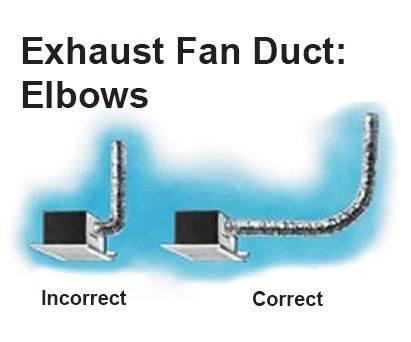
Use 3-inch diameter flex or rigid duct. Maximum length is 25 feet. Each 90-degree bend equals 5 feet of lost efficiency. Avoid kinks, sags, and compression.

Installation Steps

Flatten the end of flex duct and slide onto the fan outlet. Clamp with snap-lock or metal band. Seal with 3M duct tape, wrapping fully. Route to exterior termination. Connect to metal pipe stub and seal with tape.

Exterior Vent Cap

The vent cap must have a backdraft damper (flaps open when fan runs). This prevents rain, snow, and pests. Never vent into attic, soffit, or crawlspace.

Troubleshooting Common Issues

Fix problems before they become safety hazards. These solutions cover the most frequent issues.

Fan Will Not Turn On

Check for loose black (hot) wire. Test voltage at the switch and fan. Verify power at the breaker and GFCI.

Light Works, Fan Does Not

On Evolve models, check if continuous run is off. Test the fan motor wire and inspect for cuts.

Excessive Noise

Tighten housing screws. Secure the duct to prevent vibration. Check for debris in fan blades.

Humidity Sensor Not Working

If the brown wire is capped, uncap it. If the auto switch is off, turn it on. Verify power reaches the controller.

Boost Function Fails

If continuous run is off, turn on the top switch. Verify 142 cable is correctly wired to red (4-pin Molex).

Final Checks and Maintenance

Ensure long-term performance with proper testing and upkeep.

Post-Installation Tests

Restore power and test all switches. Feel airflow at the exterior vent. Confirm the damper opens. Listen for unusual noises. Check duct joints for leaks.

Maintenance Schedule

Monthly, clean the grille with soapy water. Annually, vacuum fan blades and housing. Every five years, inspect duct for nests and moisture.

Warranty Notes

Motor carries a limited lifetime warranty. Electrical parts carry 1 to 5 years. Register online for full coverage.

Frequently Asked Questions About Wiring a Broan Exhaust Fan

What wire size is needed for a Broan exhaust fan?

Most Broan fans use 14/2 NM-B cable for 15-amp circuits. Use 12/2 for heaters or 20-amp circuits. Use 14/3 when running separate switches for fan and light.

Can I control my Broan fan and light separately?

Yes, for models like the 678 and AER110LK, you can upgrade to 14/3 cable and install a dual rocker switch. This allows independent on/off control of fan and light.

How do I wire a Broan humidity-sensing fan?

Connect the brown wire to a dedicated switch for automatic operation. Use a three-switch setup to enable light, manual fan, and auto humidity sensing. Never cap the brown wire if you want the sensor active.

Why is my Broan fan not working after installation?

Check that all wire connections are secure, especially the black (hot) and white (neutral) wires. Verify the breaker is on and test the GFCI outlet if one exists on the same circuit.

Does a Broan exhaust fan need a dedicated circuit?

It depends on the amp draw. Most fan-only units can share a bathroom circuit. Heater units and large fans may require dedicated circuits. Check the manufacturer’s specifications and local code requirements.

Can I install a Broan fan myself, or do I need an electrician?

DIY installation is possible for basic models if you follow code and safety procedures. For heater circuits, complex automation, or if you are unsure about wiring, hire a licensed electrician.

Key Takeaways for Wiring Your Broan Exhaust Fan

Wiring a Broan exhaust fan requires matching wire colors correctly and understanding your model is specific features. Always turn off power at the breaker and verify with a voltage tester before working. Use the correct cable gauge (14/2, 12/2, or 14/3) based on your circuit and control needs.

For basic fans like the 688, a simple single-switch setup works. For advanced features like humidity sensing or programmable boost, follow the model-specific wiring sections in this guide. Test all functions after installation and perform annual maintenance to keep your fan running efficiently for years.

How to Install a Bathroom Exhaust Fan


Adding a bathroom exhaust fan is one of the most effective upgrades you can make to protect your home from moisture damage. Without proper ventilation, steam from showers lingers on walls and ceilings, creating the perfect environment for mold growth, peeling paint, and even structural rot over time. A well-installed exhaust fan removes humid air outside, maintaining indoor humidity between 30% and 50% to keep your bathroom dry and healthy. This guide walks you through selecting the right fan, planning venting, routing ductwork, making safe electrical connections, and completing the installation yourself.

Choose the Right Exhaust Fan for Your Bathroom

bathroom exhaust fan CFM chart comparison

Selecting the correct fan ensures effective moisture removal without excessive noise or energy costs. The right choice depends on your bathroom size, mounting requirements, and desired features.

Calculate the Correct CFM for Your Space

CFM (cubic feet per minute) measures how much air the fan moves. Match this rating to your bathroom square footage for optimal performance.

Calculation method:

  • Measure your bathroom length and width
  • Multiply to get square footage
  • Multiply square footage by 1.1 for minimum required CFM

Example: An 8 ft × 10 ft bathroom equals 80 sq ft, requiring at least 88 CFM (80 × 1.1).

Quick reference guide:

Bathroom Size Minimum CFM
Up to 50 sq ft 50 CFM
50–100 sq ft 80–100 CFM
Over 100 sq ft 110+ CFM

Code requirement: Most building codes mandate at least 50 CFM for bathrooms with showers or tubs.

Check the Sone Rating for Quiet Operation

The sone rating measures fan noise. Lower values mean quieter operation.

Sone ratings to know:

  • 0.5–1.0 sone: Whisper-quiet, ideal for master bathrooms
  • 1.0–2.0 sone: Quiet, similar to a refrigerator hum
  • 2.0–3.0 sone: Moderate noise, acceptable for guest bathrooms
  • Above 3.0 sone: Noticeably loud, avoid unless necessary

Pro tip: Choose a fan under 3 sones for comfortable daily use in frequently occupied bathrooms.

Select the Best Mounting Style

Your home structure determines which mounting style works best.

Ceiling-mounted fans:

  • Most common installation type
  • Installed between ceiling joists
  • Duct runs vertically through attic
  • Ideal when attic access exists

Wall-mounted fans:

  • Mount directly on exterior walls
  • Duct runs horizontally through wall studs
  • Perfect for homes without attic access
  • Works well when fan location aligns with outside wall

Design note: Modern fans include integrated LED lights, heaters, or humidity sensors—useful for combining functions and saving space.

Plan Proper Venting to the Outside

bathroom exhaust fan venting diagram correct vs incorrect

Exhaust must terminate outside your building envelope. Never vent into attics, crawlspaces, or interior walls, as this causes mold, rot, and insulation damage.

Pick the Best Vent Exit Location

Choose an exit point that minimizes duct run length while staying code-compliant.

Recommended exit locations:

  • Sidewall: Easiest and most reliable option
  • Roof: Possible but requires careful flashing
  • Gable wall: Good alternative when accessible
  • Soffit: Only with a proper backdraft damper

Critical rule: Venting indoors is unsafe and violates building codes. Always vent outside.

Use Correct Ducting Materials

Proper ductwork is essential for airflow efficiency. Poor ducting kills performance even with a powerful fan.

Duct specifications:

  • Diameter: 4 inches (standard residential size)
  • Material: Rigid or flexible metal duct (aluminum or galvanized steel)
  • Avoid: Plastic, vinyl, or foil-wrapped ducts—they collapse and are not code-compliant

Duct run limits:

  • Keep total run under 25 feet
  • Each 90-degree bend adds 5 feet of equivalent length
  • Slope duct ¼ inch per foot downward toward exterior to prevent condensation pooling

Efficiency tip: Use smooth rigid ducts instead of flexible ducting when possible for better airflow and less resistance.

Gather Tools and Materials for the Job

Having everything ready before starting prevents mid-project delays.

Tools You Will Need

  • Drill/driver
  • Jigsaw or drywall saw
  • Hole saw (4½ inch)
  • Extended spade bit (3/8 inch)
  • Tape measure
  • Layout square
  • Circuit tester
  • Wire strippers and wire nuts
  • Caulk gun
  • Safety goggles
  • Respirator mask
  • Ladder

Materials Checklist

  • Bathroom exhaust fan unit
  • 4-inch metal duct (rigid or flexible)
  • 90-degree duct elbow
  • Wall cap or roof vent cap
  • Foil duct tape or HVAC mastic
  • Cable clamp
  • Roofing cement (for roof venting)
  • Screws, spackling compound, and paint

Install a Bathroom Exhaust Fan with Attic Access

This method works best for unfinished attics and standard ceiling installations.

Mark Location and Drill Reference Hole

Choose a spot between ceiling joists, ideally centered between the shower and toilet for optimal air capture. Drill a 3/8-inch reference hole through the ceiling into the attic. Access the attic, locate the hole, and clear insulation to expose the joists.

Tip: Avoid plumbing vents and electrical wires running through the ceiling cavity.

Cut the Ceiling Opening

Measure the fan housing intake size and transfer those measurements to the ceiling using the reference hole as your guide. Draw a rectangle with a layout square, then cut with a jigsaw. Support the drywall as you cut to prevent it from falling.

Mount the Fan Housing in the Attic

Attach a 4-inch 90-degree elbow to the fan exhaust port and seal with foil duct tape (not regular duct tape). Slide the housing into the ceiling hole and expand mounting brackets against the joists. Screw securely to prevent vibration and noise.

Warning: Ensure the fan is level and tight. A loose unit causes annoying vibrations and operational noise.

Run Ductwork to the Exterior

Route metal duct from the fan to an exterior wall. Select a spot between two studs and drill through the wall sheathing with a 5-inch hole saw. Install the wall cap and secure with screws. Connect the duct to the cap and seal all joints with foil tape or HVAC mastic.

Cold climate tip: Use HVAC mastic instead of tape—it won’t crack in freezing temperatures.

Make Safe Electrical Connections

Turn off power at the breaker and verify with a circuit tester. Remove the blower motor from the housing and save the screws. Knock out the wiring knockout on the housing and install a cable clamp. Feed house wires through and connect black to black (hot), white to white (neutral), and green or bare to the ground screw. Secure with wire nuts, tuck wires inside, and replace the cover.

Safety note: If no existing switch or power source exists, hire a licensed electrician before proceeding.

Reinstall Motor and Test the Fan

Plug the blower motor back into the housing and secure with screws. Snap on the grille, restore power, and turn on the switch.

Test for success:

  • Fan runs smoothly without unusual sounds
  • No loud vibrations
  • Tissue held near the exterior vent cap gets pulled outward

Finish with Drywall Repair

Patch any gaps around the cutout with spackling compound. Sand smooth, repaint to match the ceiling, and clean the grille. Your installation is complete.

Install an Exhaust Fan Without Attic Access

No attic? No problem. Install from below in finished ceilings or cathedral-style designs.

Prepare the Ceiling Opening

Remove the old fan or test fit the new housing. If the opening is too small, enlarge it with a jigsaw. If too large, install a wood support block between joists and patch the drywall.

Attach Duct Connector from Below

Connect the duct adapter to the fan exhaust port and seal with HVAC tape. Anchor the connector to the ceiling hole with a screw for stability.

Route Duct Through Wall or Roof

Drill through the exterior wall between studs. Install the wall cap and connect the duct. For roof venting, cut through shingles with a hole saw, install the roof cap, and seal with roofing cement.

Pro tip: Use rigid duct for roof runs—it’s sturdier and easier to support than flexible duct.

Handle Wiring in Confined Space

Remove the wiring cover and knockout plug. Install a cable clamp and feed wires through. Connect by color (black-black, white-white, ground-ground), tuck wires inside, and reattach the cover.

Mount Fan and Finalize

Insert the fan into the housing and secure with screws. Install the grille, test operation, and patch drywall as needed.

Replace an Existing Exhaust Fan

Upgrading an old or noisy fan? Reuse existing ducts and wiring to save significant time.

Remove the Old Fan

Turn off power at the breaker. Remove the grille and unscrew the blower motor. Unplug the motor from the housing. Detach the old housing if replacing it entirely.

Install the New Fan

Place the new housing between joists and expand mounting brackets. Screw brackets securely. Reconnect the existing duct to the exhaust port. Feed wires through the cable clamp and connect by color. Plug in the new motor, secure it, and snap on the grille.

Time-saver: Full replacement takes 1–2 hours with existing infrastructure.

Vent Through the Roof When Needed

Sidewall venting isn’t always possible. Roof venting works but requires careful installation.

Cut the Roof Opening

Drill a pilot hole from the attic and mark the location outside. Use a 5-inch hole saw to cut through shingles and sheathing. Slide the roof vent cap under the shingles, nail in place, and seal edges with roofing cement.

Connect and Insulate the Duct

Attach the duct to the cap with HVAC tape. Insulate the duct in the attic to prevent condensation buildup. Ensure the backdraft damper opens and closes freely.

Caution: Roof flashing must be watertight. If unsure about proper installation, hire a professional roofer.

Avoid Common Installation Mistakes

Small errors reduce performance or create safety hazards. Steer clear of these common pitfalls.

Never Vent Into the Attic

Moist air in the attic causes mold, rot, and insulation collapse—a costly mistake that violates building codes.

Do Not Use Plastic or Vinyl Ducts

These materials collapse over time and are not fire-rated. Use metal ducts only for code-compliant installation.

Minimize Bends and Length

Each bend restricts airflow. Keep duct runs short and straight for maximum efficiency.

Seal All Joints Properly

Leaky joints mean moist air escapes into walls or ceilings. Use foil tape or mastic—never standard duct tape.

Always Include a Backdraft Damper

Without one, cold air flows back into your bathroom when the fan is off. Always use a self-closing damper.

Maintain Your Fan for Long-Term Performance

A well-maintained fan lasts 10–15 years. Regular upkeep keeps it running efficiently.

Clean the Grille Monthly

Remove dust and soap scum with mild soap and water. Clogged grilles reduce airflow and force the fan to work harder.

Inspect Duct and Vent Annually

Check the exterior vent cap for birds’ nests, ice, or debris. Inspect attic ductwork (if accessible) for sagging or disconnected sections.

Know When to Replace

Signs it’s time for a new fan:

  • Loud grinding or rattling sounds
  • Weak airflow compared to new performance
  • Fan won’t turn on
  • Visible moisture damage on the ceiling around the unit

Alternatives When Ducting Is Not Possible

Sometimes running ductwork isn’t feasible. Limited options exist, though they’re not ideal substitutes.

Ductless Recirculating Fans

These units filter air and blow it back into the room using charcoal filters for odor control. They do not remove moisture, so mold risk remains.

Not recommended unless paired with a dehumidifier or consistent window ventilation.

Portable Solutions

Run a dehumidifier after showers. Open windows during and after use. Use a window exhaust fan temporarily.

Best for renters or short-term fixes—not permanent solutions.

Frequently Asked Questions About Adding a Bathroom Exhaust Fan

Can you add an exhaust fan to any bathroom?

Yes—most bathrooms can be retrofitted with an exhaust fan, though complexity varies based on access and structural constraints.

Do bathroom exhaust fans need to vent outside?

Yes. Venting indoors (into attics, crawlspaces, or walls) is unsafe and violates building codes. Always vent outside the building envelope.

Can you install a bathroom exhaust fan without a duct?

Only with a recirculating fan, but it won’t reduce humidity. Proper moisture control requires a ducted system venting outside.

How much does it cost to install a bathroom exhaust fan?

DIY installation costs $120–$175 for the fan and materials. Professional installation runs $300–$600 depending on ductwork complexity, electrical needs, and roofing.

Do ductless bathroom exhaust fans work?

They reduce odors but do not remove moisture. They are not a substitute for proper ducted ventilation in moisture-prone bathrooms.

What if there is no exhaust fan in the bathroom currently?

Open windows while showering, use a portable dehumidifier, and install a fan as soon as possible to prevent mold and moisture damage.

Key Takeaways for Installing Your Bathroom Exhaust Fan

Adding a bathroom exhaust fan pays off in comfort, air quality, and home protection. Follow these essential points for a successful installation.

Size correctly: Calculate CFM using the 1.1 multiplier method (square footage × 1.1) to ensure adequate airflow.

Vent outside only: Never vent into attics, crawlspaces, or interior walls. This causes serious mold and structural damage.

Use proper materials: Install metal ducts only—avoid plastic or vinyl. Keep duct runs short and minimize bends.

Hire professionals when needed: For electrical work or complex roof venting, a licensed electrician or roofer ensures safe, code-compliant installation.

Test your work: Hold a tissue at the exterior vent cap. If it pulls inward, your fan is working correctly.

With proper planning and tools, most homeowners complete this project in one weekend. The result is a drier, healthier bathroom that stays mold-free for years to come.

How to Install Timer Switch for Exhaust Fan


Is your bathroom still foggy long after you finish showering? Excess moisture leads to mold, mildew, and potential wall damage. Installing a timer switch for your exhaust fan solves this problem by running the fan long enough to clear humidity, even if you forget to turn it off. This upgrade costs around $20, takes under an hour with basic tools, and dramatically improves indoor air quality. In this guide, you will learn how to safely replace a standard switch with a timer-controlled one, wire connections correctly, and choose the right model for your bathroom setup.

Turn Off Power and Verify Safety

Electricity poses serious hazards, so cutting power before installation is essential. Head to your main electrical panel and locate the breaker controlling the bathroom fan. Switch it off completely. Label the breaker with tape or a marker to prevent accidental reactivation while you work. Never assume power is off always verify it yourself.

Test for Live Voltage

Use a non-contact voltage tester to confirm no electricity reaches the switch. First, test the tool on a known live outlet in another room to ensure it functions properly. Hold the tester near the exposed switch wires after removing the wall plate. If the tester beeps or lights up, return to the panel and find the correct breaker. Proceed only when the tester shows zero voltage.

When to Call an Electrician

Skip DIY installation if your home has aluminum wiring, common in houses built during the 1960s and 1970s. These wires expand and contract differently than copper, creating fire hazards if not properly connected. Use only timer switches rated for aluminum wiring, apply anti-oxidant cream to connections, and consider hiring a professional. If you feel uncertain about wiring colors or circuit layout, consult a licensed electrician.

Gather Required Tools and Materials

Having the right supplies makes installation smooth and safe. You do not need advanced equipment, but gathering everything beforehand prevents mid-project trips to the hardware store.

Tools and Parts List

  • Timer switch compatible with exhaust fans
  • Phillips and flathead screwdriver
  • Wire stripper
  • Needle-nose pliers
  • Wire nuts (typically included with switch)
  • Non-contact voltage tester
  • Electrical tape for extra insulation
  • Smartphone or camera for photographing wiring

Choose a timer switch rated for your fan load. Most bathroom fans draw under 1 amp, well within standard 15A to 20A switch ratings. Never use dimmer switches unless specifically labeled for fan use, as these can damage the motor.

Remove Old Switch and Document Wiring

bathroom switch wiring before removal diagram

Start by removing the wall plate with a screwdriver. Set aside the screws and plate in a safe place. Gently pull the old switch from the electrical box. Before disconnecting any wires, take a clear photograph of the wiring arrangement. This reference prevents confusion when connecting the new timer.

Identify Your Wiring Type

Examine how wires connect to the existing switch. Screw terminals involve wires wrapped around metal screws. Back-stab connections feature wires pushed into holes in the switch back. Side-wire clamps hold wires under set screws. Back-stab connections are less reliable and prone to loosening over time. If your old switch uses this method, consider switching to screw terminals during replacement.

Handle Multi-Switch Setups

Bathrooms with separate light and fan switches often use a jumper wire to share power between both switches. One wire might be back-stabbed while another connects via screw terminal. When replacing only the fan switch with a timer, connect the timer’s line wire to the same hot source feeding the light switch. This keeps the light functioning normally while automating fan runtime.

Identify Circuit Wires in the Box

residential electrical wiring color codes switch box

Understanding your wiring configuration is crucial before connecting the timer. Most single-pole switch setups include several key wires.

Standard Wire Functions

  • Black wire carries hot power from the breaker panel
  • White wire serves as neutral to complete the circuit
  • Bare copper or green wire provides the ground connection
  • Red or second black wire acts as switched hot connecting to the fan

Check Neutral Wire Requirements

Many digital and smart timers require a neutral wire to power internal electronics like displays or countdown timers. Mechanical dial timers typically do not need a neutral. If your electrical box lacks a neutral wire, verify whether a neutral-free timer model is available for your setup. Some timer switches use minimal current leakage to power internal circuits without a neutral, which works safely for fan loads.

Connect the Timer Switch Correctly

Follow the manufacturer’s wiring diagram for your specific model. General connection steps apply to most timer switches available today.

Ground the Timer

Attach the bare copper or green ground wire from the box to the green ground wire on the timer using a wire nut. Twist clockwise and secure tightly. If your electrical box is metal and grounded, some local codes allow grounding the switch to the box screw, but only verify this with a voltage tester first.

Attach Neutral Wire If Required

If your timer needs a neutral connection, join the white wire from the box to the white timer wire. Twist the ends together clockwise, cap with a wire nut, and wrap with electrical tape for added security. Skip this step if your timer does not require a neutral.

Connect Line and Load Wires

Connect the black hot wire from the power source to the black or labeled line wire on the timer. Connect the red or second black wire leading to the fan as the load connection. The line wire brings power in, and the load wire sends power out to the fan. Reversing these connections causes malfunction or safety hazards.

Handle Stranded Wires

Electronic timer switches often use stranded wires with multiple thin strands. Before inserting into wire nuts, gently twist the strands clockwise to prevent fraying and ensure solid contact with the wire nut interior.

Mount and Secure the Timer

Carefully fold the wired connections back into the electrical box. Avoid pinching or damaging wire insulation. Align the timer switch with mounting holes and secure with screws. Reattach the wall plate.

Verify Clearance

Ensure no wires get trapped between the switch and the box. If the timer has a dial or digital face, confirm it sits flush and turns freely. Overcrowded boxes increase heat buildup and can cause premature failure.

Restore Power and Test Operation

Return to the breaker panel and restore power. Remove any tape or labels from the breaker. Test the timer according to your model instructions.

Activate and Verify Function

For mechanical dial timers, turn the knob to set runtime such as 15 or 20 minutes. For digital switches, press the button or touch sensor to start. Listen for the fan to turn on. Confirm it runs for the full duration and shuts off automatically.

Troubleshoot Basic Problems

If the fan does not start, check power, wiring connections, and verify the line and load wires are not reversed. If the fan runs continuously, the line and load wires are likely swapped. If a digital display remains dark, the neutral wire may be missing or loose. Turn off the breaker immediately if you notice sparks, heat, or burning smells, then inspect all connections.

Choose the Right Timer Type

mechanical vs digital timer switch comparison

Not all timer switches work the same way. Selecting the correct type ensures compatibility with your wiring and meets your needs.

Mechanical Dial Timers

These timers feature a simple rotating knob for operation. They do not require a neutral wire, making them ideal for older homes. Mechanical timers are durable, low-cost, and reliable, though timing is less precise than digital options.

Digital and Electronic Timers

Digital timers offer precise countdown settings from 5 to 30 minutes. They feature LED displays and programmable settings but typically require a neutral wire for internal electronics. These work best in modern homes with neutral wire access.

Smart and Sensor-Based Timers

These advanced timers activate automatically through motion detection or humidity sensing. They may require neutral wires and Wi-Fi connection. While convenient, they cost significantly more and offer features overkill for basic bathroom ventilation.

Solve Neutral Wire Problems

Many older homes lack a neutral wire in the switch box. Several solutions address this common issue.

Use Neutral-Free Timers

Some mechanical and newer electronic timer models operate without a neutral wire. Check product specifications before purchasing. These switches use minimal current leakage to power internal circuits safely for fan loads.

Add a Neutral Wire

To bring neutral to the box, run a new cable from the fan or light fixture. Connect the neutral at the fixture and extend it to the switch box. This requires opening walls and is best handled by a professional electrician.

Never Use Ground as Neutral

Never use the ground wire as a neutral substitute. This practice violates electrical code and creates serious shock hazards. Ground wires serve a critical safety function and must never carry circuit current.

Ensure Compatibility with Your Fan

Not all switches work with all exhaust fans. Verifying compatibility before buying prevents wasted money and installation frustration.

Check Load Ratings

Most residential exhaust fans draw less than 1 amp. Standard timers handle 15A to 20A loads, so rating compatibility is rarely an issue. However, confirm the timer is rated for inductive loads like motors, not just resistive loads like lights.

Avoid Fan Dimmers

Standard dimmer switches disrupt motor speed and can cause overheating. Only use fan-rated dimmers if speed control is necessary. For timer functionality, standard timer switches work perfectly with exhaust fan motors.

Set Appropriate Run Times and Educate Users

Once installed, household members need to understand how the timer works. Proper use maximizes the benefits of your upgrade.

Set Ideal Run Times

Small bathrooms typically need 10 to 15 minutes of fan runtime after showering. Large or poorly ventilated bathrooms may require 20 to 30 minutes. Adjust based on your specific situation. Too short leaves moisture behind; too long wastes energy.

Post Usage Instructions

Place a small note near the switch explaining that the fan runs automatically and shuts off after the set time. This prevents confusion and accidental breaker trips from household members thinking the fan is stuck on.

Maintain and Inspect Regularly

Timer switches require minimal maintenance, but periodic checks prevent problems and extend device life.

Check for Heat or Discoloration

Every six months, feel the switch plate while the fan is running. If it feels warm or the wall shows discoloration, turn off power and inspect connections. Loose wires cause overheating and potential fire hazards.

Tighten Connections Periodically

Turn off power and check wire nuts for tightness. Re-tighten any loose connections. Replace frayed, corroded, or damaged wires immediately. Following these simple steps keeps your timer functioning safely for 5 to 10 years.

Frequently Asked Questions About Installing Timer Switch for Exhaust Fan

Can I install a timer switch on any exhaust fan?

Most residential exhaust fans work with timer switches. Verify the timer is rated for inductive loads like motors. Standard timers handle 15A to 20A, well above the under-1-amp draw of typical bathroom fans.

What happens if my switch box has no neutral wire?

Use a mechanical dial timer that does not require a neutral wire. These timers work by allowing small current leakage through the fan motor to power internal timing mechanisms. Alternatively, hire an electrician to run a neutral wire to your box.

How long should I set the timer runtime?

Set runtime based on bathroom size and ventilation. Small bathrooms need 10 to 15 minutes. Larger or poorly ventilated bathrooms need 20 to 30 minutes. Adjust until moisture clears completely after showering.

Why does my digital timer display not turn on?

The neutral wire is likely missing or loose. Digital timers require neutral connections to power internal electronics. Check all white wire connections at both the timer and wire nuts.

Can I use a dimmer switch instead of a timer?

Never use standard dimmer switches with exhaust fans. Dimmers control light bulb brightness by varying voltage, which disrupts motor speed and can cause overheating or damage. Use only timer switches specifically rated for fan control.

Key Takeaways for Installing Timer Switch for Exhaust Fan

Installing a timer switch for your exhaust fan is a straightforward project that dramatically improves bathroom ventilation and prevents mold growth. The process involves turning off power, documenting your existing wiring, connecting the timer according to manufacturer instructions, and testing operation. Most homeowners complete this upgrade in under an hour with basic tools.

Choosing the right timer type matters significantly. Mechanical dial timers work in older homes without neutral wires, while digital timers offer precise timing but require neutral connections. Always verify compatibility with your specific fan model before purchasing.

Safety remains paramount throughout the process. Always verify power is off with a voltage tester before touching wires. If your home has aluminum wiring or you feel uncertain about any step, hire a licensed electrician. Proper installation ensures years of reliable, automatic bathroom ventilation.

How to Install Exhaust Fan Cover


If your bathroom ceiling fan cover looks yellowed, cracked, or dusty, you’re not alone. Over time, heat and humidity take a toll on plastic covers, leaving them brittle and unsightly. The good news is that installing an exhaust fan cover is a quick, affordable DIY fix that takes less than 10 minutes. With just a few simple steps, you can refresh your bathroom’s look, improve airflow efficiency, and make cleaning easier. In this guide, you’ll learn how to safely remove the old cover, choose the right replacement, and install it securely. No electrician required.

Safety First: Turn Off Power

Before touching the fan, protect yourself by cutting power to the unit. Even though replacing the cover does not involve wiring, turning off the circuit prevents accidents if you accidentally bump into wires or decide to clean the fan housing.

Locate the Correct Circuit

Go to your home’s switchboard and turn off the breaker that powers the bathroom. If you are unsure which one, turn on the fan before switching off breakers one by one until the fan stops.

Confirm Power Is Off

Flip the bathroom light and fan switch to test. No response means it is safe to proceed.

Warning: Never skip this step. Electrical safety should always come first, even for simple tasks.

Remove the Old Exhaust Fan Cover

exhaust fan cover removal spring clips

Most exhaust fan covers are held in place with spring clips that slide into slots in the housing. Understanding how these clips work makes the removal process much easier.

Pull the Cover Down Gently

Use both hands and apply even pressure. Pull the cover straight down about 5 to 10 centimeters. Do not yank or twist because it could break the clips or damage the ceiling.

Release the Spring Clips

Once the cover is loose, you will see two metal spring clips attached to the sides. Squeeze them inward slightly and guide the cover out of the mounting slots.

Pro Tip: If the cover is stuck, gently wiggle it side to side while pulling down. Avoid using tools that could scratch or crack the plastic.

Clean the Fan Housing and Blades

bathroom exhaust fan cleaning dust buildup

Now that the cover is off, take advantage of the access to remove built-up dust and lint. This step improves fan performance and extends the life of your equipment.

Use a Vacuum With Brush Attachment

Turn on your vacuum and use the soft brush nozzle to clean the fan blades, the inside of the metal housing, and around the edges where dust accumulates. Wipe gently to avoid bending the blades.

Check for Warning Signs

While cleaning, inspect for rattling noises when the fan runs, loose or damaged wiring, and corrosion or oil buildup. If you notice any of these, stop the process because this is not a cover issue. It is a motor or electrical problem that requires a licensed electrician.

Measure for the Correct Replacement Cover

exhaust fan cover dimensions measuring tape

Not all exhaust fan covers are the same size or shape. Installing the wrong one will not fit or could create a gap in the ceiling, reducing efficiency.

Take Accurate Dimensions

Use a tape measure to record the length and width of the old cover and the distance between the two spring clip slots. This critical measurement ensures your new cover will fit properly. Most standard covers are 15 by 15 centimeters or 10 by 15 centimeters, but sizes vary by model and brand.

Bring the Old Cover When Shopping

The easiest way to ensure a perfect match is to take the old one with you. Hold it next to potential replacements at the store to verify fit, clip placement, and design.

Expert Note: Look for modern covers made from heat-resistant, easy-to-clean plastic. Some have antimicrobial coatings or sleek matte finishes that resist yellowing.

Install the New Exhaust Fan Cover

With the correct replacement in hand, installation is simple and straightforward.

Compress the Spring Clips

Hold the new cover with both hands and gently squeeze the spring clips toward the center. This narrows the width so they can slide into the mounting slots.

Insert and Push Into Place

Align the clips with the slots in the housing and slide the cover upward until it is fully seated. Release the clips so they expand behind the mounting points and gently push the cover until it sits flush with the ceiling.

Visual Cue: The cover should sit flat with no gaps or tilting. If it wobbles, reseat it and ensure both clips are locked securely.

Test the Fan and Restore Power

Now it is time to make sure everything works properly after the installation.

Turn the Breaker Back On

Return to the switchboard and restore power to the bathroom circuit.

Switch On the Fan

Listen for smooth, quiet operation. There should be no scraping, rattling, or delayed start-up.

Checklist After Installation:
* Cover is level and secure
* No visible gaps around edges
* Fan runs normally
* Light (if connected) works

If anything seems off, turn off the power and recheck alignment.

Choose the Right Cover for Your Model

Not all covers are universal. Matching the right one to your fan ensures safety and optimal performance.

Know Your Fan Brand

Popular brands like Panasonic, Broan, and Vent-Axia often use proprietary designs. Check the manufacturer’s website or product label for compatible replacement parts.

Look for OEM or Certified Replacements

OEM (Original Equipment Manufacturer) parts offer an exact match and the best fit. Aftermarket options are often cheaper, but verify dimensions carefully before purchasing.

Avoid: Generic covers that claim to fit most without specific model numbers. These can warp, discolor, or not clip in securely.

Troubleshoot Common Fit Issues

exhaust fan cover not clipping in

Even with correct measurements, problems can occur during installation. Knowing how to address these saves time and frustration.

Cover Will Not Clip In

This issue usually means the spring clips are too stiff or misaligned. Compress clips fully and angle slightly during insertion. Once one side is in, pivot the other into place.

Gaps Around the Edges

Wrong size or warped cover causes this problem. Double-check measurements. If the cover is bent, return it and get a new one.

Cover Sags or Drops

Weak or broken spring clips are the culprit. Replace the clips or the entire cover. Never use tape or glue as a workaround because this creates safety hazards.

When to Call a Professional

Replacing the cover is safe for DIYers, but some issues go beyond a simple swap. Recognizing these signs protects your home and family.

Motor Is Failing

Signs include loud grinding or screeching sounds, slow spin or no movement, and a burning smell. These require full fan replacement, which involves electrical work.

Wiring Looks Damaged

Exposed wires, fraying, or melted insulation are serious hazards. A licensed electrician must handle repairs.

Rule of Thumb: If you need to touch wires, the motor, or the housing unit, hire a professional. Your safety is worth more than the savings.

Maintain Your New Exhaust Fan Cover

Keep your upgrade looking fresh with simple regular care.

Clean Every 3 to 6 Months

Remove the cover using the same method from Step 2. Wipe with a damp cloth and mild detergent, then dry completely before reinstalling.

Avoid harsh chemicals like bleach or ammonia because they can cloud or weaken plastic over time.

Prevent Yellowing and Dust Buildup

Run the fan for 15 to 20 minutes after showers to reduce steam buildup. Use a ceiling fan duster monthly to remove surface dust before it accumulates.

Frequently Asked Questions About Installing Exhaust Fan Cover

Can I replace my exhaust fan cover without turning off the power?

While the cover itself does not have electrical connections, it is still recommended to turn off the power at the breaker. This prevents accidental contact with wires inside the housing and ensures safe handling during installation.

How do I know if my exhaust fan cover is the right size?

Measure the length, width, and the distance between the spring clip slots on your existing cover. Take these measurements or the old cover itself when shopping for a replacement to ensure a proper fit.

Why does my new exhaust fan cover have gaps after installation?

Gaps usually indicate the wrong size cover or a warped piece. Remeasure your old cover and verify the new one matches exactly. If gaps persist, the cover may be defective and should be replaced.

How often should I clean my exhaust fan cover?

Clean the cover and the fan blades every 3 to 6 months. Regular cleaning prevents dust buildup, maintains airflow efficiency, and extends the life of your fan motor.

What should I do if the fan makes noise after replacing the cover?

Turn off the fan immediately and check that the cover is seated properly. If noise persists, there may be a motor issue or debris inside the housing. Consult a licensed electrician for diagnosis.

Are all exhaust fan covers universal?

No, covers vary by brand, model, and size. Some manufacturers use proprietary designs. Always check compatibility with your specific fan model before purchasing.

Key Takeaways for Installing Your Exhaust Fan Cover

Installing an exhaust fan cover is one of the easiest bathroom upgrades you can do yourself. With the right measurements, a quality replacement, and proper safety precautions, you can complete the job in under 10 minutes. The process involves turning off power, removing the old cover by releasing spring clips, cleaning the fan blades, installing the new cover, and testing that everything works properly.

Choosing the right cover matters significantly for long-term performance. OEM replacements offer the best fit, while generic covers often cause fit problems or warp over time. Regular maintenance, including cleaning every 3 to 6 months and running the fan after showers, keeps your bathroom ventilation working efficiently and prevents mold growth.

For best results, inspect your fan annually to catch problems early. If you encounter motor noise, damaged wiring, or persistent fit issues, do not attempt repairs yourself. Call a licensed electrician to handle any work beyond simple cover replacement. Your safety is always worth the investment.

How to Install Kitchen Hood Exhaust Fan


Installing a kitchen hood exhaust fan improves air quality, removes cooking odors, and prevents grease buildup. Whether you’re upgrading your current setup or installing one for the first time, a properly vented exhaust fan makes a major difference in kitchen performance and comfort. This guide walks you through every step of installing a kitchen hood exhaust fan, specifically focusing on range hood inserts, which are the functional core built into custom cabinetry or enclosures.

You’ll learn how to frame the hood, position the insert, connect ductwork, and vent it outside safely and efficiently. We’ll also cover pro tips for accessibility, proper clearance, and airflow optimization. By the end, you’ll know exactly how to install your kitchen hood exhaust fan for maximum performance and easy maintenance.

Build the Custom Hood Frame

Before installing the exhaust fan insert, you need a sturdy frame to house it. This structure supports both the insert and the outer finish materials like wood, tile, or drywall.

Choose Your Frame Material

Use 2×4 lumber for strength and ease of assembly. It provides enough depth to accommodate most inserts and duct connections. Ensure the wood is straight and free of warping to avoid alignment issues later.

Measure Clearance From Cooktop

Mount the hood between 28 and 36 inches above the cooktop. This range ensures optimal smoke and grease capture without interfering with visibility or cookware. Gas ranges typically require higher clearance, while electric stoves can go as low as 28 inches.

Cut and Assemble the Frame

Construct a rectangular frame that fits between your upper cabinets or against the wall. If replacing cabinets, build the frame to match cabinet width and depth. Secure corners with wood screws and reinforce with wood glue for stability.

Add Support Cleats for Mounting

Attach horizontal cleats inside the top of the frame where the insert will rest. These provide a stable base and help align the unit. For hanging models, install two screws extending slightly from the frame, allowing the insert to hook securely into place.

Prepare the Insert for Installation

The exhaust fan insert is the working component that pulls air out of your kitchen. Proper prep ensures it fits perfectly and functions efficiently.

Unpack and Preassemble the Insert

Follow the manufacturer’s instructions to assemble control panels, filters, and mounting brackets. Doing this before installation helps you confirm fit and avoid surprises once the frame is in place.

Check Duct Orientation

Determine whether your insert vents vertically through the ceiling or horizontally through the wall. Most wall-mounted hoods vent through an exterior wall, while island hoods require ceiling ducting. Make sure your frame allows space for the chosen path.

Dry-Fit the Insert Into the Frame

Slide the insert into the frame to verify fit. There should be minimal gaps but enough room for vibration isolation. Adjust the frame if necessary, especially if using thick finish materials like tile or stone.

Install the Ductwork System

kitchen range hood ductwork installation diagram

Proper ducting is critical for performance. Leaky or poorly routed ducts reduce airflow and increase noise.

Cut the Exterior Wall or Ceiling Opening

For wall venting, use a reciprocating saw to cut an opening in the exterior wall. Make the hole one-half inch larger than your duct diameter. Angle the exterior side slightly downward to prevent water intrusion.

For ceiling venting, cut through the drywall and frame carefully. Ensure attic or roof space allows room for duct routing to the outside.

Run Rigid Ductwork With Minimal Bends

Use rigid metal ducts instead of flexible ducts. They resist crushing and minimize airflow resistance. Allow at least 18 inches of straight duct before the first elbow. Keep elbows to a minimum, no more than two 90-degree turns. Seal all joints with aluminum foil tape, not duct tape.

Avoid Common Ducting Mistakes

Do not connect duct directly to the top of the hood without a straight run. Do not compress flexible duct, as it restricts airflow by up to 50 percent. Do not vent into an attic or crawl space, as this causes moisture and fire hazards.

Mount the Hood Insert

Now that the frame and ducting are ready, it is time to install the exhaust fan insert.

Lift the Insert Into the Hood Frame

Have a helper assist you in lifting the unit into position. Align it with the support cleats or hanging screws. Most inserts slide in from below and lock into place.

Secure the Insert With Screws

Once seated, fasten the insert to the frame using provided screws. Do not overtighten, as this can damage housing or misalign the blower. Some models have quick-release clips for future access.

Connect Power Supply

Run a dedicated electrical circuit, 120V and 15-amp, from your breaker panel to the hood location. Connect wires using wire nuts or a junction box. Follow local electrical codes and consider hiring a licensed electrician if unsure. Test the lights and fan before sealing everything up.

Finish the Custom Hood Enclosure

With the insert installed, complete the outer appearance of your hood.

Install Bottom Access Panel

Cut a removable panel for the underside of the hood. This allows future access to the insert and duct connections. Use finish-grade plywood or MDF, and secure it with hidden screws or magnetic catches.

Add Side and Top Panels

Attach your chosen finish material, whether wood, drywall, tile, or metal, to the frame. Ensure all seams are tight and aligned. If tiling, use cement board backing for durability.

Seal Gaps With Caulk

Apply heat-resistant silicone caulk around edges where the hood meets the wall or cabinets. This prevents air leaks and improves aesthetics.

Vent the Exhaust Outside

kitchen range hood exterior vent cap installation

The final step is ensuring all air exits safely outdoors.

Install the Wall or Roof Cap

Attach a weatherproof exterior hood cap to the duct exit point. Use caulk to seal around the edges and prevent water entry. Choose a cap with a backdraft damper to stop cold air from entering when the fan is off.

Test Airflow and Seal Leaks

Turn on the fan and check airflow outside. Place your hand near the cap. You should feel strong, steady exhaust. Recheck all duct joints and reseal with aluminum tape if needed. Listen for rattling or whistling, as these indicate loose parts or airflow restrictions.

Optimize Performance With Pro Tips

Maximize efficiency and simplify future maintenance with these expert recommendations.

Add a Side Access Panel for Maintenance

Cut a removable panel into the side of your custom hood. This gives you direct access to the duct connection and insert without dismantling the entire unit. This is great for cleaning, filter replacement, or troubleshooting.

Match Insert Depth to Burner Coverage

Ensure the hood extends at least to the middle of your front burners. A typical insert is 15 to 21 inches deep. Make sure your enclosure provides full coverage. Undersized hoods let smoke escape.

Use Aluminum Tape on All Joints

Never rely on sheet metal screws alone. Seal every duct joint with UL 181-rated aluminum tape. This creates an airtight seal and boosts suction power.

Paint or Finish After Installation

Wait until the insert is installed before painting or staining wood panels. This protects finishes from dust and accidental damage during construction.

Troubleshoot Common Installation Issues

Even with careful planning, problems can arise. Here is how to fix them fast.

No Power to the Fan or Lights

Check the circuit breaker and GFCI outlets. Verify wire connections inside the junction box. Consult the manual for reset procedures, as some models have internal fuses.

Weak Airflow or Noisy Operation

Inspect duct for kinks, crushing, or excessive bends. Clean grease filter, as clogged filters reduce performance. Replace flexible duct with rigid if used.

Smoke Not Being Captured

Recheck hood height, as being too high reduces efficiency. Confirm fan speed setting, using high for frying or boiling. Ensure hood is wide enough, as it should extend beyond cooktop edges.

Key Takeaways for Installing Your Kitchen Hood Exhaust Fan

kitchen range hood installation checklist

Installing a kitchen hood exhaust fan does not have to be complicated. With the right tools, planning, and attention to detail, you can achieve professional results. Focus on building a solid frame, routing straight ductwork, sealing all joints, and positioning the insert correctly. Include an access panel for easy maintenance, and always vent outside.

When done right, your kitchen hood will operate quietly, efficiently remove smoke and odors, and blend seamlessly with your custom design. Whether you are building from scratch or using a kit, this guide gives you everything you need to install a kitchen hood exhaust fan that performs flawlessly for years.

Frequently Asked Questions About Installing Kitchen Hood Exhaust Fans

What is the ideal height for installing a kitchen hood exhaust fan?

Mount the hood between 28 and 36 inches above your cooktop. Gas ranges typically require 30 to 36 inches of clearance, while electric stoves can be as low as 28 inches. This range ensures optimal smoke and grease capture.

Can I install a kitchen hood exhaust fan myself, or do I need a professional?

The average homeowner can install a wall-mounted kitchen hood exhaust fan in one to two hours. However, electrical work may require a licensed electrician, and complex custom hood installations benefit from professional help.

What type of ductwork should I use for my kitchen hood exhaust fan?

Use rigid metal ducts, either galvanized steel or aluminum. Avoid flexible ducts, as they can restrict airflow by up to 50 percent when compressed or kinked. Seal all joints with aluminum foil tape.

How do I vent a kitchen hood exhaust fan through the ceiling?

For island hoods, route ductwork through the ceiling and out through the roof or an exterior wall. Use rigid ducts with minimal bends, allowing at least 18 inches of straight run before the first elbow.

What maintenance does a kitchen hood exhaust fan require?

Clean grease filters regularly, typically every one to three months depending on use. Check duct joints annually for leaks and reseal with aluminum tape if needed. Access panels make filter replacement and ductwork maintenance much easier.

How to Install Shutter Exhaust Fan: Step-by-Step Guide


Is your garage stuffy, smelly, or filled with fumes after using power tools or lawn equipment? A shutter exhaust fan can transform it into a safer, more comfortable space. This ventilation solution actively pulls stale air, heat, and dangerous vapors outside while self-closing shutters seal tight when the fan is off to keep out pests, rain, and cold drafts.

Installing a shutter exhaust fan isn’t just for professionals. With the right planning, tools, and step-by-step guidance, most homeowners can complete the job in one weekend for under $400. This guide walks you through choosing the right CFM-rated fan, cutting the wall opening, building a secure frame, weatherproofing with J-channel, wiring safely, and ensuring long-term performance.

Choose the Right Shutter Exhaust Fan Size

CFM calculation chart garage exhaust fan

The success of your exhaust system depends on airflow capacity, measured in Cubic Feet per Minute (CFM). Too small, and the fan won’t clear fumes; too large, and it wastes energy.

Calculate Required CFM

Use this formula to determine the right fan size for your space:

Required CFM = (Room Volume × Air Changes per Hour) ÷ 60

First, calculate room volume by multiplying floor area by ceiling height. For example, a 20′ × 20′ garage with 8-ft ceilings equals 3,200 cubic feet. Next, decide how often you want the air replaced. Standard workshops need 5 air changes per hour (ACH), while heavy-duty use like painting or welding requires 10 to 15 ACH.

For a 3,200 cubic foot garage at 5 ACH, the calculation is (3,200 × 5) ÷ 60, which equals approximately 267 CFM. Always round up and consider doubling CFM if you regularly run high-fume activities.

Match Fan to Your Garage Size

Use these guidelines when selecting your shutter exhaust fan:

Garage Type Recommended CFM
1-Car Garage 160–360 CFM
2-Car Garage 240–550 CFM
3-Car Garage 450–1,050 CFM
Large Workshop (2,400+ sq ft) 3,000–8,000+ CFM

Choose a 120V model for residential garages. For shops or industrial spaces needing over 500 CFM, consider 240V fans for better efficiency. Look for TEFC motors (sealed against dust and moisture), built-in polypropylene shutters (resist corrosion), and low noise ratings under 3 sones for frequent use.

Plan the Installation Location

Mounting your shutter exhaust fan in the right spot ensures maximum airflow and performance.

Pick High and Opposite

Hot air and fumes rise, so mount the fan near the ceiling, ideally within 6 to 12 inches of the top plate. Place it on an exterior wall, far from the main door or windows to promote cross-flow ventilation.

Ensure fresh air enters from the opposite side, creating a full air exchange. If the garage has no intake vents, leave a half-inch gap under the door or install a wall vent.

Avoid Hidden Hazards

Use a stud finder to map out framing. Install between 16-inch or 24-inch on-center studs, and never cut into load-bearing headers or beams.

Check both sides of the wall before cutting. Use a voltage tester to avoid electrical wires. Look for plumbing, gas lines, or HVAC ducts inside the cavity. Avoid areas behind outlets or switches.

For aesthetics, pick a less visible wall (back or side of house) and keep the exterior vent clear of landscaping or obstructions.

Cut the Wall Opening for Your Fan

Accurate cutting ensures a proper fit for your shutter exhaust fan.

Mark and Drill Starter Holes

Follow the fan manufacturer’s template. If none is provided, measure the housing and add quarter-inch clearance on all sides.

Use a pencil and level to draw a square or rectangular outline on the drywall. Drill a half-inch hole in each corner to give the jigsaw blade room to start.

Cut with Jigsaw or Reciprocating Saw

Insert the jigsaw blade into one hole and cut along the lines. Move slowly to avoid splintering. Remove drywall, insulation, and sheathing as you go.

If working with vinyl siding, use a siding removal tool to lift and remove panels above and below the cut zone. Cut through the exterior sheathing from inside to maintain control.

Pro Tip: Cut slightly undersized first, test-fit the fan or spacer frame, then trim as needed.

Build a Solid Mounting Frame

exhaust fan mounting frame 2x4 construction

A proper frame prevents damage and ensures shutters operate freely.

Install Header and Saddle

Cut two pieces of 2×4 or 2×6 lumber to fit horizontally between the studs at the top and bottom of the opening. The top header supports the fan’s weight, while the bottom saddle prevents sagging and aligns the frame.

Secure both with 3-inch deck screws driven into the vertical studs. This reinforced box creates a stable base and prevents wall damage during installation.

Add a Wooden Spacer Frame

Many shutter exhaust fans bind if mounted flush against the wall. To prevent this, build a spacer frame from 2×4s that extends 2 to 3 inches past the wall surface. Attach it to the header and saddle using lag bolts (three-quarter-inch diameter, 3 to 4 inches long). Countersink holes with a Forstner bit for a clean finish.

This protrusion ensures shutters open and close freely, no pressure warps the housing, and proper airflow clearance is maintained.

Warning: A tight fit can jam shutters open, causing drafts, energy loss, and pest entry.

Install J-Channel and Weatherproofing

Proper weatherproofing prevents water damage and drafts.

Fit J-Channel for a Clean Finish

J-channel creates a weathertight seal and gives the exterior a professional look. Cut four lengths to fit around the opening. Miter corners at 45 degrees for seamless joints. Install with aluminum or PVC nails, overlapping upper pieces over lower ones like shingles. Slide existing siding into the channel.

Ensure the opening remains fully exposed and unobstructed.

Seal Against Water Intrusion

Apply butyl flashing tape behind all J-channel edges and around the hole. This self-adhering membrane stops water from seeping behind the wall.

Optional but recommended additions include installing a drip cap above the opening to direct rain away and using DAP DynaFlex Ultra caulk between J-channel and siding for flexibility.

Test: Spray water around the area after installation. No leaks should appear inside.

Mount the Fan Housing

Proper mounting ensures long-term stability and performance.

Position and Test Before Securing

Slide the fan into the spacer frame or against the wall. Confirm the airflow arrow points outward. Check that shutters open when pulled slightly away and blades spin freely.

Temporarily connect power and run the fan. Watch for vibration, noise, or shutter binding.

Fix Now: If shutters stick, adjust the frame or add shims before permanently securing.

Secure Fan with Heavy-Duty Screws

Once aligned, fasten the housing using quarter-inch lag screws or structural screws with washers under each head to distribute pressure. Drive screws through the flange into the spacer frame or studs. Do not overtighten, as this can warp the plastic housing.

Double-check that the unit is level and stable before proceeding.

Wire the Exhaust Fan Safely

Electrical work requires careful attention to safety.

Run Correct Gauge Electrical Cable

Most 120V fans draw 5 to 7 amps. Use 14/2 NM-B wire for 15A circuits or 12/2 for 20A. Run the cable from the power source (breaker panel, junction box, or nearby outlet) to the fan location.

Feed the wire through the knockout on the fan housing. Leave 12 inches of slack inside.

Connect Wires and Install Switch

Inside the housing, connect black (hot) to black, white (neutral) to white, and bare copper (ground) to the ground terminal. Use wire nuts rated for outdoor use. Tug each connection to ensure it’s tight.

Mount a wall switch or timer switch in a nearby electrical box. A 2-hour auto-off timer prevents accidental overuse and saves energy.

Safety First: Turn off power at the breaker. Test wires with a voltage tester before touching. Hire an electrician if unsure.

Seal and Finish the Installation

Complete weatherproofing ensures years of trouble-free operation.

Weatherproof Exterior Joints

Apply flexible exterior caulk where the fan meets the J-channel. Seal all seams and screw heads. Avoid covering shutter blades or hinges, as this could restrict movement.

Insulate and Patch Interior

On the inside, fill gaps around the housing with acoustic sealant or spray foam. This reduces noise, prevents air leaks, and improves insulation.

Patch drywall if needed. Sand and paint to match the wall.

For extra draft protection, install a backdraft damper or ensure the fan has dual internal shutters.

Test Fan Operation and Airflow

Verification ensures your installation works correctly.

Verify Outward Airflow

Turn on the fan and go outside. Hold your hand near the shutters. You should feel strong airflow pushing out.

If air is pulling in, reverse the wiring (swap hot and neutral at the switch). Never operate a fan blowing inward.

Check Shutter Function

When powered off, shutters must close completely within seconds. If they remain open, inspect for debris or ice. Adjust the spacer frame or lubricate hinges lightly with silicone spray.

Test Intake: Open a door or window on the opposite side. Without fresh air entering, the fan will struggle to move air.

Maintain Your Fan for Longevity

Regular maintenance extends the life of your shutter exhaust fan.

Clean Blades and Shutters Every 6 Months

Dust, grease, and spider webs reduce airflow and strain the motor. Turn off power, remove the grille if present, wipe blades with a damp cloth or use compressed air, and clean shutters and hinges gently.

Avoid harsh chemicals that can degrade plastic components.

Inspect Seals and Fasteners Annually

Check exterior caulk for cracks, screws for tightness, J-channel for damage, and shutters for smooth operation. Reapply sealant or replace worn parts as needed.

Lubricate motor bearings only if the manufacturer recommends it.

Troubleshoot Common Issues

Knowing how to diagnose problems saves time and money.

Shutters Won’t Close

This issue typically stems from a warped housing due to over-tightening or missing spacer frame. Install a 2 to 3-inch spacer frame to relieve pressure.

Fan Is Noisy or Vibrating

Loose mounting or unbalanced blades causes this problem. Tighten all screws, clean blades, and ensure the frame is solid.

Water Leaking Inside

Poor J-channel installation or missing flashing leads to water intrusion. Reinstall J-channel with proper overlap and add butyl tape.

No Airflow Despite Running

Inadequate intake air (closed doors) prevents proper airflow. Open a door or install an intake vent.

Fan Cycles On/Off Rapidly

A faulty thermostat or humidistat causes erratic cycling. Bypass the sensor temporarily to test.

Frequently Asked Questions About Installing Shutter Exhaust Fans

What CFM size do I need for a 2-car garage?

For a standard 2-car garage (approximately 400 sq ft with 8-ft ceilings), you need a minimum of 240 to 550 CFM. If you use the space for painting, welding, or running gas-powered equipment, double this to 500+ CFM for effective fume removal.

Can I install a shutter exhaust fan myself?

Yes, most homeowners can install a shutter exhaust fan with basic tools and electrical knowledge. The project takes 6 to 10 hours spread over one to two days and costs $120 to $400 in materials.

Where should I mount the shutter exhaust fan?

Mount the fan high on an exterior wall near the ceiling (within 6 to 12 inches of the top plate). Place it on the opposite wall from doors and windows to create cross-flow ventilation.

Do I need a spacer frame for my shutter exhaust fan?

Yes, a wooden spacer frame (2 to 3 inches proud of the wall surface) is critical. Without it, the housing can warp and bind the shutters open, causing drafts, energy loss, and pest entry.

How do I weatherproof the installation?

Install J-channel around the opening with proper overlap (like shingles), apply butyl flashing tape behind all edges, and seal seams with flexible exterior caulk. Add a drip cap above the opening for extra rain protection.

What electrical requirements does a shutter exhaust fan need?

Most residential fans run on 120V power and draw 5 to 7 amps. Use 14/2 NM-B wire for 15A circuits or 12/2 for 20A circuits. A timer switch is recommended to prevent accidental overuse.

Key Takeaways for Installing Your Shutter Exhaust Fan

Installing a shutter exhaust fan dramatically improves air quality, safety, and comfort in garages and workshops. The most critical success factors are selecting the correct CFM based on room size and intended use, building a proper mounting frame with a spacer to prevent shutter binding, and thoroughly weatherproofing with J-channel, flashing tape, and caulk.

Safe electrical wiring with a timer switch prevents accidental overuse and saves energy. With typical DIY costs of $150 to $400 and a one-day installation timeline, this project pays for itself in cleaner air and peace of mind. Once installed, simple semi-annual maintenance keeps your fan running efficiently for years to come.

« Older posts Newer posts »

© 2026 Hampton Fan Reviews

Theme by Anders NorenUp ↑